
1. Introduction
Welcome to the Spovan Electro Pro 2 Smartwatch user manual. This guide provides essential information for setting up, operating, and maintaining your new smartwatch. The Spovan Electro Pro 2 is designed to enhance your daily life with advanced health monitoring, communication features, and smart functionalities. Please read this manual carefully to ensure proper use and to maximize the device's potential.
2. Product Overview
The Spovan Electro Pro 2 Smartwatch features a 1.43-inch AMOLED display, multiple health sensors, and robust connectivity options. Familiarize yourself with the watch's components and controls.
2.1 Watch Components
- Display: 1.43-inch AMOLED touchscreen.
- Side Buttons: Typically used for navigation, power, and quick access to functions.
- Sensors: Located on the back for heart rate, blood pressure, ECG, and temperature monitoring.
- Strap: Interchangeable strap for comfort and style.
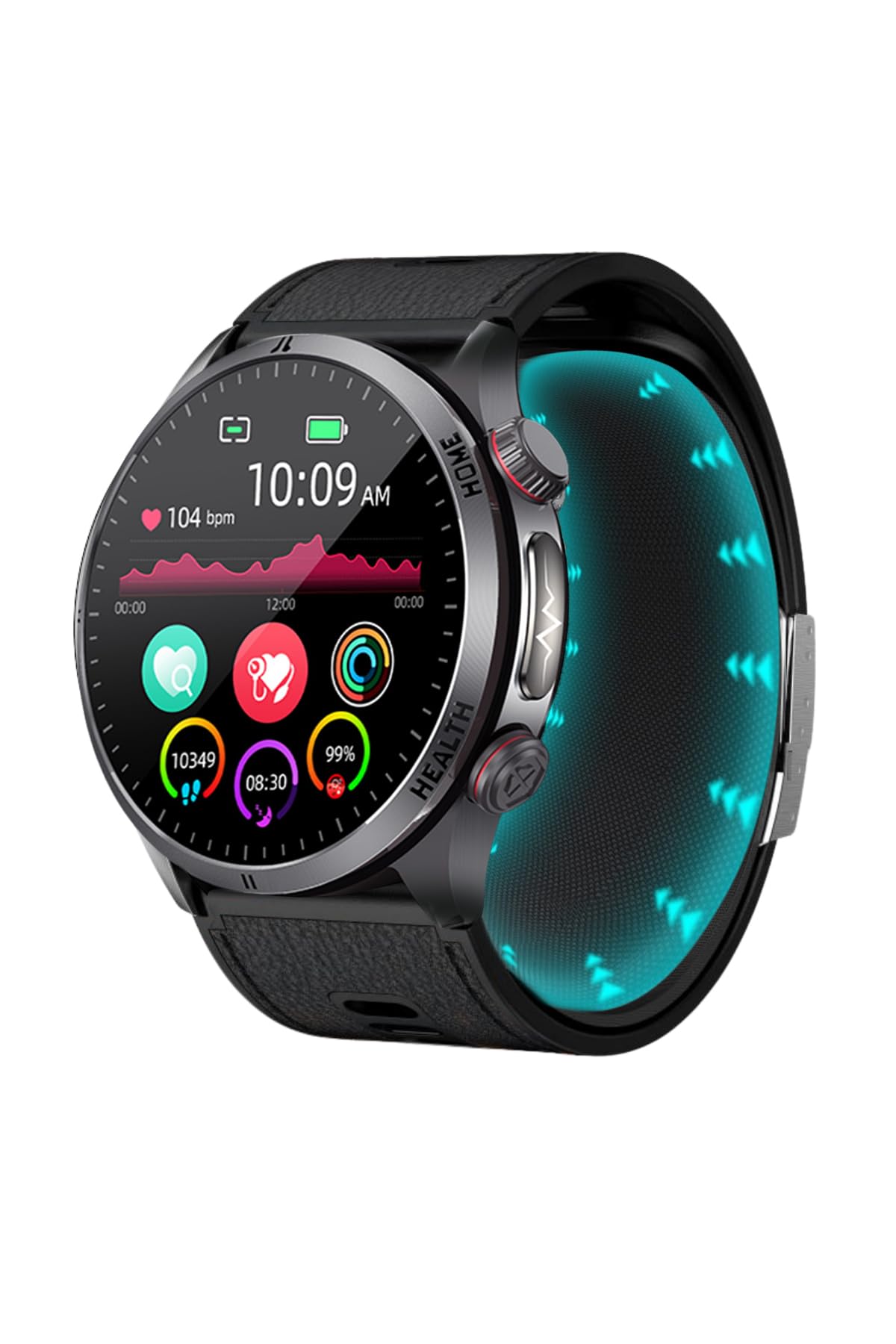
Figure 2.1: Front view of the Spovan Electro Pro 2 Smartwatch displaying its main interface with health metrics.

Figure 2.2: Side view illustrating the rotating crown and additional button for navigation and function access.

Figure 2.3: The underside of the watch, highlighting the advanced health sensors and magnetic charging points.
3. Setup
3.1 Charging the Smartwatch
Before first use, fully charge your Spovan Electro Pro 2 Smartwatch. Use the provided magnetic charging cable. Connect the magnetic end to the charging contacts on the back of the watch and the USB end to a power adapter (not included) or a computer's USB port.
- A full charge typically takes approximately 2-3 hours.
- The watch has a 600mAh high-density li-polymer battery, offering 8-13 days of typical use and 30-40 days of standby time.
3.2 App Installation
To unlock the full potential of your smartwatch, download and install the companion application on your smartphone. The app is compatible with Android 8.0 and above, and iOS 11.0 and above.
- Scan the QR code provided in the watch's packaging or search for the official app name (refer to packaging for specific app name) in your smartphone's app store (Google Play Store for Android, Apple App Store for iOS).
- Install the application.
3.3 Pairing with Your Smartphone
After installing the app, pair your smartwatch with your phone via Bluetooth.
- Ensure Bluetooth is enabled on your smartphone.
- Open the companion application on your smartphone.
- Follow the in-app instructions to add a new device. The app will search for available Bluetooth devices.
- Select "Spovan Electro Pro 2" from the list of found devices.
- Confirm the pairing request on both your phone and the smartwatch if prompted.
- Once paired, the watch will synchronize data with the app.
4. Operating Instructions
4.1 Basic Navigation
- Touchscreen: Swipe left/right, up/down to navigate through menus and widgets. Tap to select.
- Side Buttons: Press the top button to return to the home screen or wake the display. Press the bottom button for quick access to health features or exercise modes.
- Rotating Crown: Rotate the crown to scroll through lists or zoom in/out on certain interfaces.
4.2 Health Monitoring
The Spovan Electro Pro 2 offers comprehensive health tracking features.
- Heart Rate (Nabız): Access the heart rate monitor from the main menu. Ensure the watch is snug on your wrist for accurate readings.

Figure 4.1: Watch screen showing real-time heart rate (Nabız) and historical data.
- Blood Pressure (Tansiyon): The watch uses an air pressure sensor for blood pressure measurements. Follow on-screen instructions for best results.
- ECG: Initiate an ECG measurement through the dedicated app function.
- Temperature: The NTC Temperature Sensor provides body temperature readings.
- Sleep Tracking: The watch automatically monitors your sleep patterns when worn during sleep. View detailed analysis in the companion app.
- Activity Tracking: Tracks steps, distance, and calories burned throughout the day.
4.3 Communication Features
- Voice Calls: With Bluetooth connectivity, you can make and receive calls directly from your watch.
- Notifications: Receive alerts for incoming calls, messages, and app notifications from your paired smartphone.
4.4 NFC Access Control
The Spovan Electro Pro 2 supports NFC access control. Refer to the companion app for instructions on how to set up and use this feature with compatible NFC systems.
4.5 Exercise Modes
Select from various exercise modes to track specific activities. The watch will record duration, heart rate, calories, and other relevant metrics.
4.6 Other Smart Features
- Alarm Reminders: Set alarms through the app to vibrate on your wrist.
- Raise-to-Wake: Lift your wrist to automatically illuminate the screen.
5. Maintenance
5.1 Cleaning
Regularly clean your smartwatch to ensure optimal performance and hygiene.
- Wipe the screen and watch body with a soft, lint-free cloth.
- For stubborn dirt, slightly dampen the cloth with water. Avoid using harsh chemicals or abrasive materials.
- Clean the sensor area on the back of the watch to maintain accurate readings.
5.2 Water Resistance
The Spovan Electro Pro 2 has an IP68 water resistance rating. This means it is resistant to dust and can withstand immersion in water up to 1.5 meters for up to 30 minutes.
- It is suitable for daily use, such as hand washing, rain, or brief splashes.
- Avoid wearing the watch during hot showers, saunas, or diving, as steam and high water pressure can compromise the seals.
- Do not operate the buttons underwater.
- If the watch gets wet, dry it thoroughly before charging or using the buttons.
6. Troubleshooting
If you encounter issues with your Spovan Electro Pro 2 Smartwatch, refer to the following common solutions:
- Watch not turning on: Ensure the watch is fully charged. Connect it to the magnetic charger for at least 30 minutes.
- Cannot pair with smartphone:
- Ensure Bluetooth is enabled on your phone and the watch.
- Make sure the watch is within Bluetooth range of your phone.
- Restart both your phone and the watch.
- Clear the Bluetooth cache on your phone (Android) or forget the device and try pairing again (iOS).
- Inaccurate health readings:
- Ensure the watch is worn snugly on your wrist, not too tight or too loose.
- Clean the sensor area on the back of the watch.
- Remain still during measurements.
- Notifications not appearing:
- Check app permissions on your phone to ensure the companion app has access to notifications.
- Verify that notification settings are enabled within the companion app.
- Ensure the watch is connected to your phone via Bluetooth.
- Short battery life:
- Reduce screen brightness.
- Disable continuous heart rate monitoring or other intensive features if not needed.
- Limit the number of notifications.
If the problem persists, consult the support section or contact customer service.
7. Specifications
Detailed technical specifications for the Spovan Electro Pro 2 Smartwatch.
| Feature | Specification |
|---|---|
| Model Name | Electro Pro 2 |
| Operating System | Android, iOS |
| Compatible Phone Models | Android 8.0 and above, iOS 11.0 and above |
| Display Type | AMOLED |
| Screen Size | 1.43 inches (44 Millimeters) |
| Resolution | 466 x 466 |
| Connectivity Technology | Bluetooth (BT BLE 5.3), NFC |
| Battery Capacity | 600mAh (High-density Li-polymer) |
| Battery Life (Typical Use) | 8-13 days |
| Standby Time | 30-40 days |
| Charging Type | Magnetic Charging |
| Memory Storage Capacity | 128 MB |
| Key Features | Heart Rate, Blood Pressure (Air Pressure Sensor), ECG, Temperature (NTC Sensor), NFC Access Control, Voice Calls, Step Counting, Calorie Tracking, Exercise Modes, Sleep Monitoring |
| Water Resistance Level | IP68 |
| Case Material | Metal |
| Strap Material | Leather (Black Leather) |
| GPS | Via Smartphone |
| Human Interface Input | Touchscreen |
| Included Components | Smartwatch, Air Pressure Strap, Magnetic Charging Cable, Silicone Strap |
8. Warranty and Support
8.1 Warranty Information
The Spovan Electro Pro 2 Smartwatch comes with a 2-Year Distributor Warranty. This warranty covers manufacturing defects and malfunctions under normal use. Please retain your proof of purchase for warranty claims. The warranty does not cover damage caused by misuse, accidents, unauthorized repairs, or normal wear and tear.
8.2 Customer Support
For further assistance, technical support, or warranty inquiries, please contact your local distributor or the retailer from whom you purchased the product. Refer to your product packaging or the official brand website for specific contact details.