
1. Introduction
This manual provides essential information for the safe and proper assembly, operation, and maintenance of your Costzon Kids Vanity Set, Model TP10450. This vanity set includes a desk with a 3-color LED lighted mirror, various storage options, and a matching chair with integrated storage. Please read all instructions carefully before use and retain this manual for future reference.
2. Safety Information
Always assemble the vanity according to the instructions. Keep the vanity on a stable surface and away from heat sources. Do not place heavy objects on the vanity to prevent tipping. Keep the mirror area clear of obstructions to prevent breakage. Never leave children unattended while using the vanity. Batteries are not included and should be handled with care. Always turn off the vanity when not in use.

Figure 2.1: The vanity features a shatter-proof acyclic mirror and an anti-toppling design for enhanced safety. Smooth rounded corners are also incorporated to prevent injuries.
3. Parts List
Before assembly, ensure all components are present and undamaged. The package includes:
- 1 x Kids Vanity Table
- 1 x Matching Chair
- 1 x Instruction Manual
- All necessary hardware for assembly

Figure 3.1: All included components of the Costzon Kids Vanity Set.
4. Assembly Instructions
Assembly of the Costzon Kids Vanity Set is required. Please refer to the separate, detailed instruction manual included in your package for step-by-step guidance. Ensure all parts are correctly oriented and securely fastened. Two adults are recommended for assembly.
- Unpack all components and verify against the parts list.
- Follow the numerical steps provided in the dedicated assembly manual.
- Ensure all screws and fasteners are tightened, but do not overtighten.
- Place the vanity on a flat, stable surface after assembly.

Figure 4.1: The assembled vanity set, highlighting its structure and storage areas.
5. Operating Instructions
5.1. LED Lighted Mirror
The vanity mirror features 3-color adjustable LED lighting. To operate:
- Insert 3 AA batteries (not included) into the battery compartment located on the back of the mirror.
- Press the light switch located on the side of the mirror frame to turn the lights ON.
- Press the switch repeatedly to cycle through the three light colors: White, Natural, and Warm Yellow.
- Press the switch again to turn the lights OFF.
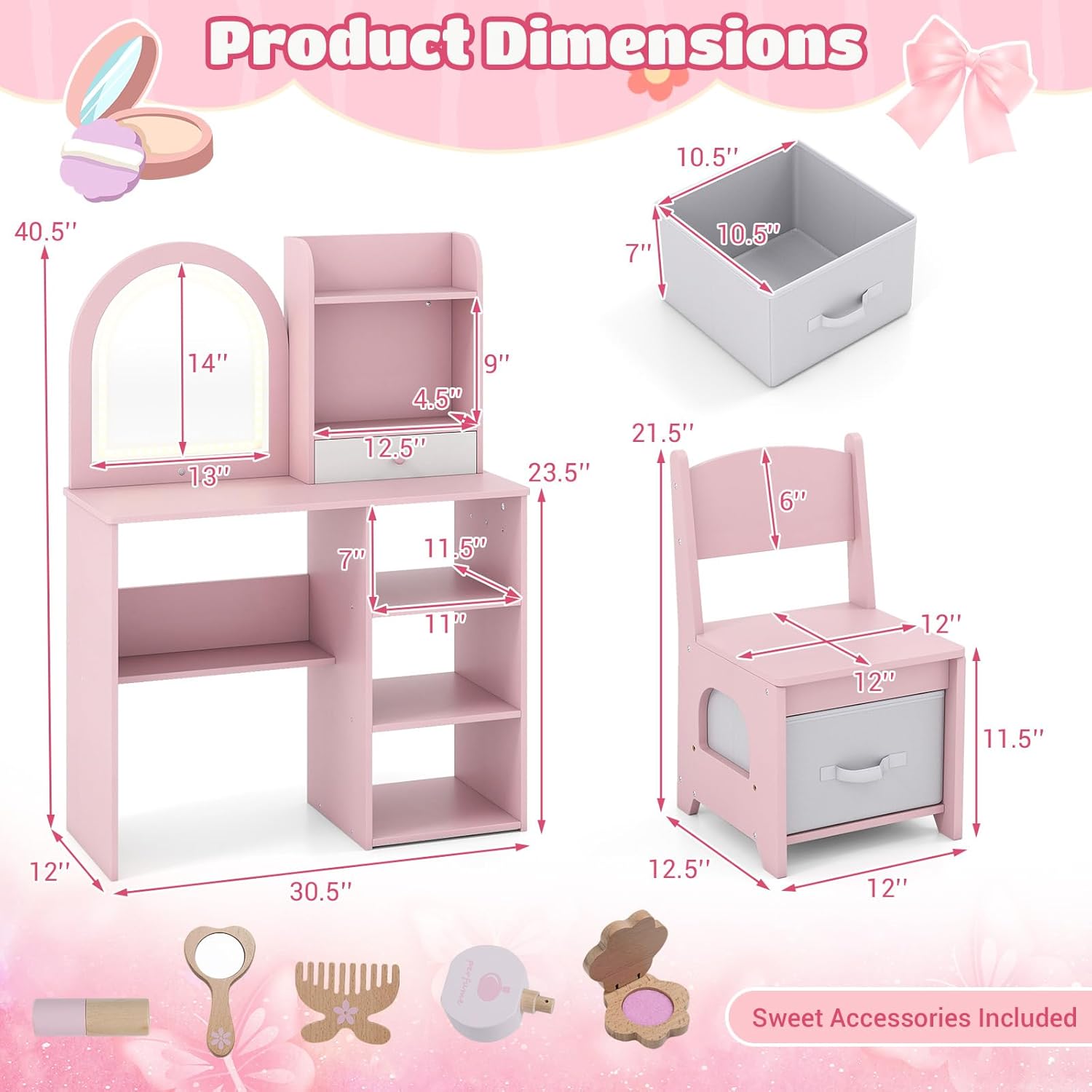
Figure 5.1: The LED lighted mirror with its control switch and various light settings.
5.2. Storage Features
The vanity set is designed with multiple storage options:
- Upper Shelf: For displaying small items or frequently used accessories.
- Open Compartment: Ideal for organizing small toys or stationery.
- Drawer: Provides concealed storage for personal items.
- Side Hooks: Three hooks are available for hanging necklaces, bracelets, or small bags.
- Open Shelves: Three additional shelves offer space for books, larger toys, or storage bins.
- Chair with Storage: The matching chair includes a removable non-woven fabric drawer for flexible storage, encouraging tidiness.

Figure 5.2: Overview of the vanity's diverse storage solutions.

Figure 5.3: Features of the matching child-friendly chair, including its storage drawer.
6. Maintenance
To ensure the longevity and appearance of your vanity set:
- Cleaning: Wipe surfaces with a soft, damp cloth. Avoid abrasive cleaners or harsh chemicals that may damage the finish.
- Mirror Care: Clean the acyclic mirror with a soft, lint-free cloth and a mild glass cleaner. Do not use sharp objects on the mirror surface.
- Hardware: Periodically check all screws and fasteners to ensure they remain tight. Retighten if necessary.
- Battery Replacement: Replace AA batteries in the LED mirror as needed. Dispose of used batteries responsibly.

Figure 6.1: The vanity features an easy-to-clean surface and smooth rounded corners for durability and safety.
7. Troubleshooting
If you encounter any issues with your Costzon Kids Vanity Set, please refer to the following common solutions:
- LED Lights Not Working:
- Check if batteries are inserted correctly with the correct polarity.
- Ensure batteries are fresh and not depleted. Replace if necessary.
- Verify the light switch is fully pressed.
- Vanity Wobbles:
- Ensure all assembly screws are securely tightened.
- Place the vanity on a level surface.
For issues not listed here, or if troubleshooting steps do not resolve the problem, please contact Costzon customer support.
8. Specifications
| Feature | Detail |
|---|---|
| Model Number | TP10450 |
| Color | Pink |
| Material | MDF, Non-woven Fabric, Acyclic |
| Overall Dimensions (L x W x H) | 30.5" x 12" x 40.5" |
| Item Weight | 38.5 pounds |
| Seat Height | 11.5 inches |
| Number of Drawers | 1 (plus 1 fabric drawer in chair) |
| Mirror Type | Shatter-proof Acyclic with 3-Color LED Lights |
| Battery Requirement | 3 x AA batteries (not included) |

Figure 8.1: Detailed product dimensions of the vanity table and chair.
9. Warranty and Support
Costzon is committed to providing high-quality products. For any questions regarding assembly, missing parts, product defects, or general inquiries, please contact Costzon customer support. Please have your model number (TP10450) and purchase information ready when contacting support.
For the most up-to-date warranty information and contact details, please visit the official Costzon website or refer to your purchase documentation.