
Introduction
This manual provides essential instructions for the installation, operation, and maintenance of your NULKOMMA King-Meter E5227 Ebike LCD Display Meter. This display is designed to provide critical information and control for your electric bicycle, enhancing your riding experience.
The King-Meter E5227 is a robust and user-friendly control panel, featuring a clear LCD display and a waterproof design for reliable performance in various conditions.
Product Features
- High-Quality Material: Constructed from premium ABS material for durability and wear resistance, ensuring a long service life.
- Waterproof Design: The LCD control panel is designed to be waterproof, allowing for convenient and practical use even in rainy conditions.
- Wide Compatibility: Equipped with a display bracket suitable for handlebars with diameters of 22.2mm, 25.4mm, 28.6mm, and 31.8mm (0.87in, 1in, 1.13in, 1.25in).
- Essential Accessory: An ideal replacement or upgrade for electric bikes, scooters, and similar vehicles.
Setup and Installation
Follow these steps to properly install the King-Meter E5227 LCD Display Meter on your electric bicycle:
- Mount the Display and Buttons: Securely fix the LCD display unit and the control buttons onto the handlebar of your electric vehicle. Adjust the position to ensure an appropriate and comfortable viewing angle.
- Connect the Wiring: With the vehicle's power turned off, connect the display's connector cable to the corresponding connector on your ebike's controller. Ensure the 5-pin male connector is properly aligned and securely inserted.
- Power On: Once the connections are secure, turn on the power to your electric vehicle. The display and the ebike system should enter their normal operating state, indicating successful installation.

Image: The King-Meter E5227 LCD display and its separate control button unit, both designed for handlebar mounting.

Image: The King-Meter E5227 display unit showing its integrated wiring and a detailed view of the 5-pin male connector for connection to the ebike controller.
Operating Instructions
The King-Meter E5227 LCD display provides real-time information and control over your ebike's functions. Familiarize yourself with the display and control buttons for optimal use.
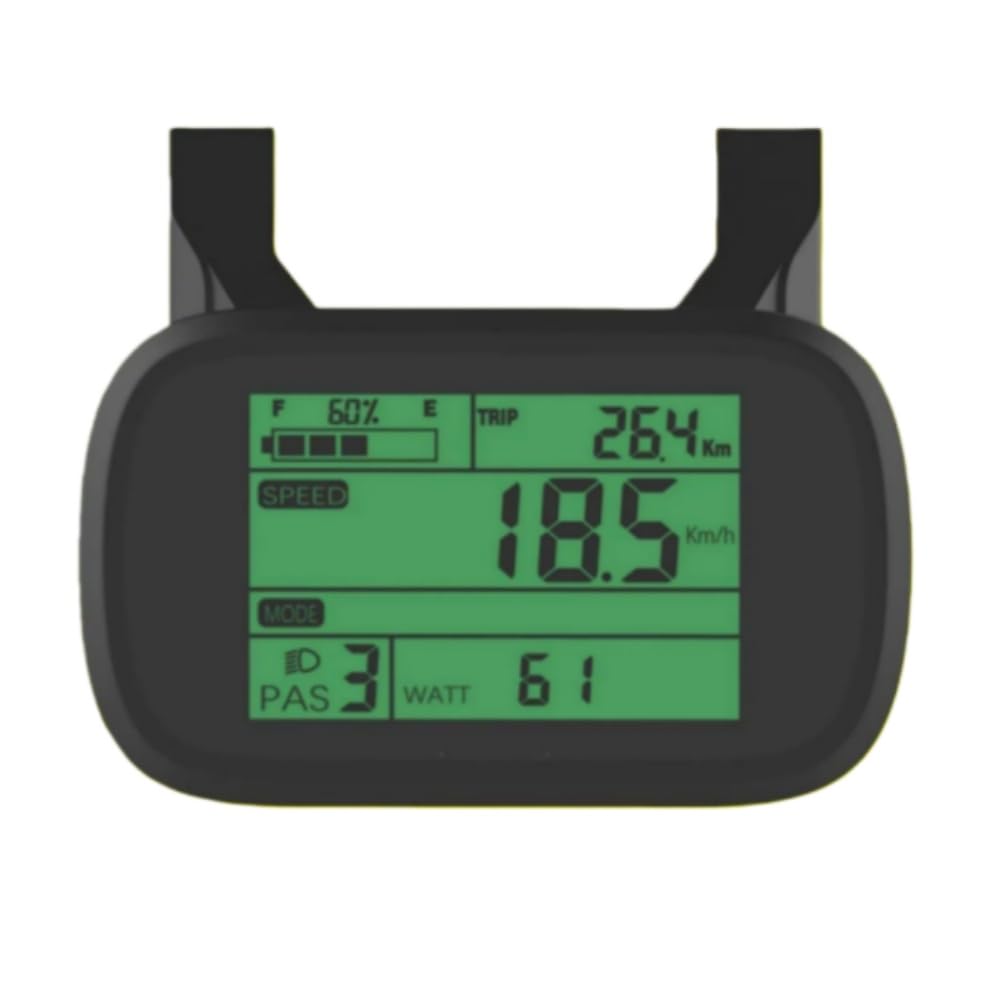
Image: The King-Meter E5227 LCD display screen, illustrating various data points such as current speed, battery charge level, Pedal Assist System (PAS) level, and trip distance.
Basic Functions:
- Power On/Off: Typically, a dedicated button on the control unit or a long press of a specific button will power the display on or off. Refer to your ebike's main power switch for overall system power.
- Display Information: The LCD screen shows essential riding data, which may include:
- Current Speed (km/h or mph)
- Battery Level Indicator
- Pedal Assist System (PAS) Level
- Trip Distance
- Total Odometer
- Wattage (if supported by controller)
- Adjusting Settings: Use the control buttons (usually up/down arrows) to cycle through PAS levels, display modes, or access settings menus.

Image: A close-up view of the control buttons for the King-Meter E5227, featuring distinct up and down arrow buttons for navigation and adjustments.
For detailed information on specific button functions and advanced settings, consult your ebike's main controller manual or the full King-Meter E5227 user guide if available.
Maintenance
Proper maintenance ensures the longevity and reliable performance of your King-Meter E5227 LCD Display Meter.
- Cleaning: Wipe the display screen and casing with a soft, damp cloth. Avoid using abrasive cleaners, solvents, or harsh chemicals, as these can damage the screen or plastic components.
- Water Exposure: While the display is waterproof, avoid submerging it in water or directing high-pressure water jets directly at it. Ensure the connector is always dry before connecting or disconnecting.
- Connection Check: Periodically inspect the wiring and connectors for any signs of wear, damage, or loose connections. Ensure all connections remain secure.
- Storage: If storing your ebike for an extended period, ensure the display is clean and dry. Store in a cool, dry place away from direct sunlight and extreme temperatures.
Troubleshooting
If you encounter issues with your King-Meter E5227 display, try the following troubleshooting steps:
- Display Not Turning On:
- Ensure the ebike's main power is switched on.
- Check all cable connections, especially the 5-pin connector to the controller, to ensure they are securely seated.
- Verify that the ebike battery has sufficient charge.
- Incorrect Readings (Speed, Distance):
- Confirm that the wheel circumference setting in your ebike controller (if adjustable) is correct.
- Check the speed sensor and its magnet for proper alignment and function.
- Buttons Not Responding:
- Ensure the control button unit is securely connected.
- Check for any physical obstructions or damage to the buttons.
- Intermittent Operation:
- Inspect all wiring for loose connections, cuts, or pinches.
- Ensure the display is firmly mounted and not vibrating excessively.
If these steps do not resolve the issue, contact NULKOMMA customer support or your ebike dealer for further assistance.
Specifications
| Feature | Detail |
|---|---|
| Brand | NULKOMMA |
| Model | E5227 |
| Display Type | LCD |
| Color | Black |
| Mounting Type | Handlebar Mount (compatible with 22.2mm, 25.4mm, 28.6mm, 31.8mm diameters) |
| Connector Type | 5-pin Male Connector |
| Item Weight | 148 Grams |
| Included Components | LCD display unit, control buttons, mounting bracket |
Warranty and Support
For warranty information or technical support regarding your NULKOMMA King-Meter E5227 Ebike LCD Display Meter, please refer to the documentation provided with your ebike conversion kit or contact the seller directly.
Keep your purchase receipt as proof of purchase for any warranty claims.