
Introduction
The Magic Mill Premium DualZone Food Dehydrator is designed for efficient and versatile food preservation. Featuring two independent drying zones, this appliance allows you to dehydrate different foods simultaneously at their optimal temperatures and durations. Its robust stainless steel construction and advanced airflow system ensure consistent and high-quality results for a variety of foods, from jerky and fruits to herbs and pet treats.
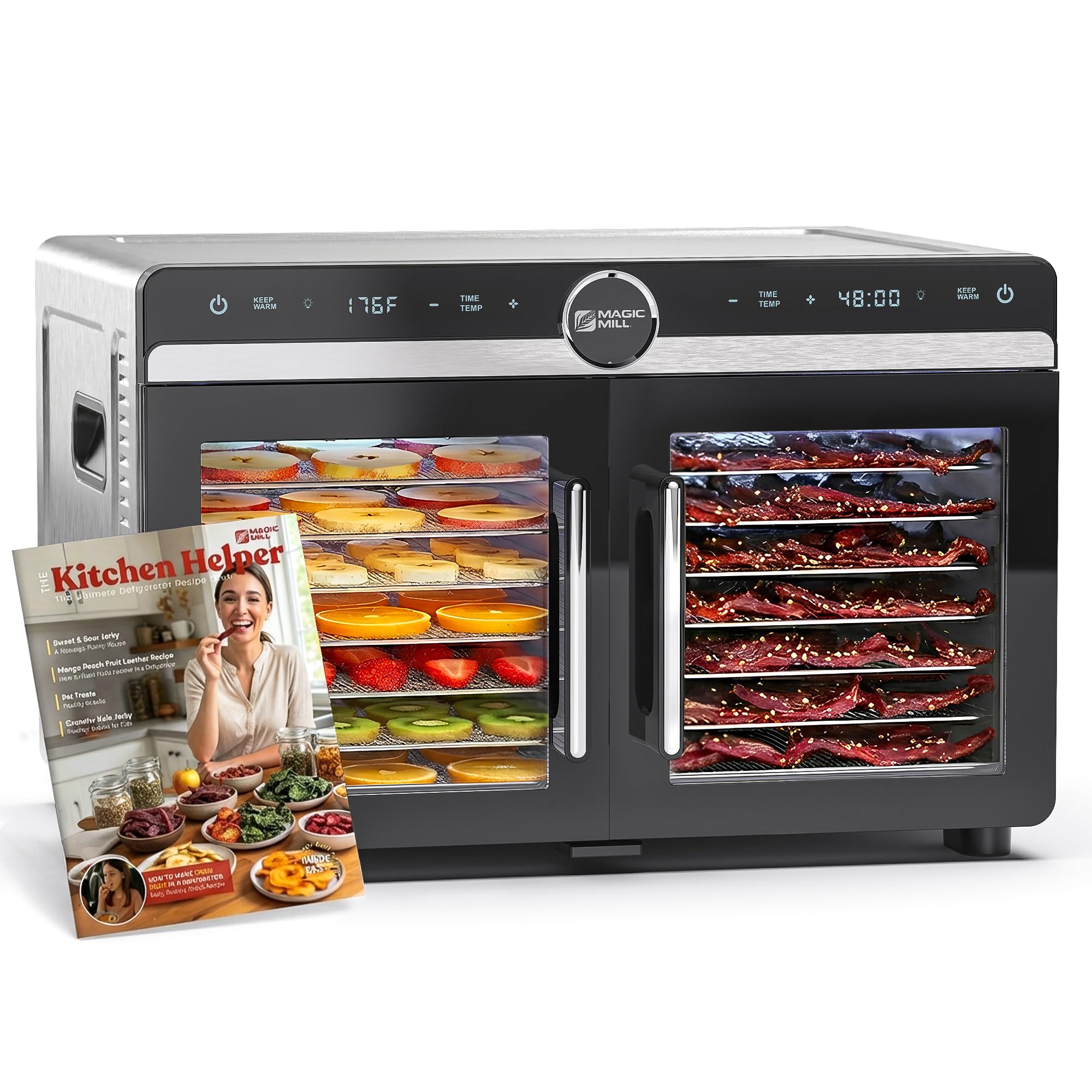
The Magic Mill Premium DualZone Food Dehydrator, ready for use.
Important Safety Instructions
To ensure safe operation and prevent injury or damage, please read and follow these instructions carefully:
- Always place the dehydrator on a stable, heat-resistant surface.
- Do not immerse the appliance, cord, or plug in water or other liquids.
- Supervise children closely when the appliance is in use.
- Unplug the dehydrator from the outlet when not in use and before cleaning.
- Do not operate the appliance with a damaged cord or plug. Contact customer support for repairs.
- Avoid touching hot surfaces. Use oven mitts or handles.
- Ensure proper ventilation around the dehydrator during operation.
- Do not use attachments not recommended by the manufacturer.
What's in the Box
Your Magic Mill Premium DualZone Food Dehydrator package includes the following components:
- 1 x Magic Mill DualZone Food Dehydrator Unit
- 16 x Stainless Steel Trays
- 2 x Fine Mesh Trays (for small items like herbs)
- 2 x Non-Stick Sheets (for fruit leathers and sauces)
- 1 x 45-Page The Kitchen Helper Recipe Book
- 1 x Quick Start Guide
- 1 x User Manual (this document)

All included accessories for your dehydrator.
Setup
- Unpack: Carefully remove all components from the packaging. Retain packaging for future storage or transport.
- Clean: Before first use, wash all stainless steel trays, mesh trays, and non-stick sheets in warm, soapy water. Wipe the interior and exterior of the dehydrator unit with a damp cloth. Ensure all parts are completely dry before assembly.
- Placement: Place the dehydrator on a flat, stable, and heat-resistant surface, away from walls or other appliances to allow for adequate airflow. Ensure the power cord can reach a grounded electrical outlet.
- Install Trays: Slide the stainless steel trays into the designated slots within each drying chamber. You can use the mesh trays or non-stick sheets on top of the stainless steel trays as needed for specific foods.
Operating Instructions
The Magic Mill DualZone Dehydrator features independent controls for each drying chamber, allowing for precise dehydration.

The dual-zone design allows for simultaneous dehydration of different foods.
- Prepare Ingredients: Slice food evenly and pat dry for best results. Arrange food in a single layer on the trays, ensuring space for airflow.
- Load Trays: Open the French doors and slide the loaded trays into the desired chamber. Close the doors securely.
- Power On: Plug the dehydrator into a grounded 120V AC outlet. Press the power button for the desired zone (left or right).
- Set Temperature: Use the 'Temp' buttons (+/-) for each zone to set the desired drying temperature. The temperature range is 95-176°F (35-80°C).
- Set Timer: Use the 'Time' buttons (+/-) for each zone to set the desired drying time. The timer can be set for up to 48 hours.
- Start Dehydration: Press the 'Start/Stop' button for each zone to begin the drying process. The display will show the remaining time and current temperature.
- Keep Warm Mode: After the set drying time completes, the dehydrator automatically switches to a 'Keep Warm' mode, maintaining a low temperature to prevent re-absorption of moisture. This feature ensures your food stays ready until you are.
- Interior Light: The dehydrator is equipped with an interior light, allowing you to monitor the drying progress without opening the doors, thus maintaining consistent internal temperature.
- Monitoring: The rear-mounted fan system provides 360° horizontal airflow, eliminating the need to rotate trays during the drying cycle.
- Completion: Once the timer reaches zero, the unit will beep and enter 'Keep Warm' mode. Press 'Start/Stop' to turn off the zone, then unplug the unit.
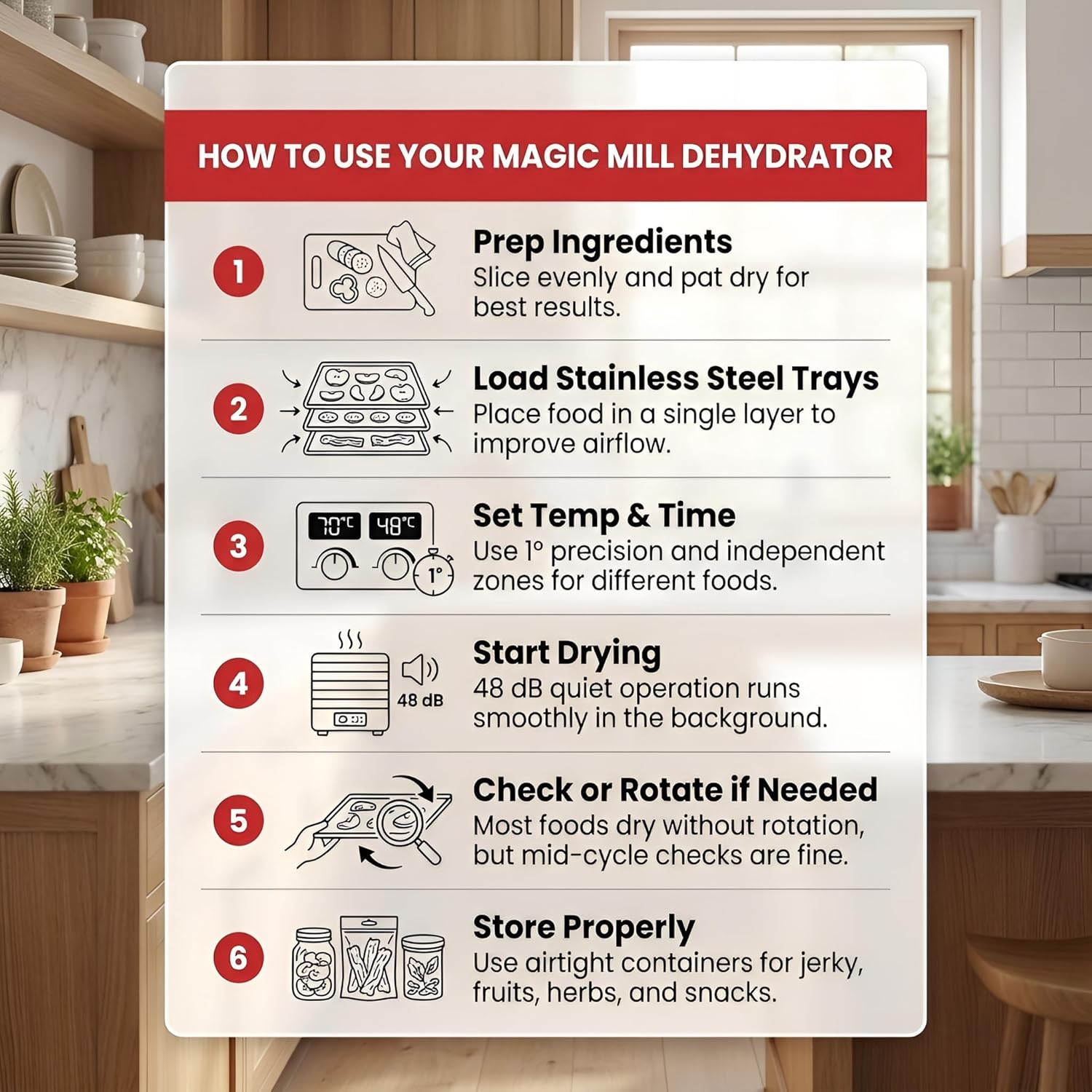
A visual guide to using your dehydrator.
Usage Examples
The Magic Mill DualZone Dehydrator is suitable for a wide range of food preservation:
- Jerky: Prepare beef, turkey, or fish jerky.
- Fruit: Dehydrate apples, bananas, mangoes, berries, and more for healthy snacks.
- Vegetables: Preserve garden harvests like tomatoes, carrots, and leafy greens.
- Herbs: Gently dry fresh herbs to retain their flavor and aroma.
- Fruit Leathers: Use the non-stick sheets to create homemade fruit roll-ups.
- Dog Treats: Make natural, preservative-free treats for your pets.

Examples of foods that can be dehydrated.
Maintenance and Cleaning
Regular cleaning ensures optimal performance and longevity of your dehydrator.
- Before Cleaning: Always unplug the dehydrator and allow it to cool completely.
- Trays and Sheets: The stainless steel trays, fine mesh trays, and non-stick sheets are dishwasher safe for easy cleaning. Alternatively, wash them by hand with warm, soapy water and a soft brush. Rinse thoroughly and dry completely.
- Dehydrator Interior: Wipe the interior of the dehydrator with a damp cloth. For stubborn residue, use a mild detergent. Avoid abrasive cleaners or scouring pads.
- Exterior: Clean the exterior with a soft, damp cloth. Do not use harsh chemicals.
- Storage: Store the dehydrator in a clean, dry place when not in use.
Troubleshooting
| Problem | Possible Cause | Solution |
|---|---|---|
| Dehydrator does not turn on. | Not plugged in; power outlet malfunction; unit not powered on. | Ensure the unit is securely plugged into a working outlet. Press the power button for the desired zone. |
| Uneven drying. | Overloaded trays; food not sliced uniformly. | Ensure food is arranged in a single layer with space between pieces. Slice food to a consistent thickness. The horizontal airflow system minimizes uneven drying, but proper loading is still important. |
| Control panel unresponsive. | Touch sensitivity issue. | Ensure your fingers are clean and slightly damp (not wet) when operating the touch controls. This can improve responsiveness. |
| Food not drying properly. | Incorrect temperature or time settings; high humidity. | Verify temperature and time settings are appropriate for the food type. Increase drying time or temperature if necessary. Operate in a low-humidity environment if possible. |
Specifications
| Feature | Detail |
|---|---|
| Model Number | MFD-8080 |
| Brand | Magic Mill |
| Material | Stainless Steel, Glass, Plastic (BPA Free, Food Safe) |
| Color | Stainless Steel - Black |
| Wattage | 1200 watts |
| Voltage | 120 volts AC |
| Product Dimensions (D x W x H) | 14.25" x 20.12" x 13.25" |
| Number of Trays | 16 (Stainless Steel) |
| Temperature Range | 95-176°F (35-80°C) |
| Timer | Up to 48 hours |
| Airflow | Rear-mounted fan, 360° horizontal airflow |
| Certifications | ETL certified |

Product dimensions for counter placement.
Warranty and Support
The Magic Mill Premium DualZone Food Dehydrator MFD-8080 comes with a 2-Year Warranty. For any questions, technical assistance, or warranty claims, please contact our dedicated lifetime customer support team based in the USA. Refer to the Quick Start Guide for contact information.