
Introduction
This manual provides instructions for the installation, operation, and maintenance of the Okin JLDK.04.04.02 Two Button Switch. This switch is designed for reliability and ease of use, offering smooth and consistent operation. It is specifically intended as a direct replacement for existing JLDK.04.04.02 switches in compatible DC 24V systems.
Key features include a simple two-button design for adjustments, a premium silver finish, and a secure 5-pin connector for stable performance.
Safety Information
- Always disconnect power to the device before attempting any installation or replacement.
- Ensure the replacement switch matches the original model number (JLDK.04.04.02) to ensure compatibility and proper function.
- This switch is rated for DC 24V, 2A systems. Do not use with systems exceeding these specifications.
- If you are unsure about any installation steps, consult a qualified technician.
Setup and Installation
The Okin JLDK.04.04.02 switch is designed as a direct replacement part. Follow these steps for safe installation:
- Power Disconnection: Before beginning, ensure that the power supply to the furniture or device where the switch will be installed is completely disconnected. This is crucial for safety.
- Identify Original Switch: Locate the existing switch you intend to replace. Verify that it is an Okin JLDK.04.04.02 model.
- Disconnect Old Switch: Carefully disconnect the 5-pin connector from the back of the old switch. Note the orientation if necessary, though the connector is typically keyed to prevent incorrect insertion.
- Remove Old Switch: Unmount the old switch from its housing. This may involve unscrewing it or releasing clips, depending on the furniture design.
- Install New Switch: Insert the new Okin JLDK.04.04.02 switch into the housing. Secure it in place using the original mounting hardware or clips.
- Connect 5-Pin Plug: Connect the 5-pin plug from the device's wiring harness to the corresponding port on the back of the new switch. Ensure the connection is firm and secure.
- Restore Power: Once the switch is securely installed and connected, restore power to the device.
- Test Functionality: Test the switch to ensure it operates correctly.

Image 1: The Okin JLDK.04.04.02 switch, displaying its product label with model number, voltage (DC 24V 2A), and manufacturer information. This label is crucial for verifying the correct replacement part.
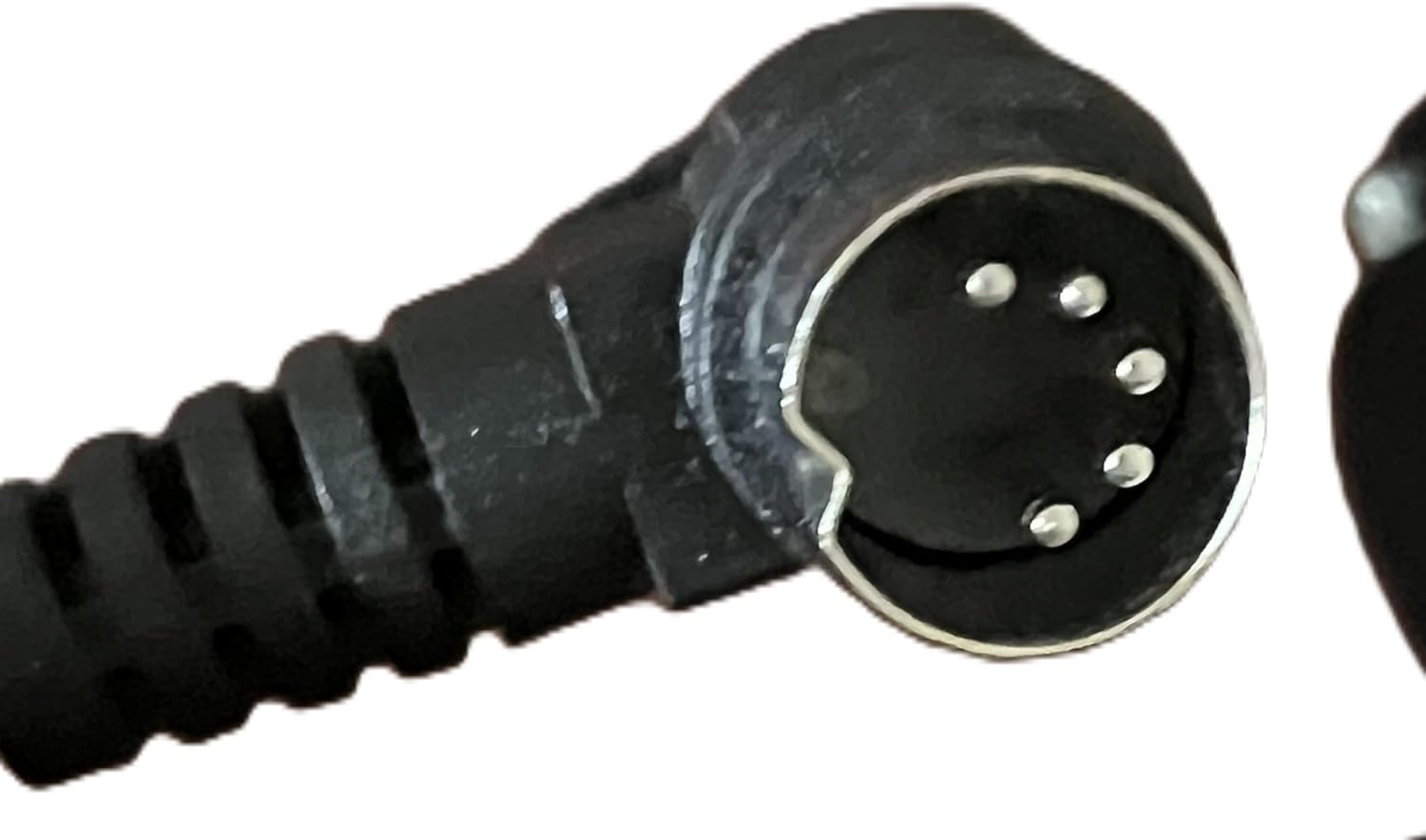
Image 2: A close-up view of the 5-pin connector, which ensures a secure and stable electrical connection for the Okin JLDK.04.04.02 switch. Proper connection is vital for functionality.
Operating Instructions
The Okin JLDK.04.04.02 switch features a straightforward two-button control system. The specific function of each button depends on the device it is connected to (e.g., reclining furniture, lift mechanisms).
- Button 1: Typically controls one direction of movement (e.g., extending a recliner, lifting a mechanism).
- Button 2: Typically controls the opposite direction of movement (e.g., retracting a recliner, lowering a mechanism).
Press and hold the desired button to activate the function. Release the button to stop the movement.
Maintenance
The Okin JLDK.04.04.02 switch requires minimal maintenance. Follow these guidelines to ensure longevity:
- Cleaning: Use a soft, dry cloth to wipe the surface of the switch. Avoid using abrasive cleaners, solvents, or excessive moisture, as these can damage the finish or internal components.
- Inspection: Periodically check the connection of the 5-pin plug to ensure it remains secure.
- Environmental Conditions: Ensure the switch is not exposed to extreme temperatures, direct sunlight for prolonged periods, or high humidity.
Troubleshooting
If the switch is not functioning as expected, consider the following troubleshooting steps:
- No Power:
- Ensure the device's main power supply is connected and active.
- Check all power cords and connections to the device.
- Switch Not Responding:
- Verify that the 5-pin connector is fully and securely plugged into the switch and the device's wiring harness.
- Temporarily disconnect and reconnect the 5-pin plug to ensure a fresh connection.
- Confirm that the switch model (JLDK.04.04.02) is the correct replacement for your system. Incompatible switches will not function.
- Intermittent Operation:
- Check for any loose wiring or damaged cables leading to the switch.
- Ensure the switch buttons are not obstructed and can be pressed fully.
If these steps do not resolve the issue, it may indicate a fault with the switch itself, the power supply, or the connected motor/actuator. In such cases, contact the manufacturer or a qualified service technician.
Specifications
| Feature | Specification |
|---|---|
| Model Number | JLDK.04.04.02 |
| Voltage Rating | DC 24V |
| Current Rating | 2A |
| Connector Type | 5-Pin Plug |
| Control Type | Dual Button |
| Finish | Silver |
| Material | Plastic |
| Item Weight | 1 pound |
| Package Dimensions | 8 x 6 x 3 inches |
| Manufacturer | OKIN |
Warranty and Support
For information regarding warranty coverage, terms, and conditions for your Okin JLDK.04.04.02 switch, please refer to the documentation provided at the time of purchase or contact your retailer or the manufacturer directly.
If you require technical assistance or have questions not covered in this manual, please reach out to Okin customer support or the authorized dealer from whom you purchased the product.
Okin America Contact Information: (Please refer to the official Okin website or product packaging for the most current contact details.)