
Introduction
The InSinkErator BADGER5 is a 1/2 horsepower continuous feed garbage disposal designed for efficient food waste grinding. It features a durable Dura-Drive induction motor and galvanized steel components for reliable performance. This manual provides essential information for the safe installation, operation, and maintenance of your BADGER5 unit.
Key Features:
- 1/2 hp Dura-Drive induction motor
- Galvanized steel construction
- Quick Lock sink mount for easy installation
- Assembled in USA
Safety Information
Please read all instructions carefully before installing or operating the garbage disposal. Failure to follow these instructions could result in electric shock, fire, serious injury, or property damage.
- Electrical Safety: Always disconnect power at the circuit breaker or fuse box before attempting to install, service, or clean the disposal. Ensure proper grounding.
- Personal Safety: Never put hands or fingers into the disposal opening. Use tongs or pliers to retrieve dropped items.
- Water Safety: Always run cold water when operating the disposal. Do not use hot water as it can melt grease and cause clogs.
- Child Safety: Keep children away from the disposal during operation and ensure they do not play with the unit.
- Prohibited Items: Do not dispose of glass, plastic, metal, large bones, fibrous materials (corn husks, artichokes), or harsh chemicals.
Package Contents
Verify that all components are present before beginning installation:
- InSinkErator BADGER5 Garbage Disposal Unit
- Quick Lock Sink Mount Assembly
- Stopper/Splash Guard
- Discharge Tube and Gasket
- Mounting Hardware
Setup (Installation)
The BADGER5 features a Quick Lock sink mount for straightforward installation or replacement. For detailed installation instructions, refer to the separate installation guide provided with your unit. A qualified electrician and plumber are recommended for installation.
General Steps (Consult full guide for details):
- Turn off electrical power at the circuit breaker.
- Remove existing disposal (if applicable).
- Assemble the Quick Lock sink mount to the sink flange.
- Connect the disposal to the sink mount.
- Connect the discharge plumbing.
- Make electrical connections (ensure proper grounding).
- Test for leaks and proper operation.
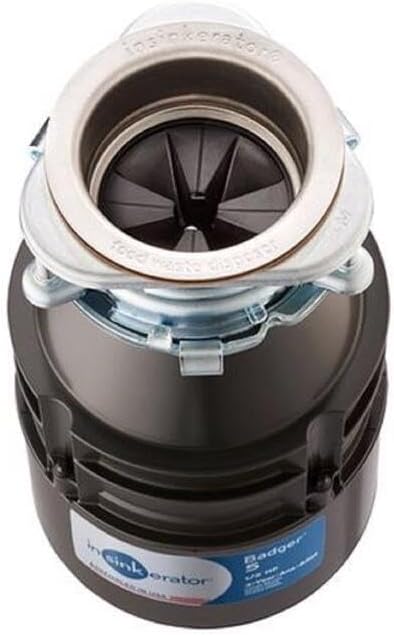
Image: Side view of the InSinkErator BADGER5 garbage disposal, showing its compact design and mounting collar.

Image: InSinkErator BADGER5 garbage disposal showing the side discharge outlet and potential plumbing connection points.
Operating Instructions
Follow these steps for safe and effective operation of your garbage disposal:
- Remove the sink stopper.
- Turn on a strong stream of cold water.
- Turn on the disposal switch.
- Slowly feed food waste into the disposal opening.
- Allow the disposal to run until all waste is ground and only the sound of water and the motor is heard.
- Turn off the disposal switch.
- Let the cold water run for a few seconds to flush the drain line.
Important: Always use cold water. Cold water keeps grease in a solid state so it can be flushed away, preventing clogs.
Maintenance
Regular maintenance helps ensure the longevity and performance of your disposal.
Cleaning the Disposal
- To clean, grind small bones or citrus peels (lemons, oranges) to help scrub the grind chamber and remove odors.
- Avoid using harsh chemicals or drain cleaners, as they can damage the disposal and plumbing.
Clearing a Jam
If the disposal hums but does not grind, it may be jammed. Follow these steps:
- Turn off the disposal and disconnect power at the circuit breaker.
- Look into the sink opening with a flashlight to identify the object causing the jam.
- Using tongs or pliers, carefully remove the object. Never use your hands.
- If no object is visible, insert the hex wrench (provided with your disposal) into the center hole on the bottom of the disposal. Work the wrench back and forth until the motor shaft turns freely.
- Press the red reset button on the bottom of the disposal.
- Restore power at the circuit breaker and test the disposal with cold water.

Image: Bottom view of the InSinkErator BADGER5 garbage disposal, highlighting the red reset button and the hexagonal opening for the jam-clearing wrench.
Troubleshooting
Before calling for service, try these troubleshooting steps:
| Problem | Possible Cause | Solution |
|---|---|---|
| Disposal does not start, no sound. | No power, tripped circuit breaker, or faulty switch. | Check circuit breaker/fuse. Ensure switch is functional. Press the red reset button on the bottom of the disposal. |
| Disposal hums but does not grind. | Jam in the grind chamber. | Turn off power. Remove object with tongs. Use hex wrench to free the motor shaft (see Maintenance section). Press reset button. |
| Leaking from disposal. | Loose plumbing connections, cracked housing, or faulty seal. | Check and tighten all plumbing connections. If housing is cracked or seals are damaged, professional service or replacement may be required. |
| Unpleasant odors. | Food particles trapped in the grind chamber or splash guard. | Grind citrus peels or small bones. Clean the splash guard. |
Specifications
| Specification | Detail |
|---|---|
| Model | BADGER5 |
| Motor | 1/2 hp Dura-Drive Induction Motor |
| Grinding Chamber Capacity | 26 oz |
| Voltage | 120 V |
| Material | Galvanized Steel (Grind Components), Stainless Steel (Housing) |
| Dimensions (L x W x H) | 6.31 x 6.31 x 11.5 inches |
| Item Weight | 13.72 pounds |
Warranty and Support
Your InSinkErator BADGER5 garbage disposal is covered by a 3-year We Come To You in-home full service limited warranty, which covers both parts and labor.
For technical assistance, warranty claims, or to locate authorized service, please contact InSinkErator customer support directly. Refer to the contact information provided in your product packaging or on the official InSinkErator website.


