
Introduction
Thank you for purchasing the AirEase AirS08X Cordless Ultrasonic Humidifier. This compact and versatile device is designed to improve air quality and comfort in various environments, including bedrooms, offices, and vehicles. It features a digital battery display, a large capacity 2600mAh battery for cordless operation, and Type-C charging for convenience. With its quiet operation and aroma compatibility, it creates a pleasant and relaxing atmosphere.
Please read this manual thoroughly before use to ensure proper operation and maintenance. Keep this manual for future reference.
Safety Instructions
- Do not immerse the humidifier in water or other liquids.
- Ensure the power adapter and cable are not damaged. Do not use if damaged.
- Keep out of reach of children and pets.
- Use only clean tap water or distilled water. Do not use hot water.
- Do not add essential oils directly into the water tank unless they are specifically water-soluble aroma oils designed for humidifiers.
- Unplug the device before cleaning or refilling.
- Do not block the mist outlet.
- The humidifier features an automatic dry-burn protection function, which stops operation when water levels are low. However, always ensure sufficient water for continuous use.
- Avoid placing the humidifier on unstable surfaces.
Package Contents
Verify that all items are present in the package:
- AirEase AirS08X Humidifier Unit
- Type-C Charging Cable
- User Manual (this document)
Product Overview
Familiarize yourself with the components of your AirEase AirS08X humidifier.
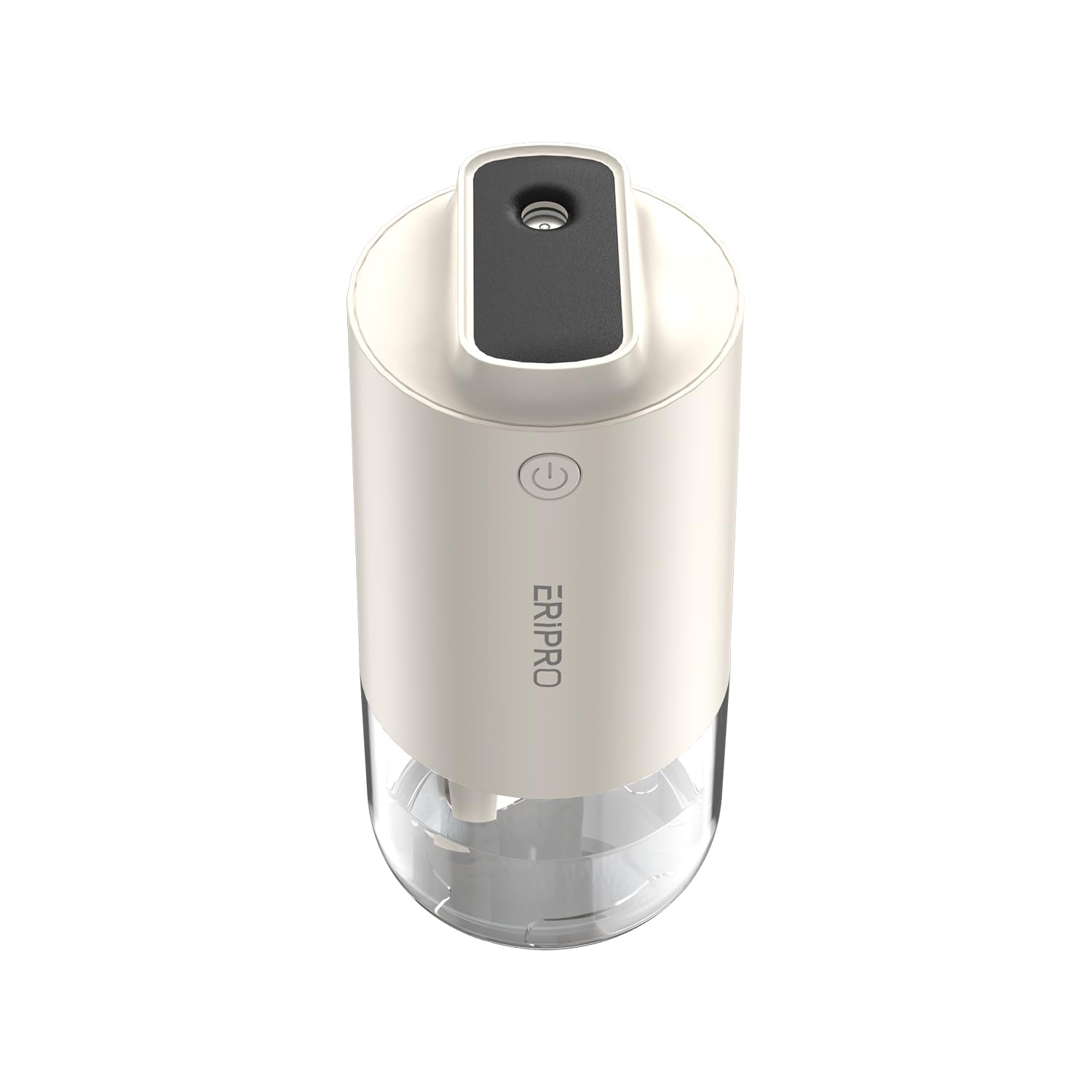
Image: AirEase AirS08X Cordless Ultrasonic Humidifier. This image displays the AirEase AirS08X humidifier in a snow white color, highlighting its portable and modern aesthetic. The device features a minimalist design, suitable for various settings.
Key Components:
- Mist Outlet: Where the humidified mist is released.
- Water Tank: Holds the water for humidification. Features antibacterial steel plate.
- Power Button/Mode Selector: Controls power and mist modes.
- Digital Display: Shows battery level.
- Type-C Charging Port: For recharging the internal battery.
- LED Light: Provides 7-color ambient lighting.
Setup
- Charge the Humidifier: Before first use, fully charge the humidifier using the provided Type-C cable and a compatible USB power adapter (not included). The digital display will show the battery percentage.
- Open the Water Tank: Gently twist or lift the top cover to access the water tank.
- Fill with Water: Fill the water tank with clean tap water or distilled water up to the maximum fill line. You may add a few drops of water-soluble aroma oil directly into the water tank if desired.
- Close the Water Tank: Securely replace the top cover, ensuring it is properly sealed to prevent leaks.
- Placement: Place the humidifier on a flat, stable surface. Ensure the mist outlet is not obstructed.
Operating Instructions
Power On/Off
- To Power On: Press the power button once. The humidifier will start in continuous mist mode.
- To Power Off: Press and hold the power button for 2-3 seconds.
Mist Modes
The humidifier offers two mist modes:
- Continuous Mist Mode: Provides a steady stream of mist. Press the power button once to activate.
- Intermittent Mist Mode: Mists for a period, then pauses, then mists again. This mode extends humidification time up to 20 hours on a full tank. Press the power button a second time to switch to intermittent mode.
LED Light Operation
The humidifier features a 7-color changing LED light:
- To Turn On/Off LED: Press and hold the power button for 1 second (short press) while the humidifier is operating.
- The LED light will cycle through 7 gentle colors, enhancing the ambiance.
Battery Display
The digital display shows the current battery percentage, allowing you to monitor power levels during use and charging.
Maintenance
Regular cleaning ensures optimal performance and extends the lifespan of your humidifier.
- Daily Cleaning: Empty any remaining water from the tank and wipe it dry with a clean cloth.
- Weekly Cleaning:
- Unplug the humidifier.
- Remove the top cover and empty the water tank.
- Wipe the inside of the water tank and the mist outlet area with a soft cloth. For stubborn mineral deposits, use a solution of white vinegar and water (1:1 ratio), let it sit for 15-30 minutes, then rinse thoroughly.
- Do not use harsh chemicals or abrasive cleaners.
- Ensure all parts are completely dry before reassembling.
- Water Quality: The humidifier is compatible with hypochlorous acid water for enhanced cleanliness. Always use clean water to prevent mineral buildup and bacterial growth.
Troubleshooting
| Problem | Possible Cause | Solution |
|---|---|---|
| No mist is being produced. | Low water level; Humidifier not powered on; Mist outlet blocked. | Refill water tank; Press power button; Check and clear mist outlet. |
| Weak mist output. | Insufficient water; Mineral buildup on transducer; Air vent blocked. | Refill water; Clean the transducer with vinegar solution; Ensure air vent is clear. |
| Humidifier leaks water. | Top cover not properly sealed; Overfilled water tank. | Ensure top cover is securely closed; Do not exceed max fill line. |
| LED light not working. | LED function is off. | Short press the power button to toggle LED light. |
| Device not charging. | Charging cable or adapter faulty; Port dirty. | Try a different Type-C cable/adapter; Clean charging port gently. |
Specifications
| Feature | Specification |
|---|---|
| Brand | AirEase |
| Model Number | AirS08X |
| Color | Snow White |
| Product Dimensions (D x W x H) | 16 x 7.5 x 7.7 cm |
| Humidification Rate | 55 ml/h (powerful mode) |
| Battery Capacity | 2600 mAh |
| Max Continuous Operation (Intermittent Mode) | Up to 20 hours |
| Charging Type | Type-C USB |
| Noise Level | Below 26 dB |
| Special Features | Digital battery display, Antibacterial steel plate, Aroma compatible (water-soluble), 7-color LED light, Dry-burn protection |
Warranty and Support
For warranty information or technical support, please refer to the product packaging or contact AirEase customer service through your retailer. Keep your purchase receipt as proof of purchase.

