
1. Introduction
This manual provides essential information for the safe and effective use of your RHYTHM FUN Treadmill with Incline. Please read it thoroughly before operating the device and retain it for future reference.

Image: The RHYTHM FUN Treadmill with Incline, showcasing its compact design and handle bar.
2. What's in the Box
Verify that all components are present upon unpacking:
- Power Cord
- Safety Key
- Tool Kit
- Remote Control
- User Manual (this document)

Image: A visual representation of the items included in the RHYTHM FUN Treadmill package, such as the power cord, remote control, safety key, and user manual.
3. Setup
The RHYTHM FUN Treadmill requires no assembly. Follow these steps to prepare it for use:
- Unfolding the Handlebar: Gently raise the handlebar to its upright position until it locks securely. Ensure both sides are firmly in place.
- Connecting Power: Plug the power cord into the treadmill's power input and then into a grounded electrical outlet. Turn on the main power switch, usually located near the power input.
- Adjusting Incline: This treadmill features a manual 3-level incline (8%). To adjust, locate the red adjustment knobs at the rear base of the treadmill. Unscrew them, lift the rear of the treadmill to the desired incline level, and re-secure the knobs firmly.

Image: A user demonstrating the manual incline adjustment at the rear of the walking pad.

Image: A person walking on the treadmill, highlighting the incline feature.
Video: An official RHYTHM FUN video demonstrating the 8% incline feature of the walking pad.
4. Operating Instructions
4.1. Power On/Off and Safety Key
To power on, ensure the treadmill is plugged in and the main power switch is on. Attach the red safety key to the designated slot on the console and clip the other end to your clothing. The treadmill will not operate without the safety key in place. To stop the treadmill quickly, pull the safety key.
4.2. Speed Control
The treadmill offers a speed range of 0.5-5.0 MPH. You can control the speed using three methods:
- Handlebar Controls: Use the '+' and '-' buttons on the handlebar to adjust speed. The 'ON/OFF' button can start or stop the belt.
- Remote Control: The included remote control allows for convenient speed adjustments and starting/stopping the treadmill.
- YPOOFIT App: Connect your device to the YPOOFIT app via Bluetooth for advanced control and tracking.

Image: Illustration showing the three control methods: handlebar, remote, and app, along with the display metrics.
4.3. Modes of Operation
The treadmill supports two primary modes:
- Walking Pad Mode (0.5-3.7 MPH): With the handlebar folded down, the treadmill operates as a walking pad, ideal for light exercise or use under a standing desk.
- Running Mode (up to 5.0 MPH): With the handlebar in the upright position, the treadmill supports higher speeds for jogging or light running.
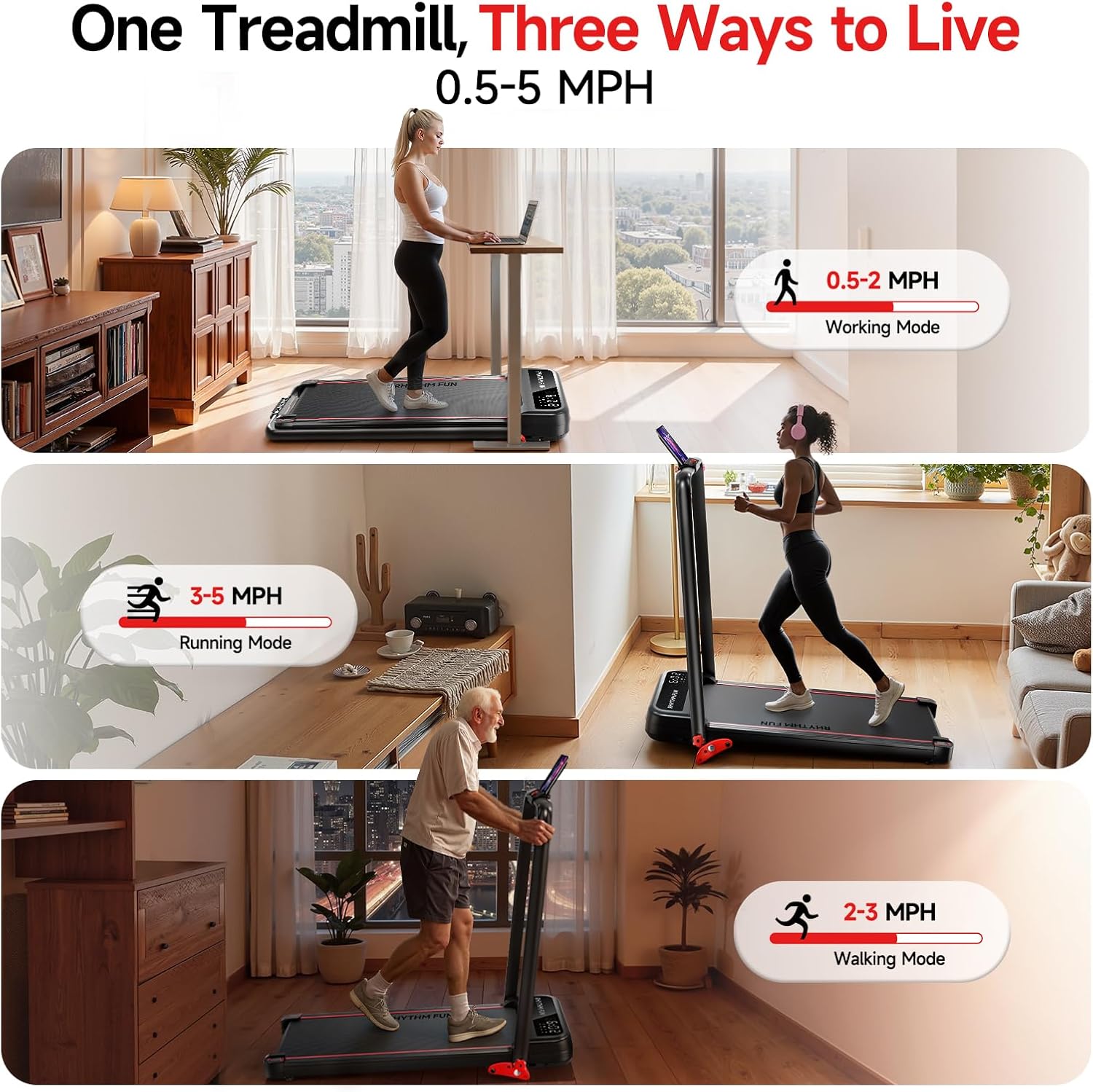
Image: A person walking on the treadmill, demonstrating its use in a home or office setting.
4.4. YPOOFIT App Connectivity
Download the YPOOFIT app to enhance your workout experience. The app allows you to:
- Participate in training sessions.
- Track workout data (calories, distance, speed, time).
- Synchronize running with other users.
A phone mount is integrated into the handlebar for convenient viewing during workouts.

Image: The YPOOFIT app interface displayed on a tablet, with a user exercising on the treadmill.
5. Features Overview
5.1. Quiet and Powerful Motor
Equipped with a 2.5HP motor, the treadmill operates quietly (below 65dB) while providing sufficient power for walking and jogging.
5.2. Shock Absorption and Running Belt
The 5-layer non-slip running belt and 8 silicone shocks provide double shock absorption, protecting your knees and ankles during exercise.

Image: Close-up of the treadmill's running belt, highlighting its anti-slip and shock-absorbing layers.
5.3. Foldable Design for Easy Storage
The treadmill features a foldable design, allowing it to be stored compactly under beds, sofas, or in small spaces. Its folded size is 45.5 x 24.5 x 4.5 inches.

Image: Visual demonstration of the treadmill being folded for compact storage.
5.4. Weight Capacity
The treadmill is designed to support users up to 300 pounds.

Image: A person running on the treadmill, illustrating its robust build and weight capacity.
6. Maintenance
Regular maintenance ensures the longevity and optimal performance of your treadmill.
6.1. Cleaning
- Wipe down the treadmill surfaces with a damp cloth after each use to remove sweat and dust.
- Avoid using abrasive cleaners or solvents that could damage the finish.
6.2. Running Belt
- The RHYTHM FUN Treadmill features a lubrication-free running belt, eliminating the need for regular lubrication.
- Periodically check the running belt for proper tension and alignment. Adjust if necessary according to the instructions in the full user manual.
6.3. General Inspection
- Regularly inspect all bolts and nuts to ensure they are tightened.
- Check the power cord for any signs of damage.
7. Troubleshooting
If you encounter issues with your treadmill, refer to the following common problems and solutions:
| Problem | Possible Cause | Solution |
|---|---|---|
| Treadmill does not start | Power cord not connected, main switch off, safety key not in place. | Ensure power cord is securely plugged in, main switch is on, and safety key is correctly inserted. |
| Running belt slips or stops | Belt tension too loose, belt off-center. | Adjust belt tension or re-center the belt according to the detailed instructions in the full user manual. |
| Unusual noise during operation | Loose components, foreign object under belt. | Check for and tighten any loose bolts. Inspect under the belt for obstructions. If noise persists, contact customer support. |
For more complex issues, please refer to the detailed troubleshooting section in the complete user manual or contact customer support.
8. Specifications
Key technical specifications for the RHYTHM FUN Treadmill with Incline:
- Brand: RHYTHM FUN
- Model Number: M4138
- Product Dimensions: 45.5"D x 24"W x 42"H
- Folded Size: 45.5"D x 24.5"W x 4.5"H
- Item Weight: 47 Pounds
- Material: Alloy Steel
- Maximum Speed: 5 Miles per Hour
- Minimum Speed: 0.5 Miles per Hour
- Maximum Incline Percentage: 8% (Manual)
- Maximum Horsepower: 2.5 HP
- Maximum Weight Recommendation: 300 Pounds
- Deck Length: 36.6 Inches
- Deck Width: 15 Inches
- Display: LED
- Connectivity Technology: App (YPOOFIT)
- Power Source: Corded Electric
- Included Components: Power Cord, Remote Control, Safety Key, Tool Kit, User Manual
9. Warranty and Support
9.1. Warranty Information
This RHYTHM FUN Treadmill comes with a 1-year warranty. Please retain your proof of purchase for warranty claims.
9.2. Customer Support
For any questions, technical assistance, or warranty inquiries, please contact RHYTHM FUN customer support through the retailer where the product was purchased or visit the official RHYTHM FUN website for contact details.
