
1. Introduction
Thank you for purchasing the OLIXIS Portable Car Refrigerator. This manual provides essential information for the safe and efficient operation of your new appliance. Please read it thoroughly before use and retain it for future reference.
This portable refrigerator is designed for cooling and freezing food and beverages, suitable for use in vehicles, camping, and home environments. It features a dual-zone cooling design, smart Bluetooth control, and multiple power options.
2. Safety Information
- Ensure the unit is placed upright for at least 6 hours before initial operation to allow refrigerant to settle.
- Do not block ventilation openings.
- Do not use electrical appliances inside the storage compartments unless they are of the type recommended by the manufacturer.
- Avoid contact with moving parts.
- Keep the appliance away from heat sources and direct sunlight.
- Use only the provided power cables.
- Disconnect power before cleaning or maintenance.
3. Product Overview
The OLIXIS Portable Car Refrigerator (Model BX-CZ-40L) offers a 40-liter capacity with dual-zone functionality, allowing for simultaneous freezing and refrigeration. It includes a built-in cutting board and is designed for easy portability with wheels and a telescopic handle.

Image 3.1: Front view of the OLIXIS Portable Car Refrigerator.
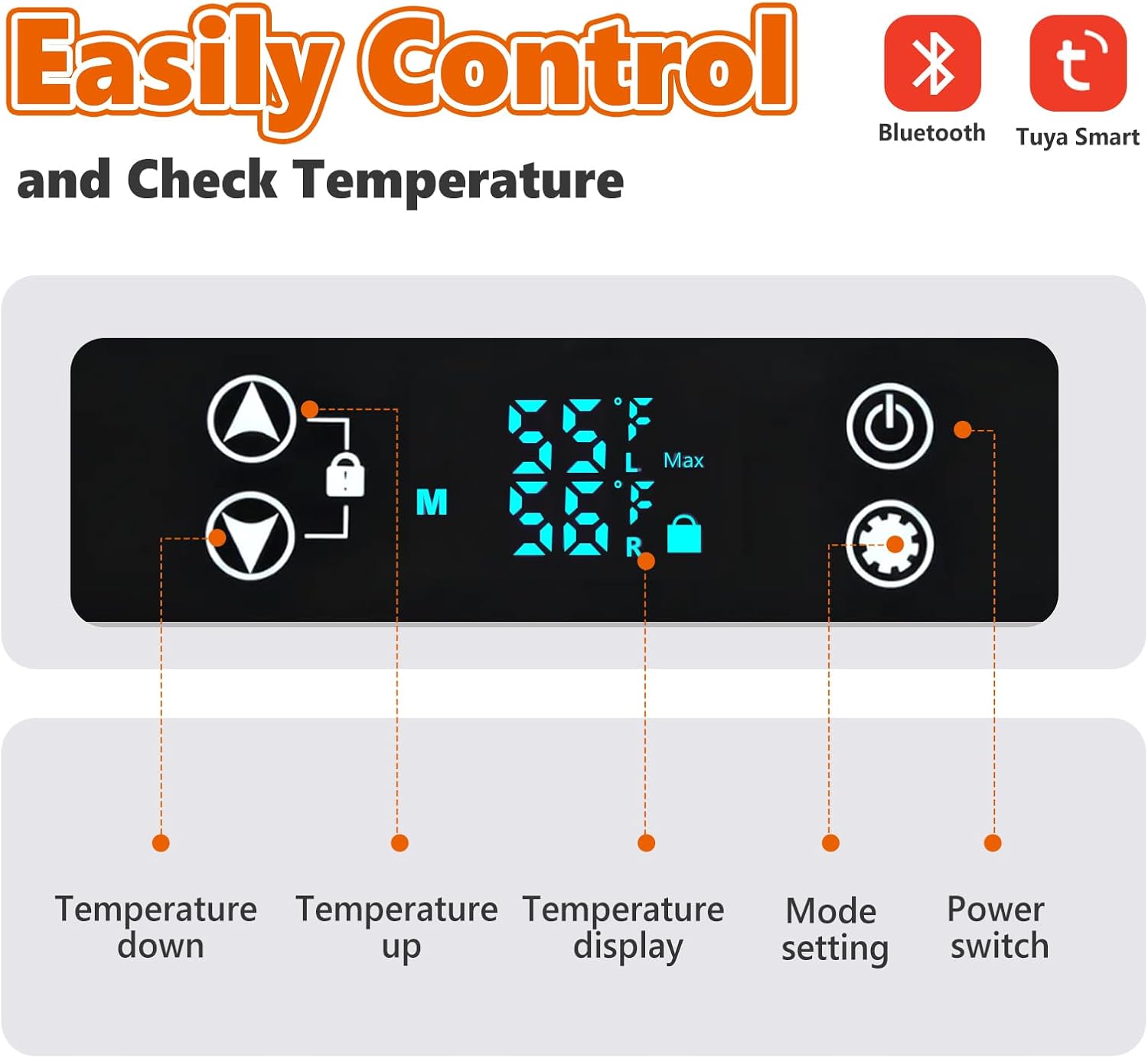
Image 3.2: Side view of the refrigerator, showing the handle and wheels.

Image 3.3: Back view of the refrigerator.
4. Setup
4.1 Unpacking and Initial Placement
- Carefully remove the refrigerator from its packaging.
- Place the unit on a flat, stable surface.
- Allow the refrigerator to stand upright for at least 6 hours before plugging it in. This allows the refrigerant to settle, ensuring optimal performance and longevity.
4.2 Power Connection
The refrigerator supports multiple power inputs:
- 12/24V DC: For vehicle use (car cigarette lighter socket).
- 100-240V AC: For home or standard wall outlet use.
Connect the appropriate power cable to the refrigerator's power input port and then to the power source. Ensure the connection is secure.

Image 4.1: Illustration of the three power supply options: 12/24V DC for car, 100-240V AC for home, and outdoor use with solar panel/power station.
4.3 Battery Protection Settings
The unit features a battery protection system to prevent your vehicle's battery from draining. You can select from three levels: Low (L), Medium (M), and High (H).

Image 4.2: Table detailing battery protection voltage levels for 12V and 24V systems.
Refer to the control panel section for instructions on how to adjust this setting.
5. Operating Instructions
5.1 Control Panel Overview
The refrigerator is equipped with an intuitive LED control panel. The main functions include:
- Power Switch: Turns the unit on/off.
- Temperature Display: Shows current and set temperatures.
- Temperature Up/Down: Adjusts the desired temperature.
- Mode Setting: Cycles through various operating modes (e.g., ECO, MAX).
- Child-Lock Function: Prevents accidental changes to settings.

Image 5.1: Detailed view of the control panel with labeled buttons for temperature control, display, mode, and power.
5.2 Setting Temperature
- Press the Power Switch to turn on the refrigerator.
- Use the Temperature Up (▲) and Temperature Down (▼) buttons to set your desired temperature. The temperature range is -4℉ to 68℉ (-20℃ to 20℃).
- The display will show the set temperature and then revert to the current internal temperature.
5.3 Dual-Zone Functionality
The refrigerator features a removable partition to create two distinct temperature zones (freezer and fridge) or a single large zone.
- With Partition Inserted: The unit operates in dual-zone mode. Typically, one side acts as a freezer and the other as a refrigerator. The temperature of the freezer zone is adjustable.
- Without Partition: The unit functions as a single-zone cooler, and the entire compartment will maintain the set temperature.

Image 5.2: Interior view demonstrating the dual-zone setup with a removable partition for freezer and fridge compartments.
5.4 Bluetooth Smart Control
Control your refrigerator remotely using the SmartLife or Tuya app via Bluetooth.
- Download the SmartLife or Tuya app from your smartphone's app store.
- Ensure Bluetooth is enabled on your smartphone.
- Open the app and follow the instructions to pair with your OLIXIS refrigerator.
- Once paired, you can monitor temperature, adjust settings, and switch modes directly from your phone.
Video 5.1: An official product video demonstrating the features and usage of the OLIXIS Portable Car Refrigerator.
6. Maintenance
6.1 Cleaning
- Disconnect the power supply before cleaning.
- Wipe the interior and exterior surfaces with a damp cloth and mild detergent.
- Do not use abrasive cleaners or harsh chemicals.
- Ensure all surfaces are dry before reconnecting power.
6.2 Storage
When storing the refrigerator for extended periods:
- Empty all contents and clean the interior thoroughly.
- Leave the lid slightly ajar to prevent odors and mold growth.
- Store in a dry, well-ventilated area, away from direct sunlight and extreme temperatures.
7. Troubleshooting
| Problem | Possible Cause | Solution |
|---|---|---|
| Refrigerator not turning on | No power supply; faulty cable; low battery voltage (in vehicle) | Check power connection; ensure vehicle engine is running or battery is charged; try a different power source/cable. |
| Insufficient cooling | Temperature setting too high; blocked ventilation; excessive ambient temperature; door not sealed properly | Lower temperature setting; ensure clear airflow around unit; avoid direct sunlight; check door seal for obstructions. |
| Unusual noise | Unit not level; fan obstruction | Place on a level surface; check for any objects obstructing the fan. |
| Bluetooth connection issues | Bluetooth off on phone; app not updated; unit too far from phone | Ensure phone Bluetooth is on; update app; move phone closer to unit. |
8. Specifications
- Model: BX-CZ-40L
- Capacity: 40 Liters (42QT)
- Temperature Range: -4℉ to 68℉ (-20℃ to 20℃)
- Power Input: 12V/24V DC, 100-240V AC
- Item Weight: 31.1 Pounds
- Product Dimensions: 15.35"D x 27.2"W x 17.44"H
- Special Features: App Control, Energy Efficient, Low Noise (≤40dB), Portable, Dual-Zone, Built-in Cutting Board, Battery Protection
- Defrost System: Manual
- Number of Doors: 1

Image 8.1: Visual representation of the 40L capacity and physical dimensions of the refrigerator.
9. Warranty and Support
For warranty information and customer support, please refer to the warranty card included with your product or visit the official OLIXIS website. You may also contact the seller directly for assistance.
Manufacturer: OLIXIS
ASIN: B0G4RBD5TG

