
Introduction
Thank you for choosing the OLIXIS Portable Car Refrigerator. This manual provides essential information for the safe and efficient operation, maintenance, and troubleshooting of your new appliance. Please read it thoroughly before use and retain it for future reference.
This portable refrigerator is designed for versatile use, offering both freezing and refrigeration capabilities with a dual-zone option, smart control via Bluetooth, and multiple power input options for vehicles and home use.
Safety Instructions
To ensure safe operation and prevent damage, please observe the following safety precautions:
- Read all instructions before operating the appliance.
- Do not operate the refrigerator if the power cord is damaged. Contact customer support for replacement.
- Ensure the voltage indicated on the appliance matches the local power supply voltage before connecting.
- Keep the ventilation openings clear of obstructions.
- Do not use electrical appliances inside the refrigerator unless they are of the type recommended by the manufacturer.
- Do not store explosive substances such as aerosol cans with a flammable propellant in this appliance.
- Avoid placing the refrigerator in direct sunlight or near heat sources.
- Always disconnect the power supply before cleaning or performing maintenance.
- This appliance is not intended for use by persons (including children) with reduced physical, sensory or mental capabilities, or lack of experience and knowledge, unless they have been given supervision or instruction concerning use of the appliance by a person responsible for their safety.
Product Overview
The OLIXIS Portable Car Refrigerator is a 53QT (50 Liter) dual-zone electric cooler designed for convenience and efficiency. It features a robust design with wheels and a telescopic handle for easy transport, a built-in cutting board, and an intuitive control panel.

Image: The OLIXIS Portable Car Refrigerator with its dimensions (15.35"D x 27.2"W x 20.19"H) and capacity illustrated, showing it can hold 50 cans (330ml), 26 bottles (550ml), or 10 bottles (750ml).

Image: Front view of the OLIXIS Portable Car Refrigerator, highlighting its compact and portable design.
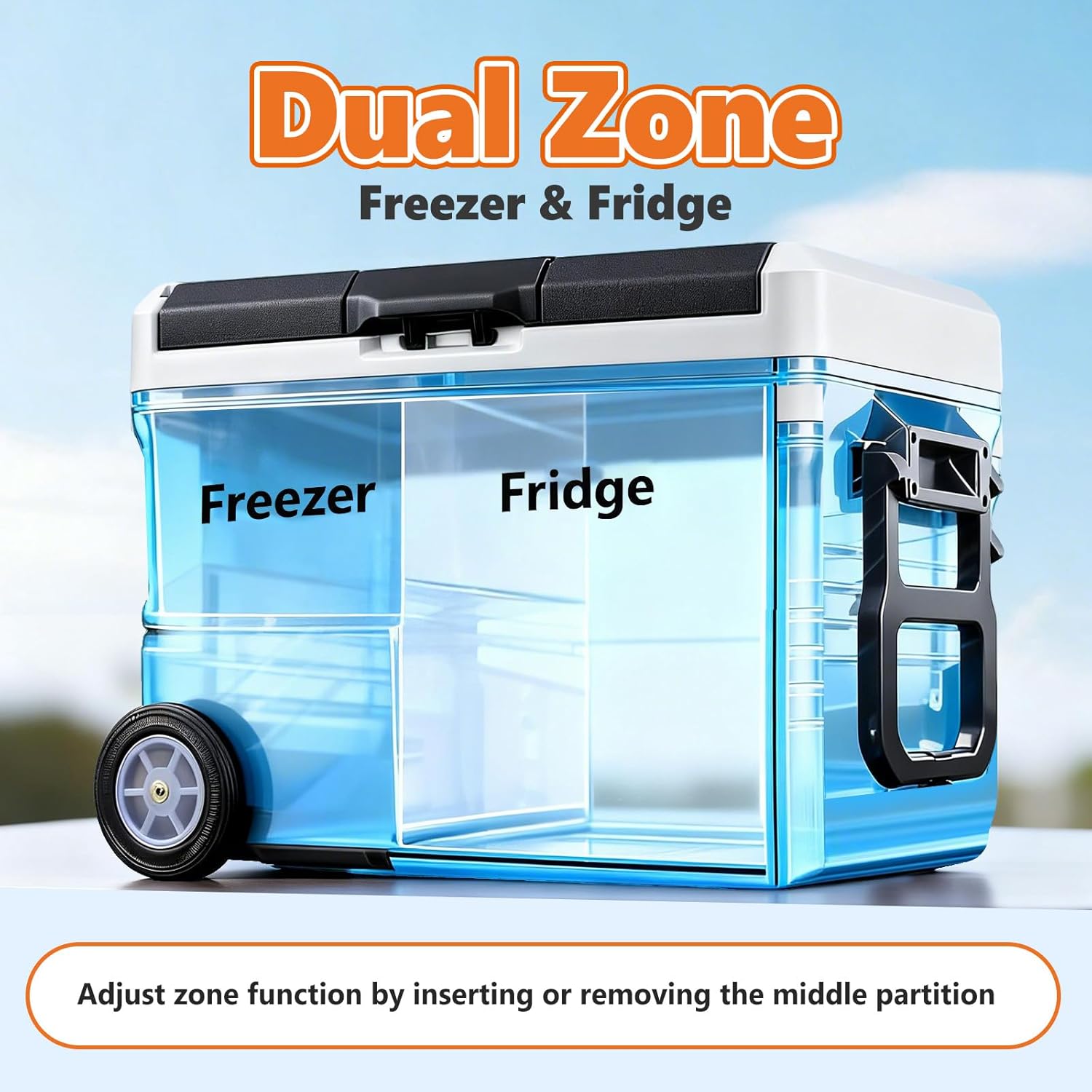
Image: Side view of the OLIXIS Portable Car Refrigerator, showcasing the durable wheels and telescopic handle for easy mobility.

Image: Back view of the OLIXIS Portable Car Refrigerator, showing the rear ventilation and power input area.
Image: The OLIXIS Portable Car Refrigerator with its lid open, revealing a built-in cutting board for added convenience during outdoor activities.
Setup
1. Unpacking
Carefully remove the refrigerator from its packaging. Inspect for any damage during transit. Retain packaging for future transport or return if necessary.
2. Initial Cleaning
Before first use, clean the interior and exterior of the refrigerator with a damp cloth and mild detergent. Wipe dry thoroughly.
3. Placement
Place the refrigerator on a flat, stable surface. Ensure adequate ventilation around the unit (at least 10 cm clearance on all sides) to allow for proper heat dissipation.
4. Power Connection
The refrigerator supports dual power input:
- 12/24V DC (Car Power): Connect the DC power cord to the refrigerator's DC input port and then to your vehicle's 12V or 24V outlet.
- 100-240V AC (Home Outlet): Connect the AC power adapter to the refrigerator's AC input port, then plug the adapter into a standard home electrical outlet.

Image: Illustration demonstrating the three power supply options: 12V/24V car power, 110-240V home outlet, and outdoor solar panel/power station.
Operating Instructions
1. Control Panel Overview
The refrigerator features an LED control panel for easy operation.

Image: Detailed view of the control panel, showing buttons for temperature adjustment (up/down), temperature display, mode setting, and power switch. It also indicates Bluetooth and Tuya Smart app compatibility.
- Power Switch: Press to turn the unit ON/OFF.
- Temperature Up/Down: Adjusts the target temperature.
- Mode Setting: Cycles through different operating modes (e.g., MAX/ECO).
- Temperature Display: Shows the current and set temperatures.
- Child-Lock Function: The LED panel includes a child-lock to prevent accidental changes. Refer to the specific instructions for activation/deactivation.
2. Powering On/Off
Press the power switch button on the control panel to turn the refrigerator on. Press and hold the button for a few seconds to turn it off.
3. Temperature Setting
Once powered on, use the 'Temperature Up' and 'Temperature Down' buttons to set your desired temperature. The display will show the set temperature, then revert to the current internal temperature.
4. Dual-Zone Functionality
The OLIXIS refrigerator features a customizable dual-zone design. The function of each zone can be adjusted by inserting or removing the middle partition.

Image: The interior of the OLIXIS Portable Car Refrigerator divided into 'Freezer' and 'Fridge' zones by a removable partition. The text indicates that the zone function is adjusted by inserting or removing this partition.
- With Partition Inserted: The unit operates in dual-zone mode. Typically, the larger left side functions as the freezer, and the smaller right side as the refrigerator. The freezer temperature is adjustable, and the refrigerator temperature will be influenced by the freezer setting.
- Without Partition: The entire unit operates as a single zone, allowing for a uniform temperature throughout. The temperature will follow the set value.
5. Bluetooth App Control
The refrigerator can be controlled remotely via a Bluetooth-enabled smartphone app (e.g., Tuya Smart). Download the app, pair your device with the refrigerator, and follow the in-app instructions to monitor and adjust settings.
6. Battery Protection System
The unit includes a battery protection system to prevent your vehicle's battery from draining. There are typically three levels (Low, Medium, High) that can be set via the control panel or app. When the input voltage drops below the set level, the refrigerator will automatically shut off.
Image: A table detailing the battery protection voltage levels for 12V and 24V systems. It shows the 'turn off' and 'turn on' voltages for Low (L), Medium (M), and High (H) settings.
| Battery Protection | 12 V turn off | 12 V turn on | 24 V turn off | 24 V turn on |
|---|---|---|---|---|
| Low grade-L | 8.5V | 10.9V | 21.3V | 22.7V |
| Medium-M | 10.1V | 11.4V | 22.3V | 23.7V |
| High grade-H | 11.1V | 12.4V | 24.3V | 25.7V |
Maintenance
1. Cleaning
- Always disconnect the power supply before cleaning.
- Clean the interior and exterior surfaces with a damp cloth and a mild, non-abrasive detergent.
- Do not use abrasive cleaners, steel wool, or harsh chemicals.
- Ensure the ventilation openings are free from dust and debris. Use a soft brush or vacuum cleaner to clean them.
- Wipe all surfaces dry before reconnecting power.
2. Defrosting
The refrigerator features a manual defrost system. If ice accumulates on the interior walls, turn off the unit, disconnect power, and allow the ice to melt naturally. Remove water with a cloth. Do not use sharp objects to remove ice.
3. Storage
When not in use for extended periods, ensure the refrigerator is clean and dry. Leave the lid slightly ajar to prevent odors and mold growth. Store in a dry, well-ventilated area.
Troubleshooting
If you encounter issues with your OLIXIS Portable Car Refrigerator, refer to the following common problems and solutions:
| Problem | Possible Cause | Solution |
|---|---|---|
| Refrigerator does not turn on. | No power supply; damaged power cord; vehicle battery protection activated. | Check power connections. Ensure power outlet is functional. If using DC, check vehicle battery voltage and adjust battery protection setting (L, M, H). Replace damaged cord. |
| Insufficient cooling. | Temperature setting too high; poor ventilation; excessive contents; lid not closed properly; ambient temperature too high. | Lower the set temperature. Ensure adequate clearance around the unit. Do not overfill. Close lid securely. Move to a cooler environment if possible. |
| Unit is noisy. | Unit not on a flat surface; fan obstruction. | Place on a flat, stable surface. Check for any obstructions around the fan. |
| App control not working. | Bluetooth not enabled; app not paired; app issues. | Ensure Bluetooth is enabled on your phone. Re-pair the device in the app. Restart the app or your phone. |
| Water leakage. | Excessive condensation or melting ice. | This is normal during defrosting. Ensure the drain plug (if present) is securely closed during operation. |
If the problem persists after attempting these solutions, please contact OLIXIS customer support.
Specifications
| Feature | Specification |
|---|---|
| Brand | OLIXIS |
| Model Name | BX-CZ-50L-BKGY |
| Capacity | 53 Quarts (50 Liters) |
| Product Dimensions (D x W x H) | 15.35"D x 27.2"W x 20.19"H |
| Item Weight | 33.7 Pounds |
| Cooling Method | Compressor |
| Temperature Range | -4°F to 68°F (-20°C to 20°C) |
| Power Source | 12/24V DC, 100-240V AC |
| Noise Level | ≤40dB |
| Defrost System | Manual |
| Special Features | App Control, Energy Efficient, Low Noise, Portable, Battery Protection, Built-in Cutting Board, Wheels |
| Certifications | ETL, FCC |
Warranty
This OLIXIS Portable Car Refrigerator comes with a 1 Year Manufacturer Warranty. Please retain your proof of purchase for warranty claims. The warranty covers defects in materials and workmanship under normal use. It does not cover damage caused by misuse, accident, unauthorized modification, or improper installation.
Support
For technical assistance, warranty claims, or any questions regarding your OLIXIS Portable Car Refrigerator, please contact OLIXIS customer support through the retailer where you purchased the product or visit the official OLIXIS website for contact information.

