
1. Introduction
This manual provides comprehensive instructions for the safe and effective use of the OceanicEcho Car Hand Controls Device, Model B0G4QQPVNK. This device is designed to assist drivers with limited foot mobility by allowing hand-operated control of acceleration and braking. Please read this manual thoroughly before installation and operation to ensure proper usage and safety.

Figure 1: OceanicEcho Car Hand Controls Device in use.
2. Safety Information and Warnings
- Important Note: Discontinue use immediately if you experience any discomfort or perceive a safety risk during operation.
- Vehicle Compatibility: This aid is not suitable for vehicles with a cramped driving space. Ensure sufficient clearance.
- Installation Warning: Do not use this device if its maximum length does not meet your vehicle’s requirements for secure pedal attachment.
- Pre-Drive Check: Always ensure the device is securely attached to the pedals and there is no interference with the steering wheel or other vehicle controls before driving.
- Practice: It is recommended to practice using the hand controls in a safe, controlled environment before driving on public roads.

Figure 2: Ensure adequate safety distance and no interference with the steering wheel.
3. Product Features
- Ergonomic Design: Tailored for drivers with limited foot mobility, allowing comfortable hand-operated driving.
- Tool-Free Installation: Designed for hassle-free setup and removal without the need for additional tools.
- Universal Compatibility: Adjustable length from 51cm (20.1") to 70cm (27.5") to fit most vehicles, including left-hand drive (LHD) and right-hand drive (RHD), and both mechanical and suspended pedals.
- Durable Construction: Made from high-grade aluminum alloy and stainless steel (SUS304 clamps) for stability and long-lasting durability.
- Adjustable Length: Features 10 simple levels of length adjustment using snap buttons for an ideal fit.
- Protective Accessories: Includes a soft storage bag for protection against scratches and easy transportation.

Figure 3: Snap button adjustment and aluminum body construction.
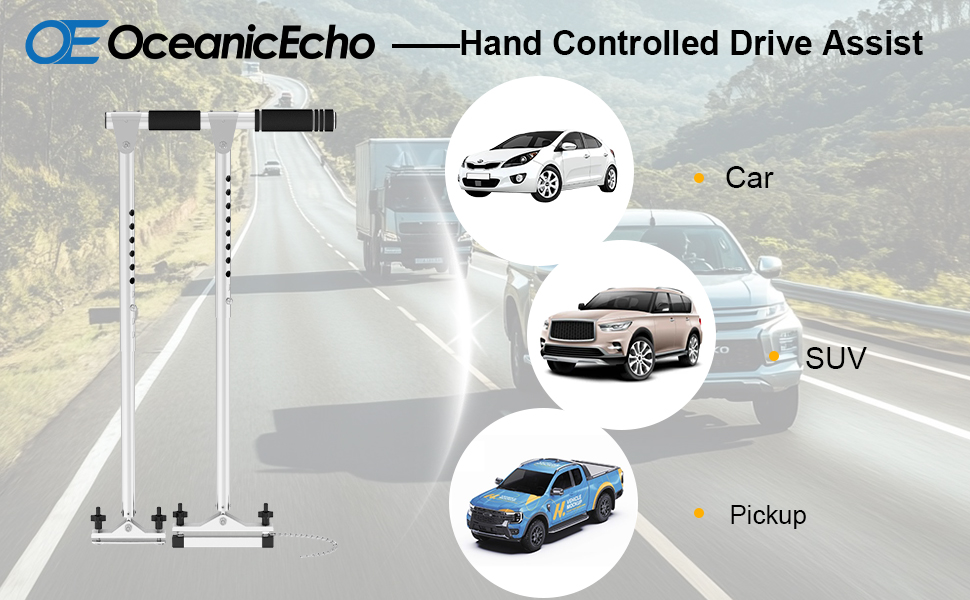
Figure 4: Universal compatibility with different vehicle types.
4. Setup and Installation
- Unpack Components: Carefully remove all components from the packaging. Ensure all parts are present, including the main control unit, pedal clamps, and storage bag.
- Adjust Length: Use the snap buttons to adjust the length of the control unit to match the distance between your vehicle's accelerator and brake pedals. Ensure the device can reach both pedals comfortably and securely. The adjustable range is 51cm (20.1") to 70cm (27.5").
- Attach to Pedals: Position the clamps over the accelerator and brake pedals. Tighten the clamps securely using the hand screws. Ensure the SUS304 clamps with anti-skid surfaces provide a firm grip on the pedals.
- Secure the Device: Use the provided straps to secure the upper part of the device to a stable point under the dashboard or steering column, preventing lateral movement.
- Final Check: Before driving, verify that the device is stable, does not interfere with the steering wheel or other controls, and that the pedals can be fully engaged and released using the hand controls.

Figure 5: Attaching the device to the car pedals.

Figure 6: Detail of SUS304 clamps with anti-skid surface.
5. Operating Instructions
The OceanicEcho Car Hand Controls Device provides intuitive operation for acceleration and braking.
- To Accelerate: Gently push the hand control handle forward towards the dashboard. This action will depress the accelerator pedal.
- To Brake: Pull the hand control handle backward towards your body. This action will depress the brake pedal.

Figure 7: Pushing the handle to accelerate.

Figure 8: Pulling the handle to brake.
Instructional Video:
Video 1: Demonstration of OceanicEcho Car Hand Controls Device installation and operation. This video shows the device being installed and a user demonstrating how to accelerate and brake using the hand controls.
6. Maintenance and Care
- Cleaning: Wipe the device with a damp cloth to remove dust and dirt. Avoid using harsh chemicals or abrasive cleaners.
- Storage: When not in use, store the device in the provided soft storage bag to protect it from scratches and damage. Store in a dry place.
- Inspection: Periodically inspect all components for signs of wear, damage, or loose connections. Ensure the clamps remain secure and the adjustment buttons function correctly.

Figure 9: Soft storage bag for protection and transport.
7. Troubleshooting
| Problem | Possible Cause | Solution |
|---|---|---|
| Device feels loose or unstable. | Clamps not tightened sufficiently; straps not secured. | Ensure all clamps are firmly tightened to the pedals. Verify straps are securely fastened to prevent movement. |
| Difficulty engaging pedals fully. | Incorrect length adjustment; obstruction. | Re-adjust the device length using the snap buttons to ensure proper reach. Check for any obstructions under the pedals or around the device. |
| Interference with steering wheel or other controls. | Improper positioning of the device. | Adjust the device's position to ensure adequate clearance from the steering wheel and other vehicle controls. Refer to Figure 2 in the Safety Information section. |
8. Specifications
| Attribute | Detail |
|---|---|
| Brand | OceanicEcho |
| Model Number | B0G4QQPVNK |
| Adjustable Length | 51cm (20.1") to 70cm (27.5") |
| Material | High-grade Aluminum Alloy, Stainless Steel (SUS304 clamps) |
| Item Weight | 2.8 pounds |
| Package Dimensions | 17.32 x 5.12 x 3.54 inches |
| Compatibility | Most LHD/RHD vehicles with mechanical or suspended pedals (not suitable for cramped driving spaces) |
9. Warranty and Support
For warranty information or technical support, please refer to the product packaging or contact OceanicEcho customer service directly. We are committed to providing high-quality products and support to ensure your satisfaction.
Return Policy: This product typically has a 30-day return policy. Please check with your retailer for specific details.