
1. Introduction
Welcome to the user manual for your uaue Y88 Smartwatch. This guide provides essential information on setting up, operating, maintaining, and troubleshooting your device. The Y88 Smartwatch features a 1.96-inch HD display, Bluetooth calling, over 110 sport modes, and comprehensive health monitoring capabilities, including heart rate, blood oxygen, and sleep tracking. It is designed for compatibility with both Android and iOS devices.
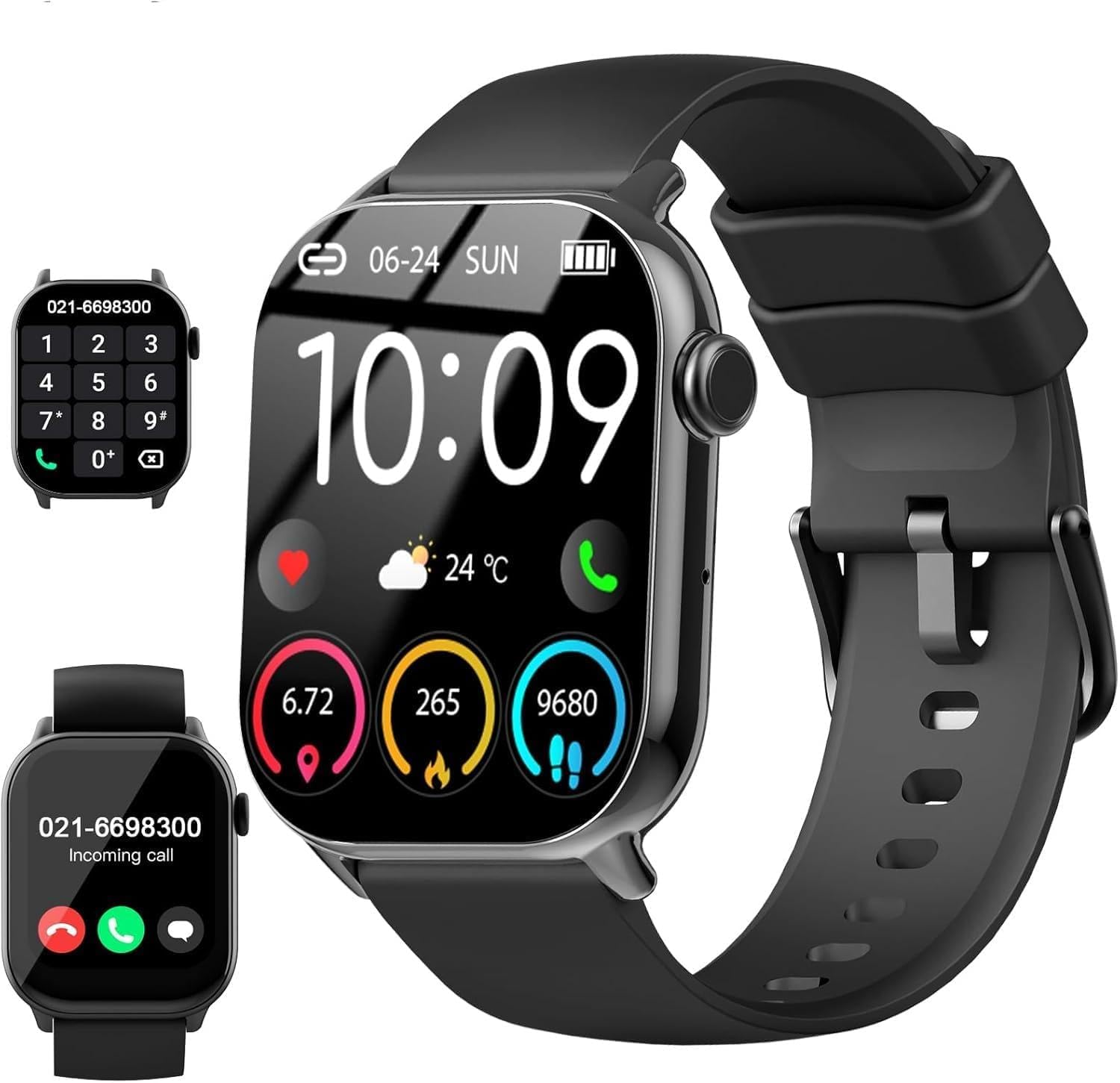
2. Key Features
- 1.96-inch HD Touch Screen: Vivid display with high resolution (1920x1080) for clear visuals and easy interaction.
- Bluetooth Calling Function: Make and receive calls directly from your wrist.
- 110+ Sport Modes: Track various physical activities with detailed metrics.
- 24/7 Health Monitoring: Includes heart rate, blood oxygen, and sleep duration tracking.
- Women's Health Management: Cycle tracking with smart reminders.
- IP68 Waterproof Rating: Resistant to rain, splashes, and daily wear, with a water resistance depth of 1.5 meters.
- Long Battery Life: Up to 30 days standby, 7 days of normal use, with a 2-hour charging time.
- Customizable Watch Faces: Over 100 stylish watch faces available via the Glory Fit APP, or create your own.
- Practical Functions: Music control, remote camera control, stopwatch, weather forecasts, alarm, voice assistant, and breath training.
- Compatibility: Works with Android (4.4+) and iOS (9.0+) smartphones.

3. Setup
3.1 Charging the Device
Before first use, fully charge your smartwatch. Connect the magnetic charging cable to the charging points on the back of the watch and plug the USB end into a standard USB power adapter (not included). A full charge typically takes approximately 2 hours. The watch has a 660 mAh Lithium-polymer battery.

3.2 App Installation
To unlock the full potential of your smartwatch, download and install the Glory Fit APP on your smartphone. You can find it on the App Store (iOS) or Google Play Store (Android).
3.3 Device Pairing (Bluetooth Connection)
Follow these steps to pair your smartwatch with your smartphone for full functionality, including Bluetooth calling:
- Open the Glory Fit APP on your phone. Navigate to the device section and select 'Y88' to connect. Confirm any pop-up pairing requests on your mobile phone system.
- On your smartwatch, turn on the Bluetooth switch. This is necessary for making calls or playing media sound through the watch.
- In your phone's Bluetooth settings, ensure that the 'Y88' device is connected. You may need to grant permissions for the smartwatch in your phone's system Bluetooth settings.
- Once successfully connected, you can use your smartwatch to make and receive calls anytime.

4. Operating Instructions
4.1 Basic Navigation
The uaue Y88 Smartwatch features a full touch screen for intuitive navigation. Swipe left, right, up, or down to access different menus, notifications, and quick settings. Tap to select options and press the side button to return to the home screen or power on/off.
4.2 Making and Receiving Calls
After successful Bluetooth pairing (refer to Section 3.3), you can use your smartwatch for calls:
- Dialpad: Access the dialpad on your watch to manually enter a number.
- Contacts: Sync your phone contacts to the watch via the Glory Fit APP to make calls directly from your contact list.
- Call History: View recent calls and redial from the call history.
- Receiving Calls: When a call comes in, the watch will display the caller ID. You can answer or reject the call directly from your wrist.

4.3 Health Monitoring
Your Y88 Smartwatch provides continuous health tracking:
- Heart Rate Monitor: Tracks your heart rate 24/7. Access the heart rate interface on the watch or in the app for detailed graphs and insights.
- Blood Oxygen Monitor: Measure your blood oxygen saturation (SpO2) levels. Useful for monitoring during high-altitude activities or for general wellness.
- Sleep Tracking: Automatically monitors your sleep patterns, including deep sleep, light sleep, and awake times. View detailed analysis in the Glory Fit APP to optimize your rest.
- Women's Health: Utilize the dedicated feature for menstrual cycle tracking and smart reminders.

4.4 Sport Modes
The smartwatch supports over 110 sport modes. Navigate to the 'Sport' section on your watch, select your desired activity (e.g., running, cycling, yoga, badminton), and start your workout. The watch will track duration, heart rate, calories burned, and other relevant metrics. Data can be viewed on the watch and in the Glory Fit APP.

4.5 Other Functions
Explore additional features for convenience and personalization:
- Music Control: Control music playback on your smartphone (play, pause, skip tracks) directly from your watch.
- Remote Camera Control: Use your watch as a remote shutter button for your phone's camera.
- Stopwatch & Timer: Access these tools for timing activities.
- Weather Forecast: Get real-time weather updates on your wrist.
- Notifications: Receive alerts for calls, messages, and social media apps (e.g., Facebook, Instagram, WhatsApp) directly on your watch.
- Customizable Watch Faces: Change your watch face to match your style. The Glory Fit APP offers over 100 options, or you can upload your own photos.

5. Maintenance
5.1 Water Resistance
The uaue Y88 Smartwatch has an IP68 waterproof rating, meaning it is resistant to dust and can withstand immersion in water up to 1.5 meters for 30 minutes. It is suitable for daily use, including washing hands, rain, and showering. However, it is not recommended for hot water baths, saunas, or deep diving, as steam and high pressure can compromise the seal.

5.2 Cleaning
To keep your smartwatch clean and functioning optimally, wipe the screen and strap regularly with a soft, dry cloth. If necessary, use a slightly damp cloth with mild soap, then dry thoroughly. Avoid harsh chemicals or abrasive materials.
5.3 Battery Care
To prolong battery life, avoid extreme temperatures. Charge the device fully when prompted and avoid letting the battery drain completely too often. Store the watch in a cool, dry place if not used for extended periods.
6. Troubleshooting
If you encounter issues with your uaue Y88 Smartwatch, try the following solutions:
- Device Not Turning On: Ensure the watch is fully charged. Connect it to the charger for at least 10-15 minutes.
- Cannot Pair with Phone: Make sure Bluetooth is enabled on both your phone and watch. Ensure the Glory Fit APP is installed and running. Try restarting both devices and attempting the pairing process again (refer to Section 3.3).
- Call Function Not Working: Verify that the Bluetooth call switch is enabled on the watch and that the watch is properly connected to your phone's Bluetooth settings for calls. Check phone permissions for the Glory Fit APP.
- Inaccurate Health Data: Ensure the watch is worn snugly on your wrist, not too tight or too loose. Clean the sensor on the back of the watch. Note that smartwatches are not medical devices and data is for reference only.
- Notifications Not Appearing: Check notification settings in the Glory Fit APP and your phone's system settings to ensure permissions are granted for the app to display notifications.
- Screen Unresponsive: Try restarting the watch by pressing and holding the side button. If unresponsive, allow the battery to drain completely and then recharge.
For persistent issues, please refer to the customer support section.
7. Specifications
| Feature | Detail |
|---|---|
| Brand | uaue |
| Model Number | Y88 |
| Screen Size | 1.96 Inches |
| Display Type | Digital |
| Resolution | 1920 x 1080 |
| Operating System | Android/iOS |
| Memory Storage Capacity | 128 MB |
| Connectivity Technology | Bluetooth |
| Wireless Communication Standard | Bluetooth |
| Battery Capacity | 660 Milliampere-hour (mAh) |
| Battery Composition | Lithium-polymer |
| Charging Time | 2 hours |
| GPS | Integrated GPS |
| International Protection Rating (IP Code) | IP68 |
| Water Resistance Depth | 1.5 Meters |
| Band Material Type | Silicone |
| Band Width | 20 Millimeters |
| Item Weight | 30 Grams |
| Color | Black |
| Human Interface Input | Touchscreen |
| Supported Application | Fitness and Health Apps |
| Compatible Devices | Laptop, Smartphone, Tablet |
| Compatible Phone Models | iOS and Android compatible |
| Meter Type | Heart Rate Monitor, Blood Oxygen Monitor, Sleep Duration Monitor |
| Product Functions | Call function, Step counter, Heart rate, Blood oxygen, Training, Weather, Messages, Music, Stopwatch, Sleep settings search |
| Box Contents | User Manual |
8. Warranty Information
The uaue Y88 Smartwatch comes with a limited warranty. For specific details regarding warranty coverage, duration, and terms, please refer to the warranty card included in your product packaging or visit the official uaue website. Keep your proof of purchase for warranty claims.
9. Customer Support
If you require further assistance, have questions, or need technical support, please contact uaue customer service. You can typically find contact information (email, phone, or support portal) on the official uaue website or within the Glory Fit APP. Please have your product model (Y88) and purchase details ready when contacting support.