
BLOKEES DX21
BLOKEES Transformers DX Classic Class - 21 Jet Wing Optimus Prime Instruction Manual
Introduction
Thank you for purchasing the BLOKEES Transformers DX Classic Class - 21 Jet Wing Optimus Prime collectible figure. This premium scale figure boasts authentic movie accuracy and LED-illuminated eyes and chest. This manual provides essential information for the setup, operation, maintenance, and care of your figure.
Important Safety Information
- Choking Hazard: This product contains small parts and is not suitable for children under 3 years of age.
- Battery Safety: Do not mix old and new batteries. Do not mix alkaline, standard (carbon-zinc), or rechargeable (nickel-cadmium) batteries. Insert batteries with correct polarity. Remove exhausted batteries promptly. Do not dispose of batteries in fire.
- Adult Supervision: Adult supervision is recommended during play, especially for younger users.
- Handling: Handle the figure with care to avoid damage to delicate parts or paint applications.
Package Contents
Please ensure all items listed below are present in your package:
- 1x BLOKEES Transformers DX Classic Class - 21 Jet Wing Optimus Prime Figure
- 1x Jet Wing accessory
- Assorted weapon accessories (e.g., sword, shield, blasters)
- Instruction Manual (this document)
Setup
Unboxing and Initial Inspection
Your BLOKEES Optimus Prime figure comes pre-assembled and ready for display or play directly out of the box. Carefully remove the figure and its accessories from the packaging. Inspect all parts for any signs of damage during transit.

Figure 1: The product packaging for the BLOKEES Transformers DX Classic Class - 21 Jet Wing Optimus Prime figure, showing the assembled figure with jet wings and weapons.
Battery Installation for LED Features
The Optimus Prime figure features LED-illuminated eyes and chest. To activate these features, you will need to install batteries.
- Locate the battery compartment, typically on the back or chest of the figure. Refer to the diagram below for exact placement.
- Using a small Phillips head screwdriver (not included), carefully open the battery compartment cover.
- Insert 2 x LR44 (or equivalent) button cell batteries, ensuring correct polarity (+/-) as indicated inside the compartment.
- Replace the battery compartment cover and secure it with the screw.
(Note: A diagram showing battery compartment location would typically be included here in a physical manual.)
Operation
Activating LED Lights
After installing the batteries, locate the small activation button, usually on the back or chest of the figure. Press this button to illuminate Optimus Prime's eyes and chest. Press again to turn off the lights.
Posing the Figure
The figure features multiple points of articulation for dynamic posing. Gently manipulate the joints to achieve desired stances. Avoid excessive force to prevent damage.

Figure 2: Optimus Prime figure in a standard pose, equipped with a shield and sword.
Attaching Accessories
The Jet Wing and various weapon accessories can be attached to the figure to enhance its appearance and play options.
- Jet Wing: Carefully align the pegs on the Jet Wing accessory with the corresponding ports on Optimus Prime's back. Press firmly until it clicks into place.
- Weapons: The sword, shield, and blasters can be held in the figure's hands or attached to designated ports on the arms or back, depending on the accessory. Refer to the visual guides below for common configurations.

Figure 3: Optimus Prime figure equipped with the Jet Wing accessory and dual blasters, ready for action.
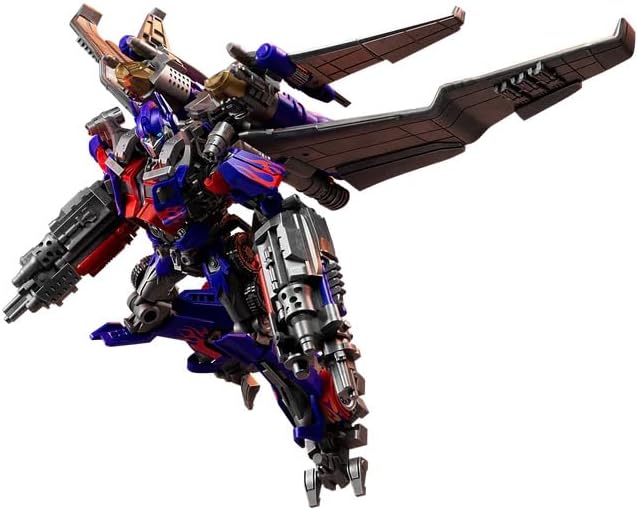
Figure 4: Optimus Prime figure showcasing a dynamic pose with the Jet Wing accessory and blasters, simulating flight.
Maintenance
Cleaning
To clean your Optimus Prime figure, gently wipe it with a soft, dry cloth. For stubborn dirt, a slightly damp cloth can be used, followed immediately by a dry cloth. Avoid using harsh chemicals, abrasive cleaners, or excessive water, as these can damage the paint or plastic.
Battery Replacement
When the LED lights dim or stop working, it's time to replace the batteries. Follow the "Battery Installation" steps in the Setup section to replace the 2 x LR44 batteries.
Storage
Store the figure and its accessories in a cool, dry place away from direct sunlight and extreme temperatures. Prolonged exposure to sunlight can cause discoloration. Keep the figure away from dust and moisture to maintain its condition.
Troubleshooting
- LED Lights Not Working:
- Ensure batteries are installed correctly with the proper polarity.
- Replace old batteries with new LR44 batteries.
- Check if the battery compartment cover is securely closed.
- Joints Feel Loose:
- Some articulation points may naturally loosen over time with repeated posing. This is generally normal for action figures.
- Avoid excessive force when posing to prevent further loosening or breakage.
- Accessories Do Not Attach Securely:
- Ensure you are aligning the pegs and ports correctly.
- Check for any obstructions in the ports or on the pegs.
Specifications
| Feature | Detail |
|---|---|
| Brand: | BLOKEES |
| Model Name: | Jet Wing Optimus Prime |
| Model Number: | DX21 |
| Character: | Optimus Prime |
| Figure Height: | 13.4 cm (5.28 inches) |
| Item Dimensions: | 10.16 x 5.94 x 4.53 inches (25.8 x 15.1 x 11.5 cm) |
| Item Weight: | 14.56 ounces (412.8 grams) |
| Material: | Plastic |
| Color: | Red and Blue |
| Additional Features: | LED Light-up eyes and chest |
| Battery Type: | 2 x LR44 (or equivalent) button cell batteries |
| Recommended Age: | 8 years and up |
Warranty and Support
For any questions, concerns, or issues regarding your BLOKEES Transformers DX Classic Class - 21 Jet Wing Optimus Prime figure, please contact the manufacturer or your retailer. Keep your proof of purchase for any warranty claims.
While specific warranty details are not provided in this manual, BLOKEES is committed to customer satisfaction. Please visit the official BLOKEES website or contact their customer service for further assistance.
Ask a question about this manual
Ask about setup, troubleshooting, compatibility, parts, safety, or missing instructions. Manuals+ will review the question and use this page’s manual context to help answer it.