
1. Introduction
This manual provides essential information for the safe and effective operation, setup, and maintenance of your AZZUNO ACDC-200L AC/DC 200A TIG Welder. Please read this manual thoroughly before using the equipment to ensure proper function and to prevent injury or damage.
2. Safety Information
WARNING: Welding can be dangerous. Always follow safety precautions to prevent serious injury or death.
- Always wear appropriate personal protective equipment (PPE), including a welding helmet with proper shade, flame-resistant clothing, welding gloves, and safety shoes.
- Ensure adequate ventilation to avoid inhaling welding fumes.
- Protect bystanders from arc rays and hot metal.
- Ensure the welding machine is properly grounded.
- Do not operate the welder in damp or wet conditions.
- Disconnect power before performing any maintenance or service.
- Keep a fire extinguisher nearby.
3. Product Overview and Features
The AZZUNO ACDC-200L is a versatile AC/DC 200A TIG welder designed for a wide range of welding applications. It supports AC/DC HF TIG, AC/DC Pulse TIG, Spot TIG, and Cold TIG, making it suitable for welding aluminum, stainless steel, mild steel, and other materials.
Key Features:
- Complete TIG Welding Functions: AC/DC HF TIG, AC/DC PULSE TIG, SPOT TIG, COLD TIG.
- Advanced AC Waveform Control: Square Wave, Sine Wave, and Triangle Wave options for precise aluminum welding.
- AC/DC Pulse & Cold Welding: Provides superior control for thin sheet welding, minimizing heat distortion.
- Memory Function: Save and recall up to 10 custom welding parameter sets.
- Large LED Display: For clear visibility and easy parameter adjustment.
- 5-Pin Foot Pedal Compatibility: Allows for remote current adjustment.

Image: The AZZUNO ACDC-200L TIG Welder highlighting its 10-in-1 welding capabilities, including AC HF TIG, AC Pulse TIG, AC/AC-P Spot TIG, Stick, DC HF TIG, DC Pulse TIG, DC/DC-P Spot TIG, and DC Cold TIG.
4. Unpacking and Contents
Carefully unpack the welding machine and all accessories. Verify that all components are present and undamaged. If any items are missing or damaged, contact your dealer immediately.
Standard Package Contents:
- AZZUNO ACDC-200L TIG Welder Unit
- TIG Torch
- Ground Clamp
- Electrode Holder (for Stick welding)
- Gas Hose
- Power Cord
- 5-Pin Foot Pedal (if included in package)
- Consumables (collets, collet bodies, ceramic nozzles, tungsten electrodes)
- Instruction Manual

Image: The AZZUNO ACDC-200L TIG Welder displayed with its various accessories, including the TIG torch, ground clamp, electrode holder, gas regulator, foot pedal, and various consumables.
5. Setup
5.1 Power Connection
The ACDC-200L supports both 110V and 220V input power. Ensure the correct power cord is used and connected to a suitable power outlet with proper grounding. The machine automatically detects the input voltage.
5.2 Gas Connection
- Connect the gas hose from your inert gas cylinder (e.g., Argon) to the gas inlet on the rear of the welding machine.
- Attach the other end of the gas hose to a gas regulator on your gas cylinder.
- Ensure all connections are tight to prevent gas leaks.
5.3 Torch and Ground Clamp Connection
- Connect the TIG torch cable to the appropriate connector on the front panel of the welder.
- Connect the ground clamp cable to the ground terminal on the front panel.
- Attach the ground clamp securely to the workpiece or welding table.
5.4 Foot Pedal Connection
The 5-pin foot pedal allows for remote current adjustment. Connect the 5-pin plug of the foot pedal to the corresponding receptacle on the front panel of the welder.

Image: The AZZUNO ACDC-200L TIG Welder with a foot pedal connected via its 5-pin connector, illustrating remote current control.
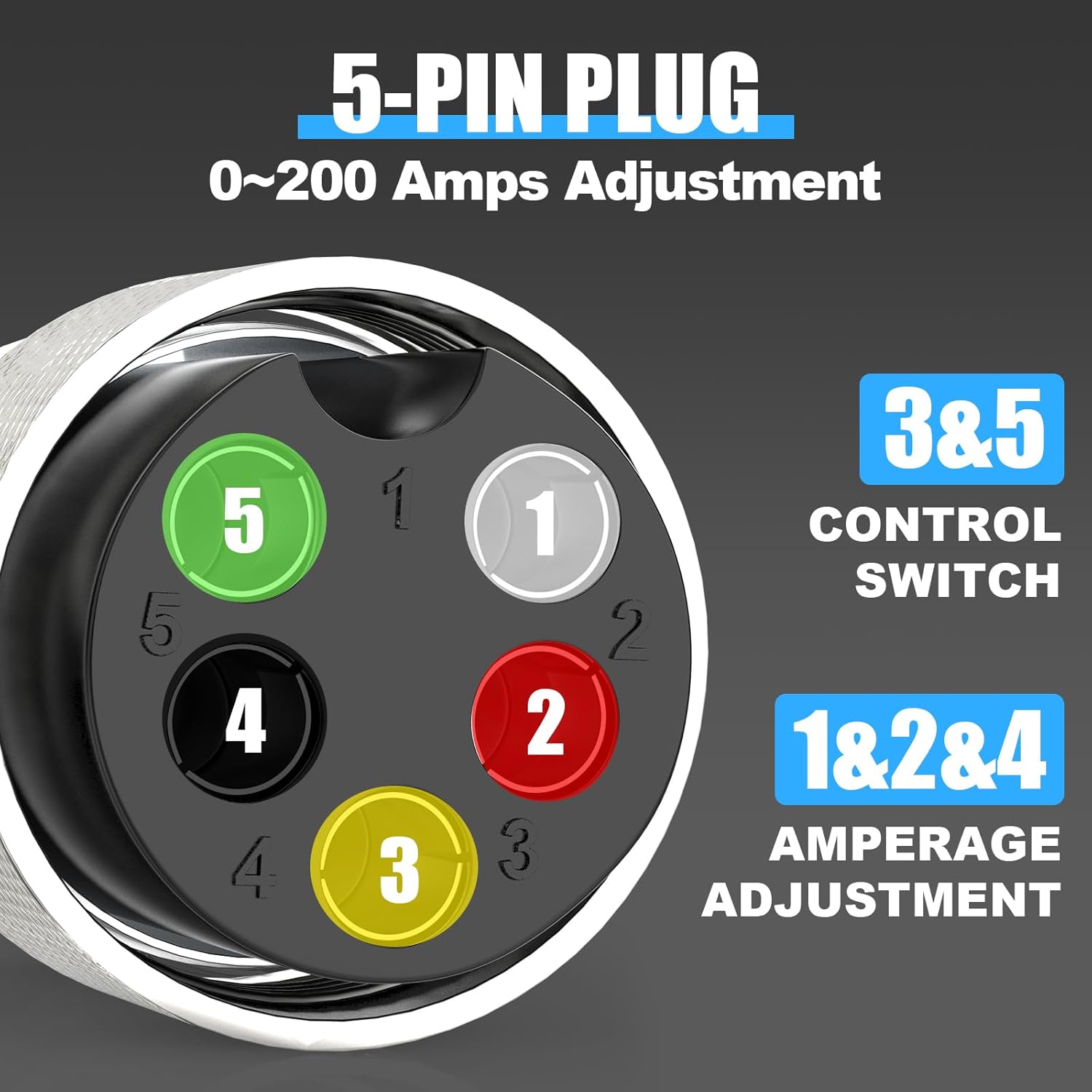
Image: A detailed view of the 5-pin plug for the foot pedal, indicating pins 3 & 5 for control switch and pins 1, 2 & 4 for amperage adjustment.

Image: The dimensions of the 5-pin foot pedal, showing its length, width, and height, along with its 10-foot cord.
6. Operating the Welder
6.1 Control Panel Overview
The large LED display and control knobs allow for precise adjustment of welding parameters. Familiarize yourself with the layout:
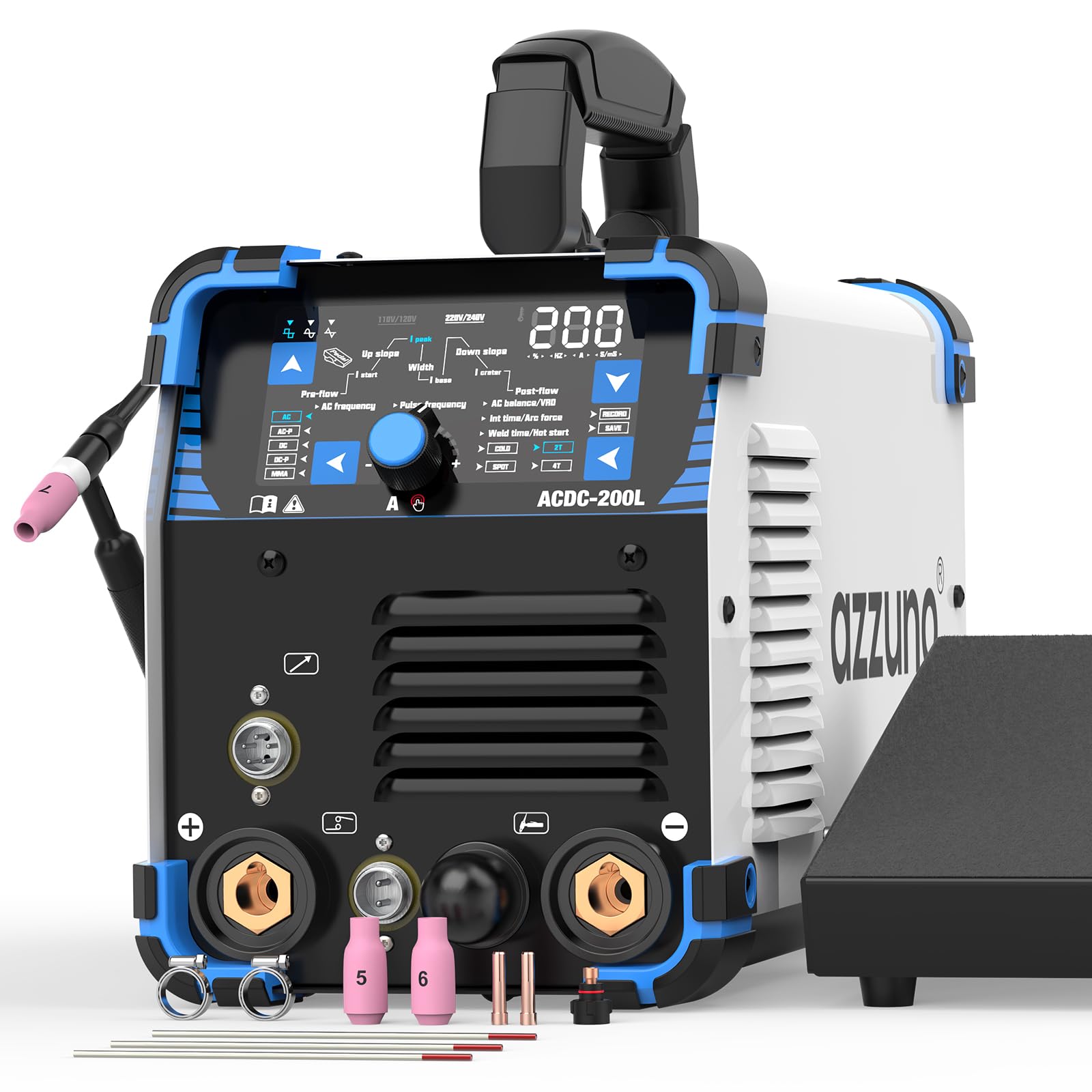
Image: A detailed view of the AZZUNO ACDC-200L TIG Welder's control panel, showing the large LED display, mode selection buttons (AC, DC, AC-P, DC-P, MMA), and various parameter settings like Pre-flow, Up slope, Width, Down slope, I crater, Post-flow, AC balance, Pulse frequency, Cold, Spot, 2T, and 4T.
6.2 Welding Modes
Select the desired welding mode using the buttons on the control panel:
- AC HF TIG: For welding aluminum and magnesium alloys. Provides high-frequency arc starting.
- DC HF TIG: For welding stainless steel, mild steel, copper, and other DC weldable metals. Provides high-frequency arc starting.
- AC Pulse TIG: Offers enhanced control for thin aluminum, reducing heat input and distortion.
- DC Pulse TIG: Ideal for thin stainless steel and other DC weldable metals, providing precise heat control.
- Cold TIG: A low-heat input function for delicate or cosmetic welds, particularly useful for thin materials like stainless steel and aluminum.
- Spot TIG: For precise, timed spot welds.
- MMA (Stick Welding): For general-purpose stick electrode welding.
6.3 Advanced Settings
AC Waveform Control
The ACDC-200L offers multiple AC waveform options for aluminum welding:
- Square Wave: Provides strong cleaning action and deeper penetration. Recommended for experienced welders.
- Sine Wave: Suitable for traditional aluminum welding, offering smooth arc stability. Recommended for beginners and those seeking aesthetic welds.
- Triangle Wave: Ideal for applications requiring minimal heat input and precision welds, especially for thin aluminum.

Image: A comparison table detailing the characteristics of Square Wave, Sine Wave, and Triangle Wave AC waveforms, including cleaning action, penetration, heat input, arc stability, and best applications.
Pulse Settings
In Pulse TIG mode, adjust the pulse frequency and pulse width to control heat input and bead appearance. Higher frequency provides a tighter arc and finer ripple, while lower frequency allows for more penetration.
Memory Function
The welder features a memory function to save and recall up to 10 custom welding parameter sets. This improves efficiency and consistency for repetitive tasks or different materials.

Image: The AZZUNO ACDC-200L TIG Welder's display showing the 'RECORD' and 'SAVE' options, illustrating the memory function for storing welding settings.
7. Maintenance
Regular maintenance ensures the longevity and optimal performance of your welding machine.
- Cleaning: Periodically clean the machine's exterior with a dry, soft cloth. Use compressed air to blow out dust from inside the machine, ensuring power is disconnected.
- Torch Maintenance: Inspect the TIG torch for wear and tear on consumables (tungsten, collet, collet body, ceramic nozzle). Replace as needed.
- Cable Inspection: Check all cables (power, ground, torch) for cuts, cracks, or loose connections. Replace damaged cables immediately.
- Gas System: Regularly check gas hoses and connections for leaks.
8. Troubleshooting
Refer to the following table for common issues and their solutions.
| Problem | Possible Cause | Solution |
|---|---|---|
| No power to machine | Power cord unplugged; circuit breaker tripped; machine switch off | Check power connections; reset breaker; turn machine on |
| No arc initiation | Ground clamp not connected; wrong welding mode; gas flow issue; faulty torch | Ensure ground connection; select correct mode; check gas supply; inspect torch consumables |
| Poor weld quality | Incorrect parameters; improper gas shielding; contaminated workpiece; worn tungsten | Adjust current/voltage/pulse; check gas flow/purity; clean workpiece; replace tungsten |
| Foot pedal not responding | Foot pedal unplugged; faulty pedal; machine not in remote mode | Check pedal connection; test pedal; ensure machine is set for foot pedal control |
9. Technical Specifications
| Parameter | Value |
|---|---|
| Model | ACDC-200L |
| Input Voltage | 110V/220V AC (Auto-sensing) |
| Max Output Current | 200A |
| Welding Processes | AC/DC HF TIG, AC/DC Pulse TIG, Cold TIG, Spot TIG, MMA (Stick) |
| Dimensions (Welder) | 16" × 7" × 8.6" |
| Net Weight (Welder) | 18.5 LBS |
| Foot Pedal Cable Length | 10 ft |
10. Warranty and Support
For warranty information and technical support, please refer to the warranty card included with your product or contact AZZUNO customer service directly. Keep your purchase receipt as proof of purchase.