
1. Product Overview
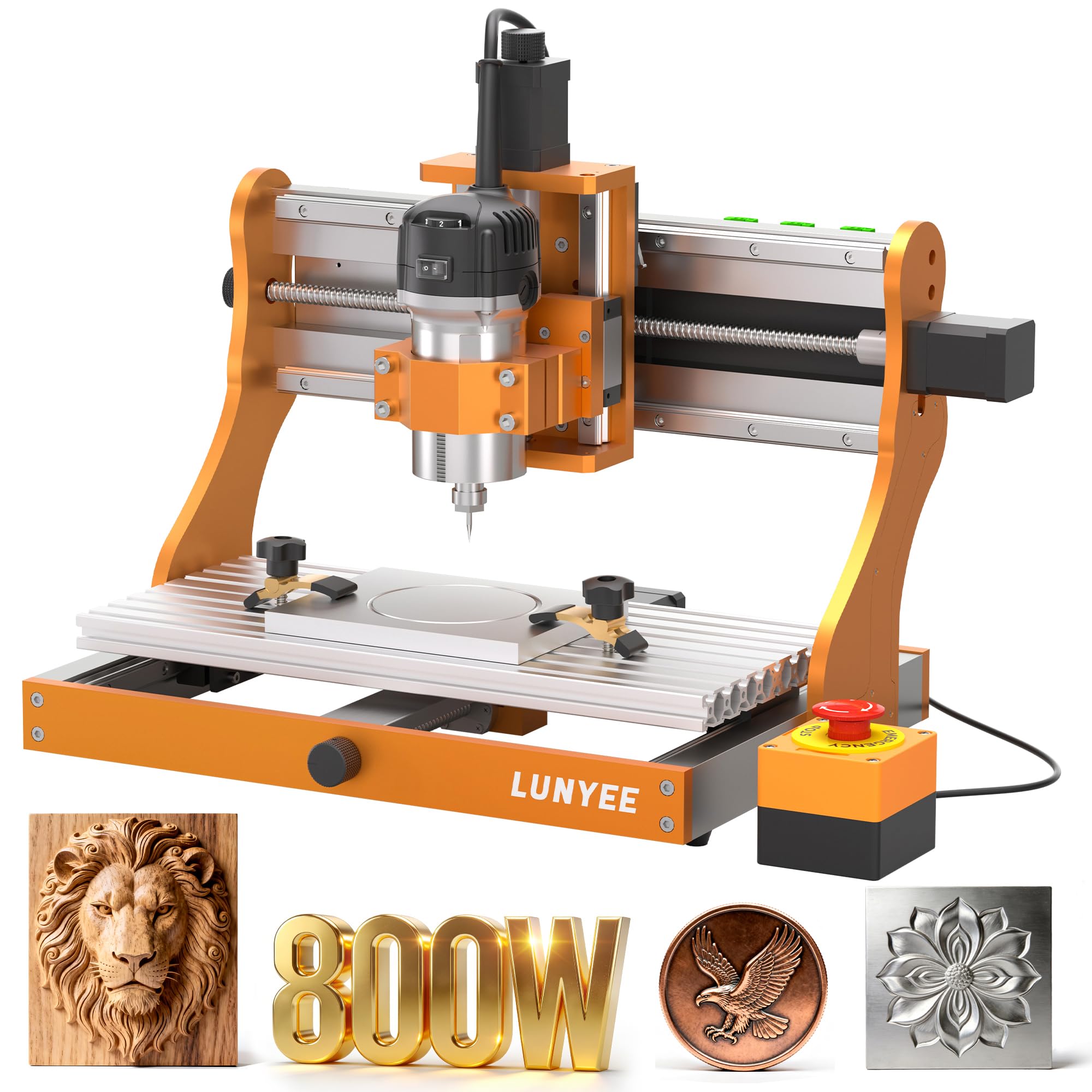
The LUNYEE 3020 Nova CNC Router Machine is a precision-engineered desktop milling machine designed for engraving and cutting various materials including aluminum, brass, wood, acrylic, MDF, and plastics. It features an all-metal frame, industrial-grade XYZ axis linear guides, and ball screws for enhanced accuracy and stability.
Key Features:
- Industrial-Grade Drive System: Each axis (X, Y, Z) is equipped with 1204 ball screws and HG-15 linear guides, ensuring precise movements and eliminating backlash.
- 800W Spindle: Provides a 6,000–30,000 RPM range with six speed settings and constant torque control for stable and accurate performance across various materials.
- Multi-Material Capability: Suitable for metal, wood, acrylic, PCB, and leather.
- Wide Software Support: Compatible with GRBL firmware software such as UGS, Fusion 360, Easel, and Candle.
- Pre-assembled Design: Arrives mostly assembled with pre-connected wiring, requiring minimal setup.
2. Setup Instructions
The LUNYEE 3020 Nova CNC machine is designed for quick setup, arriving 90% pre-assembled with wiring completed and tested. Follow these steps to prepare your machine for operation.
2.1 Unboxing and Initial Inspection
- Carefully remove the machine from its packaging.
- Inspect all components for any signs of damage during transit.
- Verify that all included accessories are present according to the packing list.

2.2 Z-Axis Module Installation
The Z-axis module is typically the only component requiring installation. It includes guide pins for proper alignment.
- Align the Z-axis module with the designated mounting points on the main frame.
- Secure the module using the provided screws. Ensure all connections are firm.
2.3 Power and USB Connection
- Connect the power line to the machine and then to a suitable power outlet.
- Connect the USB cable from the machine to your computer.
- Ensure the emergency stop button is disengaged (rotated counter-clockwise to pop out) before attempting to connect via software.
3. Operating Instructions
Operating the LUNYEE 3020 Nova involves preparing your design, setting up the material, and executing the milling process.
3.1 Software and Design Preparation
- Install your preferred GRBL-compatible software (e.g., UGS, Fusion 360, Easel, Candle) on your computer.
- Create or import your design and generate the G-code for the milling operation.
- Ensure your software settings match the machine's specifications, particularly for spindle speed and feed rates.
3.2 Material Setup
- Securely mount your material onto the machine's workbed. Use clamps or a CNC vise to prevent movement during operation.
- Install the appropriate end mill or engraving bit into the 800W spindle's ER11-1/8" collet.
- Set the Z-axis zero point according to your material thickness and design requirements.


3.3 Executing the Milling Process
- Load the generated G-code into your control software.
- Initiate the milling process. Monitor the machine closely during operation.
- Adjust spindle speed and feed rates as necessary, if your software allows real-time adjustments.
- In case of any issues, press the emergency stop button immediately.


4. Maintenance
Regular maintenance ensures the longevity and optimal performance of your LUNYEE 3020 Nova CNC Router Machine.
4.1 Cleaning
- After each use, clean the work area and machine components to remove dust, chips, and debris.
- Use a soft brush or compressed air for hard-to-reach areas. Avoid using harsh chemicals that may damage surfaces.
4.2 Lubrication
- Periodically lubricate the linear guides and ball screws with appropriate machine oil to ensure smooth movement and prevent wear.
- Refer to the detailed lubrication schedule in the full user manual for specific intervals.
4.3 Component Checks
- Regularly check all screws and fasteners for tightness. Tighten any loose connections.
- Inspect cables and wiring for any signs of wear or damage. Replace damaged cables immediately.
- Monitor spindle performance. If unusual noises or vibrations occur, cease operation and investigate the cause.
5. Troubleshooting
This section addresses common issues you might encounter with your LUNYEE 3020 Nova CNC Router Machine.
5.1 Machine Not Connecting to Computer
- Emergency Stop Button: Ensure the emergency stop button is disengaged (rotated counter-clockwise to release). The machine will not connect if the button is pressed.
- USB Cable: Verify the USB cable is functioning correctly. Try a different USB cable, such as a printer cable, to rule out a defective cable.
- Drivers: Confirm that the necessary GRBL drivers are installed on your computer.
5.2 Z-Plate Wiring Issues
- If the Z-plate (probe) is not functioning as expected, check the wiring. In some cases, wires may be reversed. Swapping the two wires can resolve the issue.
5.3 Spindle Issues (Stuck in High Speed, Controller Failure)
- If the router spindle is stuck in high-speed mode or the controller fails, contact LUNYEE support for assistance. These components may require replacement.
6. Specifications
Detailed technical specifications for the LUNYEE 3020 Nova CNC Router Machine.
| Feature | Specification |
|---|---|
| Brand | LUNYEE |
| Model Number | 3020 NOVA |
| Material | Metal |
| Product Dimensions (W x H) | 16.1"W x 20.4"H |
| Item Weight | 19.2 kg |
| Power Source | AC/DC (Corded electric) |
| Voltage | 48 volts |
| Horsepower | 1 hp |
| Spindle Power | 800W |
| Maximum Rotational Speed | 30000 rpm |
| Axis Drive System | 1204 Ball Screws, HG-15 Linear Guides |
| Accuracy | ±0.05mm |
| Max Movement Speed | 5000mm/min |
| Included Components | 3020 Nova machine |
7. Warranty and Support
For warranty information and technical support, please contact LUNYEE directly. Details regarding your product's warranty period and coverage can typically be found on the product packaging or the official LUNYEE website. When contacting support, please have your product model number (3020 NOVA) and purchase details readily available.


