
Introduction
This manual provides essential information for the safe and effective use of the LDGSUPH Compatible For Hisense Refrigerator Computer Board BCD-518WY/HC4 1989063 PCB Part. This component is designed to serve as a replacement or repair part for compatible Hisense refrigerators, controlling various functions to ensure optimal performance. Please read this manual thoroughly before installation and operation.
Safety Information
- Electrical Hazard: Always disconnect power to the refrigerator before attempting any installation, removal, or maintenance of the computer board. Failure to do so can result in electric shock or serious injury.
- Professional Installation Recommended: Installation of this component requires technical knowledge and experience with refrigerator electronics. If you are not confident in your ability to perform the installation safely, seek assistance from a qualified technician.
- Handle with Care: Electronic components are sensitive to electrostatic discharge (ESD). Handle the board by its edges and avoid touching the components directly. Use anti-static precautions if available.
- Compatibility: Ensure this part is compatible with your specific Hisense refrigerator model (BCD-518WY/HC4, 1989063) before installation. Incorrect parts can cause damage to the appliance.
Product Overview
The LDGSUPH Refrigerator Computer Board is engineered with advanced features to ensure reliable and efficient control of your refrigerator's operations.
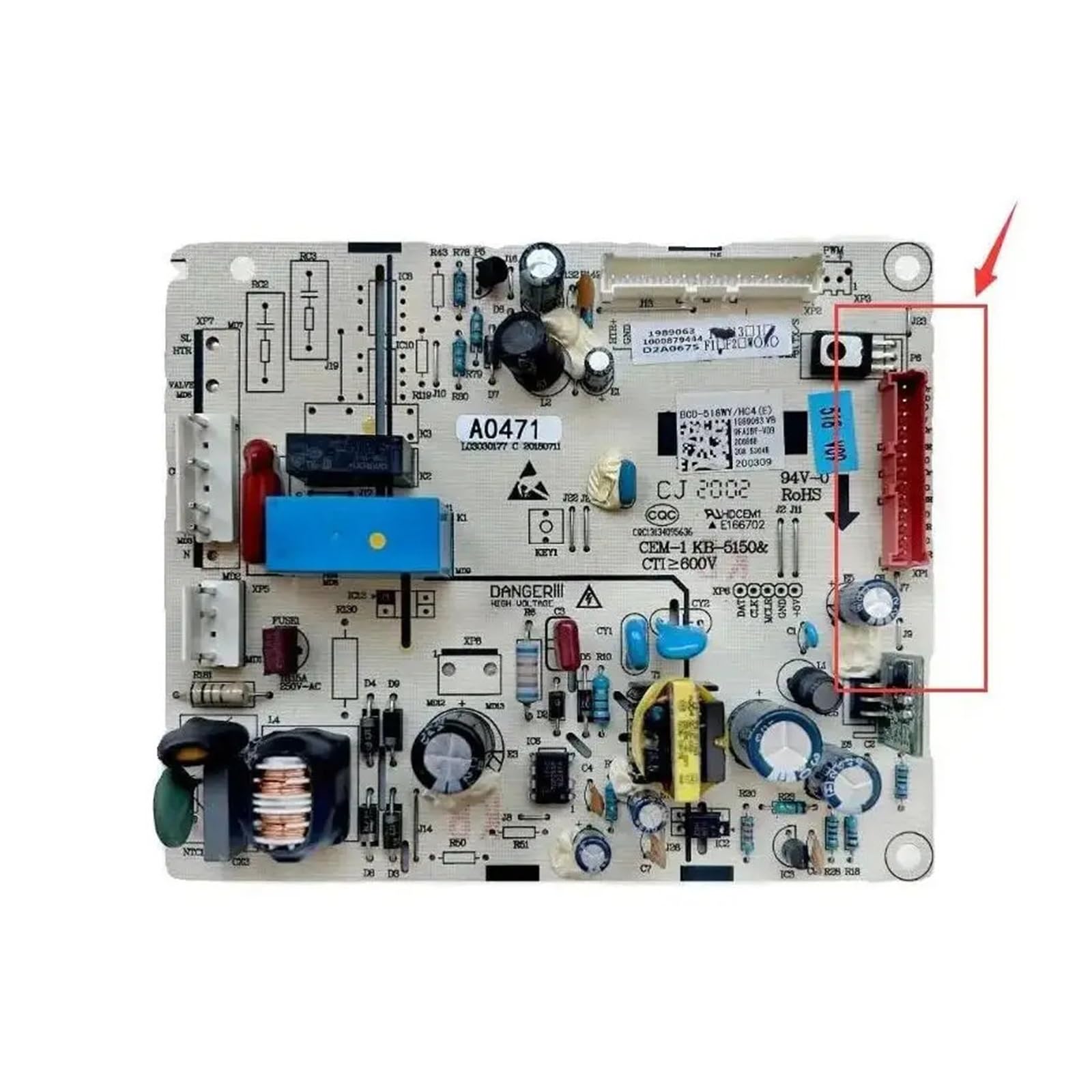
Image showing the LDGSUPH Compatible For Hisense Refrigerator Computer Board BCD-518WY/HC4 1989063 PCB Part, highlighting its various components and connectors.
- High-Performance Control Chip: Equipped with an industrial-grade main control chip, providing powerful computing and data processing capabilities for rapid command response and stable system operation.
- Comprehensive Electrical Safety: Integrates multiple protection mechanisms including overvoltage, undervoltage, overcurrent, overload, short circuit, and phase loss protection to safeguard core components like compressors and fans.
- Durable Component Design: Key components such as capacitors and relays are selected for their long-life specifications, contributing to a stable operational lifespan of 10-15 years.
- Advanced Motor Driving Capability: Features independent driving circuits for precise control of variable frequency compressors, circulating fan motors, and damper motors, ensuring synchronized and coordinated power output.
- Dynamic Load Matching: Monitors internal food load and ambient temperature in real-time, dynamically adjusting cooling output. This optimizes energy consumption, providing efficient cooling when needed and reducing energy waste during lighter loads.
Setup and Installation
The following steps outline a general procedure for replacing a refrigerator computer board. Specific models may vary. Always refer to your refrigerator's service manual for detailed instructions.
- Disconnect Power: Unplug the refrigerator from the wall outlet or turn off the circuit breaker supplying power to the appliance. Verify that power is completely off.
- Access the Control Board: Locate the existing computer board. This is typically found in the back of the refrigerator, behind a service panel, or sometimes within the control panel area. You may need basic tools like screwdrivers to remove covers.
- Document Connections: Before disconnecting any wires, take clear photos or make a diagram of all wire connections to the old board. This will be crucial for correct reassembly.
- Disconnect Wires and Remove Old Board: Carefully disconnect all wire harnesses and connectors from the old board. Release any clips or screws holding the board in place and remove it.
- Install New Board: Position the new LDGSUPH computer board in the same location as the old one. Secure it with any clips or screws.
- Reconnect Wires: Using your photos or diagram, carefully reconnect all wire harnesses and connectors to the new board. Ensure all connections are firm and correctly seated.
- Secure Covers: Replace any service panels or covers that were removed.
- Restore Power: Plug the refrigerator back into the wall outlet or turn on the circuit breaker.
- Test Operation: Allow the refrigerator to power on and observe its operation. Check if it cools properly and if any error codes are displayed.
Operating Instructions
The LDGSUPH Refrigerator Computer Board operates automatically once installed and power is supplied to the refrigerator. It functions as the central control unit, managing various refrigerator components to maintain desired temperatures and operational efficiency.
- Automatic Control: The board continuously monitors internal and external conditions, adjusting compressor, fan, and damper operations as needed.
- Temperature Regulation: It processes temperature sensor data to maintain precise temperature settings within the refrigerator and freezer compartments.
- Energy Efficiency: Through its Load Dynamic Matching Technology, the board optimizes cooling output based on the refrigerator's contents and ambient temperature, reducing energy consumption when full cooling capacity is not required.
- Diagnostic Functions: The board may also include self-diagnostic capabilities, which can trigger error codes on the refrigerator's display if a fault is detected. Refer to your refrigerator's user manual for interpreting specific error codes.
Maintenance
The LDGSUPH Refrigerator Computer Board is designed for long-term reliability and generally requires minimal maintenance. However, following these guidelines can help ensure its longevity:
- Keep Dry: Ensure the area where the board is installed remains dry and free from moisture. Moisture can cause short circuits and damage electronic components.
- Clean Connections: Periodically, with power disconnected, inspect the wire connections to the board. Ensure they are clean, free of corrosion, and securely seated.
- Inspect for Damage: During any routine refrigerator maintenance, visually inspect the board for any signs of physical damage, burn marks, or swollen components. If damage is observed, consult a qualified technician.
- Ventilation: Ensure that the refrigerator's ventilation pathways are not obstructed, as proper airflow helps dissipate heat from electronic components.
Troubleshooting
If your refrigerator experiences issues after installing this computer board, consider the following troubleshooting steps. Always disconnect power before inspecting internal components.
- Refrigerator Not Powering On:
- Check if the refrigerator is properly plugged into a working outlet.
- Verify the circuit breaker for the refrigerator has not tripped.
- Ensure all wire connections to the computer board are secure and correctly installed.
- Refrigerator Not Cooling:
- Confirm that the temperature settings are correct.
- Check if the compressor is running. If not, the board might not be sending the signal, or the compressor itself could be faulty.
- Inspect fan motors (evaporator and condenser) for operation.
- Unusual Noises:
- While the board itself typically doesn't make noise, it controls components that do. If new noises occur, it could indicate a component controlled by the board (e.g., fan, compressor) is malfunctioning.
- Error Codes Displayed:
- Refer to your specific Hisense refrigerator's user manual or service guide to interpret any error codes displayed on the control panel. These codes can help pinpoint the exact issue.
- General Malfunction:
- If basic troubleshooting does not resolve the issue, it is recommended to consult a qualified appliance repair technician. The complex nature of refrigerator electronics often requires specialized diagnostic tools.
The integrated safety protection layers (overvoltage, undervoltage, etc.) are designed to prevent damage to the board and other components. If these protections are triggered, the refrigerator may cease operation until the underlying issue is resolved.
Specifications
| Product Model | BCD-518WY/HC4 |
| Part Number | 1989063 |
| Brand | LDGSUPH |
| Compatible With | Hisense Refrigerators |
| Item Weight | 1.76 ounces |
| Package Dimensions | 0.39 x 0.39 x 0.39 inches |
| Manufacturer | chenjie0517 |
| ASIN | B0G4M8Q1L6 |
| Item Model Number (Manufacturer's) | chenjie0517 |
| Date First Available | December 1, 2025 |
Warranty and Support
Specific warranty information for the LDGSUPH Compatible For Hisense Refrigerator Computer Board BCD-518WY/HC4 1989063 PCB Part is not provided in this manual. For details regarding warranty coverage, return policies, or technical support, please contact the seller or manufacturer directly through your purchase platform.
Always retain your proof of purchase for any warranty claims.