
Introduction
Thank you for choosing the Simple Deluxe L Shaped Gaming Desk. This manual provides detailed instructions for assembly, operation, maintenance, and troubleshooting to ensure safe and efficient use of your new desk. Please read this manual thoroughly before assembly and retain it for future reference.
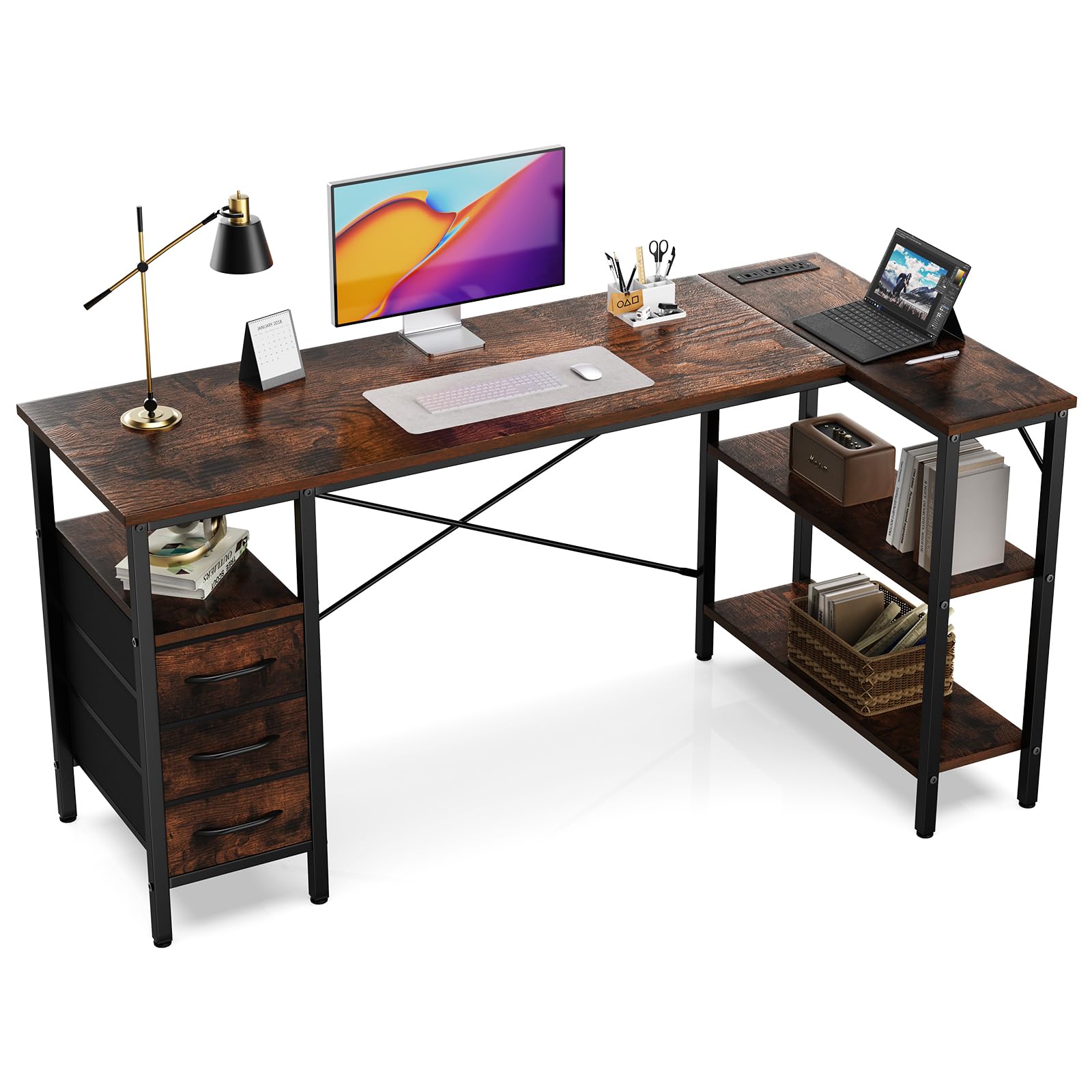
Figure 1: Simple Deluxe L Shaped Gaming Desk, Rustic Brown
Safety Information
- Always assemble the desk on a soft, clean surface to prevent scratches.
- Ensure all screws and fasteners are securely tightened before use. Periodically check and retighten as necessary.
- Do not overload the desk or shelves. Refer to the specifications section for maximum weight recommendations.
- Keep children and pets away during assembly. Small parts can be a choking hazard.
- For electrical components (power outlets, USB ports), ensure proper grounding and avoid exposing them to liquids. Do not open the power outlet module.
- Use only the provided tools and hardware for assembly.
Package Contents
Before beginning assembly, verify that all parts listed below are present and undamaged. If any parts are missing or damaged, please contact customer service.

Figure 2: Desk Components and Dimensions
Components List:
- Desktop Panels (Main, Corner, Shelf)
- Metal Frame Legs and Supports
- Fabric Drawers (3 units)
- Power Outlet Module with USB Ports
- Assembly Hardware (Screws, Allen Wrench, etc.)
- Adjustable Feet
Assembly Instructions
Follow these steps carefully for proper assembly. It is recommended to have two people for certain steps.
Assembly Video Guide:
Video 1: Detailed assembly guide for the L-shaped desk, demonstrating each step from unboxing to final setup.
Step-by-Step Guide:
1. Assemble the Main Frame Sections
Begin by connecting the metal frame components for the main desk sections. Ensure all connections are finger-tightened initially, then fully secure with the provided Allen wrench once the section is stable.
Figure 3: Assembling the metal frame (refer to video for detailed steps).
2. Install Shelf Boards
Insert the wooden shelf boards into the designated slots within the metal frame. Secure them using the provided screws. Note that the shelf heights can be adjusted to suit your needs.
Figure 4: Securing the shelf boards (refer to video for detailed steps).
3. Attach Desktop Panels
Carefully place the main desktop panels onto the assembled frame. Align the pre-drilled holes and secure the panels with screws. Ensure the L-shaped configuration is correct for your desired setup.
Figure 5: Attaching the desktop panels (refer to video for detailed steps).
4. Install Cross Braces
Attach the cross braces to the rear of the desk frame. These provide additional stability. Ensure they are correctly oriented and securely fastened.
Figure 6: Securing the cross braces for stability (refer to video for detailed steps).
5. Integrate Power Outlet Module
Carefully insert the power outlet module into the pre-cut opening on the desktop. Secure it with the provided screws. Connect the power cable to a suitable wall outlet.

Figure 7: Installing the power outlet module.
6. Assemble and Insert Drawers
Assemble the fabric drawers by unfolding them and inserting the bottom panel. Attach the wooden front panel with the handle. Slide the assembled drawers into their respective compartments.

Figure 8: Assembling and inserting the fabric drawers.
Operating Instructions
Power Outlets and USB Ports:
The integrated power strip provides convenient access to three standard AC outlets and two USB charging ports. Plug the desk's main power cord into a grounded wall outlet. You can then power your monitor, laptop, phone, and other accessories directly from the desk.
- AC Outlets: For standard electronic devices.
- USB Ports: For charging smartphones, tablets, and other USB-powered devices.
Caution: Do not exceed the maximum power rating of the integrated power strip. Avoid spilling liquids near the power outlets.
Drawers and Shelves:
The three fabric drawers offer organized storage for office supplies, gaming accessories, or personal items. The open shelves provide additional space for books, decor, or electronic devices. Ensure items are placed securely on shelves to prevent falling.
Maintenance
- Cleaning: Wipe the desk surfaces with a damp cloth. Avoid harsh chemicals or abrasive cleaners that may damage the finish.
- Hardware Check: Periodically inspect all screws and connections to ensure they remain tight. Retighten as needed to maintain stability.
- Spills: Immediately wipe up any spills to prevent damage to the wood surface or electrical components.
Troubleshooting
Desk is Wobbly:
- Check all assembly screws and ensure they are fully tightened.
- Verify that the adjustable feet are evenly set on the floor. Adjust them to compensate for uneven surfaces.
- Ensure cross braces are installed correctly and securely.
Power Outlets Not Working:
- Confirm the desk's main power cord is securely plugged into a functional wall outlet.
- Check if the wall outlet itself is receiving power (test with another device).
- Ensure the power module is correctly seated and screwed into the desktop.
- If the issue persists, discontinue use and contact customer service.
Drawers Do Not Slide Smoothly:
- Ensure the fabric drawers are fully assembled with the bottom panel inserted correctly.
- Check for any obstructions within the drawer compartments.
Specifications
| Feature | Detail |
|---|---|
| Brand | Simple Deluxe |
| Model Number | D-D3BCL01-55IN-RUST |
| Dimensions (D x W x H) | 19.7"D x 55.1"W x 29.7"H |
| Color | Rustic Brown |
| Material | Engineered Wood, Metal |
| Number of Drawers | 3 |
| Number of Shelves | 2 |
| Maximum Weight Recommendation | 220 Pounds |
| Power Outlets | Integrated AC outlets and USB charging ports |
| Assembly Required | Yes (Tools included) |
Warranty and Support
Simple Deluxe products are designed for quality and durability. For any questions, missing parts, or issues not covered in this manual, please contact Simple Deluxe customer service. Keep your purchase receipt for warranty claims.
Contact Information: Refer to your product packaging or the Simple Deluxe official website for the most current customer support details.

