
1. Introduction
Thank you for choosing the DUMOS Home Office Computer Chair. This manual provides essential information for the safe assembly, operation, and maintenance of your new chair. Please read these instructions carefully before use and retain them for future reference.
This ergonomic mid-back desk chair is designed for comfort and support during long hours of use, featuring lumbar support, a rocking mode, height adjustability, and 360° swivel functionality.
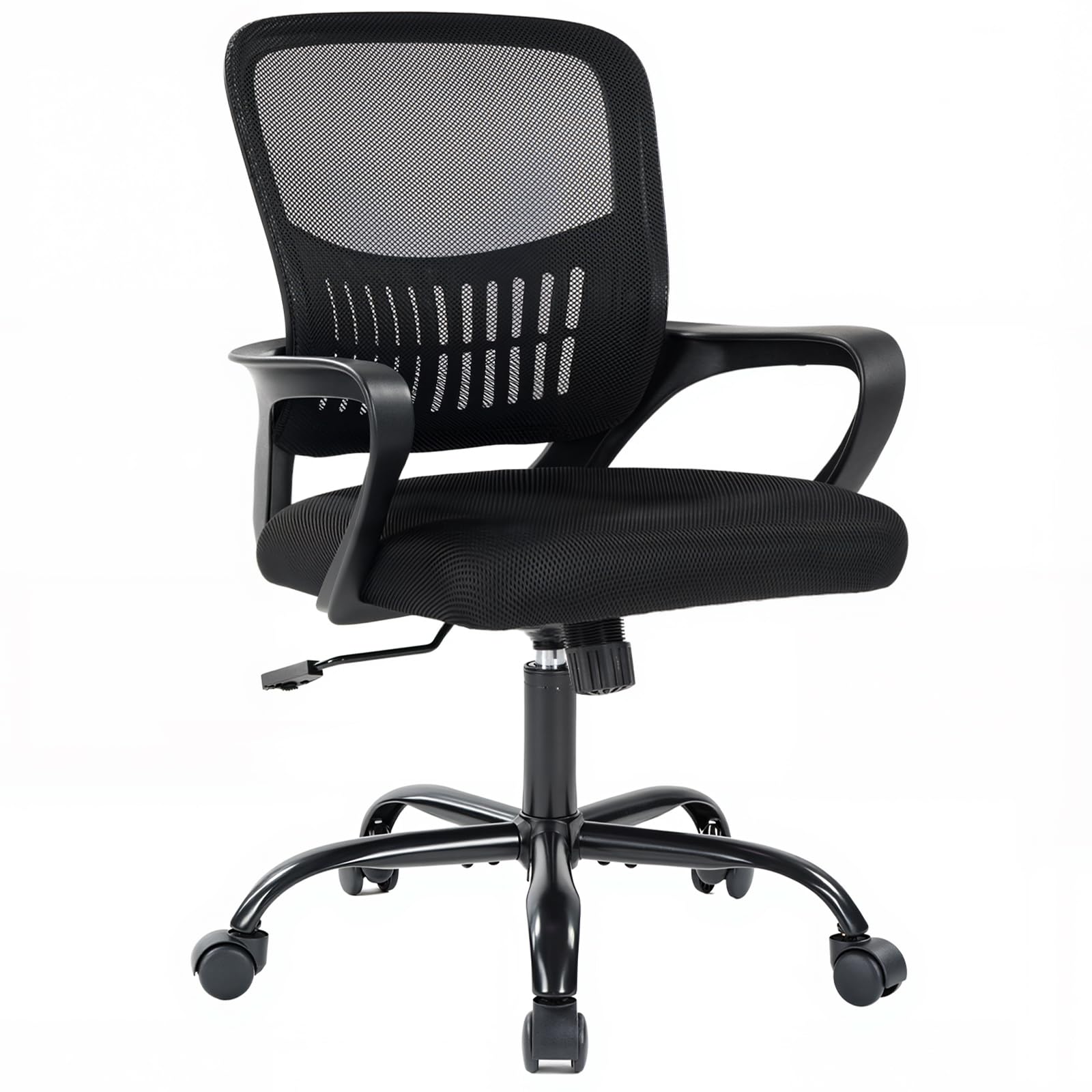
Figure 1: Front view of the DUMOS Home Office Computer Chair.
2. Safety Information
- Weight Capacity: Do not exceed the maximum weight recommendation of 250 pounds (113 kg).
- Assembly: Ensure all parts are correctly assembled and all bolts are tightened before use. Periodically check and re-tighten all fasteners.
- Stability: Do not stand on the chair. Avoid leaning excessively to one side or backward to prevent tipping.
- Children: Keep children away from moving parts during assembly and adjustment. This chair is intended for adult use.
- Movement: Use caution when rolling the chair, especially on uneven surfaces or near obstacles.
- Maintenance: Do not use abrasive cleaners or harsh chemicals on the chair's surfaces.
3. Parts List
Before assembly, verify that all components are present and undamaged. If any parts are missing or damaged, please contact DUMOS customer service.

Video 1: An overview of all components included with the DUMOS Home Office Computer Chair, Model 5512BK3-H3DU, before assembly.
| Part | Description | Quantity |
|---|---|---|
| Backrest | Mesh backrest with lumbar support | 1 |
| Seat Cushion | High-resilience foam seat | 1 |
| Armrests | Fixed armrests (Left & Right) | 2 |
| Control Mechanism | Under-seat mechanism for height and tilt | 1 |
| Gas Lift | BIFMA-certified cylinder for height adjustment | 1 |
| Base | Five-star base | 1 |
| Casters | 360° swivel wheels | 5 |
| Hardware Kit | Screws, washers, Allen wrench | 1 set |
4. Setup (Assembly Instructions)
Assembly is straightforward and typically takes about 15 minutes. An Allen wrench is included for your convenience. Do not fully tighten bolts until all parts are assembled.
Video 2: Step-by-step assembly guide for the DUMOS Home Office Computer Chair.
- Assemble the Chair Base: Attach the five legs to the central hub of the chair base using the provided screws and Allen wrench. Ensure they are securely fastened but do not overtighten initially.
- Install Casters: Insert the five casters into the holes at the end of each leg on the assembled base. Push firmly until they click into place.
- Insert Gas Lift: Place the gas lift cylinder into the central hole of the assembled base.
- Attach Armrests to Backrest: Align the armrests with the pre-drilled holes on the backrest. Secure them with screws, tightening them about 50% to allow for minor adjustments.
- Attach Seat to Armrests: Position the seat cushion between the armrests and align with the holes. Secure with screws, tightening about 50%.
- Install Control Mechanism: Attach the control mechanism to the underside of the seat cushion, ensuring the 'FRONT' label on the mechanism faces the front of the seat. Secure with screws, tightening about 50%.
- Connect Upper Assembly to Base: Carefully place the assembled seat, backrest, and armrests onto the gas lift cylinder. The tapered end of the gas lift should fit into the central hole of the control mechanism.
- Final Tightening: Once all parts are in place and the chair is upright, fully tighten all screws on the armrests and control mechanism.
5. Operating Instructions
5.1 Height Adjustment
To adjust the chair's height, locate the lever on the right side, under the seat. While seated, lift the lever to lower the chair. To raise the chair, lift the lever while standing or with minimal weight on the seat. Release the lever at the desired height to lock it in place.

Figure 2: Illustration of height adjustment and rocking mode controls.
5.2 Rocking Mode and Tilt Tension
The chair features a 90°-120° tilt mechanism for comfortable reclining. To engage the rocking mode, pull out the lever located under the seat. Push the lever in to lock the chair in an upright position.
The tension knob, located at the front of the control mechanism, allows you to customize the recline resistance. Turn clockwise to increase tension (making it harder to recline) and counter-clockwise to decrease tension (making it easier to recline).
5.3 360° Swivel and Casters
The chair is equipped with 360° swivel silent casters, allowing for effortless movement across various floor types, including hardwood and tile, without causing damage. The swivel function provides flexibility and ease of access to your workspace.
5.4 Ergonomic Lumbar Support
The mid-back design and integrated lumbar support are contoured to fit the natural curve of your spine, providing comfort and helping to relieve back and waist soreness during extended periods of sitting.

Figure 3: Visual representation of the chair's ergonomic lumbar support.
5.5 Convenient Storage Space
A convenient storage space is located at the back of the chair, allowing you to easily store items like books, newspapers, or tablets.

Figure 4: The integrated storage compartment on the chair's backrest.
6. Maintenance
- Cleaning: For the mesh backrest and fabric seat, use a soft cloth dampened with mild soap and water. Avoid harsh chemicals or abrasive cleaners.
- Inspection: Periodically check all screws and bolts to ensure they are tight. Re-tighten as necessary to maintain stability and safety.
- Caster Care: Keep the casters free of hair, dust, and debris to ensure smooth rolling.
- Gas Lift: The BIFMA-certified gas lift is designed for durability. If you experience issues with height adjustment, refer to the troubleshooting section.
7. Troubleshooting
| Problem | Possible Cause | Solution |
|---|---|---|
| Chair does not adjust height | Gas lift malfunction or lever not engaged correctly. | Ensure the height adjustment lever is fully engaged. If the issue persists, contact customer support. |
| Chair is wobbly or unstable | Loose screws or improper assembly. | Check all assembly bolts and tighten them securely. Ensure the gas lift is fully seated in the base and control mechanism. |
| Casters do not roll smoothly | Debris caught in casters or damaged casters. | Remove any hair, dust, or debris from the caster wheels. If casters are damaged, they may need replacement. |
| Chair makes squeaking noises | Loose connections or friction between parts. | Tighten all screws. Apply a small amount of silicone lubricant to moving parts if necessary. |
8. Specifications
| Feature | Detail |
|---|---|
| Brand | DUMOS |
| Model Number | 5512BK3-H3DU |
| Color | Black Fixed Arm |
| Material | Mesh (Back), Foam/Polyester (Seat), Metal (Frame) |
| Product Dimensions (D x W x H) | 22.24"D x 21.5"W x 38.2"H |
| Item Weight | 21.6 Pounds |
| Maximum Weight Recommendation | 250 Pounds |
| Adjustable Height Range | 16.7'' to 19.7'' inches |
| Reclining Position Count | 2 (90°-120° tilt) |
| Arm Style | Fixed |
| Back Style | Mesh Back |
| Casters | 360° Swivel |
| UPC | 751074100393 |
9. Customer Support
DUMOS is committed to providing high-quality products and excellent customer service. If you have any questions, concerns, or require assistance with your DUMOS Home Office Computer Chair, please do not hesitate to contact our professional customer service team. We are always ready to assist you.
Please refer to your purchase documentation or the DUMOS brand store on Amazon for specific contact information.


