1. Introduction
The Neoteck 6-in-1 Pinless Moisture Meter (Model MT35) is designed for non-destructive moisture detection in various materials. It utilizes electromagnetic field (EMF) technology to measure moisture content up to 19mm (0.75 inch) below the surface without causing damage. This device offers six measurement modes for different materials: soft wood, hard wood, drywall, plaster, screed, and concrete. It features audible and visual alarms, a 2.9-inch LCD display, customizable thresholds, and a rechargeable battery.

Figure 1: Neoteck 6-in-1 Pinless Moisture Meter MT35.
2. Safety Information
Please read and understand the following safety precautions before operating the device:
- Refer to this manual completely before initial use.
- Keep fingers and other body parts away from the sensor during measurement to avoid affecting readings.
- Always select the corresponding correct measurement mode for the material being tested.
- Ensure no metal objects are within the measurement area to prevent interference and ensure accurate readings.
- Do not expose the device to extreme temperatures, high humidity, or corrosive environments.
- Do not attempt to disassemble, modify, or repair the device yourself. Contact qualified personnel for service.
3. Product Overview
The Neoteck MT35 moisture meter provides a comprehensive solution for detecting moisture in various building materials and wood types. Its pinless design ensures non-destructive testing, making it suitable for finished surfaces.

Figure 2: Component description of the Neoteck MT35 Moisture Meter.
Key Features
- 6-in-1 Measurement Modes: Supports soft wood, hard wood, drywall, plaster, screed, and concrete.
- High Accuracy: ±2% for wood, relative values for building materials.
- Non-Destructive Measurement: EMF technology allows deep sensing up to 19mm (0.75 inch) without surface damage.
- Audible & Visual Alerts: Features a 3-color indicator light (green, yellow, red) and a screen simulation bar (dry, moist, wet) with a mute option for the audible alarm.
- 2.9-inch LCD Display: Backlit for clear readings in various lighting conditions.
- Customizable Thresholds: Set specific moist and wet alarm thresholds for different materials.
- Rechargeable Battery: Integrated 1200mAh lithium battery provides up to 16 hours of continuous use, with convenient Type-C charging.
- Automatic Power-off (APO): Device automatically turns off after 5 minutes of inactivity to conserve battery life.
- Data Hold Function: Locks the current reading on the display for easy recording.
4. Setup
4.1 Charging the Device
The Neoteck MT35 moisture meter is equipped with a built-in 1200mAh rechargeable lithium battery. Ensure the device is adequately charged before use.
- Connect the provided Type-C USB cable to the charging port on the device.
- Connect the other end of the USB cable to a standard USB power adapter (not included) with a charging voltage of 5V and current less than 1A.
- The battery level indicator on the LCD will show the charging status. A full charge provides up to 16 hours of continuous operation.

Figure 3: Charging the MT35 Moisture Meter.
4.2 Initial Power On
Press the power button (usually marked with a power icon) to turn on the device. The LCD display will illuminate, and the device will be ready for use.
5. Operating Instructions
5.1 Selecting Measurement Mode
The device offers six distinct measurement modes for different materials. It is crucial to select the correct mode for accurate readings.
- Press the "Materials Selection" button (often labeled with material icons or a mode button) to cycle through the available modes: Soft Wood, Hard Wood, Drywall, Plaster, Screed, Concrete.
- The selected material type will be displayed on the LCD screen.

Figure 4: 6-in-1 Measurement Modes.
5.2 Taking a Measurement
Follow these steps to obtain a moisture reading:
- Ensure the device is powered on and the correct material mode is selected.
- Place the back of the moisture meter (where the sensor is located) flat against the surface of the material you wish to measure.
- Apply gentle, even pressure to ensure full contact between the sensor and the material.
- Read the moisture percentage displayed on the 2.9-inch LCD screen. The device will provide a numerical reading and a visual bar graph indicating dry, moist, or wet conditions.
Video 1: Demonstration of the Neoteck 6-in-1 Pinless Moisture Meter in use, measuring moisture in various materials like wood and drywall.
5.3 Understanding Alarms and Indicators
The MT35 features both audible and visual alerts to indicate moisture levels, enhancing the reliability of warnings.
- 3-Color LED Indicator: Located at the top of the device, this LED changes color based on moisture levels:
- Green: Indicates a dry condition.
- Yellow: Indicates a moist condition.
- Red: Indicates a wet condition.
- Audible Alarm: A beeping sound will activate when the moisture level reaches the "wet" threshold. This can be muted by pressing the "Buzzer switch / Automatic power off switch" button.
- Screen Simulation Bar: A graphical bar on the LCD provides a visual representation of the moisture level (Dry, Moist, Wet).

Figure 5: Visual and Audible Alarm System.
5.4 Customizing Alarm Thresholds
You can adjust the moist and wet alarm thresholds for each material type to suit specific project requirements.
- Press the "SET" button once to enter the alarm threshold setting mode.
- Use the up/down arrow buttons to adjust the threshold values for moist and wet conditions.
- Press the "SET" button twice to exit the setting mode and save your changes.

Figure 6: Customizable Alarm Thresholds.
5.5 Data Hold Function
To freeze the current reading on the display for easier viewing or recording, press the "HOLD" button. Press it again to release the hold function and resume live readings.
5.6 Automatic Power-Off (APO)
The device will automatically power off after 5 minutes of inactivity to conserve battery. This feature can typically be toggled on/off by pressing and holding the "Buzzer switch / Automatic power off switch" button (often labeled with APO).
6. Maintenance
6.1 Cleaning
Wipe the device with a soft, dry cloth. Do not use abrasive cleaners, solvents, or immerse the device in water. Ensure the sensor area on the back of the device is kept clean and free of debris.
6.2 Storage
Store the moisture meter in a cool, dry place, away from direct sunlight and extreme temperatures. If storing for extended periods, ensure the battery is partially charged (around 50%) to prolong its lifespan. Use the provided storage pouch for protection.
7. Troubleshooting
7.1 Inaccurate Readings
- Incorrect Material Mode: Ensure the correct material mode (Soft Wood, Hard Wood, Drywall, Plaster, Screed, Concrete) is selected for the surface being tested.
- Insufficient Contact: Ensure the sensor is placed flat and firmly against the surface. Uneven contact can lead to inconsistent readings.
- Metal Interference: Check for metal objects (pipes, electrical wiring, studs, nails) within the measurement area. Metal can interfere with EMF readings. Keep the device at least 2 inches (5 cm) away from metal objects.
- Material Thickness: For materials 20-40 mm thick, the reading shows moisture at approximately 20 mm depth. Readings may be less accurate for materials outside this range or very thin materials.
- Sensor Contamination: Clean the sensor area on the back of the device with a soft, dry cloth.
7.2 Device Not Powering On
- Low Battery: Charge the device using the provided Type-C cable and a 5V USB adapter.
- Faulty Cable/Adapter: Try a different Type-C cable and USB power adapter to rule out accessory issues.
7.3 No Audible Alarm
- Mute Function Active: Press the "Buzzer switch / Automatic power off switch" button to unmute the alarm.
- Moisture Below Threshold: The alarm only sounds when the moisture level exceeds the "wet" threshold. Check the display for current readings and ensure the thresholds are set appropriately.
8. Specifications
| Feature | Detail |
|---|---|
| Model | MT35 |
| Measurement Depth | ≤ 19mm (0.75 inch) |
| Minimum Test Area | 50x50mm (1.97x1.97 inch) |
| Soft Wood Range | 5.0% ~ 55.0% |
| Hard Wood Range | 3.0% ~ 34.0% |
| Drywall Range | 0.1% ~ 31.0% |
| Plaster Range | 0.1% ~ 26.0% |
| Screed Range | 0.1% ~ 6.0% |
| Concrete Range | 0.1% ~ 18.0% |
| Wood Accuracy | ±2% |
| Building Materials Accuracy | Relative Values |
| Battery | 1200mAh Lithium Polymer |
| Continuous Use | Up to 16 hours |
| Charging | Type-C USB (5V, <1A) |
| Automatic Power-Off | 5 minutes of inactivity |
| Item Weight | 7.8 ounces |
| Package Dimensions | 7.72 x 3.11 x 1.54 inches |
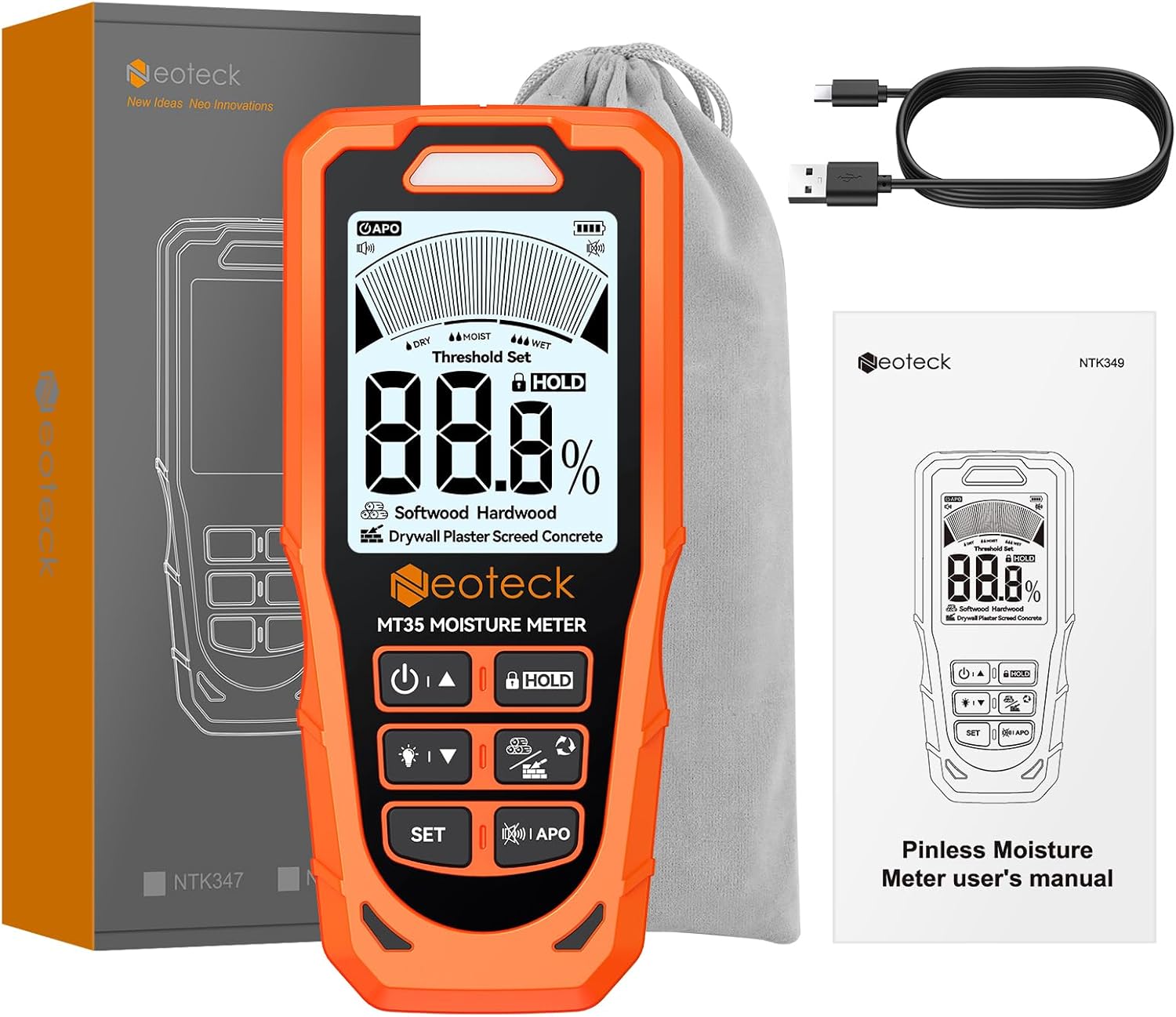
Figure 7: Package Contents.
9. Warranty and Support
9.1 Warranty Information
This Neoteck product comes with an 18-month warranty. Please retain your proof of purchase for warranty claims. The warranty covers manufacturing defects and malfunctions under normal use. It does not cover damage caused by misuse, accidents, unauthorized modifications, or improper maintenance.
9.2 Customer Support
For technical assistance, troubleshooting, or warranty inquiries, please contact Neoteck customer support. Refer to the contact information provided in the included instruction manual or visit the official Neoteck website.


