
1. Introduction
This manual provides essential instructions for the setup, operation, and maintenance of your Aumotop CT-90287A TV Remote Controller. Designed for ease of use, this remote features large, clearly identifiable buttons and offers reliable long-distance transmission with low power consumption. Please read this manual thoroughly to ensure proper use and longevity of your device.
2. Product Overview
The Aumotop CT-90287A is a multi-functional TV remote controller crafted from durable ABS material, providing a comfortable grip. It is designed to be compatible with various TV models, including CT90307, CT-90327, CT90273, and CT90274.

Image 2.1: Front view of the Aumotop CT-90287A TV Remote Controller, showcasing its array of large, clearly labeled buttons for various functions including power, number input, volume, channel control, and media playback.

Image 2.2: This image displays a comparison between the 'New Type' and 'Old Type' versions of the Aumotop CT-90287A remote control, highlighting that product variations may be shipped randomly. Both types maintain the same core functionality and button layout.
3. Setup
3.1 Battery Installation
- Locate the battery compartment on the back of the remote control.
- Slide the battery compartment cover downwards or press the latch and lift to open.
- Insert two (2) AAA batteries (not included) into the compartment, ensuring the positive (+) and negative (-) terminals align correctly with the indicators inside.
- Replace the battery compartment cover by sliding it back into place until it clicks securely.
Note: Always use new batteries and ensure correct polarity for optimal performance.
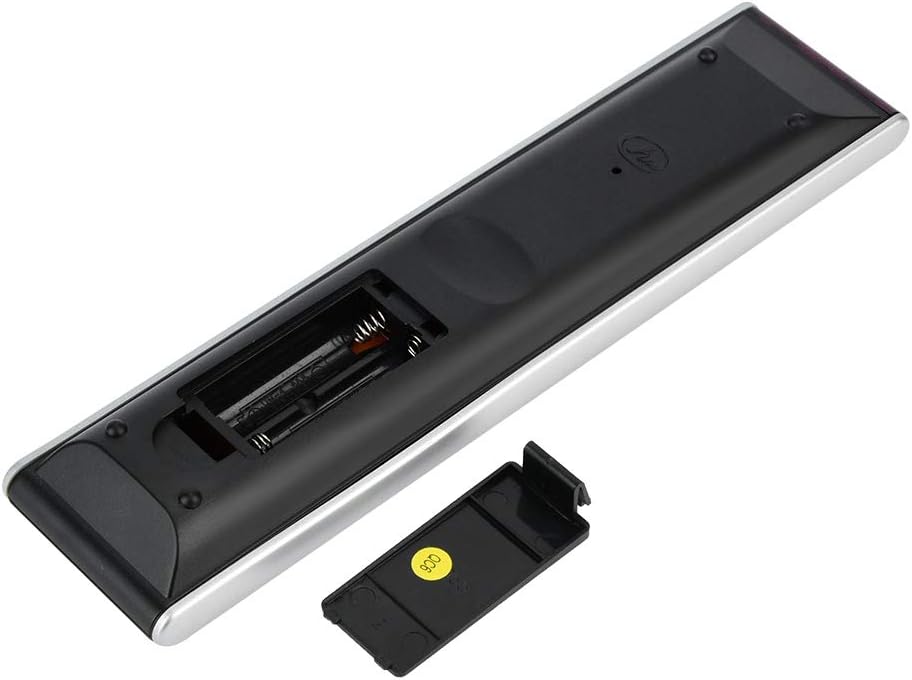
Image 3.1: The back of the Aumotop CT-90287A remote control with the battery compartment cover removed, showing the slots for two AAA batteries and the 'QC6' quality control sticker.
4. Operating Instructions
The Aumotop CT-90287A remote control is designed for straightforward operation. Point the remote directly at your television's infrared receiver for best results.
4.1 Basic Functions
- Power Button (Red): Turns the TV on or off.
- Number Buttons (0-9): Directly select channels.
- Volume Up/Down (+/-): Adjusts the sound volume.
- Channel Up/Down (P^/P˅): Changes the TV channel sequentially.
- Mute Button: Toggles sound on or off.
4.2 Menu and Navigation
- Menu Button: Accesses the TV's main menu.
- Directional Pad (Up, Down, Left, Right): Navigates through menu options.
- OK Button: Confirms selections within menus.
- Return/Exit Buttons: Returns to the previous screen or exits the current menu.
4.3 Special Functions
- Content Menu: Accesses specific content-related menus.
- A/D: Switches between analog and digital audio.
- Color Buttons (Red, Green, Yellow, Blue): Used for specific functions within interactive TV services or menus, as indicated on screen.
- Subtitle: Toggles subtitles on or off.
- Audio: Selects audio tracks or modes.
- Text: Activates teletext or information services.
- Media Control Buttons (Play, Pause, Stop, Rewind, Fast Forward, Skip): Controls media playback if your TV supports it.
5. Maintenance
5.1 Cleaning
To clean the remote control, gently wipe its surface with a soft, dry cloth. For stubborn dirt, slightly dampen the cloth with water or a mild, non-abrasive cleaner. Avoid using harsh chemicals or abrasive materials, as these can damage the remote's finish or internal components.
5.2 Battery Replacement
Replace batteries when the remote's response becomes sluggish or it stops functioning. Always replace both AAA batteries simultaneously. Do not mix old and new batteries, or different types of batteries, as this can lead to leakage or improper operation. Dispose of used batteries according to local regulations.
5.3 Storage
When not in use for extended periods, it is recommended to remove the batteries to prevent potential leakage and damage to the remote control. Store the remote in a cool, dry place away from direct sunlight and extreme temperatures.
6. Troubleshooting
- Remote not responding:
- Check if the batteries are correctly inserted and have sufficient charge. Replace if necessary.
- Ensure there are no obstructions between the remote control and the TV's infrared sensor.
- Verify that you are pointing the remote directly at the TV.
- Buttons not working:
- Clean the remote's surface, especially around the buttons, to remove any dirt or debris that might be preventing proper contact.
- If only specific buttons are not working, the remote may require professional servicing.
- Short transmission distance:
- Replace the batteries with new ones.
- Ensure no strong light sources (like direct sunlight) are interfering with the infrared signal.
7. Specifications
| Feature | Specification |
|---|---|
| Model | CT-90287A |
| Compatible Models | CT90307, CT-90327, CT90273, CT90274 |
| Dimensions (Approx.) | 22 x 5 x 2 cm (8.7 x 2 x 0.8 inches) |
| Weight (Approx.) | 95g (3.35 ounces) |
| Material | ABS |
| Battery Type | 2 x AAA batteries (not included) |
| Transmission Distance | Long distance (specific range depends on environment) |
8. Warranty and Support
For information regarding product warranty, please refer to the documentation provided at the time of purchase or contact your retailer. For technical support or further assistance, please reach out to the Aumotop customer service department through the contact information provided with your product or on the official Aumotop website.