
1. Introduction
The SMSL PL20 is a versatile HiFi CD player designed for high-fidelity audio reproduction, featuring advanced decoding capabilities, multiple input/output options, and convenient CD ripping functionality. This manual provides detailed instructions for setting up, operating, and maintaining your PL20 to ensure optimal performance and longevity.
Video Description: This video provides a general overview of the SMSL PL20 HiFi CD Player, showcasing its design and highlighting key features such as CD ripping and dual CS43131 chips.
Official Product Video: SMSL PL20 HiFi CD Player CD Ripper display of products. This video offers a visual demonstration of the PL20's features and design.
2. Safety Information
- Do not expose the device to rain or moisture.
- Do not disassemble the unit. Refer all servicing to qualified personnel.
- Avoid placing the unit near heat sources or in direct sunlight.
- Ensure proper ventilation to prevent overheating.
- Use only the specified power adapter (USB-C 5V/2A).
- Keep out of reach of children.
3. Package Contents
Verify that all items are present in the package:
- 1x SMSL PL20 CD Player
- 1x Remote Control
- 1x USB Type-A to Type-C Cable
- 1x User Manual
- 1x SMSL Card
Video Description: This video shows the unboxing process of the SMSL PL20 HiFi CD Player. It begins with the outer packaging, then reveals the inner box containing the device and accessories. The video highlights the SMSL card, instruction manual, USB cable, and remote control before showcasing the main unit.
Official Product Video: SMSL PL20 HiFi CD Player Unboxing. This video demonstrates the unboxing experience of the SMSL PL20, showing all included components.
4. Product Overview
4.1 Front Panel Controls
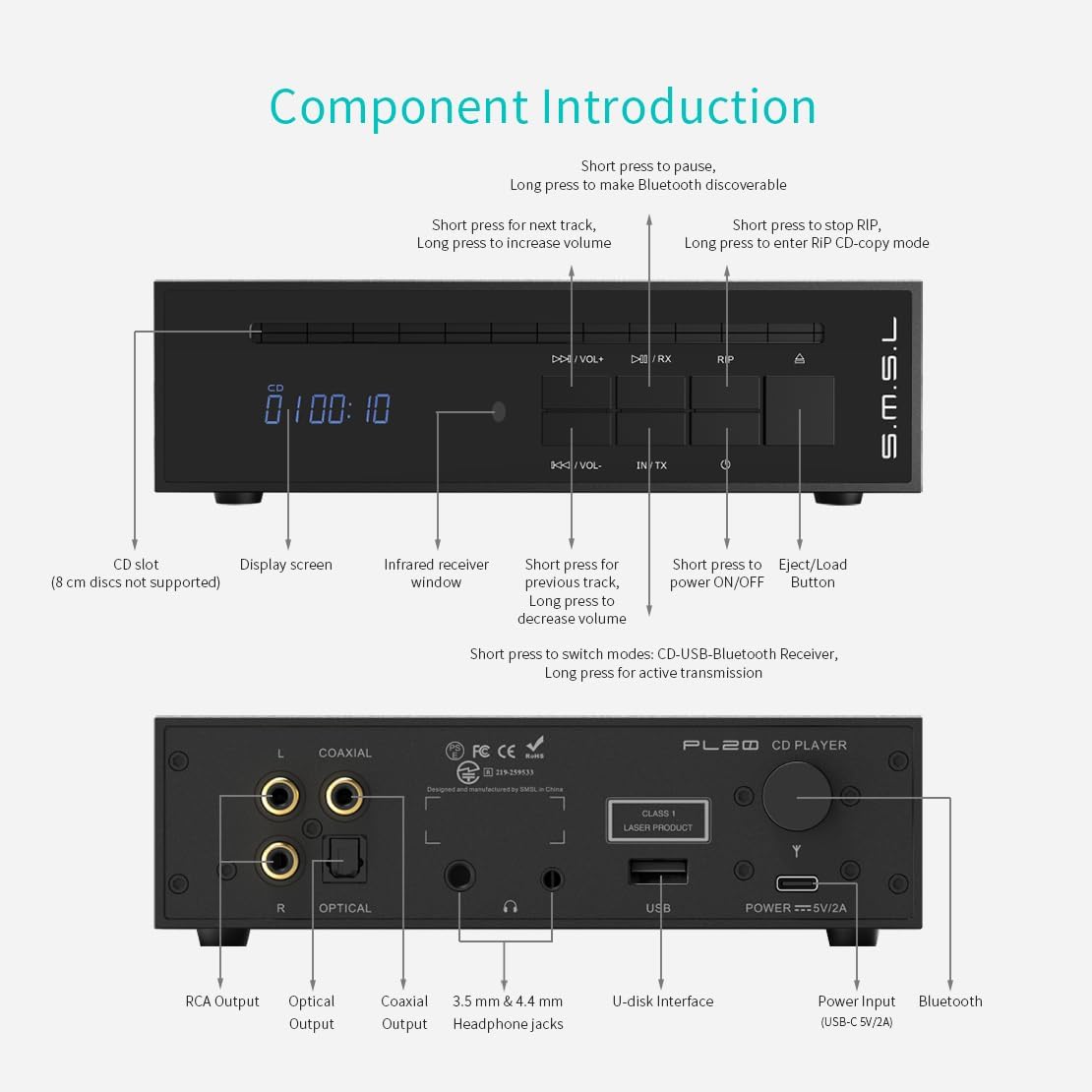
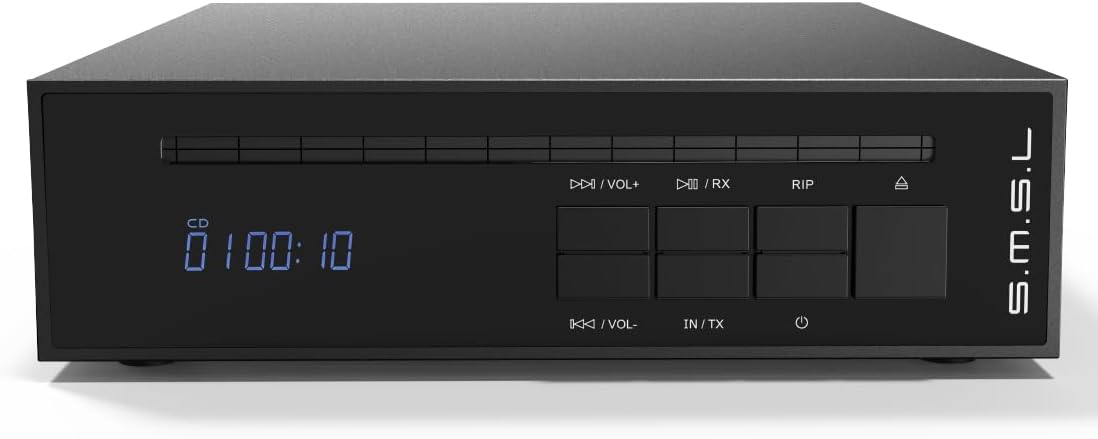
- CD Slot: For inserting audio CDs (8 cm discs not supported).
- Display Screen: Shows track information, volume, and current mode.
- Infrared Receiver Window: For remote control signals.
- Play/Pause (Short press) / Make Bluetooth discoverable (Long press): Controls playback and Bluetooth pairing.
- Next Track (Short press) / Increase Volume (Long press): Navigates tracks and adjusts volume.
- Previous Track (Short press) / Decrease Volume (Long press): Navigates tracks and adjusts volume.
- Stop RIP (Short press) / Enter RIP CD-copy mode (Long press): Controls CD ripping function.
- Eject/Load Button: Ejects or loads a CD.
- Power ON/OFF: Turns the unit on or off.
- Switch Modes (Short press: CD-USB-Bluetooth Receiver) / Active Transmission (Long press): Cycles through input modes and activates Bluetooth transmission.
4.2 Rear Panel Connections
- RCA Output (L/R): Analog audio output for connecting to amplifiers or powered speakers.
- Optical Output: Digital audio output.
- Coaxial Output: Digital audio output.
- 3.5 mm & 4.4 mm Headphone Jacks: For connecting headphones (standard and balanced).
- U-disk Interface (USB-A): For connecting USB flash drives for playback and CD ripping.
- Power Input (USB-C 5V/2A): Connect the provided USB cable for power.
- Bluetooth Antenna: For wireless Bluetooth connectivity.
4.3 Remote Control Functions

- Power ON/OFF: Turns the unit on or off.
- Eject: Ejects the CD.
- Vol+ / Vol-: Adjusts volume up or down.
- Previous Track / Next Track: Navigates between tracks.
- Play/Pause: Starts or pauses playback.
- Bluetooth Active Connection: Initiates Bluetooth pairing.
- Shuffle: Toggles shuffle playback mode.
- TX (Transmit): Activates Bluetooth transmission mode.
- IN (Input): Cycles through input modes.
- RIP Mode: Enters CD ripping mode.
- RIP Stop: Stops the CD ripping process.
Video Description: This video demonstrates the functions of the SMSL PL20 remote control. It shows how to power on/off, eject a CD, adjust volume, navigate tracks, play/pause, activate Bluetooth connection, shuffle, switch modes, and use the RIP functions.
Official Product Video: SMSL PL20 HiFi Balanced CD Player with Remote Control. This video illustrates the various functions of the remote control for the PL20.
5. Setup Guide
Follow these steps to set up your SMSL PL20 CD Player:
5.1 Power Connection
- Connect the provided USB Type-A to Type-C cable to the "POWER === 5V/2A" port on the rear panel of the PL20.
- Connect the other end of the USB cable to a compatible 5V/2A USB power adapter (not included) or a USB port that provides sufficient power.
- Press the power button on the front panel or remote control to turn on the unit.
5.2 Audio Output Connections
Choose the appropriate audio output method for your setup:
- RCA Output: Connect RCA cables from the "L" and "R" RCA output jacks on the PL20 to the corresponding analog input jacks on your amplifier or powered speakers.
- Optical Output: Connect an optical cable from the "OPTICAL" output port on the PL20 to the optical input on your DAC or digital amplifier.
- Coaxial Output: Connect a coaxial cable from the "COAXIAL" output port on the PL20 to the coaxial input on your DAC or digital amplifier.
- Headphone Output: Connect your headphones to either the 3.5mm or 4.4mm balanced headphone jack on the rear panel.
Video Description: This video demonstrates how to connect the SMSL PL20 to various audio components. It shows connecting the power input, a USB drive, 3.5mm and 4.4mm headphones, optical output, coaxial output, and RCA output.
Official Product Video: How to connect SMSL PL20 HiFi CD Player for Home. This video provides a visual guide for connecting the PL20 to your audio system.
6. Operating Instructions
6.1 CD Playback
- Ensure the PL20 is powered on and connected to your audio system.
- Gently insert an audio CD into the CD slot on the front panel. The player will automatically draw in the disc.
- The display will show "Cd rEAd" and then begin playback automatically.
- Use the Play/Pause, Next Track, Previous Track, and Volume buttons on the front panel or remote control to manage playback.

6.2 USB Drive Playback
- Insert a USB flash drive into the U-disk interface on the rear panel.
- Press the "IN/TX" button on the front panel or the "IN" button on the remote to switch to USB input mode. The display will show "USB".
- The PL20 supports DSD64 (DFF/DSF), WAV, FLAC, APE, WMA, and MP3 formats.
- Use the playback controls to select and play music from the USB drive.

6.3 Bluetooth Operation (Receive & Transmit)
The PL20 features two-way Bluetooth 5.3 for both receiving and transmitting audio.
6.3.1 Bluetooth Reception (RX Mode)
- Press the "IN/TX" button on the front panel or the "IN" button on the remote to switch to Bluetooth Receiver mode. The display will show "BT RX".
- On your phone, tablet, or other Bluetooth device, search for "CD player" in the Bluetooth settings.
- Select "CD player" to connect. Once connected, audio from your device will play through the PL20.
6.3.2 Bluetooth Transmission (TX Mode)
- Long press the "IN/TX" button on the front panel or the "TX" button on the remote control.
- The PL20 will automatically search for the strongest Bluetooth signal nearby (e.g., Bluetooth headphones, speakers).
- Once connected, audio from the PL20 (CD or USB) will be transmitted to the paired Bluetooth device.

6.4 CD Ripping Function
The PL20 allows you to rip audio tracks from a CD directly to a USB flash drive in lossless WAV format.
- Insert an audio CD into the CD slot.
- Insert a USB flash drive (FAT32 or exFAT formatted; NTFS is not supported for ripping) into the U-disk interface.
- Long press the "RIP" button on the front panel or remote control to enter CD-copy mode.
- The PL20 will begin ripping the tracks from the CD to the USB drive.
- To stop ripping, short press the "RIP" button or the "RIP STOP" button on the remote.
- Once ripped, the WAV files can be played back from the USB drive on the PL20 or transferred to a computer.

7. Maintenance
- Cleaning: Use a soft, dry cloth to clean the exterior of the unit. Do not use liquid cleaners or aerosols.
- Disc Care: Handle CDs by the edges. Keep them clean and free of scratches to ensure optimal playback and ripping performance.
- Storage: When not in use for extended periods, store the unit in a cool, dry place.
8. Troubleshooting
| Problem | Possible Cause | Solution |
|---|---|---|
| No power | Power cable not connected or faulty power adapter. | Check power cable connection. Ensure power adapter is 5V/2A. |
| No sound output | Incorrect input/output selection, loose cables, or external amplifier/speakers off. | Verify correct input mode on PL20 and external device. Check all audio cable connections. Ensure external audio equipment is powered on. |
| CD not playing/reading | Dirty or scratched CD, incorrect disc type, or disc inserted incorrectly. | Clean the CD. Try a different CD. Ensure the disc is inserted correctly. Note: 8cm discs are not supported. |
| USB drive not recognized | Incorrect USB format, unsupported file type, or faulty USB drive. | Ensure USB drive is FAT32 or exFAT. Check file formats. Try a different USB drive. |
| Bluetooth pairing failure | Device too far, not in pairing mode, or interference. | Ensure both devices are in pairing mode and within range. Reduce interference. |
| CD ripping not working | USB drive formatted as NTFS, or insufficient space. | Use a USB drive formatted as FAT32 or exFAT. Ensure enough free space on the USB drive. |
9. Specifications
| Feature | Detail |
|---|---|
| Input | CD, USB Drive, Bluetooth |
| Output | 4.4mm Headphone, 3.5mm Headphone, Optical, Coaxial, RCA, Bluetooth |
| U-disk Formats | FAT32, exFAT, NTFS (read-only) |
| CD Type | CD-DA/CD-ROM/CD-R/CD-RW/CD-DSD/MP3 |
| Headphone Output Power (32Ω) | 4.4mm: 160mW, 3.5mm: 40mW |
| THD+N | 0.0012% |
| SNR | 98dB |
| Power Consumption | <3.5W |
| Standby Power | <0.1W |
| Size (WxHxD) | 166.3 x 49.5 x 209.3 mm |
| Weight | 1.39 kg / 3.06 lbs |
Additional Features:
- Dual CS43131 DAC chips for enhanced audio performance.
- High-quality CNC all-aluminum shell with gold-plated connectors.
- Automatic disc magnetization for smooth loading.
10. Warranty and Support
The SMSL PL20 comes with a standard manufacturer's warranty. Please refer to the included SMSL Card or contact your retailer for specific warranty terms and conditions.
For technical support or further assistance, please visit the official SMSL website or contact their customer service department.
