
1. Introduction
This manual provides detailed instructions for the safe and effective use of your Jeeber Smart WiFi Baby Monitor VB816PRO-2. Please read this manual thoroughly before operating the device and retain it for future reference.
The Jeeber Smart WiFi Baby Monitor VB816PRO-2 is designed to provide comprehensive monitoring of your baby with dual cameras, a 4-inch IPS screen, night vision, two-way talk, motion and cry detection, and temperature sensing capabilities. It supports both local monitor control and remote app access.
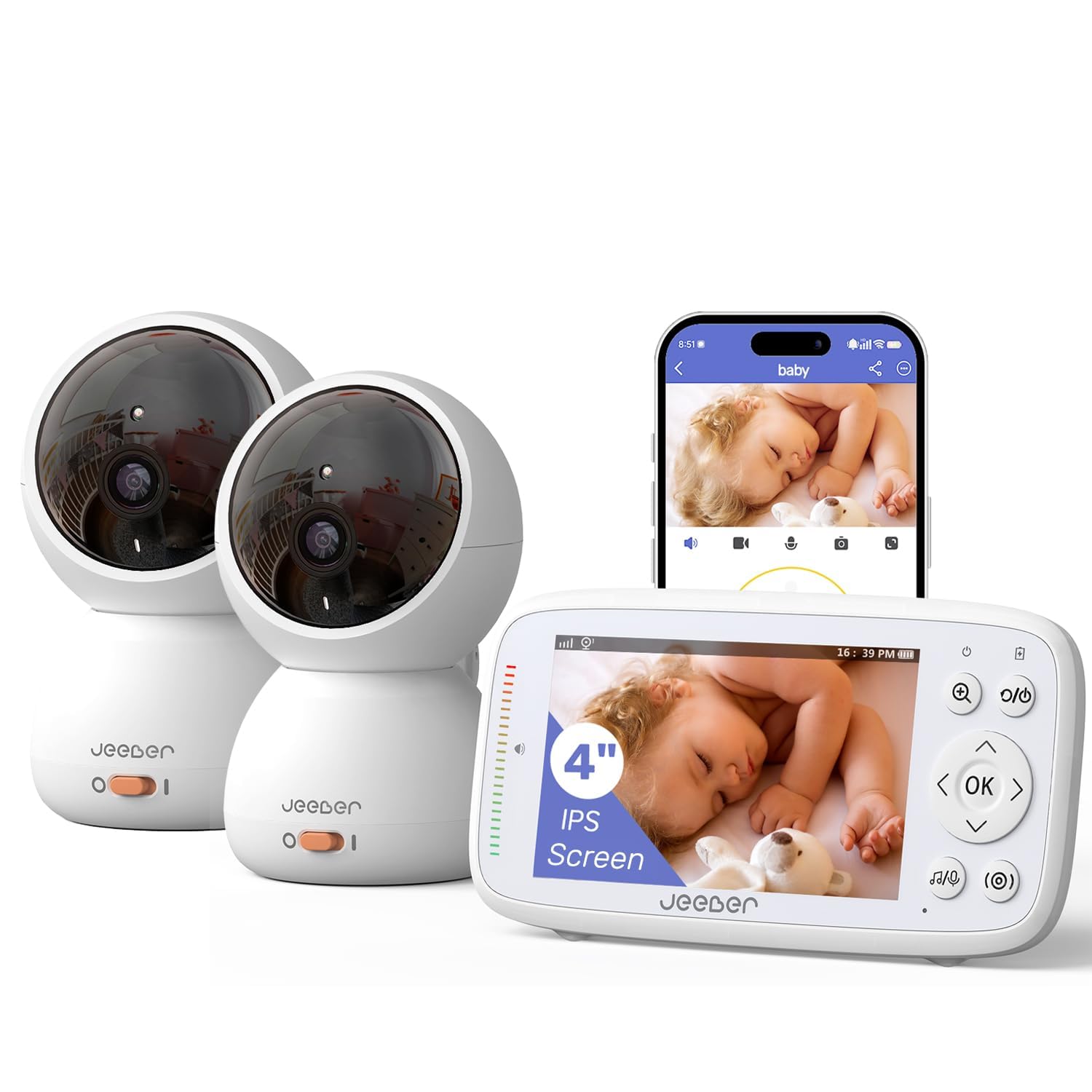
Image: The Jeeber Smart WiFi Baby Monitor VB816PRO-2 system, showing the monitor unit and two camera units.
2. Package Contents
Verify that all items are present in the package:
- 1 x Monitor Unit
- 2 x Camera Units
- 3 x Power Adapters (Chargers)
- 1 x User Manual (This document)
3. Product Overview
3.1 Monitor Unit
- 4-inch IPS Screen
- Control Buttons (Power, Menu, Navigation, Volume, Brightness)
- Microphone and Speaker for Two-Way Talk
- Battery Indicator
- Charging Port (USB-C)
3.2 Camera Unit
- Camera Lens (340° horizontal, 70° vertical viewing angle, 3x zoom)
- Infrared LEDs for Night Vision
- Microphone and Speaker for Two-Way Talk
- Temperature Sensor
- Power Port
- Pairing Button

Image: The camera unit illustrating its 340-degree pan and 70-degree tilt capabilities.
4. Setup
4.1 Powering On
- Connect each camera unit to a power outlet using the provided power adapters.
- Connect the monitor unit to a power outlet using its power adapter to charge the internal battery. The monitor can also operate on battery power.
- Press and hold the Power button on the monitor unit to turn it on.
4.2 Initial Connection (Monitor & Cameras)
The monitor and cameras are pre-paired at the factory. Upon powering on, the monitor should automatically connect to both cameras and display their feeds. If a connection is not established:
- Ensure both camera units are powered on and within range of the monitor.
- Access the monitor's menu, navigate to "Camera Management" or "Pairing".
- Select an empty camera channel or the channel you wish to re-pair.
- Press the pairing button on the back or bottom of the camera unit. The monitor should display a confirmation once paired.
4.3 App Connection (Optional)
For remote viewing and advanced features, download the "FeelBaby" app (or specified app name) from your smartphone's app store. The app requires a 2.4GHz Wi-Fi network for camera connection.
- Download and install the app on your smartphone or tablet.
- Create an account and log in.
- Follow the in-app instructions to add your camera units. This typically involves scanning a QR code on the camera or manually entering device details.
- Ensure your smartphone is connected to a 2.4GHz Wi-Fi network during the setup process.

Image: Illustration of dual-mode connection, showing local monitor viewing at home and remote app viewing outdoors.
5. Operating Instructions
5.1 Dual-Camera View
The monitor supports viewing feeds from both cameras. You can switch between cameras manually or enable an automatic cycle view if more than one camera is connected. Refer to the monitor's menu for camera switching options.
5.2 Pan, Tilt, and Zoom (PTZ)
Use the navigation buttons on the monitor unit to remotely adjust the camera's viewing angle. The camera offers a 340° horizontal pan and a 70° vertical tilt. Digital zoom (up to 3x) can also be controlled from the monitor.
5.3 Motion and Cry Detection (VOX Mode)
The monitor features motion and cry detection capabilities. When enabled, the monitor screen will activate and an alert will be issued if motion or crying is detected. Sensitivity levels for these detections can be adjusted in the monitor's settings.

Image: A smartphone displaying a motion detection alert from the baby monitor app.

Image: The monitor unit displaying a baby's image, indicating VOX sound detection functionality.
5.4 Virtual Safety Fence (App Feature)
Through the mobile app, you can define a virtual safety zone. If your baby moves outside this predefined area, you will receive an immediate push notification on your smartphone.

Image: A smartphone screen showing a virtual safety fence alert, indicating a baby within a defined safe zone.
5.5 Night Vision and Lullabies
The camera automatically activates infrared night vision in low-light conditions, providing a clear image without disturbing your baby. The monitor also includes 8 pre-programmed lullabies that can be played through the camera unit to soothe your baby.

Image: A baby sleeping peacefully, with the monitor and camera unit nearby, highlighting night vision, two-way talk, temperature detection, and lullaby functions.
5.6 Two-Way Talk and Temperature Sensor
Press and hold the microphone button on the monitor to speak to your baby through the camera's speaker. The camera unit also features a built-in temperature sensor, displaying the nursery's real-time temperature on the monitor screen. Alerts can be set for temperature deviations.
6. Maintenance
- Cleaning: Use a soft, dry cloth to clean the monitor and camera units. Do not use abrasive cleaners or solvents.
- Lens Care: Gently wipe the camera lens with a lens cleaning cloth to ensure clear image quality.
- Storage: When not in use for extended periods, store the device in a cool, dry place away from direct sunlight.
- Battery: The monitor unit contains a rechargeable lithium polymer battery. Avoid extreme temperatures and fully discharge and recharge periodically if stored for long durations.
7. Troubleshooting
| Problem | Possible Cause | Solution |
|---|---|---|
| No image on monitor screen. | Camera not powered on or not paired. | Ensure camera is plugged in and powered on. Re-pair the camera with the monitor if necessary (refer to Section 4.2). |
| Poor image quality. | Camera lens dirty, poor lighting, or camera too far from monitor. | Clean the camera lens. Ensure adequate lighting or check night vision activation. Move camera closer to the monitor. |
| No sound or poor sound quality. | Volume too low, microphone blocked, or interference. | Increase monitor volume. Ensure camera microphone is not obstructed. Move away from other electronic devices. |
| App cannot connect to camera. | Incorrect Wi-Fi network (not 2.4GHz), incorrect password, or camera not in pairing mode. | Verify your Wi-Fi network is 2.4GHz. Re-enter Wi-Fi password. Follow in-app instructions for camera pairing. |
| Monitor battery drains quickly. | Screen always on, high brightness, or frequent alerts. | Enable VOX mode to turn off the screen when quiet. Reduce screen brightness. Adjust alert sensitivity. |
8. Specifications
- Model: VB816PRO-2
- Screen Size: 4-inch IPS
- Video Capture Resolution: 720p
- Viewing Angle: 360° (Pan), 70° (Tilt)
- Zoom: 3x Digital
- Night Vision Range: 5 Meters
- Connectivity: FHSS Wireless (Monitor), Wi-Fi (App)
- Power Source: Battery Powered (Monitor), AC Powered (Cameras)
- Battery Type (Monitor): Lithium Polymer (1 C battery included)
- Material: Flame-Retardant ABS Plastic
- Dimensions (L x W x H): 14 x 11.58 x 7.04 cm
- Weight: 940 g
- Special Features: 2-Way Audio, Cry Detection, Motion Sensor, Night Vision, PTZ Technology, Temperature Sensor, Lullabies
- Mounting Type: Wall Mount, Crib Mount, Tabletop Placement
- Indoor/Outdoor Usage: Indoor (Cameras), Indoor/Outdoor (App Monitoring)
9. Warranty and Support
Your Jeeber Smart WiFi Baby Monitor VB816PRO-2 comes with a 2-year manufacturer's warranty, covering defects in materials and workmanship under normal use.
For technical assistance, warranty claims, or any product-related inquiries, please contact our customer support team:
- Email: help@jeebervip.com
Please provide your model number (VB816PRO-2) and purchase details when contacting support to expedite assistance.
