
1. Product Overview
The IMALENT HT70 is a high-performance, rechargeable LED headlamp designed for various outdoor activities. It features multiple light sources, adjustable brightness levels, and a durable, waterproof construction.
Included Components:
- IMALENT HT70 Headlamp
- Headband with silicone sweat-diverting strip
- Charging Cable (Type-C)
- User Manual

Figure 1: IMALENT HT70 Headlamp and its included accessories.
2. Setup
2.1 Headband Adjustment
The headlamp comes with an elastic and breathable headband, including a silicone sweat-diverting strip for comfort and stability. Adjust the straps to ensure a snug yet comfortable fit on your head. The top strap is connected with a hook for easy adjustment.
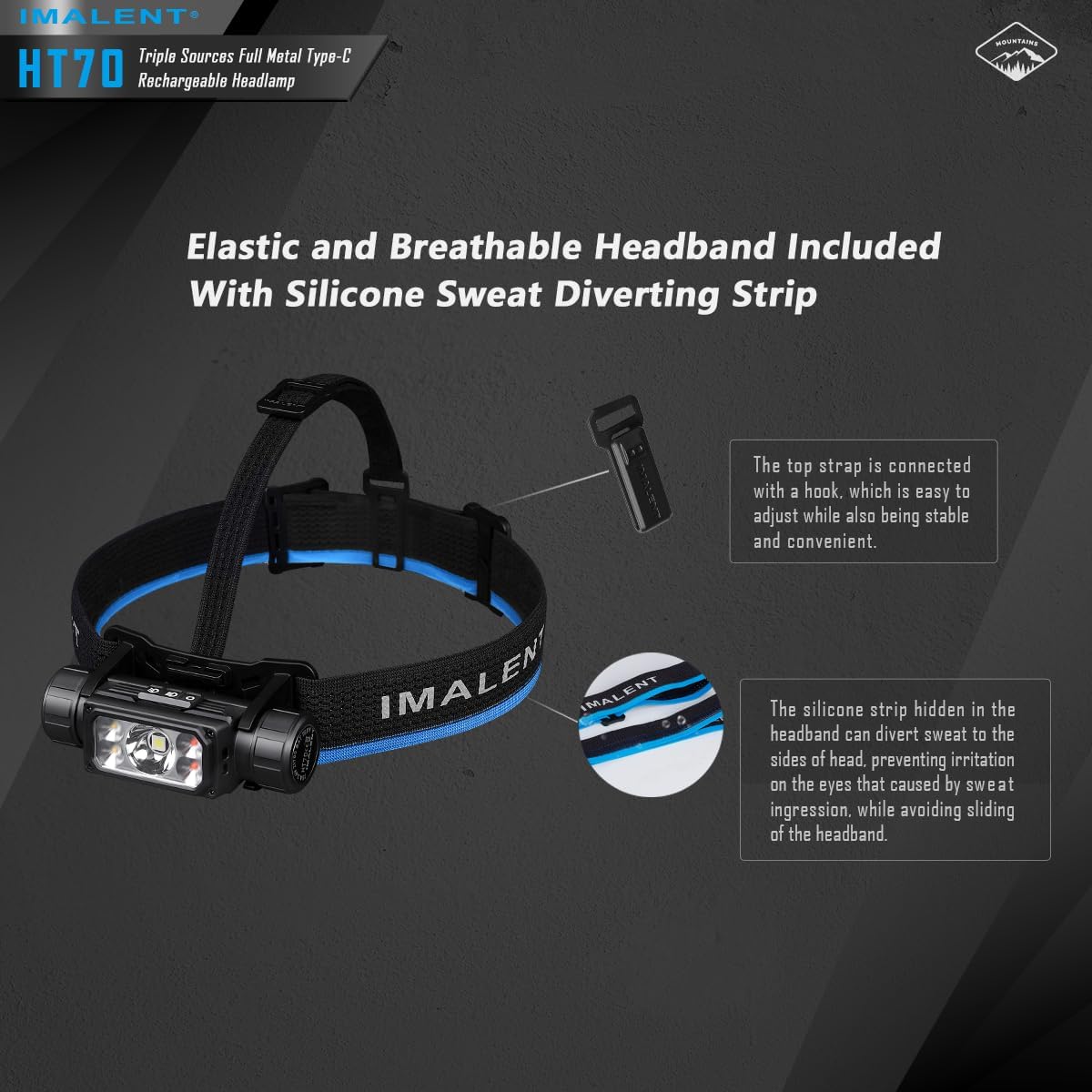
Figure 2: Adjustable headband with silicone strip for sweat diversion.
2.2 Charging the Battery
The HT70 headlamp features a Type-C rechargeable port. Connect the provided charging cable to the headlamp and a suitable USB power source. The charging indicator will show red while charging and turn green when fully charged. A full charge takes approximately 3 hours and 10 minutes.

Figure 3: Headlamp connected to a Type-C charging cable, showing charging indicators.
2.3 Adjusting the Light Angle
The headlamp unit can be adjusted 180 degrees to direct the light precisely where needed, ensuring no blind spots in outdoor environments.

Figure 4: Headlamp unit demonstrating 180-degree angle adjustment.
3. Operating Instructions
The HT70 headlamp features dual switches for intuitive control: a power button and a mechanical slide switch to change light sources.
3.1 Power Button Operation
- Turn On/Off: Single press the power button to turn the headlamp on or off.
- Change Brightness Levels: When the headlamp is on, press and hold the power button to cycle through brightness levels. Release the button at your desired level.
- Memory Function: The headlamp will remember the last used brightness level when turned off and on again.
3.2 Mechanical Slide Switch
Use the mechanical slide switch on the side of the headlamp to select between different light sources: Auxiliary Warm White Light (Right), Primary White Light (Middle), and Auxiliary Red Light (Left).

Figure 5: Mechanical slide switch for selecting light sources.
3.3 Light Modes and Brightness
The HT70 offers 12 lighting modes across its different light sources:
- Primary White Light: Offers various brightness levels from Moonlight (6 lumens) to Turbo (3500 lumens).
- Auxiliary Warm Light: Provides soft, natural-looking light, suitable for various activities. Levels include Low (10 lumens), Middle (100 lumens), and High (250 lumens).
- Auxiliary Red Light: Ideal for low-light conditions or signaling, with levels including Low (5 lumens), Middle (30 lumens), and High (80 lumens), plus a flashing mode.

Figure 6: Visual representation of Neutral White, Warm Light, and Red Light modes.
3.4 Activating Turbo and Strobe Modes
To activate the Turbo mode (3500 lumens), first push the mechanical switch to the Primary White Light mode. Then, double-press the power button. Double-press the power button again to activate the Strobe mode.
Video 1: Demonstration of the IMALENT HT70 headlamp's various light modes and operation.
Video 2: Quick overview of the IMALENT HT70 headlamp's features and light output.
3.5 Detachable Flashlight Function
The LED flashlight unit can be detached from the headband for use as a standalone LED flashlight, offering versatility.
4. Maintenance
4.1 General Care
- Clean the headlamp regularly with a soft, damp cloth.
- Avoid using harsh chemicals or abrasive materials.
- Ensure the Type-C charging port cover is securely closed when not charging to maintain its IP66 waterproof rating.
4.2 Battery Care
- Charge the battery fully before first use.
- To prolong battery life, avoid completely draining the battery. Recharge when the battery indicator shows low power.
- If storing the headlamp for an extended period, charge the battery to approximately 50% and recharge every 3-6 months.
5. Troubleshooting
5.1 Light Not Turning On
- Ensure the battery is properly inserted and the battery cap is tightened securely.
- Check if the battery is charged. If not, connect the headlamp to the charging cable.
5.2 Battery Capacity Discrepancy
The included battery is rated at 5000mAh. Actual usable capacity may vary slightly based on environmental conditions and usage patterns. If you suspect a significant discrepancy, ensure the battery is fully charged and discharged correctly during testing.
5.3 Rough Battery Cap Threads
If the battery cap threads feel rough, ensure they are clean and free of debris. Applying a small amount of silicone grease (not included) can help smooth the threading and improve water resistance.
5.4 Headlamp Feels Heavy
The HT70 is constructed from aerospace-grade aluminum alloy for durability. While the weight is distributed for comfort, some users may find it heavy during prolonged use. Ensure the headband is adjusted correctly for optimal comfort.
6. Specifications
| Feature | Value |
|---|---|
| Special Feature | High Lumens, High Power, Lightweight, Long Range, Rechargeable |
| Color | Black |
| Power Source | Battery Powered |
| Light Source Type | LED |
| Material | Aluminum |
| White Brightness | 3500 Lumens |
| Battery Type | Lithium Ion |
| Water Resistance Level | Waterproof (IP66) |
| Light Output Maximum | 3500 Lumens |
| Mounting Type | Head Mount |
| Color Temperature | 6500 Kelvin |
| Runtime (Max) | 350 hours (Moonlight mode) |
| Item Dimensions L x W x H | 3.74"L x 1.1"W x 1.44"H |
| Item Weight | 0.6 Pounds |

Figure 7: Detailed technical data and runtime specifications.
7. Warranty & Support
7.1 Manufacturer's Warranty
The IMALENT HT70 LED Headlamp comes with a 2-year limited manufacturer's warranty. Please retain your proof of purchase for warranty claims.
7.2 Customer Support
For further assistance, product information, or to explore other IMALENT products, please visit the official IMALENT store on Amazon: IMALENT Store.