
Product Overview
The Stiflix Bluetooth Retro Car Stereo Receiver (Model B0G4C8P7BV) is a single DIN head unit designed to provide modern audio functionalities while maintaining a classic European aesthetic, suitable for vehicles from the 1980s and 1990s. This receiver integrates Bluetooth for hands-free calling and music streaming, a built-in Digital Signal Processor (DSP), dual subwoofer outputs, and multiple media inputs including USB, MicroSD, and AUX. It also features a Type-C PD3.0 fast charging port and supports AM/FM radio with RDS.

Image: The Stiflix Retro Car Stereo Receiver seamlessly integrated into different classic car dashboards, showcasing its European style compatibility.
Setup and Installation
This section provides general guidelines for installing your Stiflix car stereo. Professional installation is recommended for optimal performance and safety.
1. Unboxing and Package Contents
Verify that all components are present in the package:
- Single Din Classic Stereo Unit
- Wiring Harness
- Mounting Kits
- Instruction Manual

Image: The Stiflix Retro Car Stereo Receiver, displaying its front panel and the various ports and buttons, alongside its wiring harness and mounting accessories.
2. Installation Steps
- Preparation: Disconnect the vehicle's negative battery terminal before starting installation to prevent electrical shorts.
- Remove Existing Unit: Carefully remove the existing car stereo from the dashboard.
- Wiring: Connect the supplied wiring harness to the vehicle's wiring. Ensure correct connections for power, ground, speakers, and accessories. Refer to your vehicle's wiring diagram if necessary.
- Mounting: Secure the new Stiflix stereo unit into the single DIN opening using the provided mounting kit.
- Connect Antennas: Connect the radio antenna and any external microphone (if applicable).
- Final Checks: Reconnect the vehicle's negative battery terminal. Turn on the ignition and test the stereo's basic functions.
Operating Instructions
1. Basic Controls
- Power Button: Press to turn the unit on or off.
- Volume Knob: Rotate to adjust the volume level. Press to mute/unmute.
- Source (SRC) Button: Press to cycle through available audio sources (FM, AM, Bluetooth, USB, SD, AUX).
- Display (DISP) Button: Press to change display information or settings.
2. Bluetooth Connectivity
The unit supports Bluetooth for hands-free calling and wireless audio streaming.
- Pairing: Select Bluetooth as the source. On your mobile device, search for available Bluetooth devices and select "Stiflix Car Stereo" (or similar name). Enter "0000" if a PIN is required.
- Hands-Free Calling: Once paired, you can make and receive calls directly through the stereo. Use the built-in microphone or connect an external microphone for clearer audio.
- Music Streaming: Play audio from your paired device, such as Spotify or Pandora, directly through the car stereo.

Image: A man driving, demonstrating the hands-free Bluetooth calling feature of the Stiflix Retro Car Stereo Receiver, with a phone displaying a call interface.
3. Digital Multimedia Receiver Functions
The stereo supports various digital media inputs:
- USB Port: Insert a USB flash drive (up to 64GB) to play audio files.
- MicroSD Slot: Insert a MicroSD card (up to 32GB) to play audio files.
- AUX Input: Connect external audio devices using a 3.5mm audio cable.
- Type-C PD3.0 Fast Charging: Use the Type-C port to fast charge compatible mobile devices.

Image: The Stiflix Retro Car Stereo Receiver's front panel, highlighting the USB port, MicroSD card slot, AUX input, and Type-C PD3.0 fast charging port, with a phone charging via the Type-C port.
4. AM/FM Radio Operation
- Tuning: Press the 'BAND' button to select FM or AM. Use the seek buttons to find stations.
- Presets: Save your favorite stations to preset buttons for quick access.
- RDS (Radio Data System): Displays station information where available.

Image: The Stiflix Retro Car Stereo Receiver's display showing an FM radio frequency, indicating its AM/FM tuner capabilities.
5. DSP and Subwoofer Outputs
The built-in DSP allows for audio effect customization. The unit features 4-channel outputs and 2 separate subwoofer outputs for enhanced audio systems.
- Equalizer (EQ): Access preset equalizer settings (e.g., Pop, Rock, Classic) or customize your own.
- Subwoofer Control: Adjust subwoofer output levels and crossover frequencies through the menu settings.

Image: A diagram illustrating the integrated DSP chip and the dual subwoofer output connections (SUB-1, SUB-2) along with front (FR, FL) and rear (RR, RL) speaker outputs, indicating the unit's audio processing capabilities.
6. Smart APP Control & Steering Wheel Control
- App Control: Download the dedicated smartphone application to wirelessly control various functions of the stereo, including volume, source, and equalizer settings.
- Steering Wheel Control (SWC): If your vehicle supports it, connect the SWC wires to integrate control functions directly from your steering wheel. This allows for safe adjustment of volume, track changes, and other features without taking your hands off the wheel.
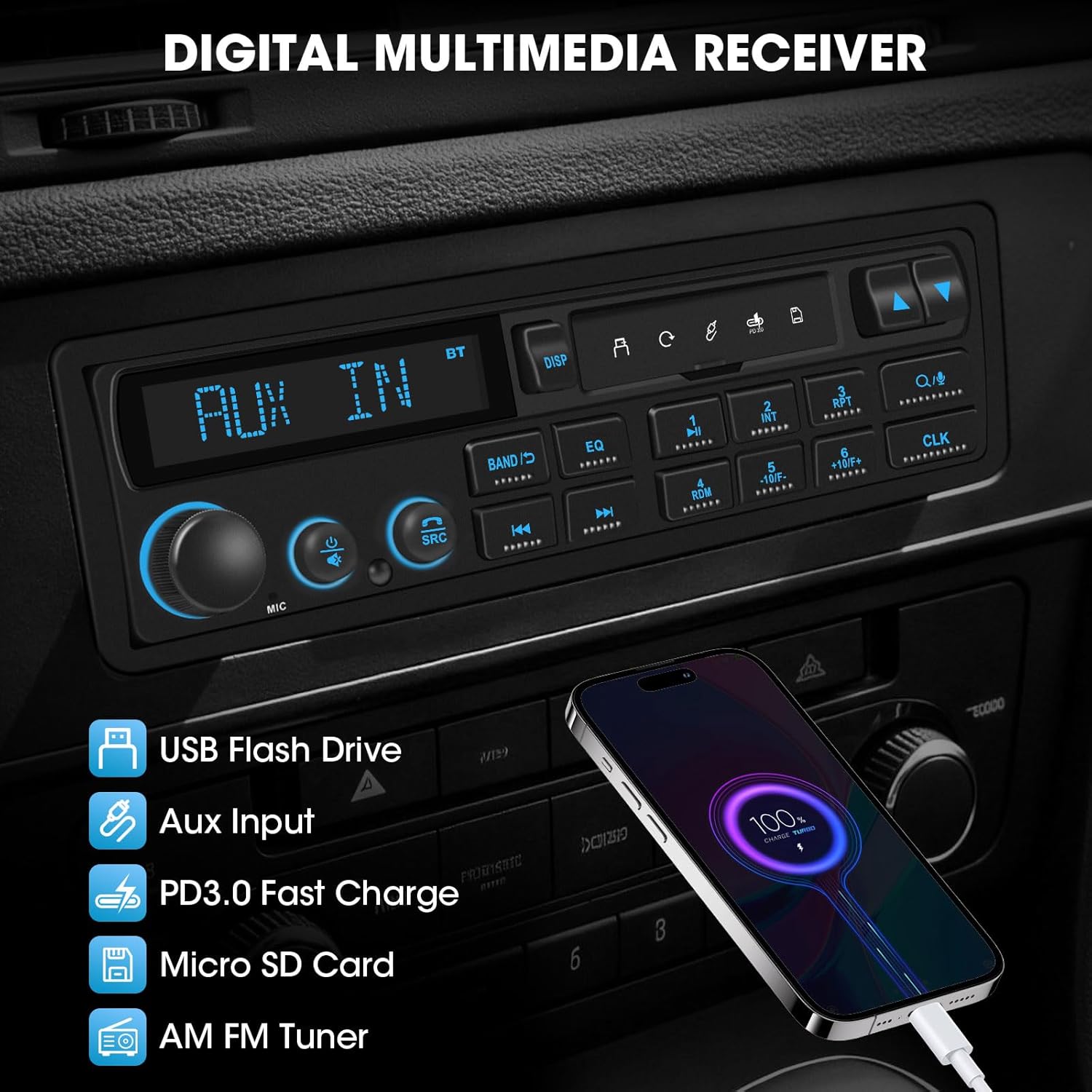
Image: The Stiflix Retro Car Stereo Receiver's display showing app control on a smartphone and a steering wheel with integrated control buttons, illustrating both smart app and steering wheel control functionalities.
Maintenance
- Cleaning: Use a soft, dry cloth to clean the unit's front panel. Avoid abrasive cleaners or solvents.
- Dust: Regularly remove dust from the unit's vents to ensure proper cooling.
- Connections: Periodically check all wiring connections to ensure they are secure.
Troubleshooting
| Problem | Possible Cause | Solution |
|---|---|---|
| No Power | Blown fuse; incorrect wiring; loose power connection. | Check vehicle's fuse box and the unit's fuse. Verify power and ground wiring connections. |
| No Sound | Volume muted; incorrect source selected; speaker wiring issues. | Check volume and mute status. Ensure correct audio source is selected. Verify speaker connections. |
| Bluetooth Pairing Fails | Device not in pairing mode; interference; incorrect PIN. | Ensure Bluetooth is enabled on both devices and the stereo is in pairing mode. Move closer to the unit. Re-enter PIN. |
| Poor Radio Reception | Antenna not connected; weak signal area; damaged antenna. | Check antenna connection. Try tuning to a stronger station. Inspect antenna for damage. |
| USB/SD Not Reading | Incompatible file format; corrupted media; unsupported capacity. | Ensure media contains supported audio files. Try a different USB drive/SD card. Check capacity limits (USB up to 64GB, MicroSD up to 32GB). |
Specifications
| Feature | Detail |
|---|---|
| Model Number | B0G4C8P7BV |
| Brand | Stiflix |
| Product Dimensions (D x W x H) | 4.1" x 7.3" x 2.2" |
| Connectivity Technology | Auxiliary, Bluetooth, USB |
| Controller Type | Push Button, App |
| Output Power | 240 Watts (60W x 4-CHN Peak Power) |
| Number of Channels | 4 |
| Surround Sound Channel Configuration | 4.2 |
| Audio Output Mode | Stereo |
| Compatible Devices | Amplifier, Speaker, Subwoofer |
| Supported Internet Services | Pandora, Spotify (via Bluetooth streaming) |
| Special Features | Built-in DSP, Preset Equalizer, Bluetooth Calling & Music Streaming, LCD Display Multicolor Illumination, Physical Knob, Smart APP Control, Steering Wheel Control, USB, Micro SD Card, AUX Input, PD3.0 Type-C Fast Charge, FM AM Radio with RDS, 2 Subwoofer Outputs |
Warranty Information
The Stiflix Bluetooth Retro Car Stereo Receiver (Model B0G4C8P7BV) comes with a 12-month warranty from the date of purchase. This warranty covers manufacturing defects and malfunctions under normal use. It does not cover damage caused by misuse, accidents, unauthorized modifications, or improper installation.
Please retain your proof of purchase for warranty claims.
Customer Support
If you encounter any issues or have questions regarding your Stiflix Bluetooth Retro Car Stereo Receiver that are not addressed in this manual, please contact Stiflix customer support. For the most up-to-date contact information, please refer to the official Stiflix website or the contact details provided with your purchase documentation.
When contacting support, please have your product model number (B0G4C8P7BV) and proof of purchase readily available.
