
Havells Prolife Vista
Havells Prolife VISTA 4.2 L Air Fryer Instruction Manual
Model: Prolife Vista
1. Important Safety Instructions
Please read all instructions carefully before using the Havells Prolife VISTA Air Fryer. Retain this manual for future reference.
- Always ensure the appliance is placed on a stable, heat-resistant surface, away from walls or other appliances to allow adequate air circulation.
- Do not immerse the main unit, cord, or plug in water or any other liquid to prevent electrical shock.
- Close supervision is necessary when any appliance is used by or near children.
- Unplug from the outlet when not in use and before cleaning. Allow to cool before putting on or taking off parts.
- Do not operate any appliance with a damaged cord or plug, or after the appliance malfunctions or has been damaged in any manner.
- The appliance surfaces become hot during use. Use oven mitts when handling hot components.
- Do not block any ventilation openings.
- Do not use accessories not recommended by the appliance manufacturer, as this may cause injuries.
- This appliance is for household use only. Do not use outdoors.
- The appliance features an automatic shut-off function for safety, preventing overheating.
2. Product Overview
The Havells Prolife VISTA Air Fryer utilizes Aero Crisp 360° air circulation technology to cook food with minimal oil. It features a 4.2 L capacity, a transparent see-through window, and a non-stick silicon-coated basket.
Components:
- Main Unit
- Frying Pan (4.2 L)
- Frying Plate
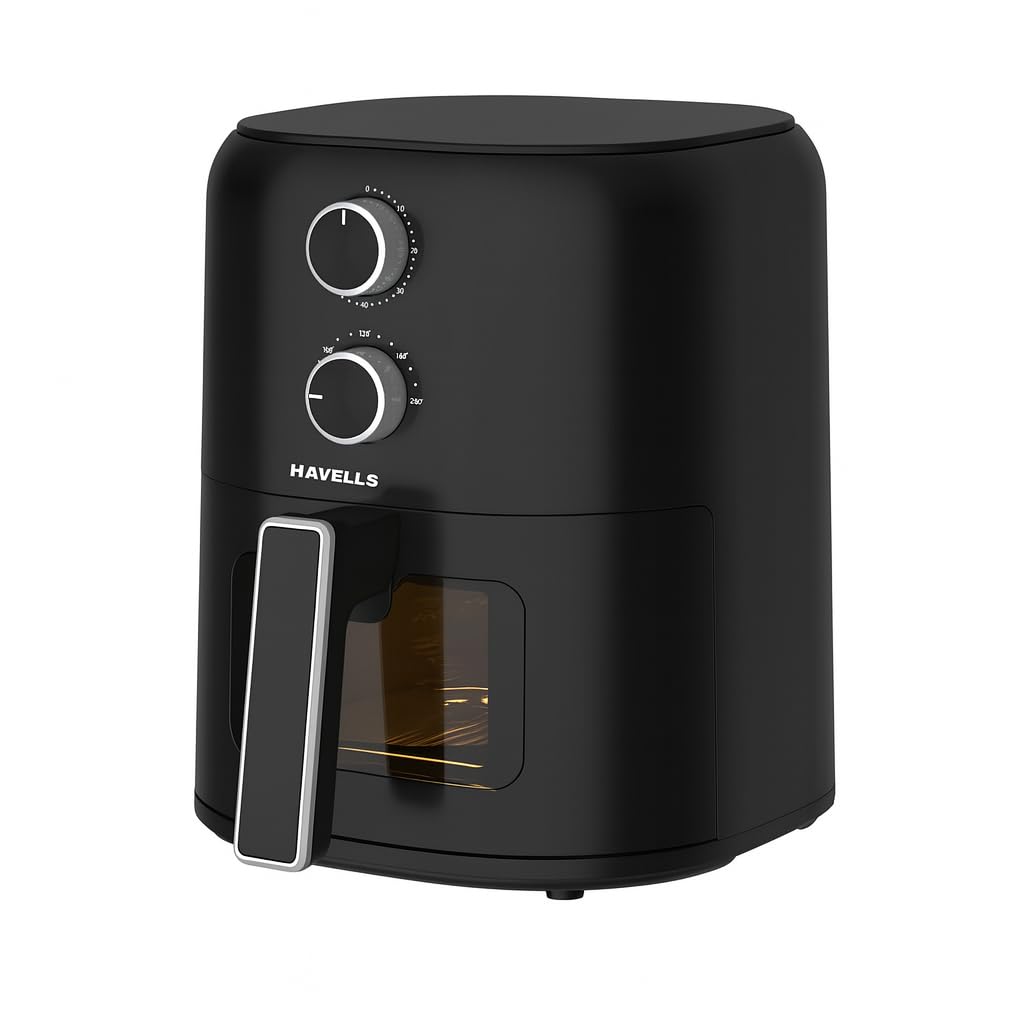
Image 2.1: Havells Prolife VISTA Air Fryer Main Unit with controls and basket.

Image 2.2: Close-up view of the non-stick silicon coated basket and frying plate.

Image 2.3: The air fryer showcasing its transparent see-through window for monitoring food.

Image 2.4: Illustration of the Aero Crisp 360° air circulation technology.
3. Setup and First Use
3.1 Unpacking
- Remove all packaging materials, stickers, and labels from the appliance.
- Check that all components listed in Section 2 are present and undamaged.
3.2 Initial Cleaning
- Wipe the exterior of the main unit with a damp cloth.
- Wash the frying pan and frying plate with hot water, dish soap, and a non-abrasive sponge. Rinse thoroughly and dry completely.
- Do not use abrasive cleaning agents or metal scouring pads, as this can damage the non-stick coating.
3.3 Placement
- Place the air fryer on a stable, level, and heat-resistant surface.
- Ensure there is at least 10 cm (4 inches) of free space around the back and sides of the appliance, and 10 cm (4 inches) above it, for proper ventilation.
- Do not place the appliance near flammable materials or heat sources.
3.4 Power Connection
- Plug the power cord into a grounded wall outlet.
4. Operating Instructions
4.1 Preparing for Cooking
- Place the frying plate into the frying pan.
- Place the ingredients into the frying pan. Do not overfill the basket beyond the MAX indication.
- Slide the frying pan back into the main unit until it clicks into place.
4.2 Setting Temperature and Time

Image 4.1: Close-up of the adjustable temperature and timer control knobs.
- Use the top knob to set the desired cooking temperature (up to 200°C).
- Use the bottom knob to set the cooking time (up to 60 minutes). The appliance will start cooking automatically once the timer is set.
- The power indicator light will illuminate, indicating the appliance is operating.
4.3 Monitoring and Shaking
- The transparent see-through window allows you to monitor the cooking process without opening the frying pan, preserving heat and ensuring consistent results.
- For some recipes, it may be necessary to shake or turn the ingredients halfway through the cooking time. Carefully pull out the frying pan, shake the contents, and then slide it back in. The appliance will resume cooking.
4.4 Completing the Cooking Cycle
- When the set cooking time has elapsed, the timer will ring, and the appliance will automatically shut off.
- Carefully pull out the frying pan from the air fryer.
- Empty the contents into a serving dish. Use tongs to remove larger items.
- Allow the appliance to cool down completely before cleaning.
4.5 Multi-Functional Cooking Guide

Image 4.2: Visual guide for various cooking functions including Fry, Roast, Grill, and Bake.
The Havells Prolife VISTA Air Fryer can be used for various cooking methods. Refer to the table below for general guidelines. Cooking times and temperatures may vary based on food quantity and desired crispness.
| Food Item | Temperature | Time | Notes |
|---|---|---|---|
| Frozen Fries (thin) | 180°C | 15-20 min | Shake halfway |
| Chicken Nuggets | 180°C | 10-15 min | Shake halfway |
| Fresh Chicken Drumsticks | 180°C | 20-25 min | Turn halfway |
| Vegetables (e.g., broccoli) | 160°C | 10-12 min | Toss with a little oil |
| Small Cakes/Muffins | 160°C | 15-20 min | Use oven-safe bakeware |
5. Maintenance and Cleaning
Regular cleaning ensures optimal performance and extends the lifespan of your air fryer.
5.1 Cleaning After Each Use
- Unplug the air fryer and allow it to cool down completely before cleaning.
- Wipe the exterior of the main unit with a damp cloth. Do not use harsh abrasives.
- Remove the frying pan and frying plate. Wash them with hot water, dish soap, and a non-abrasive sponge. The non-stick coating is delicate; avoid metal utensils or harsh scrubbing.
- The frying pan and frying plate are not dishwasher safe. Hand wash only.
- Clean the interior of the appliance with a damp cloth. For stubborn residue, use a mild detergent.
5.2 Storage
- Ensure all parts are clean and dry before storing.
- Store the air fryer in a cool, dry place.
6. Troubleshooting
If you encounter issues with your air fryer, refer to the following common problems and solutions:
| Problem | Possible Cause | Solution |
|---|---|---|
| Air fryer does not turn on. | Appliance not plugged in. Frying pan not inserted correctly. | Ensure the power cord is securely plugged into a grounded outlet. Push the frying pan firmly into the main unit until it clicks. |
| Food is not cooked evenly. | Too much food in the basket. Food not shaken/turned. | Reduce the amount of food per batch. Shake or turn food halfway through cooking. |
| White smoke coming from the appliance. | Greasy residue from previous use. High-fat ingredients. | Clean the frying pan and frying plate thoroughly after each use. For high-fat foods, absorb excess oil with a paper towel before cooking. |
| Food is not crispy. | Temperature too low or time too short. Too much moisture in food. | Increase temperature or cooking time. Pat food dry before cooking. A light coating of oil can help. |
7. Specifications
Detailed technical specifications for the Havells Prolife VISTA Air Fryer:
| Feature | Specification |
|---|---|
| Model Name | Prolife Vista |
| Capacity | 4.2 litres |
| Output Wattage | 1350 Watts |
| Voltage | 230 Volts |
| Max Temperature Setting | 200 Degrees Celsius |
| Timer | Up to 60 minutes |
| Control Method | Push Button (Rotary Knobs) |
| Special Feature | Automatic Shut-Off, See-Through Window |
| Non-stick Coating | Yes |
| Product Dimensions (D x W x H) | 29D x 30W x 29H Centimeters |
| Item Weight | 3.4 Kilograms |
| Material | Acrylonitrile Butadiene Styrene (ABS) |
| Included Components | 1 N Main Unit, 1 N Frying Pan (4.2 L), 1 N Frying Plate |
8. Warranty and Support
8.1 Warranty Information
The Havells Prolife VISTA Air Fryer comes with a 2-year Havells warranty. This warranty assures reliable long-term performance and dependable after-sales support. Please retain your purchase receipt as proof of purchase for warranty claims.
8.2 Customer Support
For any queries, service requests, or technical assistance, please contact Havells customer support:
- Website: www.havells.com (Please visit the official Havells website for the most current contact information and support options.)
- Customer Service Number: Refer to the Havells official website or product packaging for regional contact numbers.
- Email Support: Refer to the Havells official website for email contact options.
When contacting support, please have your product model name (Prolife Vista) and purchase details ready.
Related documentsProlife Vista

Ask a question about this manual
Ask about setup, troubleshooting, compatibility, parts, safety, or missing instructions. Manuals+ will review the question and use this page’s manual context to help answer it.