
Introduction
The FNIRSI LCR-ST2 is an advanced LCR meter designed for precise testing of SMD components. This all-in-one device measures resistors, capacitors, inductors, diodes, continuity, and voltage. It features smart auto-sorting to identify abnormal components and offers a full-range scan from 100 Hz to 100 kHz for comprehensive analysis. Its compact and portable design, combined with a clear HD display and versatile testing modes, makes it an essential tool for electronics diagnostics and component verification.
What's in the Box
- LCR-ST2 Tweezer
- Storage Bag
- Curved Tip (pair)
- Shorting Plate
- Data Cable (USB-A to Type-C)
- Calibration Board
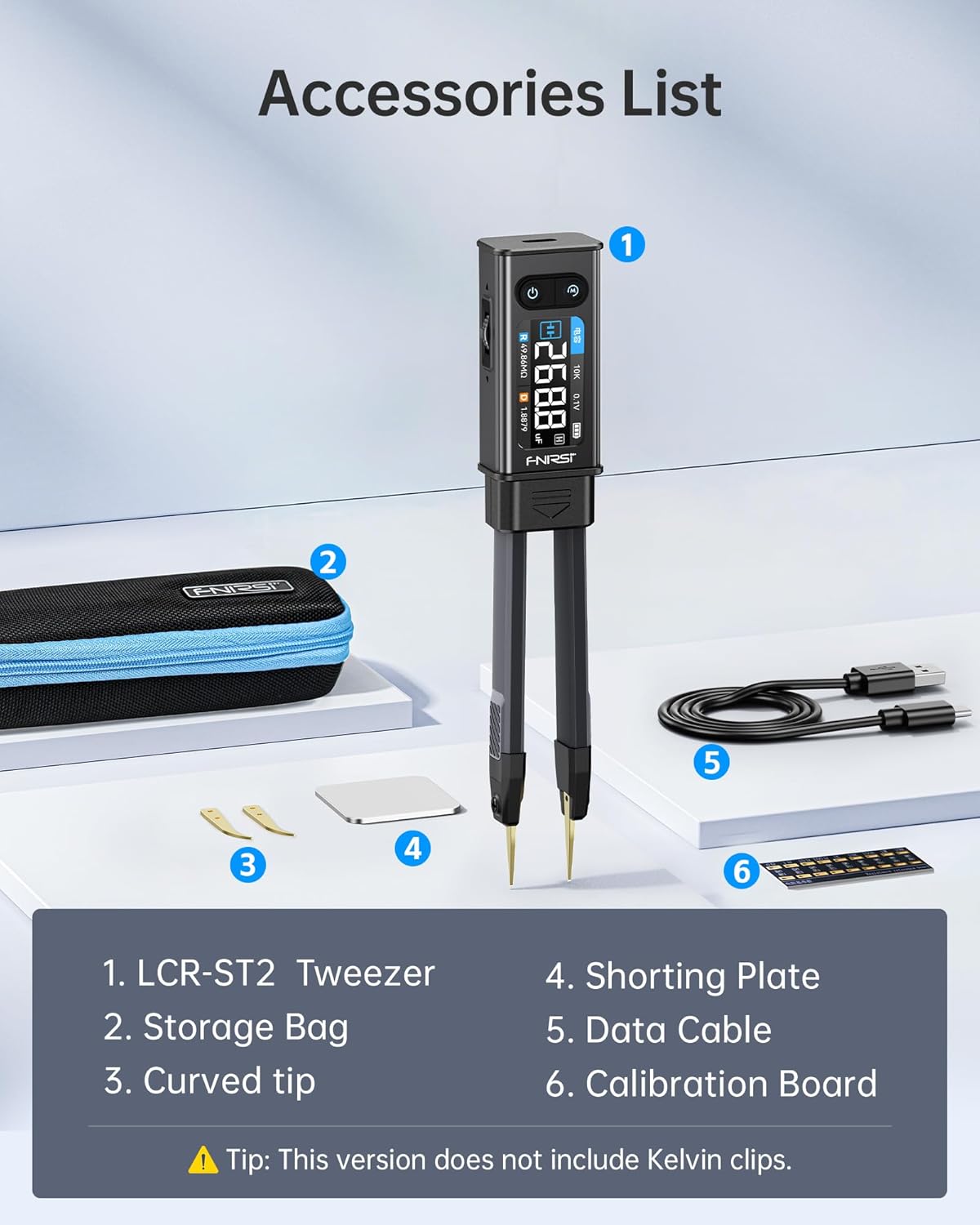
Image: All components included in the FNIRSI LCR-ST2 package.
Product Features
- All-in-One Measurement: Measures resistors, capacitors, inductors, diodes, continuity, and voltage.
- Precise & Reliable Testing: Features four RMS test levels (0.1 / 0.3 / 0.6 / 1.0 V) and series/parallel modes to minimize parasitic effects. Measurement ranges include Capacitors (1 pF–22 mF), Resistors (10 mΩ–10 MΩ), Inductors (1 µH–10 H), Diodes (≤0.7 V), and Voltage (±30 V).
- Primary/Secondary Display: Provides both primary parameters (R/C/L/Z) and secondary parameters (X/D/Q/θ) for comprehensive analysis.
- Easy to Use & Read: Equipped with a 1.47" HD display with adjustable brightness, left/right-hand mode for screen orientation, and a built-in 300 mAh rechargeable battery with Type-C charging and auto power-off. A high-strength rear magnet allows for convenient storage.
- Portable & Versatile: Comes with gold-plated straight and angled tweezer tips with a quick plug-and-swap design for different components. Includes a storage pouch for easy transport.

Image: Overview of the FNIRSI LCR-ST2's smart measurement capabilities.

Image: Effortless and instant tip and probe swapping.
Setup
- Charging: Before first use, fully charge the device using the provided USB-A to Type-C data cable. Connect the Type-C end to the LCR-ST2 and the USB-A end to a compatible USB power source. The battery status will be displayed on the screen.
- Tip Installation/Swapping: The LCR-ST2 comes with straight gold-plated tweezer tips installed. To swap to the curved tips or connect external Kelvin clips (if applicable), gently pull the existing tips/module out from the main body. Align the new tips/module with the slot and push firmly until it clicks into place.
- Power On/Off: Press and hold the power button (usually the top button on the front panel) for a few seconds to turn the device on or off.
- System Configuration: After powering on, you can navigate the settings menu using the rotary button. Adjust language, display brightness, auto power-off duration (e.g., 5, 15, 30 minutes, or off), and screen orientation (auto, left, right) to suit your preference. The auto-orientation feature automatically adjusts the display for left or right-handed use.

Image: Key features for ease of use and setup.
Operation
The FNIRSI LCR-ST2 offers various measurement modes accessible via the menu. Use the rotary button to navigate and select your desired mode.
- LCR Mode: This is the primary mode for measuring inductance (L), capacitance (C), and resistance (R). The device will automatically identify the component type and display the relevant parameters.
- Scan Mode: Performs a full-band scan across multiple frequencies (100 Hz, 120 Hz, 1 kHz, 10 kHz, 100 kHz) to provide detailed impedance characteristics of components. This is particularly useful for analyzing frequency-dependent components like inductors and capacitors.
- Sort Mode: Allows you to set preset values and tolerances for components. The device will then automatically sort and compare components, indicating whether they pass or fail based on your criteria.
- Voltage Measurement: The LCR-ST2 can measure DC voltage within a range of ±30V. Ensure the device is in voltage mode before connecting to a voltage source.
- Series/Parallel Mode: This mode helps eliminate parasitic effects, providing more accurate R/L/C data. You can switch between series and parallel equivalent models for thorough analysis.

Image: Intelligent sorting and comparison feature.

Image: Series-Parallel Equivalent Model for accurate measurements.

Image: Full coverage frequency testing capabilities.

Image: Voltage measurement function.
Calibration
To ensure accurate measurements, especially for resistance, it is recommended to calibrate the device using the provided resistance reference board. Navigate to the 'Calibration' option in the settings menu. Follow the on-screen prompts to perform short-circuit (SC) and open-circuit (OC) calibrations. You can also use the reference board to verify readings across different resistance values.

Image: Detailed product parameters and measurement ranges.
Maintenance
- Keep the device clean and free from dust and debris. Use a soft, dry cloth for cleaning.
- Store the LCR-ST2 in its provided storage pouch when not in use to protect it from physical damage and environmental factors.
- Ensure the battery is charged regularly, especially if storing for extended periods, to maintain battery health.
- Avoid exposing the device to extreme temperatures or high humidity. Refer to the operating and storage temperature ranges in the specifications.
Troubleshooting
- Unstable Readings: Ensure proper contact with the component. Clean the tweezer tips if necessary. Check for external interference or parasitic effects, especially when measuring components on a PCB. Using Kelvin clips (if available) can improve accuracy.
- Device Not Powering On: Check the battery level. Connect the device to a power source using the Type-C cable and allow it to charge for some time.
- Incorrect Component Identification (Auto Mode): While the auto-measurement mode is smart, some complex or unusual components might confuse it. In such cases, manually switch to the specific L, C, R, or D mode for more accurate results.
- Firmware Update: If you experience persistent issues or wish to access new features, check the official FNIRSI website for the latest firmware updates and follow the provided instructions for upgrading.
Specifications
| Parameter | Value |
|---|---|
| Model | LCR-ST2 |
| Display | 1.47" HD Color Screen |
| Dimensions | 6.61 x 1.1 x 0.71 inches (31*170.7*20.3mm) |
| Weight | 2.24 ounces (≈60.8g) |
| Battery Life | ≈3 hours |
| Charging Port | Type-C |
| Operating Temperature | 0°C - 50°C (Humidity <75% RH) |
| Storage Temperature | -20°C - 60°C (Humidity <75% RH) |
| Capacitance Range | 1 pF - 22 mF |
| Resistance Range | 10 mΩ - 10 MΩ |
| Inductance Range | 1 µH - 10 H |
| Diode Voltage | On-state voltage <0.7V |
| Voltage Measurement | ±30V |
Official Product Video
Video: A comprehensive review and demonstration of the FNIRSI LCR-ST2, covering unboxing, system configuration, firmware upgrade, voltage testing, and LCR measurements for various components.
Warranty and Support
For warranty information, technical support, or service inquiries, please refer to the documentation included with your product or visit the official FNIRSI website. Keep your purchase receipt for warranty claims.


