
1. Introduction
This manual provides essential information for the safe and efficient operation of your Humsienk LiFePO4 48V 314Ah battery. Please read this manual thoroughly before installation and use. This battery is designed for photovoltaic energy storage systems, off-grid applications, and other power backup needs, offering a high capacity of 16.07 kWh and a long cycle life.
2. Safety Information
Always prioritize safety during installation and operation. Failure to follow these instructions may result in injury, damage to the battery, or other property damage.
- Electrical Safety: Only qualified personnel should perform electrical connections. Ensure all power sources are disconnected before working on the battery system.
- Ventilation: Install the battery in a well-ventilated area to prevent heat buildup.
- Environment: Avoid exposure to direct sunlight, high temperatures, moisture, or corrosive substances.
- Handling: The battery is heavy (133 kg). Use appropriate lifting equipment and techniques to prevent injury.
- Short Circuits: Prevent short circuits by ensuring proper insulation and using appropriate tools.
- Emergency: In case of fire, use a Class D fire extinguisher. Do not use water.
3. Package Contents
Verify that all items are present in the package upon unboxing:
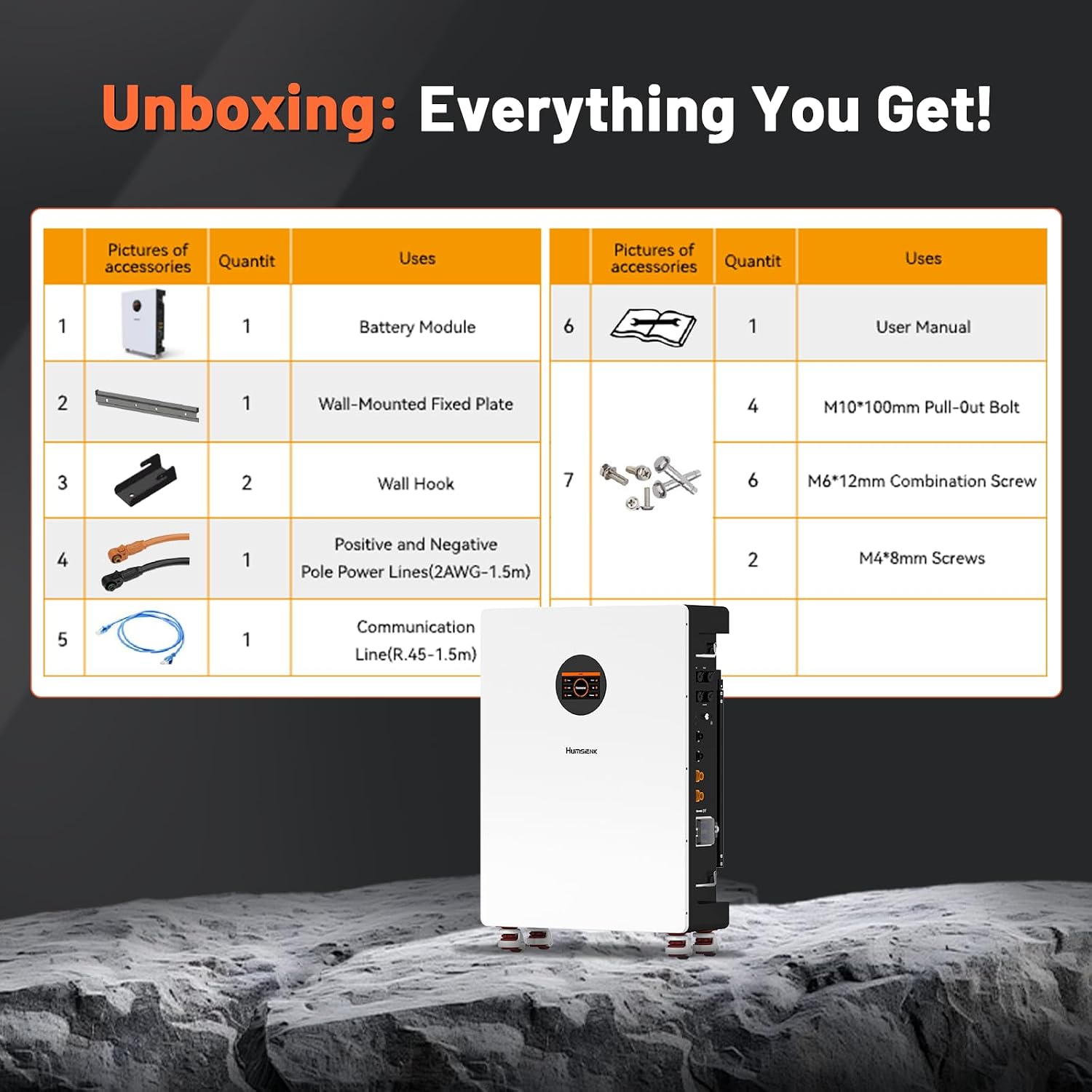
Image: Unboxing contents, showing the battery module, wall-mounted fixed plate, wall hooks, power lines, communication line, user manual, bolts, and screws.
| Item | Quantity | Description |
|---|---|---|
| Battery Module | 1 | Humsienk 48V 314Ah LiFePO4 Battery |
| Wall-Mounted Fixed Plate | 1 | For securing the battery to a wall |
| Wall Hook | 2 | Additional hooks for wall mounting |
| Positive and Negative Pole Power Lines | 1 set (2AWG - 1.5m) | Cables for power connection |
| Communication Line | 1 (R.45 - 1.5m) | Cable for data communication |
| User Manual | 1 | This instruction guide |
| M10*100mm Pull-Out Bolt | 4 | Bolts for mounting |
| M6*12mm Combination Screw | 6 | Screws for assembly |
| M4*8mm Screws | 2 | Screws for assembly |
4. Product Overview
The Humsienk 48V 314Ah LiFePO4 battery is a high-capacity energy storage solution designed for reliability and longevity. It features an integrated Battery Management System (BMS) and a user-friendly interface.
4.1 Key Features
- Dual Reliable Protection: Equipped with a 200A intelligent BMS and two 125A circuit breakers for comprehensive safety. The BMS offers six levels of protection, while dual breakers disconnect both positive and negative poles during overload or short circuit.
- Smart LCD & Multiple Communication Ports: A 4.3-inch color LCD provides real-time data on voltage, SOC, temperature, and BMS status. RS485, CAN, and RS232 communication protocols ensure broad compatibility with popular inverters.
- High Storage Capacity: Offers 51.2V 314Ah (16.07 kWh) of usable energy with up to 96% depth of discharge. Ideal for home backup, off-grid cabins, and RV power systems.
- Ultra-Long Lifespan: Constructed with Grade A LiFePO4 cells, maintaining over 80% capacity after 10,000 deep cycles, ensuring over 10 years of reliable performance.
- Intuitive Installation & Flexible Expansion: Features removable terminals for simple wiring and system expansion. Equipped with four robust Footmaster nylon swivel wheels and L-mounting brackets for smooth movement and stable positioning.
4.2 Components and Interfaces

Image: Detailed view of the battery's side panel, showing communication ports (RS485/CAN, RS232), LINK-IN, LINK-OUT, GND, power terminals (positive and negative), circuit breaker, handles, and swivel wheels with foot brakes.
- RS485/CAN: Communication ports for inverter integration.
- RS232: Communication port for monitoring and control.
- LINK-IN/LINK-OUT: Ports for parallel connection of multiple battery units.
- GND: Grounding terminal.
- Power Terminals (+/-): Connectors for main power cables.
- Circuit Breaker: Manual ON/OFF switch and automatic protection.
- Handles: For easier handling and positioning.
- Swivel Wheels & Foot Brake: For mobility and stable placement.
5. Setup and Installation
Proper installation is crucial for the battery's performance and safety. Follow these steps carefully.
5.1 Physical Installation
The Humsienk 48V 314Ah battery is designed for wall-mounted installation, offering space-saving benefits. It also includes swivel wheels for easy positioning before final mounting.

Image: The Humsienk 48V 314Ah battery shown wall-mounted, with dimensions: 24.41 inches (62cm) width, 10 inches (25.4cm) depth, and 35.04 inches (89cm) height. The battery weighs 294.32 lbs (133 kg).
- Choose Location: Select a dry, well-ventilated area with a stable wall capable of supporting the battery's weight (133 kg). Ensure adequate clearance for air circulation and access to ports.
- Mounting Plate: Secure the wall-mounted fixed plate to the chosen wall using the provided M10*100mm pull-out bolts. Ensure it is level and firmly attached.
- Position Battery: Carefully move the battery into position using its swivel wheels. Align the battery with the fixed plate and secure it using the wall hooks and M6*12mm combination screws.
- Stabilize: Engage the foot brakes on the swivel wheels to prevent accidental movement.
5.2 Electrical Connections
Ensure all connections are tight and correctly polarized to prevent damage or hazards.
- Grounding: Connect the GND terminal to a reliable earth ground.
- Power Cables: Connect the provided positive (+) and negative (-) power lines to the corresponding terminals on the battery. Ensure the other ends are connected to your inverter or charge controller with correct polarity.
- Circuit Breaker: Ensure the integrated circuit breaker is in the OFF position before making any electrical connections.
5.3 Communication Setup
The battery supports RS485, CAN, and RS232 communication protocols for integration with various inverters.

Image: The Humsienk battery shown next to a display of various inverter brands (Pylontech, Luxpower, Growatt, INVT, Deye, SRNE, Megarevo, Must, SMA, Aiswei, SMK Solar, Sofar, Sol-Ark, PowMr, Goodwe, Victron Energy) indicating universal compatibility via CAN/RS485/RS232.
- Select Protocol: Identify the communication protocol supported by your inverter (RS485, CAN, or RS232).
- Connect Cable: Use the appropriate communication cable (e.g., the provided R.45 communication line) to connect the battery's communication port to your inverter's corresponding port.
- Configure Inverter: Refer to your inverter's manual for specific settings to enable communication with the battery.
5.4 Parallel Connection (Optional)
Up to 15 Humsienk 48V 314Ah battery units can be connected in parallel to increase total capacity.

Image: A house powered by two Humsienk batteries connected in parallel, illustrating the capacity to run various household appliances like air conditioners, microwave ovens, coffee machines, refrigerators, and televisions for extended durations.
- Daisy Chain: Connect the LINK-OUT port of the first battery to the LINK-IN port of the second battery, and so on.
- Power Connections: Ensure all batteries in the parallel system are connected to the main power bus with appropriate cabling.
- Configuration: Some inverters may require specific configuration for parallel battery systems. Consult your inverter manual.
6. Operating Instructions
Once installed, the battery is ready for operation. Use the integrated LCD display or the Bluetooth mobile app for monitoring and control.
6.1 Initial Power-Up
- Turn On: Flip the integrated circuit breaker to the ON position. The LCD display should illuminate.
- System Check: Observe the LCD display for any error messages or warnings.
6.2 LCD Display and Mobile App Monitoring
The 4.3-inch LCD touchscreen provides real-time data, and the Bluetooth mobile app offers convenient remote monitoring.

Image: The Humsienk battery's 4.3-inch LCD display showing various monitoring interfaces (Home, Pack, Chart) and a smartphone displaying the corresponding Bluetooth mobile app interface for real-time data and control.
- LCD Display: Navigate through the display interfaces (Home, Pack, Chart) using the touchscreen to view parameters such as voltage, State of Charge (SOC), temperature, and BMS status.
- Bluetooth App: Download the Humsienk mobile application from your device's app store. Pair your smartphone with the battery via Bluetooth to access detailed monitoring and control features remotely.
7. Maintenance
The Humsienk LiFePO4 battery requires minimal maintenance due to its robust design and intelligent BMS.
7.1 General Care
- Cleaning: Keep the battery clean and free from dust. Use a dry cloth for cleaning.
- Connections: Periodically check all electrical and communication connections for tightness.
- Environment: Ensure the installation environment remains within the specified operating temperature range.
7.2 Battery Management System (BMS)
The integrated 200A BMS provides comprehensive protection for the battery cells, enhancing safety and lifespan.

Image: An internal view of the Humsienk battery highlighting the integrated 200A BMS and Grade A cells. Icons represent various protections: Overcharge, Over-discharge, Over-current, Short-circuit, Over-voltage, and High/Low-temperature protection. The image also indicates 15,000 cycles at 50% DoD.
- Overcharge Protection: Prevents the battery from being charged beyond its safe voltage limit.
- Over-discharge Protection: Prevents the battery from being discharged below its safe voltage limit.
- Over-current Protection: Protects against excessive current during charge and discharge.
- Short-circuit Protection: Automatically disconnects the battery in case of a short circuit.
- Over-voltage Protection: Monitors and protects against excessively high voltage.
- High/Low-temperature Protection: Ensures the battery operates within safe temperature ranges, automatically shutting down if limits are exceeded.
8. Troubleshooting
This section addresses common issues you might encounter. For problems not listed here, contact customer support.
| Problem | Possible Cause | Solution |
|---|---|---|
| Battery not powering on | Circuit breaker is OFF Loose power connections Battery deeply discharged | Flip circuit breaker to ON Check and tighten all power cables Connect to a compatible charger and allow time to charge |
| No output power | Circuit breaker tripped Overload condition BMS protection activated | Reset circuit breaker Reduce connected load Check LCD for BMS error codes; address the underlying issue (e.g., temperature, voltage) |
| LCD display not working | Battery is OFF Display cable loose | Ensure battery is ON Check display cable connection |
| Communication error with inverter | Incorrect communication cable Wrong protocol setting Loose cable connection | Ensure correct cable type is used Verify inverter and battery communication settings Check and secure communication cable |
9. Specifications
Detailed technical specifications for the Humsienk LiFePO4 48V 314Ah battery.

Image: The Humsienk battery shown alongside a table detailing its product specifications, including voltage, capacity, dimensions, weight, and operating temperatures.
| Specification | Value |
|---|---|
| Brand | HumsiENK |
| Model Name | HS48V314AH200WALLBT |
| Rated Voltage | 51.2 Volt |
| Working Voltage | 40-58.4 Volt |
| Charging Voltage | 58.4 Volt |
| Discharge Cut-off Voltage | 40 Volt |
| Usable Energy | 16.07 kWh |
| Dimensions (LxWxH) | 62 x 89 x 25.4 cm (24.41 x 35.04 x 10 inches) |
| Item Weight | 133 Kilograms (294.32 lbs) |
| Working Temperature (Charge) | 2-50°C / 35.6-122°F |
| Working Temperature (Discharge) | -20-65°C / -4-149°F |
| Continuous Charging Current | 200A |
| Continuous Discharging Current | 200A |
| Interface | RS232/CAN/RS485 |
| Maximum Parallel Units | 15 |
| Cycle Life | 8000+ cycles (to 80% DoD) |
| Country of Origin | China |
10. Warranty
The Humsienk LiFePO4 48V 314Ah battery comes with a 5-year manufacturer's warranty. This warranty covers defects in materials and workmanship under normal use and service. Please retain your proof of purchase for warranty claims. The warranty does not cover damage caused by improper installation, misuse, neglect, or unauthorized modifications.
11. Support
For any questions, technical assistance, or warranty claims, please contact Humsienk customer service. Our support team is available 24/7 to assist you.
- Online Support: Visit the official Humsienk website for FAQs and support resources.
- Email Support: Refer to your product packaging or the official website for contact email.
- Phone Support: Refer to your product packaging or the official website for contact phone number.
