
Waterdrop WD-C1SL
Waterdrop C1SL Mineralized Reverse Osmosis System User Manual
Model: WD-C1SL
1. Introduction
Thank you for choosing the Waterdrop C1SL Mineralized Reverse Osmosis System. This countertop system provides purified, mineralized, and alkaline ambient water without the need for complex installation. Please read this manual thoroughly before operating the device to ensure proper use and maintenance.

Image 1.1: Overview of the Waterdrop C1SL system highlighting its benefits.
2. Safety Information
- Do not use with well water or water with a Total Dissolved Solids (TDS) level exceeding 500 PPM.
- This product filters water at ambient temperature only and does not have a heating function.
- Ensure the power source is stable and matches the device's requirements.
- Keep the device away from direct sunlight and heat sources.
- Do not immerse the main unit in water or other liquids.
- Keep out of reach of children.
3. What's in the Box
Upon unpacking, please verify that all the following components are included:
- Waterdrop C1SL Main Unit
- 5-Liter Water Tank
- 7-in-1 Composite Filter
- Touch Control Panel (integrated)
- Drain Seat
- Inlet/Outlet Hoses
- User Instructions (this manual)
4. Setup
The Waterdrop C1SL system is designed for easy, no-installation setup. Simply plug it in and it's ready to use.
- Unpack the System: Carefully remove all components from the packaging.
- Place the Unit: Position the system on a flat, stable surface in your kitchen, bedroom, office, or RV. Ensure adequate space around the unit for ventilation.
- Connect the Water Tank: Ensure the 5-liter water tank is properly seated in the main unit.
- Install the Filter: Follow the instructions provided with the filter for correct installation into the system.
- Fill the Water Tank: Fill the 5-liter water tank with tap water.
- Connect Power: Plug the power cord into a suitable electrical outlet.
- Initial Flush: For first-time use or after filter replacement, it is recommended to flush the system by dispensing and discarding the first few liters of purified water. This helps to rinse the new filter and prepare the system for optimal performance.

Image 4.1: The Waterdrop C1SL is easy to set up and can be placed in various locations.
5. Operating Instructions
The Waterdrop C1SL features an intuitive touch control panel for easy operation.
5.1 Power On/Off
Press the power button on the touch screen to turn the unit on or off.
5.2 Water Dispensing
Place a glass or container under the dispenser nozzle. Select your desired water volume from the available options on the touch screen. The system will automatically dispense the selected amount of purified water.

Image 5.1: The touch screen offers multiple water volume options and the portable pitcher can be refrigerated.
5.3 Smart Display Functions
The integrated smart display provides real-time information:
- TDS Monitoring: Displays the Total Dissolved Solids (TDS) level of the purified water.
- Filter Lifespan Indicator: Shows the remaining life of the composite filter, prompting you when it's time for replacement.
- Water Volume Selection: Allows selection of preset water volumes (e.g., 150ml, 250ml, 350ml, 500ml, MAX) or a customized volume.

Image 5.2: The smart control panel and portable water tank.
5.4 Mineralized Alkaline Water
The 7-stage filtration process includes a remineralization stage that adds beneficial alkaline minerals such as Potassium (K), Calcium (Ca), Sodium (Na), and Magnesium (Mg). This process also adjusts the water's pH to an optimal 7.5±, enhancing taste for drinking, cooking, coffee, or tea. Note: The electronic display of the Waterdrop C1SL does not show the pH value.

Image 5.3: Benefits of mineralized alkaline water.
6. Maintenance
6.1 Filter Replacement
The 7-in-1 composite filter has an estimated lifespan of 12 months. The system's smart display will indicate when the filter needs replacement. To replace the filter:
- Turn off and unplug the system.
- Remove the old filter cartridge according to the instructions provided with the replacement filter.
- Insert the new filter cartridge, ensuring it is securely in place.
- Plug in and turn on the system. Perform an initial flush as described in the setup section.
- Reset the filter life indicator on the touch screen, if applicable, following the on-screen prompts.
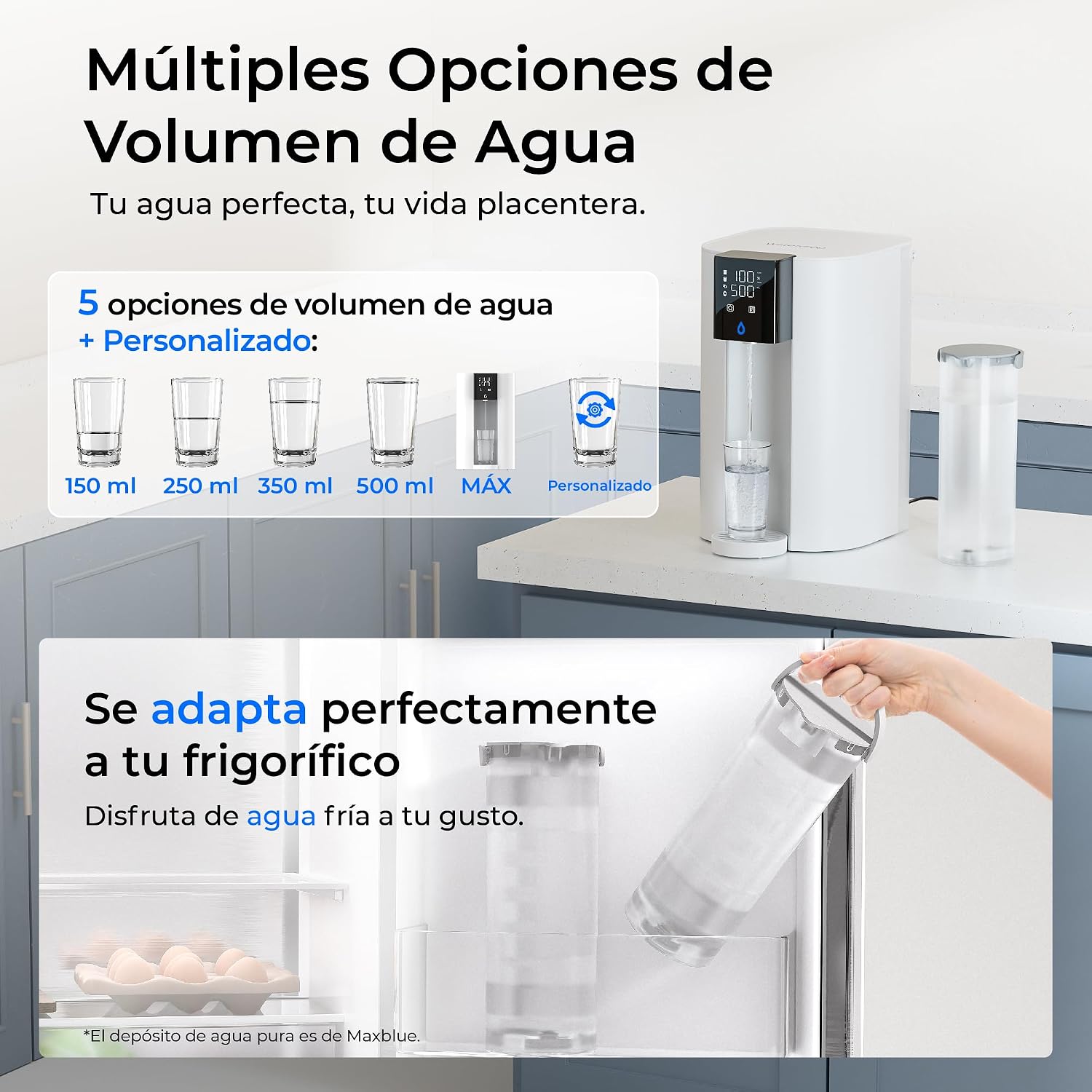
Image 6.1: The 7-in-1 composite filter and its economic benefits.
6.2 Cleaning the System
- Exterior: Wipe the exterior of the unit with a soft, damp cloth. Do not use abrasive cleaners or solvents.
- Water Tank: Periodically clean the 5-liter water tank with mild soap and water. Rinse thoroughly before refilling.
- Drip Tray: Empty and clean the drip tray regularly to prevent water overflow and bacterial growth.
7. Troubleshooting
If you encounter any issues with your Waterdrop C1SL system, please refer to the table below for common problems and solutions.
| Problem | Possible Cause | Solution |
|---|---|---|
| No water dispensed | Water tank empty; Power not connected; Filter not installed correctly; Airlock in system. | Refill water tank; Check power connection; Reinstall filter; Perform initial flush to remove air. |
| Low water flow | Clogged filter; Low water level in tank. | Replace filter; Refill water tank. |
| Unusual taste/odor | New filter needs flushing; Filter lifespan expired. | Perform initial flush; Replace filter. |
| TDS reading is high | Filter lifespan expired; Water source has extremely high TDS. | Replace filter; Ensure water source TDS is below 500 PPM. |
| System leaks | Loose connections; Damaged component. | Check all connections; Contact customer support if damage is suspected. |
If the problem persists after attempting these solutions, please contact Waterdrop Customer Support for assistance.
8. Specifications
| Feature | Detail |
|---|---|
| Model Number | WD-C1SL |
| Dimensions (L x W x H) | 39.7 x 27.7 x 42.8 cm |
| Weight | 7.98 kg |
| Material | Plastic |
| Water Tank Capacity | 5 Liters |
| Purification Method | 7-Stage Reverse Osmosis with Remineralization |
| Installation Type | Countertop (No Installation Required) |
| Power Source | Electric Cable |
| Operating Temperature Range | 20 - 25 Degrees Celsius (Ambient Water) |
| Maximum Input Water TDS | 500 PPM |
| Filter Lifespan | Up to 12 Months (depending on usage and water quality) |
| Pure Water to Drain Ratio | 3:1 |
9. Warranty and Support
Waterdrop products are designed for reliability and performance. For specific warranty details regarding your Waterdrop C1SL system, please refer to the warranty card included in your product packaging or visit the official Waterdrop website.
For technical support, troubleshooting assistance, or to inquire about replacement filters, please contact Waterdrop Customer Support. Contact information can typically be found on the Waterdrop website or on the product packaging.
When contacting support, please have your model number (WD-C1SL) and purchase date available.
Related documentsWD-C1SL


Ask a question about this manual
Ask about setup, troubleshooting, compatibility, parts, safety, or missing instructions. Manuals+ will review the question and use this page’s manual context to help answer it.