
1. Important Safety Information
Before operating your YPOO Treadmill M4438-black, please read and understand all safety instructions. Keep this manual for future reference.
- Maximum User Weight: This treadmill is designed to support a maximum user weight of 300 pounds. Exceeding this limit may result in injury or damage to the equipment.
- Safety Key: Always attach the safety key to your clothing before starting your workout. In case of an emergency or if you step off the treadmill, the safety key will immediately stop the machine.
- Clearance: Ensure adequate clear space around the treadmill (at least 2 feet on sides and 6 feet behind) for safe operation and emergency dismount.
- Children and Pets: Keep children and pets away from the treadmill during operation and when it is unattended.
- Power Source: Connect the treadmill to a grounded electrical outlet. Do not use extension cords or adapters.
- Maintenance: Regularly inspect the treadmill for wear and tear. Do not use if any parts are damaged.
2. What's in the Box
Carefully unpack all components and ensure you have the following items:
- YPOO Treadmill Main Unit
- Power Cord
- Safety Key
- Tool Kit
- User Manual (this document)
If any parts are missing or damaged, please contact customer support.
3. Setup and Assembly
The YPOO Treadmill M4438-black comes 95% pre-assembled, making setup quick and straightforward. You will primarily need to secure the uprights and console.
- Unpack: Remove the treadmill from its packaging and place it on a flat, stable surface.
- Unfold: Carefully unfold the treadmill according to the instructions in the included quick start guide. The soft-drop hydraulic mechanism assists in lowering the running deck.
- Secure Uprights: Use the provided tool kit to tighten the 8 screws that secure the uprights and console in place. Ensure all connections are firm.
- Connect Power: Plug the power cord into the treadmill's power input and then into a grounded electrical outlet.
- Attach Safety Key: Place the safety key into its designated slot on the console. The treadmill will not operate without the safety key in place.

For a visual guide on setup and features, please watch the official product video below:
Official product video demonstrating the YPOO Treadmill M4438-black features and ease of use.
4. Operating Instructions
4.1 Console Overview

The console features an LCD screen displaying key workout metrics such as distance, calories burned, time, and speed. Control buttons allow you to adjust settings and select programs.
4.2 Starting a Workout
- Ensure the safety key is properly inserted and attached to your clothing.
- Press the START button (usually a green button) to begin the treadmill belt movement.
- Adjust the speed using the + and - buttons, or use the quick-access speed controls for 3 mph, 6 mph, and 8 mph.
4.3 Adjusting Incline
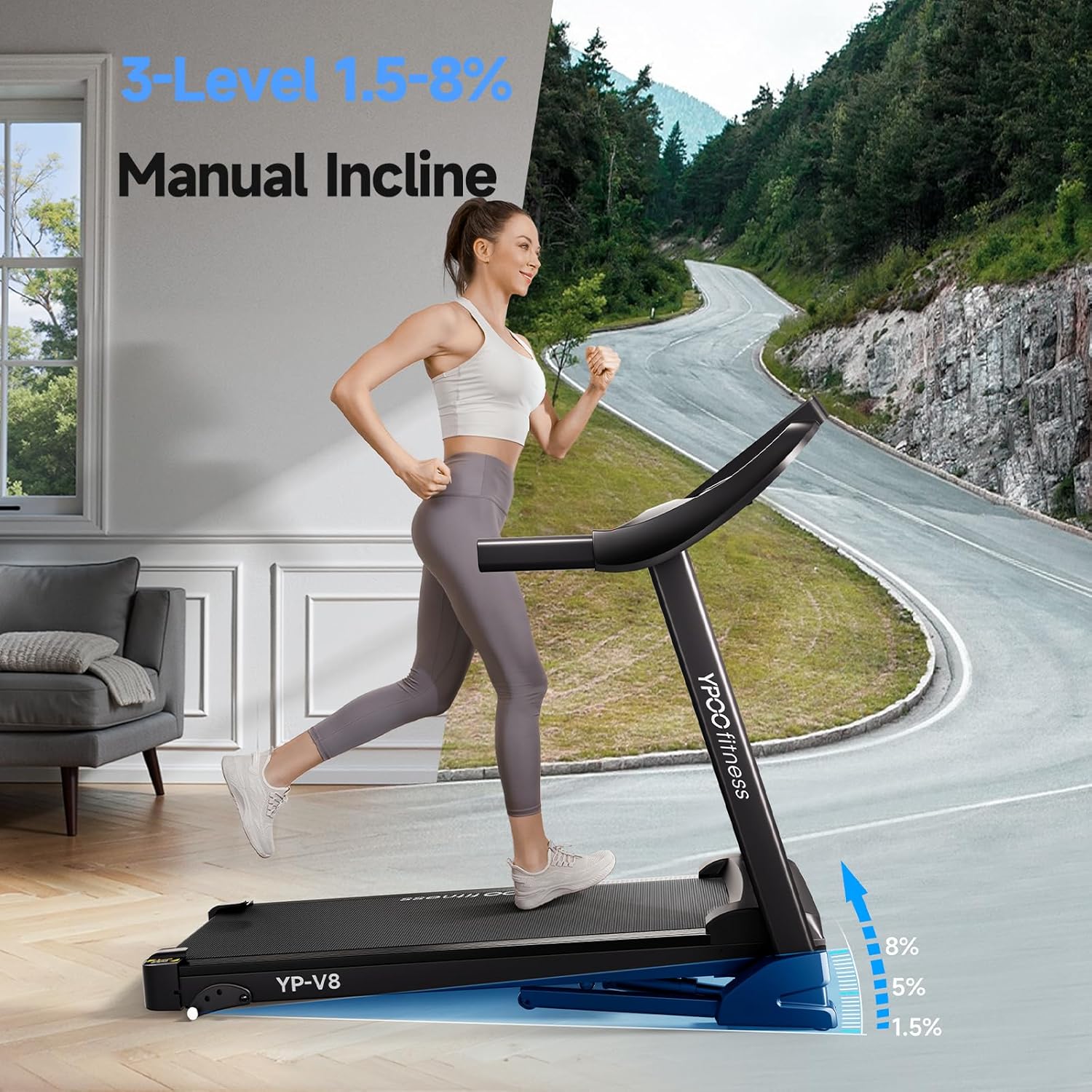
This treadmill features a manual incline with 3 levels, offering up to 8% elevation. To adjust the incline:
- Stop the treadmill and step off the belt.
- Locate the incline adjustment pins at the rear of the treadmill deck.
- Lift the rear of the deck and reposition the pins to the desired incline level (1.5%, 5%, or 8%).
- Ensure both sides are adjusted to the same level before resuming your workout.
4.4 Using Programs and Modes
The treadmill includes 12 preset programs (P-button programs) and countdown modes to vary your workout intensity. Press the PROG button to cycle through the available programs. Refer to the console display for program details.
4.5 Bluetooth Connectivity
Connect your mobile device to the treadmill via Bluetooth to use the YPOOFIT App. This app allows you to sync and track your workout data (distance, calories, time, speed) in real-time. You can also stream music through the built-in speakers.
- Ensure Bluetooth is enabled on your mobile device.
- Open the YPOOFIT App and follow the on-screen instructions to pair with your treadmill.
- Once connected, you can control certain functions and view detailed workout statistics through the app.
4.6 Folding and Storage

The treadmill features an auto-folding design for convenient storage:
- Ensure the treadmill is stopped and unplugged.
- Lift the running deck until it locks into the upright position. The soft-drop mechanism will assist.
- Utilize the transport wheels to easily move the folded treadmill to a storage location. When folded, it occupies approximately 10.5 cubic feet.
5. Maintenance
Regular maintenance ensures the longevity and optimal performance of your treadmill.
- Cleaning: Wipe down the console and other surfaces with a damp cloth after each use. Avoid using abrasive cleaners.
- Belt Lubrication: Periodically lubricate the running belt to reduce friction and extend its lifespan. Refer to the quick start guide for specific instructions on how often and where to apply lubricant.
- Belt Tension and Alignment: Check the running belt tension and alignment regularly. Adjust as needed using the provided tool kit to ensure smooth operation and prevent premature wear.
- Power Cord Inspection: Inspect the power cord for any damage. If damaged, discontinue use and contact customer support.
6. Troubleshooting
If you encounter any issues with your treadmill, refer to the following common solutions:
- Treadmill Not Starting: Ensure the power cord is securely plugged in and the safety key is correctly inserted. Check the circuit breaker.
- Belt Slipping: This may indicate the running belt needs tensioning. Refer to the maintenance section for adjustment instructions.
- Unusual Noises: Stop the treadmill immediately. Inspect the belt for foreign objects or signs of wear. If the noise persists, contact customer support.
- Display Not Working: Check all cable connections to the console. If the issue persists, power cycle the treadmill by unplugging it for 30 seconds and plugging it back in.
For problems not listed here, please contact YPOO customer support.
7. Specifications
| Feature | Detail |
|---|---|
| Brand | YPOO |
| Model Number | M4438-black |
| Product Dimensions (D x W x H) | 51.8" x 23.8" x 44.5" |
| Folded Size | 126 x 24 x 12 inches (approx. 10.5 cubic feet) |
| Item Weight | 63.9 Pounds |
| Material | Alloy Steel |
| Maximum Speed | 8 Miles per Hour |
| Minimum Speed | 0.5 Miles per Hour |
| Maximum Incline Percentage | 8.0% (3 manual levels) |
| Maximum Horsepower | 2.5 Horsepower |
| Maximum Weight Recommendation | 300 Pounds |
| Number of Programs | 12 Preset Programs |
| Connectivity Technology | Bluetooth |
| Metrics Measured | Calories Burned, Distance, Speed, Time |
| Assembly Required | Yes (95% pre-assembled) |
8. Warranty and Support
8.1 Product Warranty
The YPOO Treadmill M4438-black comes with a 1-year warranty from the date of purchase. This warranty covers manufacturing defects and ensures the product is free from defects in material and workmanship under normal use.
Please retain your proof of purchase for warranty claims.
8.2 Customer Support
For technical assistance, warranty claims, or any questions regarding your YPOO Treadmill, please contact the seller, YIFIT FITNESS, or Amazon customer support. Provide your model number (M4438-black) and purchase details for efficient service.


