
Introduction
This manual provides detailed instructions for the setup, operation, maintenance, and troubleshooting of your Transformers TF-Y17Pro Mecha Bluetooth TWS Speaker. Please read this manual thoroughly before using the product to ensure proper function and longevity.
What's in the Box
Verify that all items are present in the package:
- Y17 Mecha Speaker
- Detachable & Foldable Tri-pedal Stand
- Type-C Charging Cable
- User Manual (this document)

Image: Contents of the TF-Y17Pro package.
Setup
1. Assembling the Tri-pedal Stand
The TF-Y17Pro speaker features a detachable and foldable tri-pedal stand. To attach, align the snap-on quick-release ports on the stand with the corresponding slots on the speaker. Press firmly until you hear a click, indicating a secure connection. The legs of the stand can be folded or adjusted to position the speaker as desired.
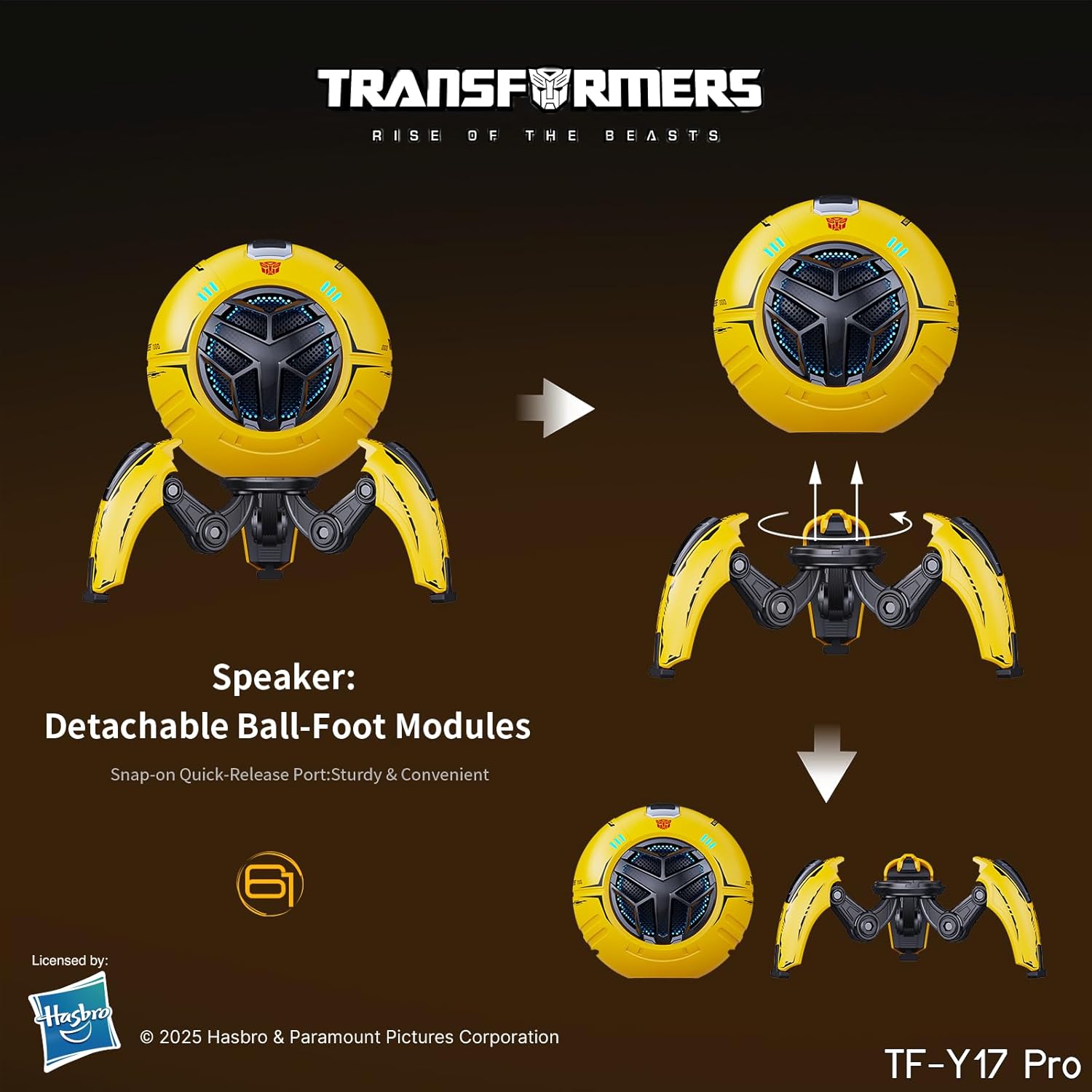
Image: Attaching the detachable tri-pedal stand.

Image: TF-Y17Pro speaker with tri-pedal stand.
2. Initial Charging
Before first use, fully charge the speaker. Connect the provided Type-C charging cable to the speaker's USB-C port and the other end to a compatible 5V/1A USB power adapter (not included). The charging indicator will show the charging status. A full charge typically takes approximately 3 hours and provides 5-8 hours of continuous playback.
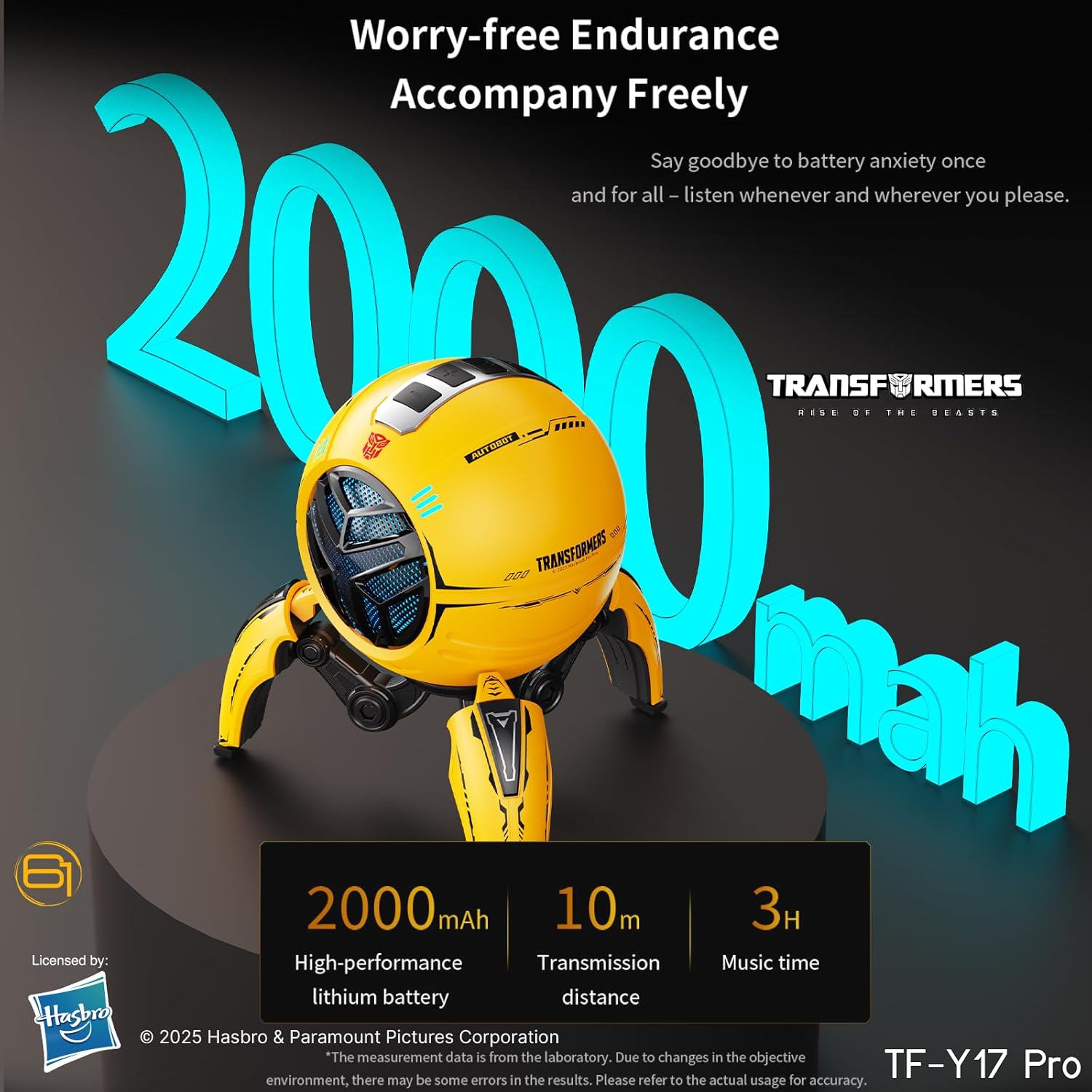
Image: Battery and charging information.
Operating Instructions
1. Power On/Off
- To power on: Press and hold the Power button until the speaker activates. You may hear a "tech" mech voice prompt.
- To power off: Press and hold the Power button until the speaker deactivates.
2. Bluetooth Pairing
- Ensure the speaker is powered on and in Bluetooth pairing mode (indicated by a flashing LED).
- On your device (smartphone, tablet, computer), enable Bluetooth and search for available devices.
- Select "TF-Y17Pro" from the list of devices.
- Once paired, the speaker will indicate a successful connection, and the LED will stop flashing.
3. TWS (True Wireless Stereo) Pairing
To achieve a wider stereo soundstage, you can pair two TF-Y17Pro speakers together:
- Ensure both TF-Y17Pro speakers are powered on and not connected to any other Bluetooth device.
- On one of the speakers, press the "M" button (Mode button) to initiate TWS pairing. It will search for another TF-Y17Pro speaker.
- The two speakers will automatically connect to each other. Once connected, one speaker will act as the master (left channel) and the other as the slave (right channel).
- Now, connect your device to the master speaker via Bluetooth as described in step 2.
4. TF Card Playback
Insert a TF (microSD) card loaded with audio files into the designated TF card slot on the speaker. The speaker will automatically switch to TF card playback mode. Use the control buttons to navigate tracks.
5. Hands-Free Calling
When connected to your smartphone via Bluetooth, the speaker can be used for hands-free calls. Incoming calls will be routed through the speaker. Use the control buttons to answer or end calls.
6. RGB Lighting Effects
The speaker features dynamic RGB ambient lighting. The lighting effects are synchronized with sound. Specific controls for changing or turning off RGB lighting may vary; refer to the device's physical buttons or any associated app if available.
7. Volume Control
Use the '+' and '-' buttons on the speaker to adjust the volume. You can also control the volume from your connected device.
Maintenance
- Cleaning: Use a soft, dry cloth to clean the speaker's surface. Do not use abrasive cleaners, solvents, or harsh chemicals.
- Storage: Store the speaker in a cool, dry place away from direct sunlight and extreme temperatures.
- Water Exposure: This speaker is not waterproof. Avoid exposing it to water or excessive moisture.
- Battery Care: To prolong battery life, avoid fully discharging the battery frequently. Charge the speaker regularly, even if not in use for extended periods.
Troubleshooting
No Power
- Ensure the speaker is fully charged. Connect it to a power source using the Type-C cable.
- Verify the charging cable and adapter are functioning correctly.
No Sound or Distorted Sound
- Check the volume levels on both the speaker and your connected device.
- Ensure the speaker is properly paired via Bluetooth. Disconnect and re-pair if necessary.
- If using a TF card, ensure the audio files are in a compatible format and the card is inserted correctly.
- Move the speaker closer to the connected device to avoid interference.
- If sound is distorted at high volumes, reduce the volume.
Bluetooth Pairing Issues
- Make sure the speaker is in pairing mode (flashing LED).
- Disable and re-enable Bluetooth on your device.
- Forget "TF-Y17Pro" from your device's Bluetooth list and attempt to pair again.
- Ensure no other devices are actively connected to the speaker.
- If attempting TWS pairing, ensure both speakers are not connected to any other device before initiating TWS mode.
Product Specifications
| Feature | Specification |
|---|---|
| Model Name | TF-Y17Pro |
| Speaker Type | Portable Speaker |
| Speaker Maximum Output Power | 10 Watts |
| Audio Driver Type | Dynamic Driver |
| Audio Driver Size | 57 Millimeters |
| Woofer Diameter | 57 Millimeters |
| Frequency Response | 80 Hz |
| Impedance | 4 Ohms |
| Connectivity Technology | Bluetooth 5.4, Wireless |
| Audio Output Mode | Stereo (with TWS pairing) |
| Power Source | Battery Powered |
| Battery Capacity | 2000 Milliamp Hours (18650 cell) |
| Input Voltage | 5 Volts (USB-C) |
| Material | Strong, sturdy, durable plastic |
| Product Dimensions (Speaker only) | Approximately 4" x 4" x 4" |
| Product Dimensions (with stand) | 6"D x 5.4"W x 6.35"H |
| Item Weight | 1.65 pounds |
| Mounting Type | Tabletop Mount |
| Control Method | Buttons on device, App (if available) |
| Special Features | Dual-Form Mecha Transformation, Hi-Fi 10W 57mm Dynamic Driver, Multi-Mode Playback (BT/TF/Call), RGB Ambient Lighting, TWS Stereo Wireless Linking |
| Is Waterproof | False |
Warranty and Support
The Transformers TF-Y17Pro Mecha Bluetooth TWS Speaker comes with a Limited Warranty. For specific details regarding warranty coverage, duration, and terms, please refer to the warranty card included in your product packaging or contact the manufacturer directly.
For technical support, troubleshooting assistance, or any product-related inquiries, please contact Transformers customer service through their official website or the contact information provided with your purchase.


