
BTHFST Full Over Full Bunk Bed
BTHFST Full Over Full Bunk Bed with Desk and Storage Instruction Manual
Model: Full Over Full Bunk Bed (Black)
Brand: BTHFST
Important Safety Information
Please read and understand all instructions before assembly and use. Keep this manual for future reference. Failure to follow these warnings could result in serious injury.
- Top Bunk Age Limit: The top bunk is not suitable for children under 6 years of age.
- Weight Capacity: Do not exceed the recommended weight capacity for each bunk. Refer to the specifications section for details.
- Guardrails: Always use the guardrails on the upper bunk. Ensure they are properly installed and secured.
- Mattress Thickness: The mattress on the upper bunk must not exceed 4-6 inches in thickness to ensure the effectiveness of the guardrails.
- No Jumping: Do not allow jumping on the bed.
- Ladder Safety: Always use the ladder for entering and exiting the upper bunk. Ensure the ladder is securely attached.
- Anti-Tipping Device: Securely anchor the bunk bed to the wall using the provided anti-tipping device to prevent accidental tipping.
- Regular Checks: Periodically check and ensure that all connectors are tight and secure.

Image: Child on the top bunk demonstrating the safety guardrails. The guardrails are 13.4 inches high, ensuring a secure sleeping environment.

Image: Detailed view of safety and stability features, including four mattress slide stoppers, wide stair treads for easy climbing, an anti-tipping device for wall anchoring, and a noise-free design for quiet use.
Product Overview
The BTHFST Full Over Full Bunk Bed is designed to maximize space and functionality, integrating sleeping, studying, and storage solutions. This bed features a sturdy alloy steel frame, a built-in desk, five fabric storage drawers, a charging station, and RGB LED lights. It is suitable for children and teens, providing a versatile and organized living space.
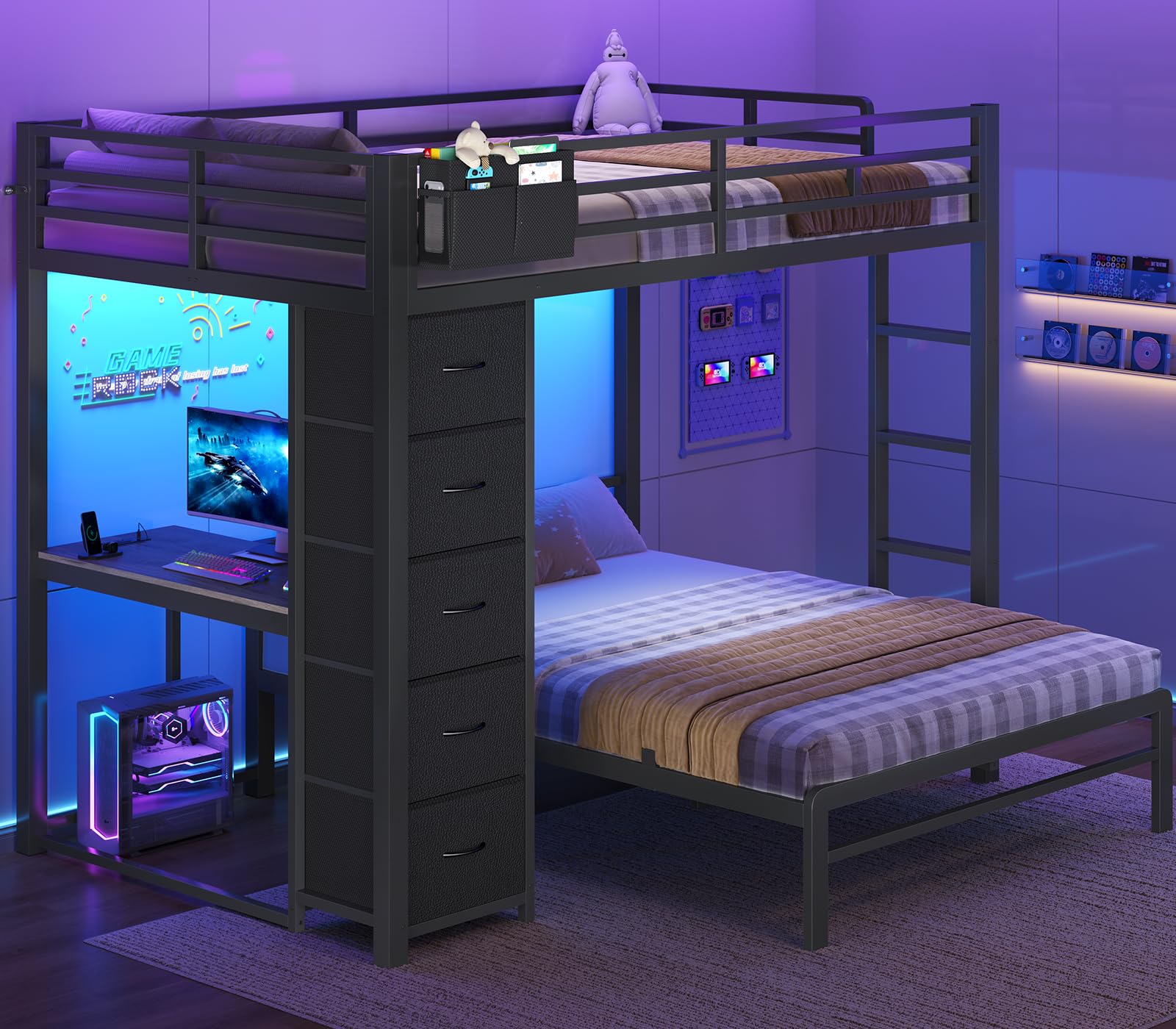
Image: Full view of the BTHFST Full Over Full Bunk Bed in black, showcasing its integrated desk, storage drawers, and overall design.
Video: An overview of the BTHFST Bunk Bed, highlighting its desk, storage drawers, charging station, and LED lights in action.
Components List
Before beginning assembly, ensure all parts listed below are present and undamaged. If any parts are missing or damaged, please contact customer support.
- Bunk Bed Frame (Upper and Lower Sections)
- 5 Fabric Drawers
- LED Lights Strip
- Remote Control for LED Lights
- Charging Station (Integrated into desk)
- Bedside Caddy
- Desk-Side Fabric Bag (5 pockets)
- Hardware Kit (Screws, bolts, Allen wrench, etc.)
- Assembly Instructions (This document and supplementary guides)
Setup and Assembly
This bunk bed requires self-assembly. Detailed step-by-step instructions and diagrams are included in the separate assembly guide provided with your purchase. Please follow those instructions carefully. Ensure you have adequate space and a second person to assist with assembly for safety and ease.
- Unpack Components: Carefully remove all parts from the packaging and lay them out on a clean, soft surface to prevent scratches. Verify all components against the 'Components List'.
- Assemble Frame: Follow the provided assembly guide to construct the main bunk bed frame, starting with the lower bunk, then the desk and storage unit, and finally the upper bunk.
- Install Slats: Securely install the steel slats for both the upper and lower bunks. Ensure they are evenly spaced and firmly attached.
- Attach Safety Features: Install all guardrails, the ladder, and the anti-tipping device as per the assembly guide. The anti-tipping device must be securely fastened to a wall stud.
- Integrate Accessories: Install the fabric drawers, bedside caddy, and desk-side fabric bag. Connect the LED lights and charging station according to the electrical instructions.
- Final Check: Once assembled, double-check all bolts, screws, and connections to ensure they are tight and secure.

Image: An assembled BTHFST bunk bed with desk and storage, illustrating the final product setup in a room.
Operating Instructions
Desk Usage
The integrated desk offers flexible usage options. It can be used from the outer side with a chair, or you can sit directly on the lower bunk to utilize the desk space.
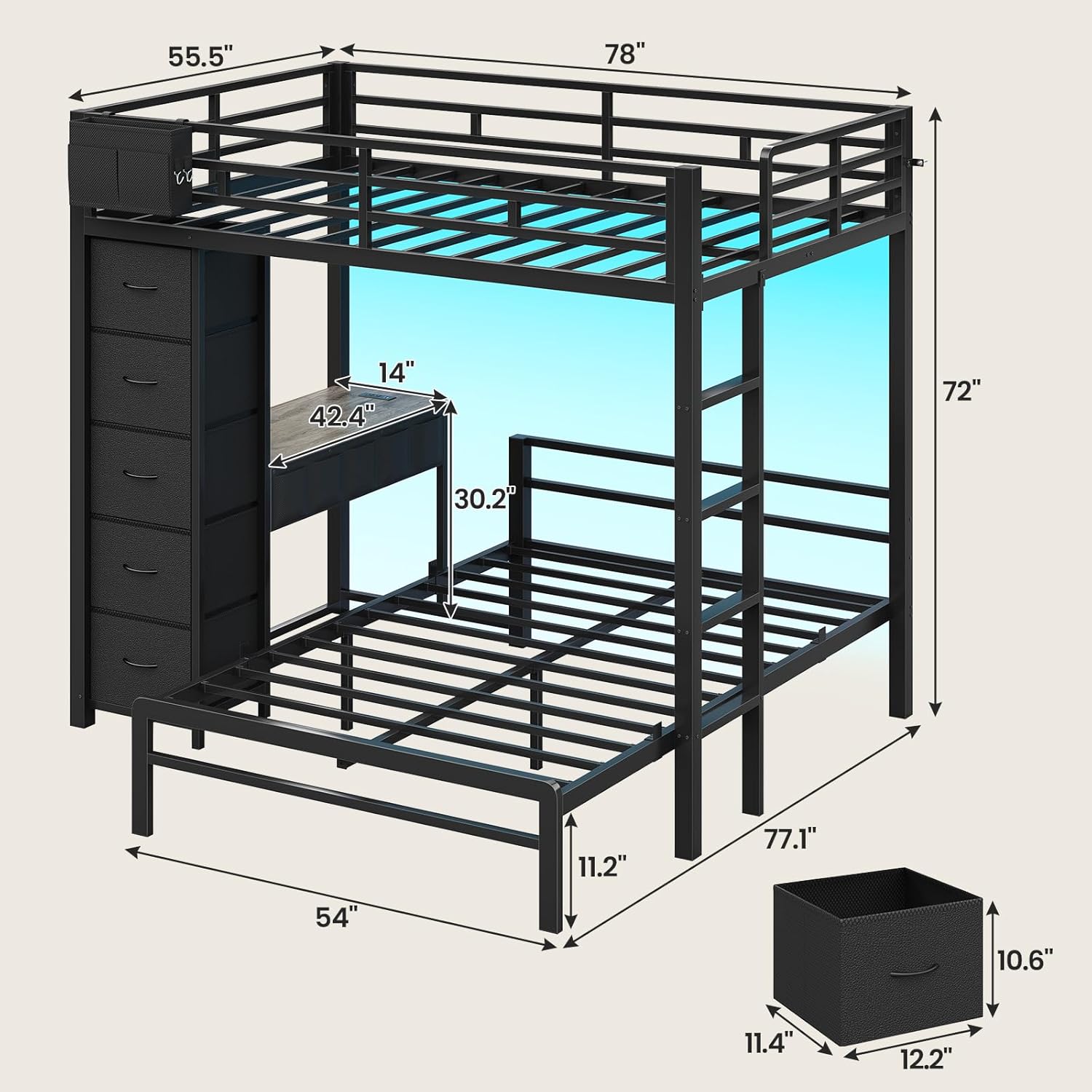
Image: The desk area with a laptop, lamp, and other items, showing its dimensions (42.4 inches wide, 14 inches deep).

Image: Illustration of desk versatility, showing a user working from outside with a chair and another user working while seated on the bed.
Charging Station
The desk includes a built-in power strip for convenient charging of electronic devices.
- AC Outlets: 2 x 125V / 12A outlets for standard plugs.
- USB-A Port: 1 x 5V / 2.1A USB-A port.
- USB-C Port: 1 x 5V / 2.1A USB-C port.
To use, simply plug your devices into the appropriate ports. Ensure the bunk bed is connected to a power source.

Image: Close-up of the power strip with 2 AC outlets, 1 USB-A port, and 1 USB-C port, demonstrating its use for charging a phone and tablet.
RGB LED Lights
The integrated RGB LED lights can be controlled via a mobile application or the included remote control. They offer a wide range of color options and dynamic lighting effects.
- Control Methods: Mobile app (download instructions in separate LED guide) or dedicated remote control.
- Color Options: Over 60,000 color choices available.
- Dynamic Effects: Includes music synchronization, rainbow gradients, and various dynamic modes.
- Timing Function: Set schedules for the lights to turn on/off.

Image: The bunk bed illuminated with RGB LED lights, illustrating the various control options including app control, remote control, dynamic modes, music mode, and timing function.
Storage System
The bunk bed incorporates multiple storage solutions to keep the room tidy and organized.
- 5 Fabric Drawers: Located on the side, these drawers are suitable for organizing clothing, bedding, books, and other items.
- 5 Table-Side Storage Pockets: Attached to the desk, these pockets provide convenient storage for stationery, small electronics, and frequently used items.
- Removable Bedside Caddy: The upper bunk features a caddy for personal items, allowing easy access without leaving the bed.
- Under-Bunk Space: The area beneath the lower bunk offers ample space for larger storage bins, toy boxes, or suitcases.

Image: A composite image showing the five fabric drawers, five table-side storage pockets, and the bedside caddy, highlighting the ample storage space.
Maintenance
Regular maintenance helps ensure the longevity and safety of your bunk bed.
- Cleaning: Wipe the metal frame with a soft, damp cloth. Avoid harsh chemicals or abrasive cleaners. Fabric drawers can be spot cleaned as needed.
- Hardware Check: Periodically (e.g., every 3-6 months) inspect all bolts, screws, and connections. Tighten any that have become loose.
- LED Lights: If LED lights malfunction, check the power connection and remote control battery. Refer to the separate LED light manual for specific troubleshooting.
- Charging Station: Ensure the power cord is securely plugged into a wall outlet. If the charging station is not working, check the circuit breaker.
Troubleshooting
| Problem | Possible Cause | Solution |
|---|---|---|
| Bed feels wobbly or unstable | Loose hardware; Anti-tipping device not secured | Tighten all bolts and screws. Ensure the anti-tipping device is firmly anchored to the wall. |
| LED lights not working | Power connection issue; Remote battery low; LED strip damage | Check power adapter connection. Replace remote battery. Refer to LED light manual for further troubleshooting. |
| Charging station not providing power | Bed not plugged in; Circuit breaker tripped; Faulty outlet | Ensure the bed's power cord is fully plugged into a working wall outlet. Check your home's circuit breaker. Test the outlet with another device. |
| Drawers do not slide smoothly | Obstruction; Misalignment | Check for any items blocking the drawer path. Ensure drawers are correctly inserted into their slots. |
Specifications
| Brand | BTHFST |
| Model | Full Over Full Bunk Bed |
| Color | Black |
| Material | Alloy Steel |
| Overall Dimensions (L x W x H) | 78"L x 77.1"W x 72"H |
| Number of Drawers | 5 Fabric Drawers |
| Special Features | Integrated Desk, Charging Station (2 AC, 1 USB-A, 1 USB-C), RGB LED Lights (App & Remote Control), Bedside Caddy, Desk-Side Fabric Bag |
| Recommended Mattress Thickness (Upper Bunk) | 4-6 inches |
| Assembly Required | Yes |
| Age Range | Child, Teen |
Warranty and Support
For any questions regarding assembly, missing parts, or product functionality, please contact BTHFST customer support. Specific warranty details may be provided with your purchase documentation. Keep your purchase receipt for warranty claims.
Contact information for support can typically be found on the packaging or the brand's official website.
Ask a question about this manual
Ask about setup, troubleshooting, compatibility, parts, safety, or missing instructions. Manuals+ will review the question and use this page’s manual context to help answer it.