
Introduction
This instruction manual provides detailed guidance for the assembly, operation, and maintenance of your SOFTSEA Twin L-Shaped Gaming Loft Bed (Model x95). This innovative bed design features two twin beds, two integrated desks, a TV stand, LED lights, USB ports, and ample storage shelves, making it an ideal space-saving solution for gaming, study, and relaxation. Please read all instructions carefully before beginning assembly and retain this manual for future reference.
Safety Information
- Maximum Weight Capacity: The bed is designed to support a maximum weight of 450 LBS. Do not exceed this limit.
- Assembly: Full assembly is required. It is recommended that at least two people work together to ensure safe and efficient assembly.
- Tools: All necessary tools for assembly are included.
- Stability: Ensure all connections are securely fastened before use. Regularly check and tighten all bolts and screws.
- Mattress Thickness: The recommended mattress thickness is 6 inches.
- Fall Hazard: Always use the provided ladder for accessing the upper bed. Do not jump on the bed.
- Electrical Safety: When using the integrated USB ports and power outlets, ensure devices are compatible and do not overload the circuit.
Product Features
- L-Shaped Design: Maximizes space with two twin beds and integrated storage. The L-shaped structure can be configured on either the left or right side.
- Gaming Ready: Features built-in RGB LED lights for an immersive atmosphere.
- Integrated Power Hub: Includes USB ports and power outlets for convenient device charging.
- Ample Storage: Equipped with multiple storage shelves and two desks, including a dedicated TV stand area.
- Durable Construction: Crafted from high-quality wood and engineered materials for stability and longevity.

This image displays the SOFTSEA Twin L-Shaped Gaming Loft Bed configured for a gaming setup, featuring integrated desks, a TV stand, and various storage options. The room is illuminated with blue LED lighting, highlighting the bed's modern design.

A front perspective of the L-shaped loft bed, illustrating its complete structure, including the two loft beds, desks, and storage units.
Dimensions
The overall dimensions of the SOFTSEA Twin L-Shaped Gaming Loft Bed are approximately 94.5 inches (L) x 78.7 inches (W) x 67.5 inches (H). Please refer to the diagrams below for more detailed measurements of individual components.

This diagram illustrates the overall dimensions of one possible L-shaped loft bed configuration, with a total length of 118.1 inches and a width of 94.4 inches.

This diagram provides an alternative configuration's overall dimensions for the L-shaped loft bed, with a total length of 133.8 inches and a width of 78.7 inches.

This image provides detailed measurements for various components of the loft bed, including desk lengths, shelf depths, and the height of the bed frame, assisting with space planning.
Setup and Assembly
Your SOFTSEA Twin L-Shaped Gaming Loft Bed will arrive in four separate packages. Please ensure all packages are received before beginning assembly. Full assembly is required, and it is strongly recommended that at least two people work together to minimize hassle and ensure safety. All necessary tools are included in the packaging.
Follow the step-by-step instructions provided in the separate assembly guide included with your product. Pay close attention to diagrams and ensure all parts are correctly oriented and securely fastened.
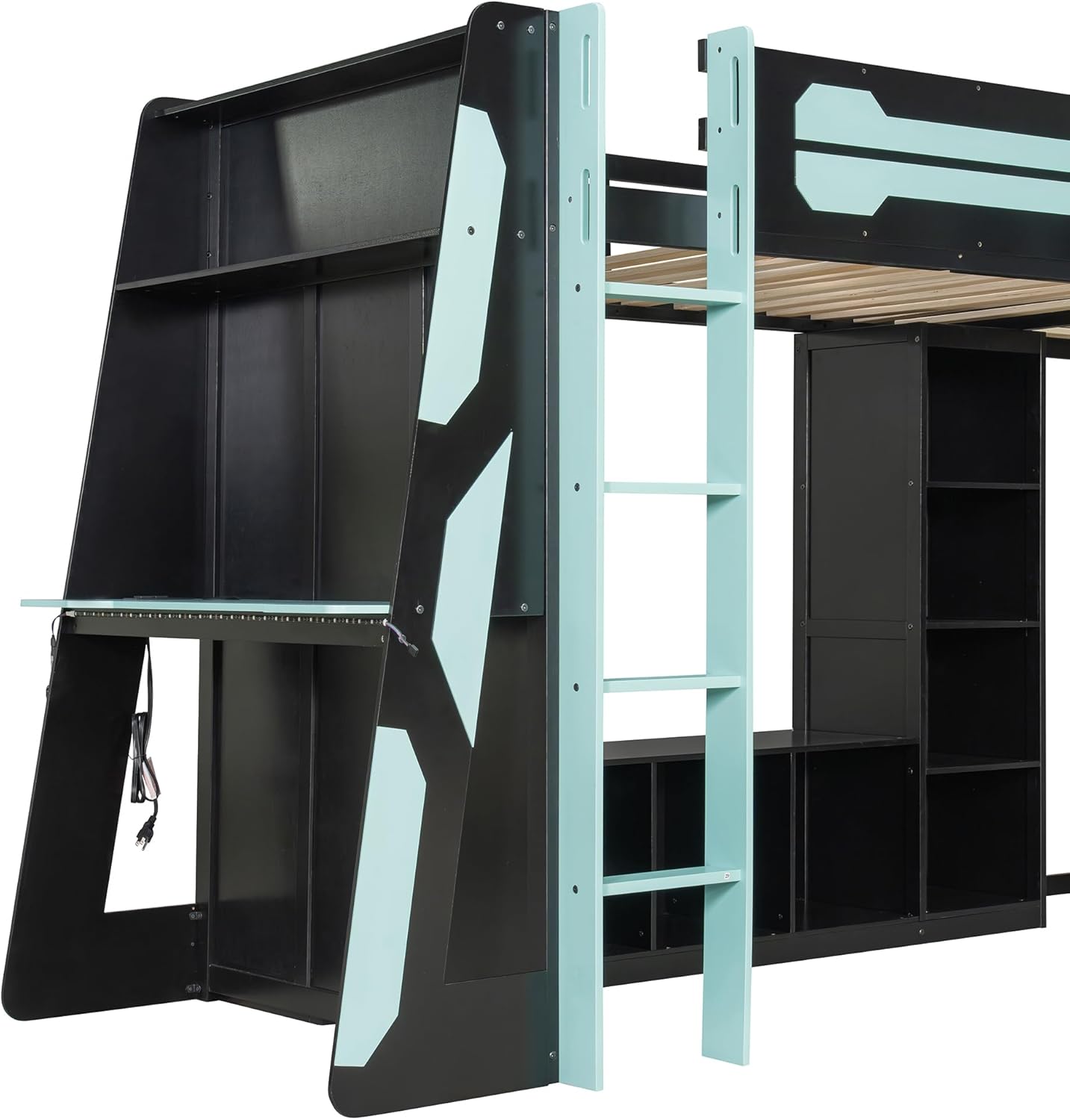
A detailed view of the left-side desk area, featuring a spacious work surface and the integrated ladder for accessing the upper bed.

This image highlights the central TV stand area and the surrounding storage shelves, designed for media equipment, gaming consoles, and other items.

This image shows the right-side desk area, providing a clear view of the workspace available beneath the loft bed.
Operating Instructions
LED Lights
The integrated RGB LED lights can be controlled to create various ambient lighting effects. Refer to the separate LED light controller instructions for specific functions, color changes, and brightness adjustments.
USB Ports and Power Outlets
The bed includes conveniently located USB ports and standard power outlets. Use these to charge your electronic devices such as phones, tablets, and gaming accessories. Ensure devices are compatible with the power output. Always turn off the power strip when not in use or before cleaning.
This video provides a visual overview of the ADORNEVE Gaming RGB Loft Bed, highlighting its integrated LED lighting, various storage solutions, and dedicated desk areas for gaming or study. It showcases the bed's versatility and modern design.
Maintenance
- Cleaning: Wipe surfaces with a soft, damp cloth. Avoid harsh chemicals or abrasive cleaners that may damage the finish.
- Hardware Check: Periodically inspect all bolts, screws, and connections to ensure they are tight. Re-tighten as necessary to maintain stability.
- LED Lights: If LED lights malfunction, refer to the specific troubleshooting guide for the lighting system.
- General Care: Avoid placing excessively hot or cold items directly on the desk surfaces without protection.
Troubleshooting
Loose Connections
If the bed feels wobbly or unstable, check all assembly hardware. Tighten any loose bolts or screws. Ensure the bed is placed on a level surface.
LED Lights Not Working
Check the power connection to the LED strip and the controller. Ensure the power outlet is functional. If the issue persists, consult the LED light system's specific manual or contact customer support.
USB Ports/Outlets Not Functioning
Verify that the power hub is properly plugged into a working wall outlet. Check the safety switch on the power hub to ensure it is in the 'ON' position. Test with a different device to rule out device-specific issues.
Specifications
| Feature | Detail |
|---|---|
| Brand | SOFTSEA |
| Model Number | x95 |
| Size | Twin |
| Color | Blue |
| Product Dimensions | 94.5"L x 78.7"W x 67.5"H |
| Material | Wood + MDF |
| Weight Limit | 450 Pounds |
| Item Weight | 365 Pounds |
| Assembly Required | Yes |
| Special Features | Gaming Loft Bed with Desk, L-shaped, LED Lighting, USB Port |
Contact and Support
For any questions, missing parts, or assistance with assembly, please contact SOFTSEA customer support. Refer to your purchase documentation for specific contact details or visit the official SOFTSEA website.