
1. Introduction
Thank you for choosing the GOBOULT Z40 V2.0 True Wireless Earbuds. These earbuds are designed to provide a high-quality audio experience with features such as extended playtime, clear call quality, and low-latency gaming. This manual provides instructions for setup, operation, maintenance, and troubleshooting to ensure optimal use of your device.

Image 1.1: GOBOULT Z40 V2.0 True Wireless Earbuds and Charging Case.
2. Product Overview
2.1 Included Components
The package includes the following items:
- GOBOULT Z40 V2.0 Earbuds
- Charging Case
- USB Charging Cable
- Eartips (various sizes)
- User Manual
- Warranty Card
2.2 Key Features
- Up to 70 hours total playtime
- Quad Mic Environmental Noise Cancellation (ENC) for clear calls
- 13mm Bass Drivers for enhanced audio
- 45ms Low Latency Gaming Mode
- Bluetooth v5.4 for stable connectivity
- IPX5 Water Resistance
- Smart Touch Controls with Voice Assistant support
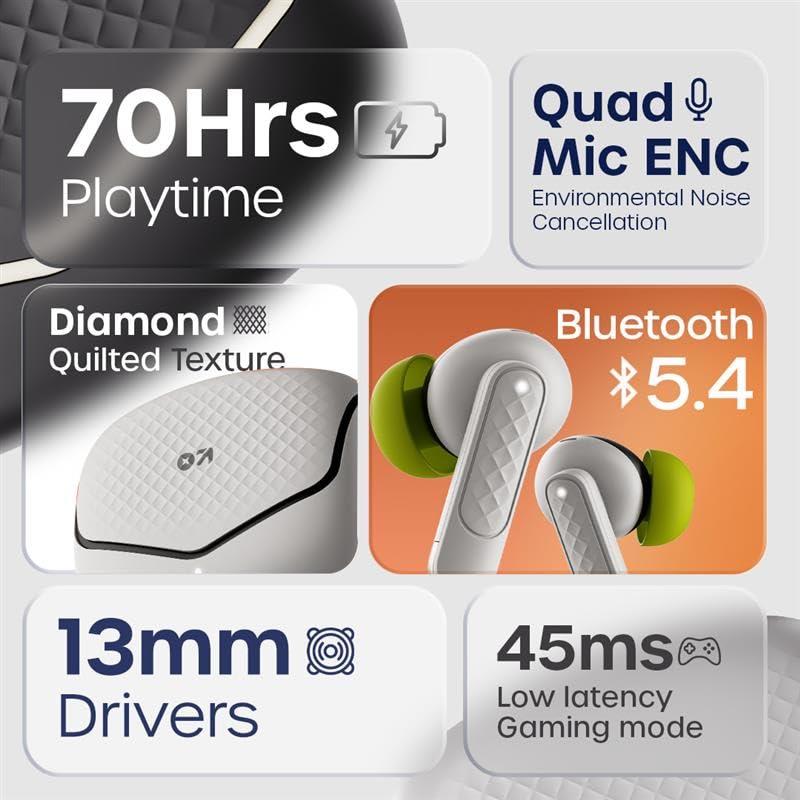
Image 2.1: Overview of GOBOULT Z40 V2.0 key features.
3. Setup Instructions
3.1 Charging the Earbuds and Case
Before first use, fully charge the earbuds and the charging case.
- Place the earbuds into the charging case.
- Connect the USB charging cable to the charging port on the case and to a power source.
- The indicator light on the case will show charging status.
- A 10-minute charge provides approximately 120 minutes of playtime. The case offers up to 70 hours of total battery life for the earbuds.

Image 3.1: Charging and battery life details.
3.2 Bluetooth Pairing
The GOBOULT Z40 V2.0 earbuds utilize Bluetooth v5.4 for quick and reliable pairing.
- Open the charging case. The earbuds will automatically enter pairing mode (Blink&Pair™ Tech).
- On your device (smartphone, tablet, laptop), enable Bluetooth.
- Search for available Bluetooth devices and select "GOBOULT Z40 V2.0" from the list.
- Once connected, the earbuds will indicate successful pairing.
- The earbuds will automatically reconnect to the last paired device when removed from the case.

Image 3.2: Bluetooth 5.4 and Blink&Pair™ technology.
4. Operating Instructions
4.1 Touch Controls
The earbuds feature intuitive touch controls for managing various functions:
- Play/Pause: Single tap on either earbud.
- Next Track: Double tap on the right earbud.
- Previous Track: Double tap on the left earbud.
- Answer/End Call: Single tap on either earbud.
- Reject Call: Press and hold either earbud for 2 seconds.
- Activate Voice Assistant: Triple tap on either earbud.
- Toggle Gaming Mode: Press and hold the right earbud for 2 seconds (specific gesture may vary, refer to quick start guide).

Image 4.1: Hands-free control and voice assistant activation.
4.2 Making and Receiving Calls
The Quad Mic ENC system ensures clear voice transmission during calls by reducing environmental noise.
- Ensure earbuds are connected to your device.
- Use the touch controls to answer, end, or reject calls.

Image 4.2: Quad Mic ENC for clear calls.
4.3 Gaming Mode
Activate Combat™ Gaming Mode for a low-latency audio experience, ideal for gaming and video playback.
- Refer to the touch control section for activating Gaming Mode (typically a press and hold gesture).
- This mode reduces audio latency to 45ms, providing synchronized sound with on-screen action.

Image 4.3: Low Latency Gaming Mode.
5. Maintenance
5.1 Cleaning
Regular cleaning helps maintain the performance and longevity of your earbuds.
- Use a soft, dry, lint-free cloth to wipe the earbuds and charging case.
- Gently remove any earwax or debris from the eartips and speaker mesh using a small brush or cotton swab.
- Avoid using abrasive materials, alcohol, or chemical cleaners.
5.2 Water Resistance (IPX5)
The earbuds are rated IPX5 water-resistant, meaning they can withstand sweat and light splashes.
- Do not submerge the earbuds in water.
- Avoid exposing them to heavy rain or strong water jets.
- Ensure the earbuds are dry before placing them back into the charging case to prevent damage.
Image 5.1: IPX5 Water Resistance.
6. Troubleshooting
If you encounter any issues with your GOBOULT Z40 V2.0 earbuds, please refer to the following common solutions:
- No Sound: Ensure the earbuds are charged and properly paired with your device. Check the volume level on both the earbuds and your device.
- Pairing Issues: Make sure Bluetooth is enabled on your device and the earbuds are in pairing mode. Try unpairing and re-pairing the earbuds.
- Intermittent Connection: Ensure you are within the 10-meter Bluetooth range. Avoid obstacles between the earbuds and your device.
- Charging Problems: Verify the charging cable is securely connected and the power source is active. Clean the charging contacts on both the earbuds and the case.
- Microphone Not Working: Ensure the earbuds are properly seated in your ears. Check if any debris is blocking the microphone ports.
If the problem persists, please contact GOBOULT customer support for further assistance.
7. Specifications
Detailed technical specifications for the GOBOULT Z40 V2.0 True Wireless Earbuds:
| Feature | Specification |
|---|---|
| Model Name | Z40 V2.0 (Airbass Earbuds) |
| Connectivity Technology | Wireless (Bluetooth) |
| Bluetooth Version | 5.4 |
| Bluetooth Range | 10 Metres |
| Audio Driver Size | 13 Millimetres |
| Audio Driver Type | Dynamic Driver |
| Frequency Response | 20 Hz |
| Sensitivity | 115 dB |
| Battery Life (Earbuds) | Up to 70 Hours (with charging case) |
| Charging Time | 10 Minutes for 120 minutes playtime |
| Microphone | Quad Mic with ENC |
| Audio Latency | 45 Milliseconds (Gaming Mode) |
| Water Resistance | IPX5 |
| Controller Type | Touch |
| Hardware Interface | USB Type C |
| Ear Placement | In Ear |
| Product Dimensions | 5.8 x 4 x 4.9 cm |
| Item Weight | 600 g (total package weight) |

Image 7.1: 13mm Bass Drivers for enhanced audio.
8. Warranty and Support
8.1 Manufacturer's Warranty
The GOBOULT Z40 V2.0 True Wireless Earbuds come with a 1-year manufacturer’s warranty. This warranty covers manufacturing defects and ensures product quality and durability.
8.2 Customer Support
For any product-related queries, technical assistance, or warranty claims, please contact GOBOULT customer support. Refer to the warranty card included in your package for contact details or visit the official GOBOULT website.


