
Introduction
This manual provides comprehensive instructions for the installation, operation, and maintenance of your QWORK 3-Digit Combination Cam Lock. Please read this guide carefully before attempting to install or use the product to ensure proper function and security.
Product Features
- Durable Construction: The lock body is crafted from chrome-plated zinc alloy, offering optimal protection against oxidation and rust.
- Keyless Security: Features a 3-digit combination mechanism for easy, keyless access and enhanced security for your belongings.
- Default Combination: The factory-set combination is 0-0-0.
- Versatile Application: Suitable for various uses including gym lockers, cabinets, drawers, and mailboxes.
Specifications
| Material | Chromed Zinc Alloy |
| Cylinder Length | 30 mm |
| Panel Thickness Compatibility | 15 - 25 mm |
| Lock Diameter | 19 mm |
| Distance from Cabinet Top to Lock Center | 24 mm |
| Item Dimensions (L x W x H) | 10.7 x 7.7 x 4 cm |
| Item Weight | 190 Grams |
| Model Number | WD45903 |
| Color | Silver |
Package Contents
The package typically includes the following items:
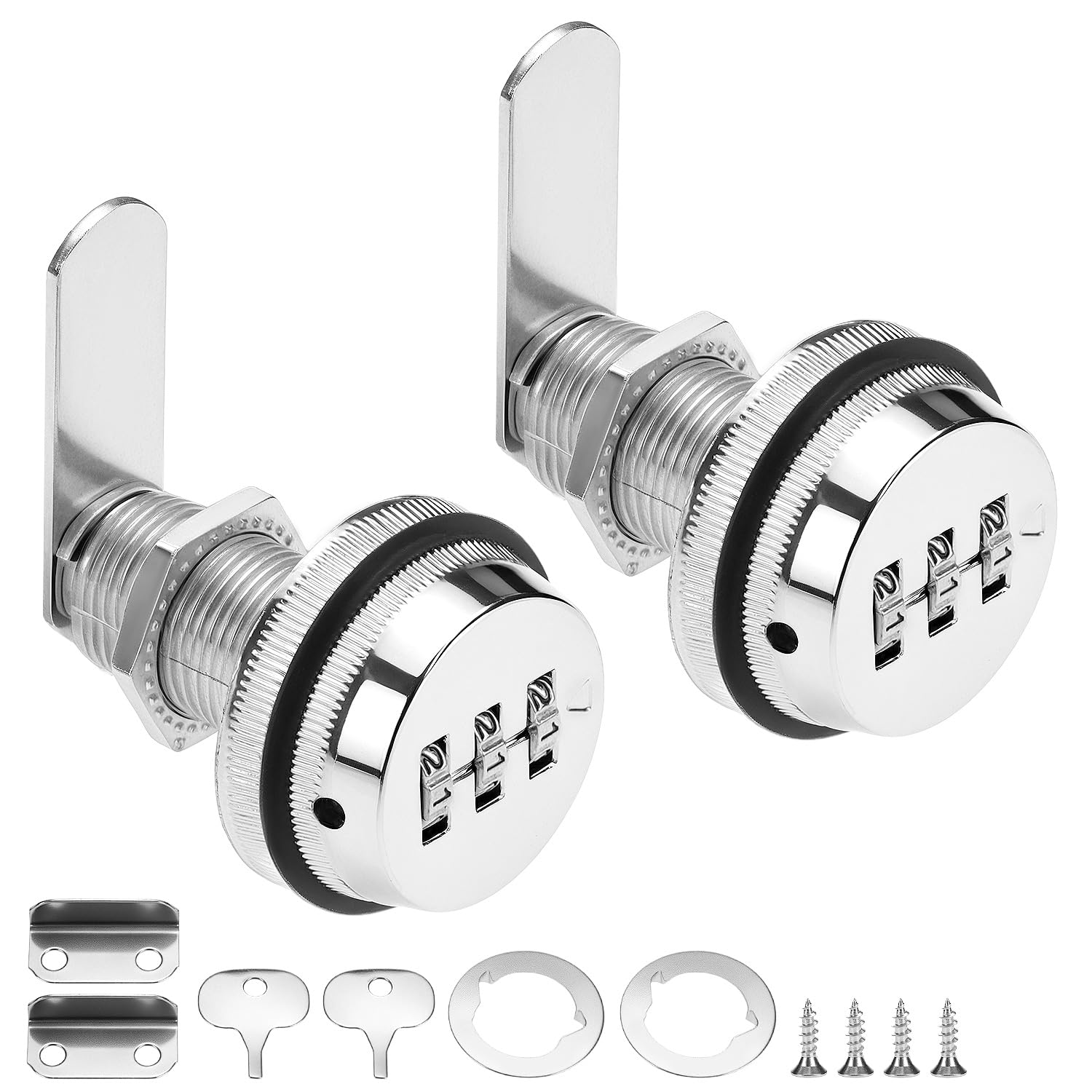
- 2 x QWORK Combination Cam Locks
- Mounting hardware (including deepened hex nut, reinforcement washer, anti-slip screw, and cam arm)

Image showing the individual components of the QWORK combination cam lock, including the main lock cylinder, hex nut, washers, and cam arm.
Installation
Follow these steps to install your combination cam lock:
- Prepare the Panel: Ensure the cabinet or drawer panel has a pre-drilled hole with a diameter of 19mm. The lock is suitable for panel thicknesses between 15mm and 25mm.
- Insert Lock Cylinder: Insert the threaded portion of the lock cylinder through the prepared hole from the exterior side of the panel.
- Secure with Hex Nut: From the interior side of the panel, thread and tighten the deepened hex nut onto the lock cylinder to secure it firmly in place.
- Attach Cam Arm: Place the reinforcement washer onto the cylinder, followed by the cam arm. Secure the cam arm using the anti-slip screw. Ensure the cam arm is oriented correctly to engage with the cabinet frame when locked.
- Test Functionality: Verify that the lock operates smoothly and the cam engages and disengages properly with the cabinet or drawer frame.
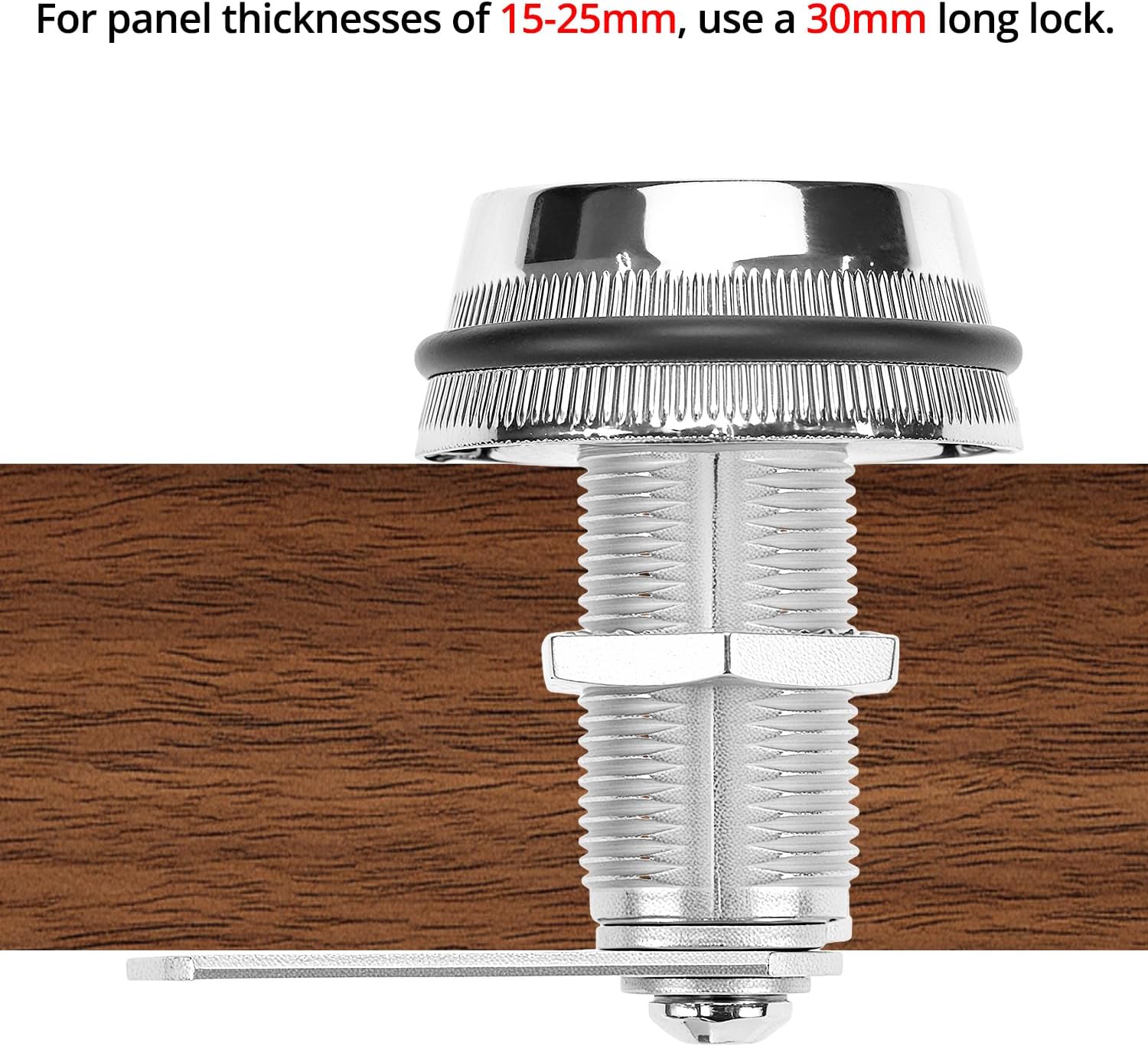
Image illustrating the lock cylinder installed through a wooden panel, secured by a nut.

Diagram providing detailed measurements of the lock components for proper installation.
Setting and Changing the Combination
The default combination is 0-0-0. To set or change your personal 3-digit combination, follow these steps:
- Open the Lock: Ensure the lock is currently open. If it's locked, set the dials to the current combination (default 0-0-0) and turn the knob to the unlocked position.
- Locate Reset Hole: Find the small reset hole located on the side of the lock body.
- Insert Tool: Insert a sharp, small tool (such as a pen tip or a straightened paperclip) into this hole and press firmly.
- Set New Combination: While keeping the tool pressed into the reset hole, rotate the three number dials to your desired new 3-digit combination.
- Release Tool: Once your new combination is set, release the tool from the reset hole. The new combination is now active.
Important Note: If you forget your modified combination, you will not be able to unlock the lock. Please remember your new combination and store it securely if necessary.
Visual instructions demonstrating the process of changing the lock's 3-digit combination.
Operation
To operate your QWORK Combination Cam Lock:
- To Unlock: Rotate the three number dials to your set 3-digit combination. Once the correct combination is aligned, turn the knob to the open position to unlock the cabinet or drawer.
- To Lock: Close the cabinet or drawer. Turn the knob to the locked position. Then, scramble the dials to hide your combination, preventing unauthorized access.

Image of the combination cam lock securely installed on a wooden cabinet.
Maintenance
Proper maintenance will ensure the longevity and smooth operation of your lock:
- Cleaning: Regularly wipe the lock body with a soft, dry cloth to remove dust, dirt, and fingerprints.
- Avoid Harsh Chemicals: Do not use abrasive cleaners, solvents, or harsh chemicals, as these can damage the chrome finish and internal mechanisms.
- Lubrication: If the dials become stiff or difficult to turn, apply a small amount of silicone-based lubricant or graphite powder to the dial mechanism. Avoid oil-based lubricants which can attract dust.
- Check Fasteners: Periodically inspect the mounting screws and hex nut to ensure they remain tight and the lock is securely installed.
Troubleshooting
If you encounter issues with your QWORK Combination Cam Lock, refer to the following common problems and solutions:
Lock will not open:
- Incorrect Combination: Double-check that you have entered the correct 3-digit combination. Ensure each dial is precisely aligned with the indicator mark.
- Recently Changed Combination: If you recently changed the combination, ensure you are using the new combination, not the old one or the default.
Dials are stiff or hard to turn:
- Debris: Clean any accumulated dust or debris from around the dials and between the moving parts.
- Lubrication: Apply a small amount of dry lubricant (e.g., graphite powder or silicone spray) to the dial mechanism.
Warranty and Support
For warranty information, technical assistance, or any product-related inquiries, please contact QWORK customer service through their official channels. Please retain your purchase receipt as proof of purchase for any warranty claims.