
1. Important Safety Instructions
Please read all instructions carefully before using this appliance. Failure to follow these instructions may result in electric shock, fire, or serious injury.
- This appliance is for household use only. Do not use outdoors or on wet surfaces.
- Do not allow children to operate the vacuum cleaner. Close supervision is necessary when used near children.
- Do not pick up flammable or combustible liquids, such as gasoline, or use in areas where they may be present.
- Do not pick up anything that is burning or smoking, such as cigarettes, matches, or hot ashes.
- Do not use without the dust cup and filters in place.
- Turn off the appliance before connecting or disconnecting the motorized brush, extension wand, or other accessories.
- Use only as described in this manual. Use only manufacturer's recommended attachments.
- Do not handle the charger or appliance with wet hands.
- Keep hair, loose clothing, fingers, and all parts of body away from openings and moving parts.
- Exercise extra care when cleaning on stairs.
- Store the appliance indoors in a cool, dry place.
2. Product Overview
The Kermoky Robust 5 is a cordless stick vacuum cleaner designed for efficient cleaning of various floor types. It features powerful suction, a long-lasting battery, and specialized brush technology.
Key Components
- Main Motor Unit (with dust cup and interactive screen)
- Extension Wand
- Motorized Floor Brush (with soft & hard combo bristles)
- Wall-Mounted Charging Dock
- Crevice Tool
- 2-in-1 Brush Tool
- Mite Remover Tool
- Power Adapter
- Aroma Tablets
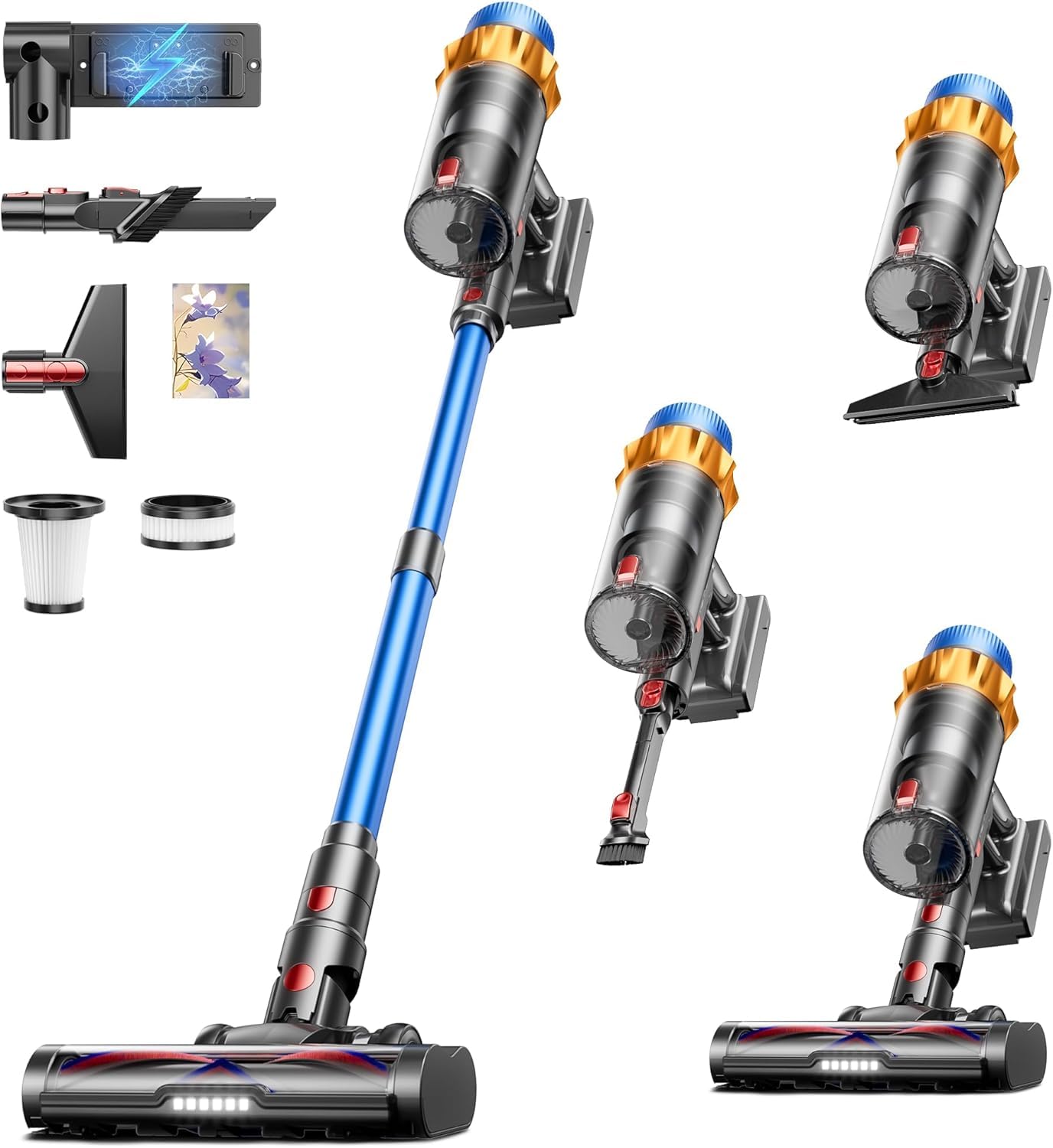
Image: The main components of the Kermoky Robust 5 Cordless Vacuum Cleaner, including the motor unit, extension wand, and floor brush.

Image: Close-up of the interactive screen on the main motor unit, showing battery level and current suction mode indicators.
3. Setup and Initial Use
3.1 Assembly
- Connect the Extension Wand: Insert the extension wand into the main motor unit until it clicks securely.
- Attach the Floor Brush: Connect the motorized floor brush to the other end of the extension wand, ensuring it locks into place. For handheld use, attach accessories directly to the main motor unit.
- Install Wall-Mounted Charging Dock: Choose a suitable location near a power outlet. Secure the charging dock to the wall using the provided screws and anchors.
3.2 Initial Charging
Before first use, fully charge the vacuum cleaner. Connect the power adapter to the wall-mounted charging dock and plug it into a power outlet. Hang the vacuum cleaner on the dock to initiate charging. The interactive screen will display the charging status.

Image: The vacuum cleaner mounted on its wall-charging dock, indicating the charging process.
4. Operating Instructions
4.1 Power On/Off and Suction Adjustment
- Press the power button on the main motor unit to turn the vacuum on.
- Use the mode button to switch between different suction power levels (e.g., Eco, Standard, Max). The interactive screen will display the selected mode.
- Press the power button again to turn the vacuum off.
4.2 Using Attachments
The Kermoky Robust 5 comes with various attachments for different cleaning needs:
- Motorized Floor Brush: Ideal for both hardwood floors and carpets. Its soft and hard combo bristles effectively remove dust and pet hair while preventing tangles.
- Crevice Tool: Use for narrow gaps, corners, and edges.
- 2-in-1 Brush Tool: Combines a brush and a wide nozzle for versatile cleaning of upholstery, curtains, and delicate surfaces.
- Mite Remover Tool: Attach directly to the main motor unit for cleaning mattresses, sofas, and other fabric surfaces to remove dust mites.

Image: Close-up of the upgraded soft and hard combo brush head, designed for effective cleaning on various surfaces and anti-tangle performance.

Image: The vacuum cleaner equipped with the mite remover tool, demonstrating its use on a mattress for deep cleaning.
4.3 Self-Standing Feature
The vacuum cleaner is designed to stand upright on its own, allowing you to pause cleaning at any time without needing to lean it against a wall or furniture.

Image: The vacuum cleaner standing independently in a room, showcasing its self-standing design.
4.4 Aromatherapy Tablet Integration
The vacuum outlet is equipped to hold aromatherapy tablets. Insert a tablet into the designated slot to release a pleasant scent while vacuuming, improving the air quality in your home.
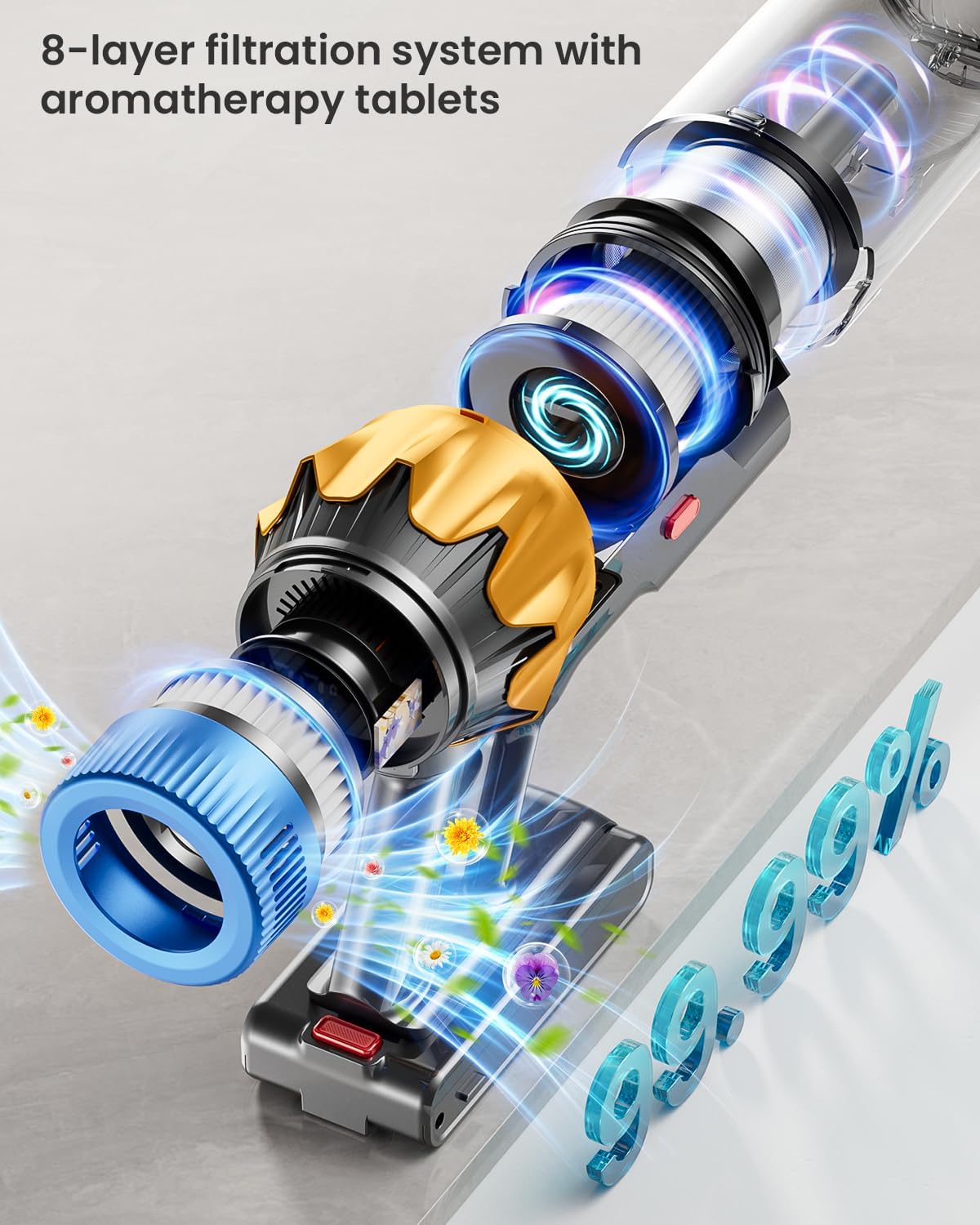
Image: An exploded view illustrating the 8-stage filtration system and the location for inserting aromatherapy tablets.
4.5 Operational Videos
Video: Demonstration of the vacuum cleaner's powerful suction on various debris. This video highlights its cleaning capabilities.
Video: A user demonstrating the lightweight design of the vacuum cleaner by using it to clean high-up areas like ceiling vents.
Video: An unboxing and review of the Kermoky Cordless Stick Vacuum Cleaner, showcasing its components and initial setup.
5. Maintenance
Regular maintenance ensures optimal performance and extends the lifespan of your vacuum cleaner.
5.1 Emptying the Dust Cup
- When the dust cup is full, or suction power decreases, empty it.
- Press the dust cup release button to detach it from the main motor unit.
- Open the bottom lid of the dust cup and empty contents into a trash bin.
- Close the lid and reattach the dust cup to the main unit.
5.2 Cleaning Filters
The 8-stage filtration system includes multiple filters that require regular cleaning.
- Remove the dust cup and separate the filter components (e.g., mesh filter, HEPA filter).
- Tap off loose dirt over a trash bin.
- Rinse washable filters under cold running water. Ensure they are completely dry before reassembling. Do not use hot water or detergents.
- Replace filters if they are damaged or cannot be cleaned effectively.
5.3 Cleaning the Brush Roll
The anti-tangle brush roll minimizes hair wrapping, but occasional cleaning may still be necessary.
- Turn off the vacuum and detach the motorized floor brush.
- Locate the brush roll release mechanism (usually a latch or button) and remove the brush roll.
- Use scissors or a cleaning tool to cut and remove any tangled hair or debris from the brush roll.
- Reinsert the brush roll and secure it in place.
6. Troubleshooting
If you encounter issues with your Kermoky Robust 5 vacuum cleaner, refer to the following common problems and solutions:
| Problem | Possible Cause | Solution |
|---|---|---|
| Vacuum does not turn on | Battery is depleted Power button not pressed correctly | Charge the battery fully Ensure the power button is pressed firmly |
| Low suction power | Dust cup is full Filters are clogged Hose or nozzle is blocked Brush roll is jammed | Empty the dust cup Clean or replace filters Check and clear any blockages Clean the brush roll |
| Brush roll not spinning | Hair or debris tangled Brush roll is damaged Connection issue | Clean the brush roll Contact customer support for replacement Ensure the floor brush is securely attached |
| Battery not charging | Power adapter not connected Charging dock not properly installed Faulty battery or charger | Ensure power adapter is securely plugged in Verify charging dock connection Contact customer support |
If the problem persists after trying these solutions, please contact Kermoky customer support.
7. Specifications
| Feature | Detail |
|---|---|
| Brand | Kermoky |
| Model Name | Robust 5 |
| Motor Power | 650W |
| Suction Power | Up to 55,000PA (55KPA) |
| Battery Life | Up to 70 minutes |
| Filter Type | HEPA Filter, 8-Stage Filtration System |
| Special Features | Aromatherapy, Anti-Tangle Brush, Self-Standing Design, Wall-Mounted Charging |
| Surface Recommendation | Hardwood Floor, Carpet |
| Power Source | Battery Powered |
| Item Weight | 3.94 Kilograms |
| Color | Blue |

Image: An illustration detailing the vacuum's battery pack and highlighting its 70-minute runtime.
8. Warranty and Support
The Kermoky Robust 5 Cordless Vacuum Cleaner comes with a manufacturer's warranty. For specific warranty details, terms, and conditions, please refer to the warranty card included in your product packaging or visit the official Kermoky website.
Customer Support
If you have any questions, require technical assistance, or need to make a warranty claim, please contact Kermoky customer support. Contact information can typically be found on the product packaging, the official website, or through your retailer.