
1. Introduction
Welcome to the ESKUTE M200 Electric Mountain Bike user manual. This guide provides essential information for the safe assembly, operation, and maintenance of your e-bike. Please read this manual thoroughly before your first ride and keep it for future reference.
Safety Warnings
- Always wear a helmet when riding.
- Perform a pre-ride safety check before each use.
- Familiarize yourself with local e-bike regulations.
- Do not ride under the influence of alcohol or drugs.
- Ensure all components are securely fastened before riding.
2. Package Contents
Your ESKUTE M200 Electric Mountain Bike package includes the following items:
- ESKUTE M200 E-Bike (partially assembled)
- Front Wheel
- Seat and Seat Post
- Pedals (Left and Right)
- Battery Charger
- Tool Kit (multi-tool, wrench)
- User Manual (this document)
- NFC Card (for unlocking)
- Front Headlight
- Fenders (if included with specific model)
- Rear Rack (if included with specific model)

3. Setup and Assembly
The ESKUTE M200 E-Bike arrives 90% pre-assembled. Follow these steps to complete the assembly:
3.1 Handlebar Installation
- Remove the preservative screen and tighten the screws on the stem. Replace the anticorrosive sieve.
- Use the provided tool to remove the screws from the handlebar clamp and position the handlebar correctly.
- Tighten the screws to secure the handlebar. Ensure the handlebars are centered and aligned with the front wheel.

3.2 Front Wheel Installation
- Remove the screws and plastic protective cover from the front fork.
- Carefully place the front wheel into the front fork, ensuring the brake rotor aligns with the caliper.
- Tighten the screws with the appropriate tool to secure the front wheel.
3.3 Headlight Installation
- Attach the headlight to the designated mounting point on the front fork.
- Insert the screws and fix the rear nail cap.
- Tighten the screws to secure the headlight.
3.4 Seat Installation
- Insert the seat post into the frame's seat tube.
- Adjust the seat height to a comfortable position and secure it by tightening the quick-release lever or fixing bolts.
- (Optional) Place the provided seat cover over the seat for added comfort.
3.5 Pedal Installation
Identify the left (L) and right (R) pedals. The left pedal screws counter-clockwise, and the right pedal screws clockwise.
- Carefully thread each pedal into its corresponding crank arm.
- Tighten the pedals firmly with a wrench.
3.6 Battery Installation
The battery is typically pre-installed or needs to be inserted into the frame. Ensure it is securely locked in place using the provided key.

4. Operating Instructions
4.1 Powering On/Off
To power on the bike, press and hold the power button on the display. Repeat to power off.
4.2 Riding Modes
The ESKUTE M200 offers 4 versatile riding modes:
- Manual Mode: Ride like a traditional bicycle.
- Pedal-Assist Mode (PAS): The motor provides assistance as you pedal. Adjust assistance levels using the display controls.
- Throttle-Only Mode: Use the throttle for power without pedaling.
- Walk Mode: Provides low-speed assistance for walking the bike.

4.3 Gear Shifting (21-Speed Shimano)
Use the Shimano gear shifters on the handlebars to change gears. Shift to lower gears for climbing hills and higher gears for flat terrain or descents.

4.4 NFC Unlock
The bike features an NFC smart card unlock system. Tap your NFC card to the designated area on the display to unlock and start your ride without a password.
5. Maintenance
Regular maintenance ensures the longevity and safe operation of your ESKUTE M200 E-Bike.
- Tire Pressure: Check tire pressure before each ride. Maintain recommended PSI for optimal performance and safety.
- Brakes: Regularly inspect brake pads and rotors for wear. Adjust or replace as needed.
- Chain: Keep the chain clean and lubricated for smooth gear changes and to prevent rust.
- Battery Care: Charge the battery regularly, even when not in use, to maintain its health. Avoid fully discharging the battery.
- Fasteners: Periodically check all bolts and screws for tightness.
- Cleaning: Clean the bike with a damp cloth. Avoid high-pressure washing directly on electrical components.
6. Troubleshooting
Here are some common issues and their potential solutions:
| Problem | Possible Cause | Solution |
|---|---|---|
| Bike does not power on | Battery not charged or not properly installed. Loose connections. | Ensure battery is fully charged and securely locked. Check all electrical connections. |
| Motor not assisting | PAS level set to 0. Loose motor cable. Brake levers engaged. | Increase PAS level. Check motor cable connection. Ensure brake levers are not squeezed. |
| Brakes feel weak | Worn brake pads. Loose brake cable. Air in hydraulic system (if applicable). | Inspect and replace brake pads. Adjust brake cable tension. Consult a professional for hydraulic brakes. |
| Gears are not shifting smoothly | Derailleur out of adjustment. Dirty or rusty chain. | Adjust derailleur. Clean and lubricate the chain. |
7. Specifications
| Feature | Detail |
|---|---|
| Bike Type | Electric Bike, Mountain Bike |
| Motor | 1200W Peak Brushless Motor |
| Top Speed | Up to 28 MPH |
| Battery | 48V 10.4Ah (or 13Ah variant) Removable Lithium Battery, TUV Certified |
| Range | Up to 55 miles (Pedal-Assist), 40 miles (Throttle-only) |
| Charging Time | Approximately 4 hours |
| Gear System | 21-Speed Shimano |
| Wheel Size | 27.5 Inches |
| Tires | 27.5" x 2.1" All-Terrain Tires |
| Suspension | Dual Front Suspension |
| Brake Style | Dual Disc Brake |
| Frame Material | Carbon Steel |
| Special Features | Adjustable Handlebars, Adjustable Seat, Headlight, NFC Unlock |
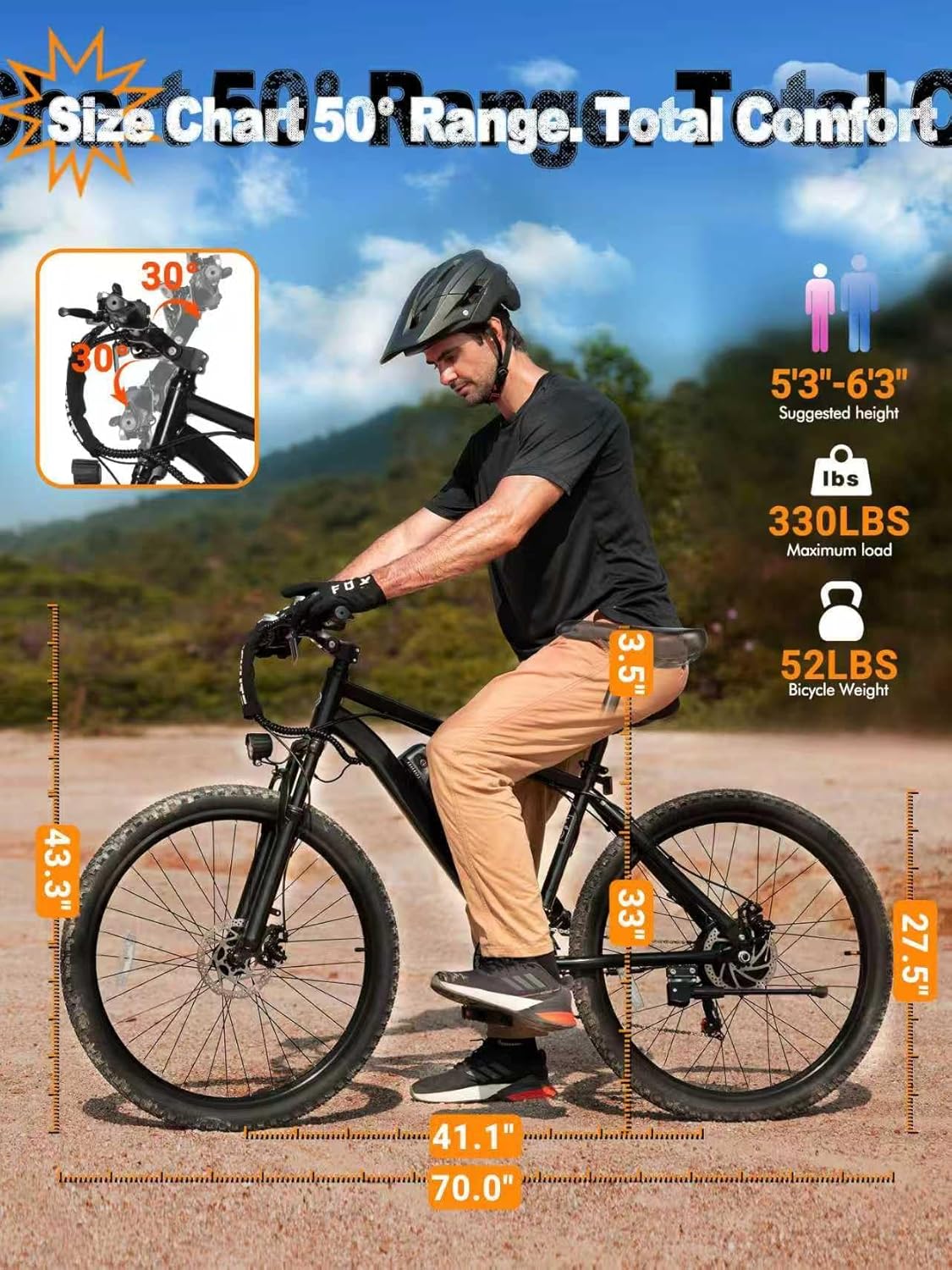
| Max Load Capacity | 330 lbs |
| Bicycle Weight | 52 lbs |
8. Warranty and Support
Your ESKUTE M200 Electric Mountain Bike comes with a 12-month limited warranty. For any questions, technical support, or warranty claims, please contact ESKUTE customer service.
- Pre-sales Support: 1 888 886-2818
- After-sales Support: 1 240 332-0549
- Email: support.us@eskute.com
- Operating Hours: Mon-Fri, 9:00am-6:00pm EST


