
1. Introduction
Thank you for choosing the Miaosical Automatic Cat Feeder. This device is designed to provide a consistent and controlled feeding schedule for up to two cats, ensuring they receive appropriate portions of dry food even when you are away. It features a 4.2-liter capacity, dual stainless steel bowls, programmable portion control, a 10-second voice recorder, and a dual power supply for reliable operation.
Please read this manual thoroughly before operating the feeder to ensure proper setup, usage, and maintenance.
2. Package Contents
- 1 x Main Feeder Unit
- 2 x Stainless Steel Bowls
- 2 x Bowl Holders (plastic)
- 1 x Power Adapter (5V)
- 1 x Desiccant Bag
- 1 x User Manual
3. Key Features
3.1 Dual Portion Control & Large Capacity
The feeder is equipped with dual bowls, allowing two cats to eat simultaneously. It has a 4.2-liter capacity for dry food, capable of dispensing 1-6 meals per day, with 1-12 portions per meal (approximately 6g ± 2g per portion). This helps maintain a balanced diet and consistent feeding schedule.

Image: The Miaosical Automatic Cat Feeder in black, featuring two stainless steel bowls positioned on opposite sides, with two cats eating from them. This setup allows for simultaneous feeding without conflict.

Image: A black Miaosical Automatic Cat Feeder displaying its flexible timer settings, illustrating how users can schedule 1 to 6 meals per day at specific times.
3.2 Anti-Clog Rotor
The feeder incorporates an anti-clog rotor mechanism to prevent kibble jams, ensuring smooth and consistent food delivery. It is suitable for dry kibble sizes between 2-15mm.

Image: A transparent view of the Miaosical Automatic Cat Feeder's internal anti-clog rotor, designed to prevent kibble from jamming during dispensing. The image also indicates compatibility with dry kibble sizes from 2-15mm.
3.3 10-Second Voice Recorder
Record a personalized 10-second voice message to call your pets at meal times, adding a familiar and comforting sound to their feeding routine.

Image: The Miaosical Automatic Cat Feeder with a visual representation of its 10-second voice recording feature, showing sound waves emanating from the feeder and a speech bubble indicating a call to cats for mealtime.
3.4 Dual Power Supply
The feeder can be powered by the included 5V power adapter or by 3 D-cell batteries (not included) for backup, ensuring uninterrupted feeding even during power outages.

Image: An underside view of the Miaosical Automatic Cat Feeder, revealing the battery compartment designed for three D-cell batteries (not included), highlighting its dual power supply capability.
3.5 Desiccant Bag Holder
A desiccant bag holder is integrated into the lid to keep the pet food fresh and dry, preventing moisture and clumping.

Image: A close-up view of the Miaosical Automatic Cat Feeder's lid, showing the integrated compartment for a desiccant bag to maintain food freshness.
3.6 3 Safety Locks Feature
The feeder is designed with three safety locks (two lid locks and one panel lock) to prevent pets from accessing the food reservoir or altering settings.

Image: An illustration highlighting the three safety lock features of the Miaosical Automatic Cat Feeder: two on the lid and one on the control panel, designed to secure the food and settings.
3.7 Schedule Setting Memory
The feeder retains its programmed schedule even after unplugging or a power outage, thanks to its internal memory and dual power supply.

Image: A close-up of the Miaosical Automatic Cat Feeder's LCD screen, illustrating its schedule setting memory feature, which preserves programmed meal times and portions.
4. Setup
- Assemble the Feeder: Align the food bucket's transparent strip with the display on the main unit. Rotate the food bucket until a locking sound is heard.
- Insert Desiccant Bag: Open the desiccant bag holder on the underside of the lid. Insert the desiccant bag and press both sides to secure it.
- Attach Bowls: Invert the main body with one hand and lock the plastic bowl holders in place with the other. Place the stainless steel bowls on top of the plastic holders.
- Fill with Food: Pour dry pet food into the food bucket. Ensure the dry food diameter is between 2-15mm.
- Secure Lid: Place the lid on the food bucket. Hold the bucket with one hand and rotate the lid to lock it securely.
- Power On: Connect the 5V power adapter to the feeder and a power outlet. Optionally, install 3 D-cell batteries (not included) for backup power.

Image: A step-by-step diagram illustrating the installation process of the Miaosical Automatic Cat Feeder, from assembling the main unit to filling with food and securing the lid.
Video: How to Disassemble and Clean the Dual Cats Feeder
Video Description: This video demonstrates the process of disassembling the Miaosical Automatic Cat Feeder for cleaning, showing how to remove the food bucket, bowls, and other detachable parts.
5. Operating Instructions
- Unlock the Screen: The control panel automatically locks after 20 seconds of inactivity. Press and hold the 'SET' button for 3 seconds to unlock the screen.
- Set Current Time: After unlocking, press 'SET' once. The hour digit will flash. Use the ▲ (Up) and ▼ (Down) buttons to adjust the hour. Press 'SET' again to confirm and move to minutes, then repeat for minutes and AM/PM.
- Program Feeding Schedule: Press 'SET' repeatedly to cycle through meal settings (1 to 6). For each meal, set the time and portion size (1-12) using the ▲ and ▼ buttons. Press 'SET' to confirm each setting.
- Record Voice Message: Press and hold the microphone button for 3 seconds until you hear a beep. Record your 10-second message. Release the button to save. The message will play during scheduled meal times.
- Manual Feeding: To dispense food manually, press and hold the ▲ (Up) button. Food will be dispensed as long as the button is held down.
6. Maintenance
Regular cleaning ensures the longevity and hygiene of your feeder. The main unit is NOT washable. Only detachable parts are washable.
- Detachable Parts: The stainless steel bowls, plastic bowl holders, and food bucket are detachable and washable. Hand wash these parts with mild soap and water, then rinse thoroughly and dry completely before reassembling.
- Main Unit: Wipe the main unit with a soft, damp cloth. Do not immerse the main unit in water or expose it to excessive moisture.
- Desiccant Bag: Replace the desiccant bag every 1-2 months to maintain optimal food freshness.

Image: Detachable components of the Miaosical Automatic Cat Feeder, including the stainless steel bowls and food container, being washed in a sink, emphasizing the ease of cleaning.
Video: How to Disassemble and Clean the Dual Cats Feeder
Video Description: This video demonstrates the process of disassembling the Miaosical Automatic Cat Feeder for cleaning, showing how to remove the food bucket, bowls, and other detachable parts.
7. Troubleshooting
| Problem | Solution |
|---|---|
| Buttons can't be pressed | The panel automatically locks without operation for 20 seconds. Please press the 'SET' button for 3 seconds to unlock the screen. |
| Forget the feeding schedule | Unlock the screen, press the 'SET' button, then press the ▲ (Up) button to view your setting history. |
| Pet food doesn't come out |
|
| Red Light On |
|
| Can't hear recorded voice | Make sure you have recorded your voice – unlock the screen, press the microphone button to check. If you still don't hear the voice, please record again. |
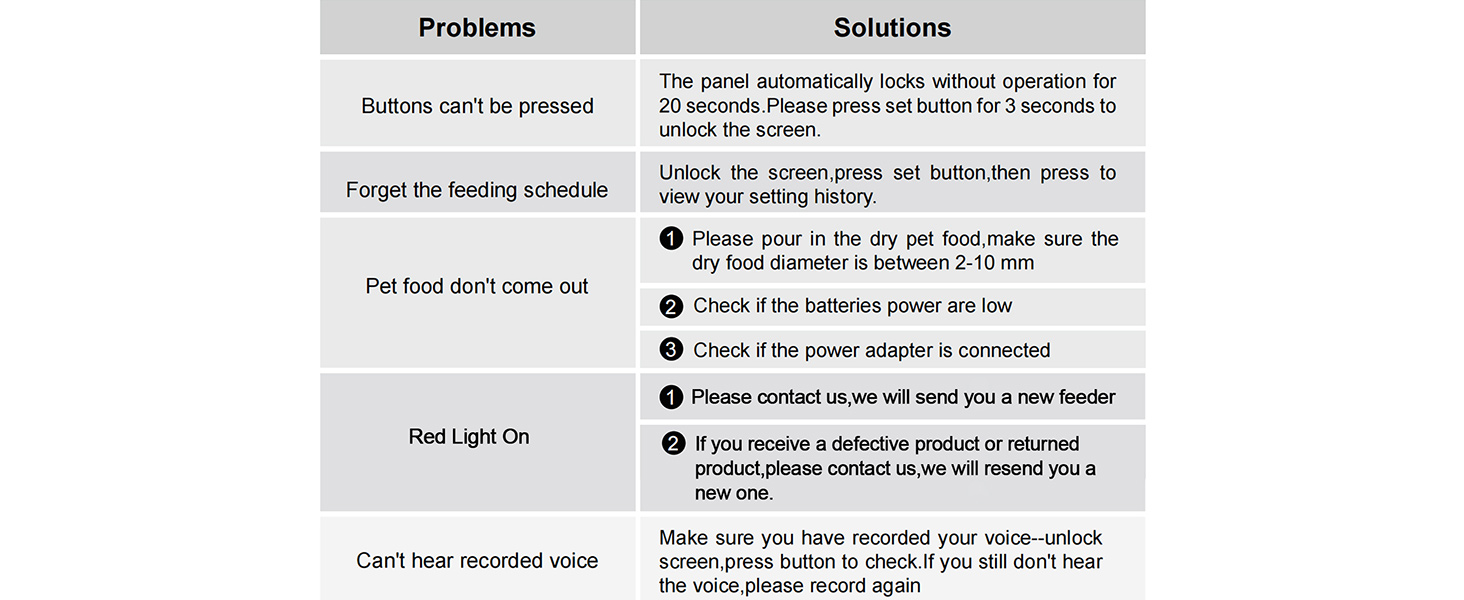
Image: A troubleshooting guide for the Miaosical Automatic Cat Feeder, listing common problems and their corresponding solutions.
8. Specifications
- Model Number: SC-A80K
- Capacity: 4.2 Liters
- Product Dimensions: 17.32 x 6.3 x 12.6 inches; 3.13 Pounds
- Item Dimensions L x W x H: 6.9"L x 6.9"W x 9"H
- Item Weight: 1.42 Kilograms
- Material: Acrylonitrile Butadiene Styrene (ABS)
- Target Species: Cat
- Power Source: Corded Electric (5V adapter) / 3 x D-Cell Batteries (not included)
- Operation Mode: Automatic
- Special Feature: Programmable, Voice Recorder, Dual Bowls
- Recommended Uses: Indoor
- Product Care Instructions: Hand Wash Only (detachable parts)
9. Warranty and Support
This Miaosical Automatic Cat Feeder comes with a 1-year warranty from the date of purchase. For any product issues, questions, or support needs, please contact Miaosical customer service directly.
Contact Information: Please refer to the contact details provided on the product packaging or the official Miaosical website for the most up-to-date support information.
You can also visit the Miaosical Store on Amazon for more product information and support resources.

