
1. Introduction
Thank you for choosing a MONSGA Robot Vacuum Cleaner. This manual provides essential information for the safe operation, setup, maintenance, and troubleshooting of your MS1 MAX, MS1, or MR1 SE robot vacuum. Please read this manual thoroughly before using the product and retain it for future reference.
2. Safety Instructions
To reduce the risk of injury or damage, read and follow all safety precautions.
- This appliance can be used by children aged 8 years and above and persons with reduced physical, sensory or mental capabilities or lack of experience and knowledge if they have been given supervision or instruction concerning use of the appliance in a safe way and understand the hazards involved.
- Children should be supervised to ensure they do not play with the appliance.
- Cleaning and user maintenance shall not be made by children without supervision.
- Use only the original power adapter provided by the manufacturer.
- Do not use the robot in wet environments or near water.
- Remove any loose cables, small objects, or fragile items from the cleaning path before operation.
- Do not operate the robot on elevated surfaces without barriers.
- Turn off the robot and unplug the charging dock before performing any maintenance.
3. Package Contents
Please check the contents of your package. Components may vary slightly depending on the specific model purchased (MS1 MAX, MS1, or MR1 SE).
- Robot Vacuum Cleaner
- Charging Dock / Self-Emptying Station (MS1 MAX)
- Power Adapter
- Side Brushes
- Main Brush
- Dustbin
- Water Tank (for mopping models)
- Mop Cloths (for mopping models)
- User Manual
- Remote Control (MS1)
4. Product Overview
4.1 MONSGA MS1 MAX Robot Vacuum
The MS1 MAX features powerful suction, 3-in-1 cleaning capabilities (sweep, vacuum, mop), and a convenient self-emptying station.
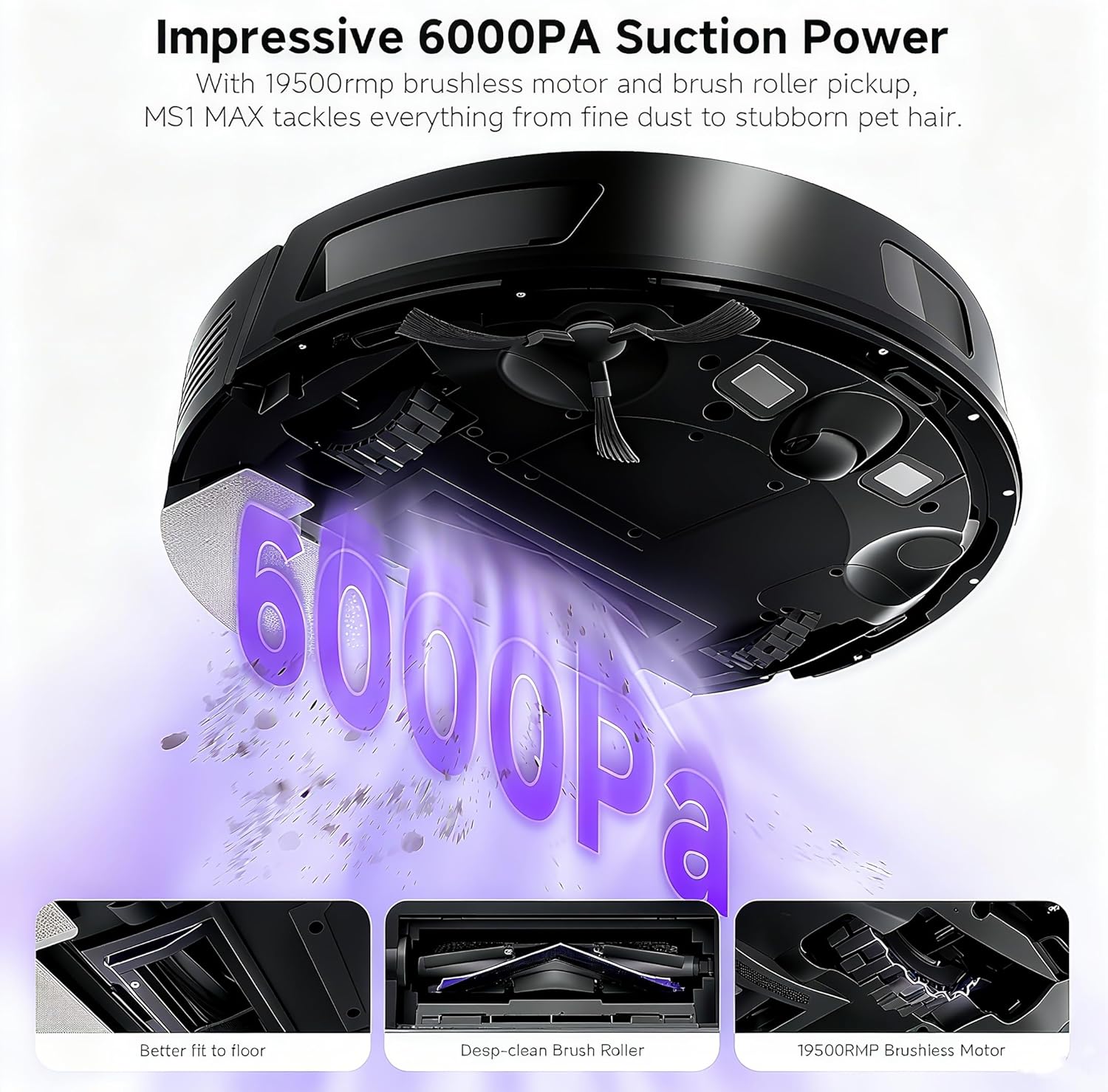
Image: The MS1 MAX robot vacuum demonstrating its 6000Pa suction power, lifting dirt and debris from the floor. Insets show a V-shaped brush, a deep-clean brush roller, and a brushless motor.

Image: Three MS1 MAX robot vacuums illustrating different cleaning modes: Vacuum Only, Mop Only, and Vacuum & Mop, suitable for various floor types.
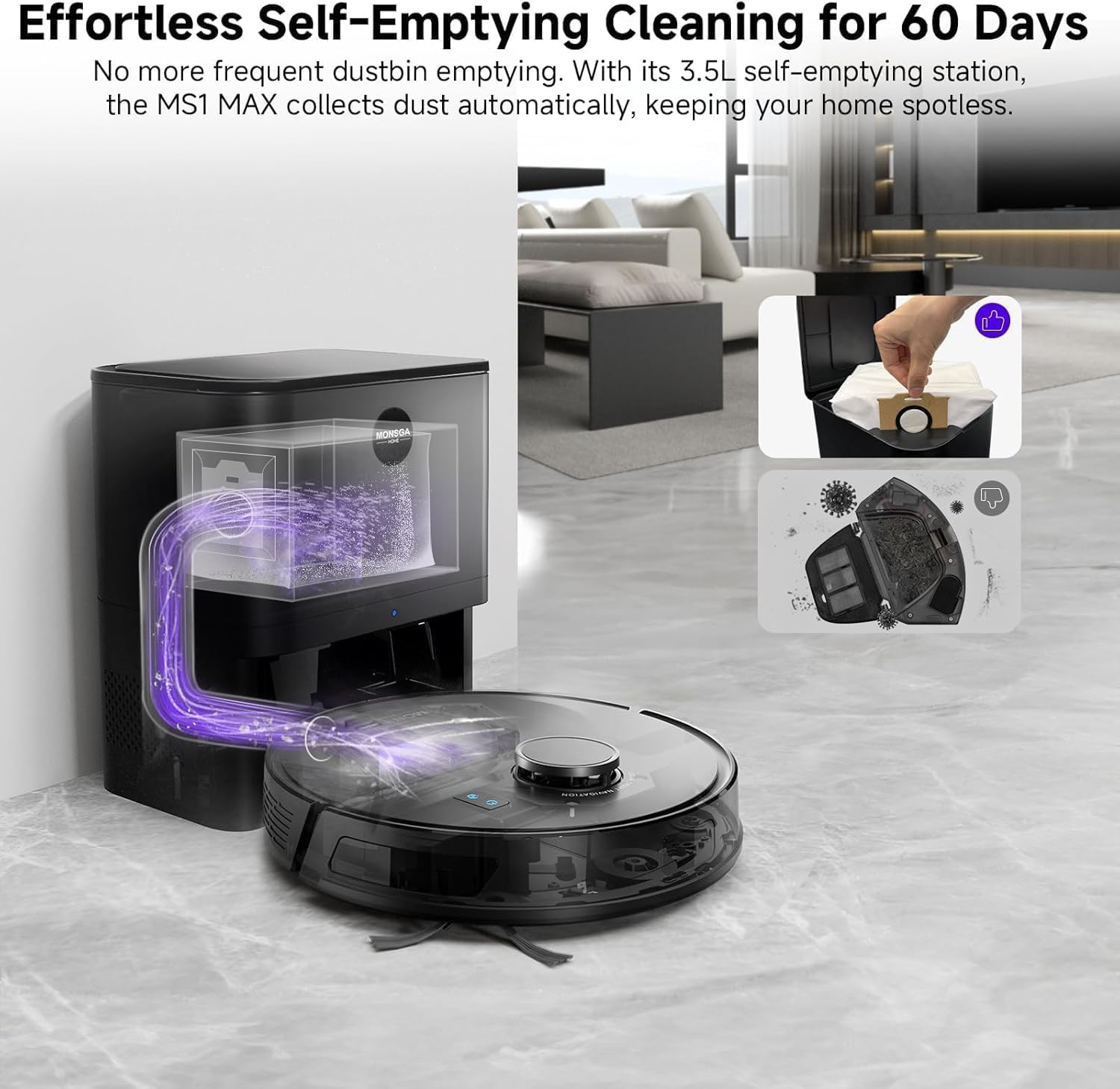
Image: The MS1 MAX robot vacuum docked at its self-emptying station, showing the automatic dust transfer into a 3.5L dustbag. Insets show the dustbag and the robot's dustbin.
4.2 MONSGA MS1 Robot Vacuum
The MS1 model offers powerful 7000Pa suction and versatile cleaning options, controllable via app or remote.
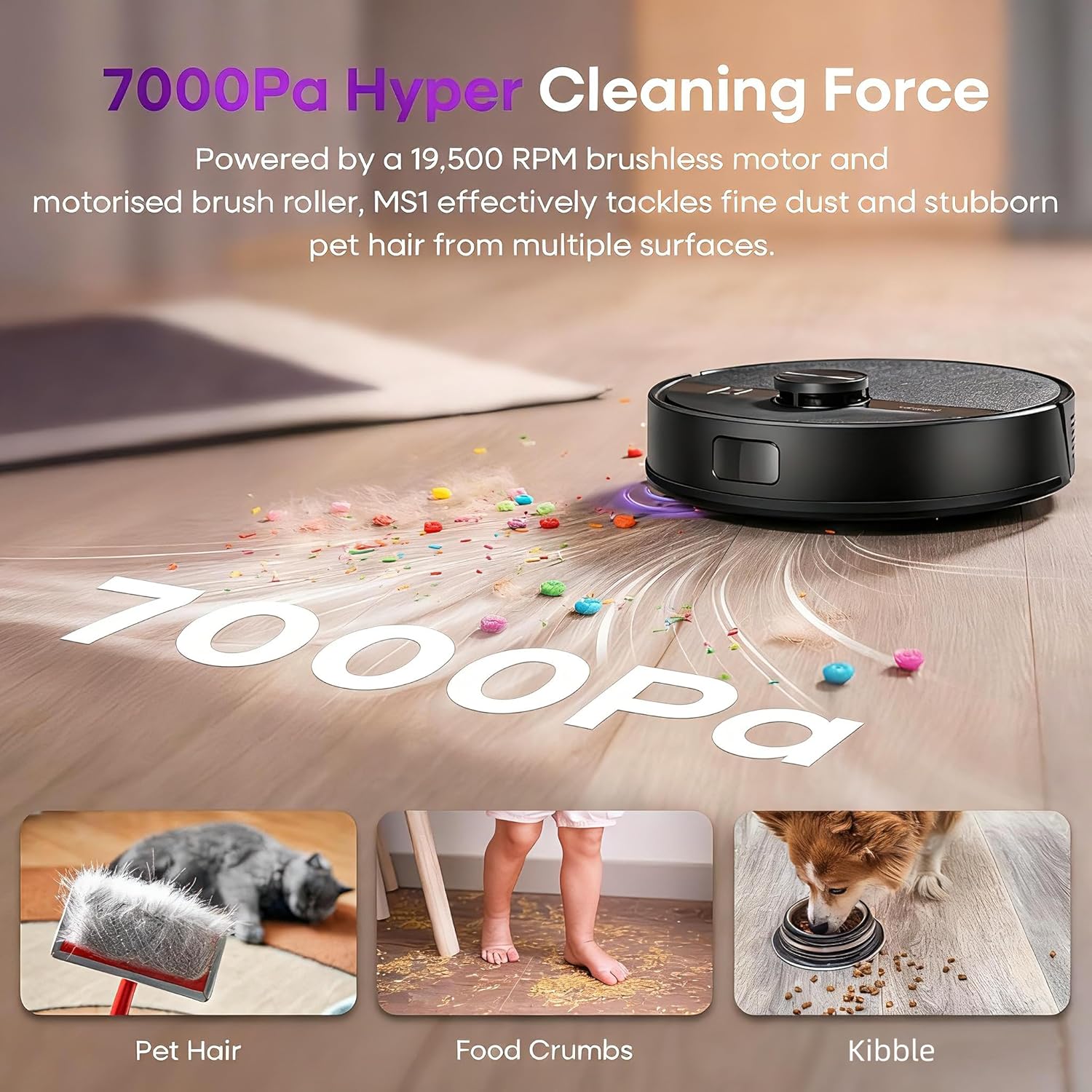
Image: The MS1 robot vacuum demonstrating its 7000Pa suction power, effectively cleaning fine dust, pet hair, and kibble from a hard floor.

Image: The MS1 robot vacuum with its remote control, showing adjustable water speed (Low, Middle, High) and suction power (ECO, Standard, MAX) settings for sweeping, vacuuming, and mopping.
4.3 MONSGA MR1 SE Robot Vacuum
The MR1 SE is designed for efficient cleaning in tight spaces with its slim profile and 3000Pa suction.

Image: The MR1 SE robot vacuum demonstrating its 3000Pa suction power, effectively cleaning various types of debris including hair, cereal crumbs, and fine dust.

Image: The MR1 SE robot vacuum, with its 3.2-inch slim design, cleaning effectively under a sofa, highlighting its ability to reach tight spaces.
5. Setup
5.1 Preparing the Robot
- Remove all protective films and packaging materials from the robot and charging dock.
- Attach the side brushes by pressing them onto the posts until they click into place.
- Ensure the main brush and dustbin are correctly installed.
5.2 Placing the Charging Dock / Self-Emptying Station
- Place the charging dock against a wall on a hard, level surface.
- Ensure there is at least 0.5 meters (1.6 feet) of clear space on either side and 1.5 meters (4.9 feet) in front of the dock.
- Plug the power adapter into the charging dock and then into a wall outlet.
- For MS1 MAX, ensure the 3.5L dustbag is correctly installed in the self-emptying station.
5.3 Initial Charging
Place the robot onto the charging dock, ensuring the charging contacts align. The robot will begin charging automatically. For first-time use, fully charge the robot before operation (approximately 4-6 hours).
5.4 Connecting to the App (MS1 MAX, MS1)
Download the 'Smart Life' or 'Tuya Smart' app from your mobile app store. Follow the in-app instructions to connect your robot vacuum to your home Wi-Fi network. This enables advanced features like scheduling, mapping, and remote control.
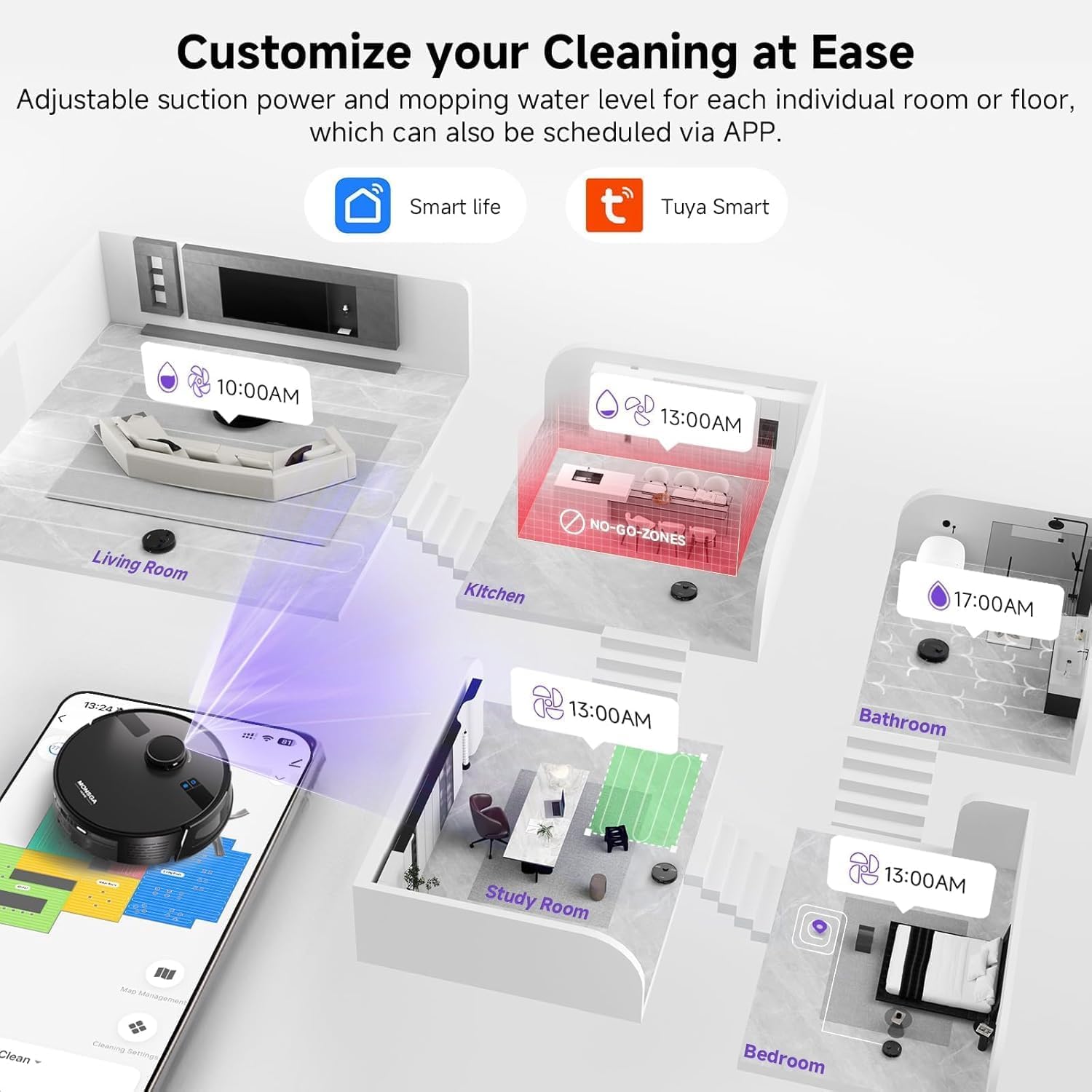
Image: A smartphone screen displaying the app interface for the MS1 MAX, showing options to schedule cleaning times, define no-go zones, and customize settings for different rooms.
6. Operating
6.1 Starting/Pausing/Stopping Cleaning
- Start: Press the power button on the robot or the 'Clean' button on the app/remote.
- Pause: Press the power button or 'Pause' button during cleaning.
- Stop: Press and hold the power button for a few seconds, or use the 'Stop' function in the app/remote.
6.2 Cleaning Modes
Your robot may offer various cleaning modes:
- Auto Clean: The robot intelligently navigates and cleans your entire floor area.
- Spot Clean: Cleans a specific area more intensely.
- Edge Clean: Cleans along walls and furniture edges.
- Vacuum Only: For dry debris removal.
- Mop Only: For wet mopping (ensure water tank is filled).
- Vacuum & Mop: Simultaneous vacuuming and mopping (MS1 MAX, MS1).
6.3 Adjusting Suction Power and Water Flow
You can adjust these settings via the mobile app or remote control (MS1) to suit different floor types and cleaning needs.
- Suction Levels: ECO, Standard, MAX (or similar).
- Water Flow: Low, Middle, High (for mopping).
6.4 Mapping and Navigation (MS1 MAX)
The MS1 MAX uses LiDAR navigation to create accurate maps of your home. This allows for efficient cleaning paths, room-specific cleaning, and the setting of virtual walls or no-go zones through the app. It supports up to 5 unique maps for multi-level homes.
7. Maintenance
Regular maintenance ensures optimal performance and extends the lifespan of your robot vacuum. Always turn off the robot and unplug the charging dock before maintenance.
7.1 Emptying the Dustbin
Empty the dustbin after each use. For MS1 MAX, the self-emptying station will automatically transfer debris to the 3.5L dustbag, which typically needs replacement every 60 days.
7.2 Cleaning the Main Brush
Remove the main brush cover and lift out the brush. Use the cleaning tool to remove hair and debris tangled around the brush. Reinstall the brush and cover.
7.3 Cleaning Side Brushes
Check side brushes regularly for tangled hair or debris. If damaged, replace them. Gently pull to remove and push to reinstall.
7.4 Cleaning Filters
Tap the primary filter to remove dust. The HEPA filter should be cleaned with a brush. Do not wash the HEPA filter with water. Replace filters every 3-6 months depending on usage.
7.5 Cleaning the Water Tank and Mop Cloths (Mopping Models)
Empty any remaining water from the tank after each use. Wash mop cloths by hand or machine and air dry. Do not use harsh detergents.
7.6 Cleaning Sensors and Charging Contacts
Wipe the cliff sensors, wall sensors, and charging contacts on both the robot and the charging dock with a clean, dry cloth to ensure proper function.
8. Troubleshooting
If your robot vacuum encounters an issue, refer to the following common solutions:
| Problem | Possible Cause | Solution |
|---|---|---|
| Robot does not turn on | Low battery; Power button not pressed | Charge the robot; Press and hold power button |
| Robot cannot charge | Charging contacts dirty; Dock not powered | Clean contacts; Ensure dock is plugged in |
| Poor cleaning performance | Dustbin full; Brushes tangled; Filter clogged | Empty dustbin; Clean brushes; Clean/replace filter |
| Robot gets stuck frequently | Obstacles; Cliff sensors dirty | Clear obstacles; Clean sensors |
| App connection failure | Incorrect Wi-Fi password; Router issues | Verify password; Restart router and robot; Ensure 2.4GHz Wi-Fi |
| MS1 MAX self-emptying not working | Dustbag full; Suction port blocked | Replace dustbag; Clear any blockages in the station's suction port |
If the problem persists, please contact MONSGA customer support.
9. Specifications
9.1 MONSGA MS1 MAX
- Suction Power: 6000Pa
- Motor Speed: 19,500 RPM
- Cleaning Functions: Sweep, Vacuum, Mop (3-in-1)
- Dustbin Capacity: 340ml (robot)
- Water Tank Capacity: 270ml
- Self-Emptying Station Dustbag Capacity: 3.5L (up to 60 days)
- Navigation: LiDAR (360°)
- Mapping: Supports up to 5 maps
- Control: Mobile App (Smart Life/Tuya Smart)
9.2 MONSGA MS1
- Suction Power: 7000Pa
- Motor: 550W Brushless Motor
- Motor Speed: 19,500 RPM
- Cleaning Functions: Sweep, Vacuum, Mop
- Brush: V-shaped floating roller brush
- Control: Mobile App, Remote Control
9.3 MONSGA MR1 SE
- Suction Power: 3000Pa
- Motor Speed: 15,000 RPM
- Brush: Tangle-free brush roller
- Design: 3.2-inch Slim
10. Warranty and Support
MONSGA products come with a standard manufacturer's warranty. Please refer to the warranty card included in your package for specific terms and conditions. For technical support, troubleshooting assistance, or to inquire about replacement parts, please contact MONSGA customer service through the contact information provided on the official MONSGA website or your purchase platform.
Online Support: Visit the MONSGA store on Amazon: MONSGA Store


