
1. Safety Information
Please read and understand all instructions before beginning installation. Failure to follow these instructions may result in electric shock, fire, or personal injury.
- Always disconnect power at the circuit breaker or fuse box before installation or servicing.
- Ensure all electrical connections comply with local codes and ordinances, as well as the National Electrical Code (NEC).
- Consult a qualified electrician if you are unsure about wiring or installation procedures.
- The fan must be mounted with a minimum of 7 feet (2.1 meters) clearance from the floor to the blade trailing edge.
- Ensure the mounting structure can support the weight of the fan (at least 35 lbs / 15.9 kg).
- Do not operate the fan with damaged blades or housing.
2. Package Contents
Verify that all components are present before proceeding with installation:
- Fan Motor Assembly
- 5 Solid Wood Blades
- Mounting Bracket
- Remote Control with Wall Mount
- Receiver
- Hardware Pack (screws, wire nuts, washers)
- Instruction Manual
3. Installation
Follow these steps for proper installation of your WINGBO ceiling fan. It is recommended to have two people for installation.
3.1 Pre-Installation Considerations
This fan is designed for flush mount installation, suitable for rooms with ceilings less than 9 feet high. The fan has a 48-inch blade span and a total height of 7.5 inches from the ceiling to the bottom of the fan.

Image: Technical diagram displaying the dimensions of the WINGBO 48-inch Flush Mount Ceiling Fan, including its 48-inch blade span, 7.4-inch canopy width, 5.1-inch motor housing height, and 7.5-inch total height from ceiling to blade bottom. It also indicates suitability for rooms up to 12'x14'.
3.2 Mounting the Fan
- Turn off power at the circuit breaker.
- Secure the mounting bracket to the ceiling junction box. Ensure the junction box is securely fastened to the building structure and can support the fan's weight.
- Carefully lift the fan motor assembly and hang it from the mounting bracket using the provided hook or support system.
3.3 Electrical Connections
- Connect the fan's electrical wires to the household wiring according to the wiring diagram in the manual. Typically, this involves connecting live, neutral, and ground wires.
- Install the receiver for the remote control within the canopy.
- Ensure all wire connections are secure using wire nuts.
3.4 Attaching Blades and Canopy
- Attach the fan blades to the motor housing using the provided screws. Ensure all screws are tightened securely.
- Carefully push the canopy up against the ceiling and secure it to the mounting bracket with the designated screws.
3.5 Installation Video Guide
Video: This video provides a step-by-step guide for installing the WINGBO Flush Mount DC Ceiling Fan without lights. It covers mounting, wiring, and final assembly.
4. Operating Instructions
Your WINGBO ceiling fan can be controlled via the included remote control or a compatible wall switch.

Image: WINGBO 48-inch Flush Mount DC Ceiling Fan showing its two control methods: remote control and wall switch. The image highlights features like multi-pairing, no 'beep' sound, memory function, wall switch control, and a reversible DC motor.
4.1 Remote Control Functions
The remote control allows for comprehensive operation of your fan:

Image: Remote control for WINGBO ceiling fan with labeled buttons for fan control, speed adjustment (1-6), follow/reverse mode, timing set (1H, 2H, 4H, 8H), and nature mode.
- Power Button: Turns the fan ON or OFF.
- Speed Buttons (1-6): Adjusts the fan speed from 1 (lowest) to 6 (highest).
- Follow/Reverse Button: Changes the direction of blade rotation for summer or winter mode.
- Timing Set (1H, 2H, 4H, 8H): Sets the fan to turn off automatically after the selected duration.
- Nature Mode: Simulates a natural breeze by varying fan speed.
4.2 Summer and Winter Modes
The reversible DC motor allows for optimal air circulation throughout the year:
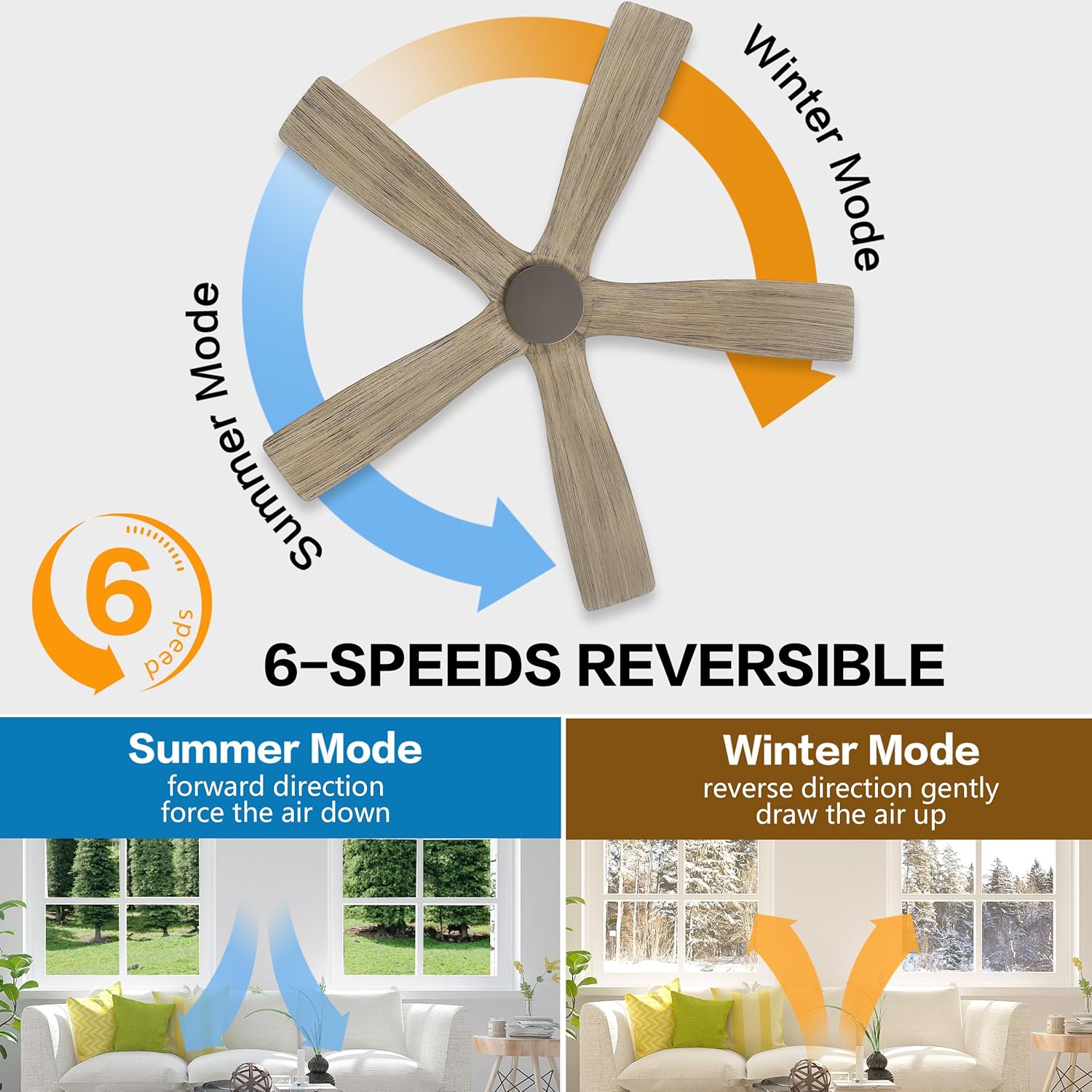
Image: Diagram illustrating the 6-speed reversible function of the WINGBO ceiling fan. It shows 'Summer Mode' (forward direction, forces air down) and 'Winter Mode' (reverse direction, gently draws air up) with corresponding airflow arrows in a room setting.
- Summer Mode (Downward Airflow): Blades rotate counter-clockwise, pushing cool air down to create a wind-chill effect.
- Winter Mode (Upward Airflow): Blades rotate clockwise, drawing warm air up and distributing it evenly throughout the room.
4.3 Timer Function
Use the timer function to automatically turn off the fan after a set period:

Image: Image demonstrating the timer function of the WINGBO 48-inch Flush Mount DC Ceiling Fan. A remote control is shown next to a sleeping person, with a circular diagram indicating timer settings for 1, 2, 4, and 8 hours.
- Press the 1H, 2H, 4H, or 8H button on the remote to activate the timer. The fan will operate for the selected duration and then turn off.
4.4 Wall Switch Compatibility
When powered on or off via a wall switch, the fan automatically restores the last speed setting, providing convenience without needing to reset preferences.
4.5 Product Overview Video
Video: An overview video showcasing the features and design of the WINGBO Flush Mount DC Ceiling Fan in Graphite and Gray, highlighting its quiet operation and modern aesthetic.
5. Maintenance
Regular maintenance helps ensure the longevity and optimal performance of your ceiling fan.
- Cleaning: Use a soft, damp cloth to clean the fan blades and motor housing. Do not use abrasive cleaners or solvents.
- Blade Inspection: Periodically check that all blade screws are tight. Loose blades can cause wobbling and noise.
- Dust Removal: Dust the fan regularly to prevent buildup, which can affect performance and motor lifespan.
- No Lubrication Needed: The DC motor is permanently lubricated and does not require additional oiling.
6. Troubleshooting
If you experience issues with your fan, refer to the following common problems and solutions:
| Problem | Possible Cause | Solution |
|---|---|---|
| Fan does not start | No power to the fan; Loose wire connections; Remote control not paired or battery low. | Check circuit breaker; Ensure all wires are securely connected; Replace remote battery or re-pair remote. |
| Fan wobbles | Loose blade screws; Unbalanced blades; Loose mounting bracket. | Tighten all blade screws; Use a balancing kit (not included) to balance blades; Ensure mounting bracket is secure. |
| Remote control not working | Low or dead battery; Remote not paired with receiver; Obstruction between remote and receiver. | Replace battery; Re-pair remote with receiver (refer to remote manual); Ensure clear line of sight. |
| Fan is noisy | Loose screws; Motor housing rubbing; Blades hitting an obstruction. | Check and tighten all screws; Ensure no parts are rubbing; Verify blades have clear clearance. |
7. Specifications
| Feature | Detail |
|---|---|
| Brand | WINGBO |
| Model Name | SYCF4805 |
| Size | 48 inches |
| Color | Graphite and Gray |
| Electric Fan Design | Ceiling Fan |
| Power Source | DC |
| Style | Modern |
| Product Dimensions (D x W x H) | 48"D x 48"W x 9"H |
| Room Type | Bedroom, Kitchen, Living Room, Patio |
| Special Feature | No Light |
| Recommended Uses | Indoor |
| Mounting Type | Flush Mount |
| Controller Type | Remote Control |
| Number of Speeds | 6 |
| Number of Blades | 5 |
| Voltage | 110 Volts |
| Indoor/Outdoor Usage | Indoor |
| Motor Type | DC |
| Material | Wood |
| Blade Material | Wood |
| Finish Type | Painted |
| Included Components | Remote |
8. Warranty and Support
WINGBO products are manufactured with quality and durability in mind. For specific warranty details regarding your SYCF4805 ceiling fan, please refer to the warranty card included in your product packaging or contact WINGBO customer support.
For technical assistance, troubleshooting beyond this manual, or to inquire about replacement parts, please visit the official WINGBO website or contact their customer service department. Keep your purchase receipt for warranty claims.


