
Introduction
Thank you for purchasing the Kaedear KDR-B14 Motorcycle USB Power Supply. This device is designed to provide convenient and reliable charging for your electronic devices while riding. It features dual USB Type-A and Type-C ports with fast charging capabilities, an integrated voltmeter for real-time battery monitoring, and a robust waterproof design. Please read this manual thoroughly before installation and use to ensure proper function and safety.
Key Features
- Dual Port Fast Charging: Equipped with USB Type-C (PD3.0 30W) and USB Type-A (QC3.0 22.5W) ports, offering a combined output of 52.5W. Both ports provide independent power output for simultaneous fast charging without performance degradation.
- Ultra-Thin Design with Voltmeter: At just 13mm thick, the slim design fits seamlessly into tight spaces around your motorcycle's handlebars. The built-in digital voltmeter displays real-time battery voltage, helping you monitor your vehicle's condition and prevent unexpected battery drain.
- Independent ON/OFF Switch with Memory: Features an independent power switch to manage power flow. When turned off, it completely cuts standby power, making it safe for direct battery connection without worrying about battery drain. The memory function retains the last ON/OFF state after the ignition is turned off.
- Independent Waterproof Caps: Both Type-A and Type-C ports have individual waterproof caps. Only open the port you are using, keeping unused ports sealed to minimize the risk of dust and water intrusion. The design ensures IP66 equivalent waterproofing and prevents accidental opening due to wind pressure during riding.
- Kaedear Common SAE Connector: Utilizes the familiar SAE connector, allowing for easy connection and interchangeability with other Kaedear accessories and battery chargers. The long harness (approx. 1.9m) provides ample length for routing from the handlebars to the battery, even on larger vehicles.
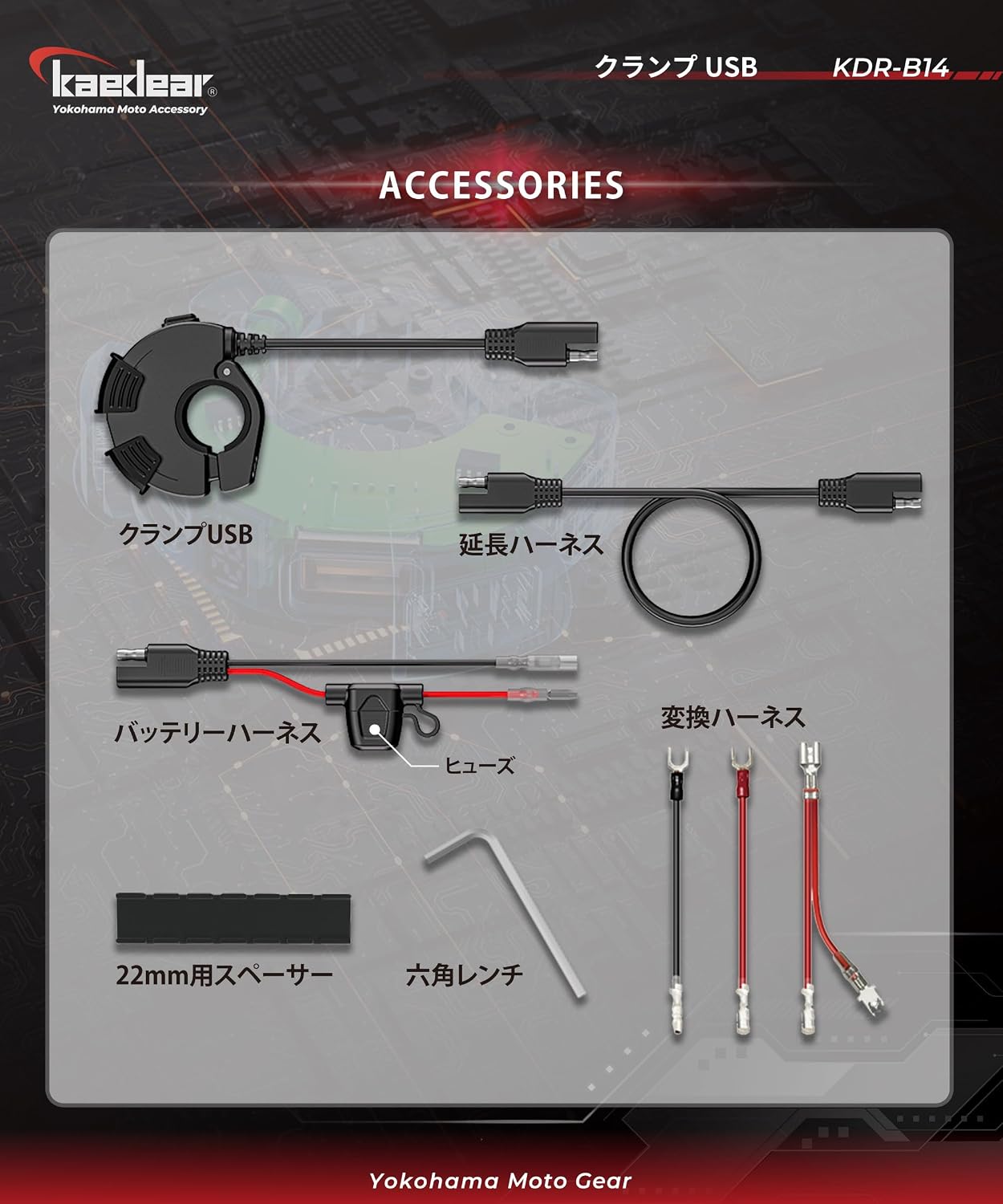
Package Contents
Please verify that all items are included in your package:
- KDR-B14 Main Unit
- 22mm Conversion Rubber
- Spade Terminal Conversion
- Flat Branch Conversion
- Fuse
- Hex Wrench
Safety Precautions
Important: Installation requires specialized knowledge and technical skills. If you are unsure, please consult a professional.
- Always disconnect the motorcycle's battery before beginning installation to prevent electrical shock or short circuits.
- Ensure the product is securely mounted and all connections are tight to prevent loosening due to vibration.
- Do not modify the product or use it for purposes other than its intended use.
- Keep the product away from excessive heat, direct sunlight, and corrosive materials.
- If you notice any smoke, unusual odors, or abnormal operation, immediately turn off the power and disconnect the device.
Installation
Follow these steps for proper installation:
- Mounting the Main Unit: Attach the KDR-B14 main unit to your motorcycle's handlebars. The unit is designed to fit handlebars with a diameter of 22mm or 25.4mm. Use the included 22mm conversion rubber if necessary. Ensure the unit is positioned where it does not interfere with steering or other controls.
- Connecting to Battery: The KDR-B14 uses an SAE connector for power input. Connect the provided battery harness to your motorcycle's 12V DC battery. The harness includes a fuse for protection. The total length of the harness is approximately 1.9 meters (500mm + 1400mm extension), providing flexibility for routing.
- Wiring Precautions:
- Connect the negative terminal directly to the battery's negative terminal.
- When using a tester, ensure the resistance between the battery negative terminal and the ground point is 0Ω.
- Do not connect to points with high resistance, such as the handlebar or tank, as this can cause voltage drop.
- Use appropriate male/female terminals. If terminals are different, voltage drop may occur due to poor contact.
- Power Verification: After installation, verify the power supply. With the power switch ON, measure the voltage between the SAE connector terminals using a multimeter.


Operating Instructions
Using your KDR-B14 USB Power Supply:
- Power ON/OFF: The unit features an independent ON/OFF switch. Press the switch to toggle power. When the switch is OFF, the unit consumes no standby power. The unit remembers its last ON/OFF state when the ignition is turned off. If you wish for continuous power, leave it ON. If you turn it OFF before stopping the engine, it will not unintentionally power on when the engine restarts.
- Voltmeter Function: Upon powering on, the digital voltmeter on the unit's front face will display your motorcycle's battery voltage in real-time. This helps you detect voltage drops early, aiding in battery condition management.
- Opening and Closing Waterproof Caps: The Type-A and Type-C ports have independent waterproof caps. To open a cap:
- Slightly lift the claw of the cap until you hear a 'click'.
- Slide the cap open.
- Charging Devices: Connect your USB-compatible devices (smartphones, tablets, action cameras, GPS, etc.) to the appropriate Type-A or Type-C port using a compatible charging cable. The device will automatically detect and provide fast charging.


Maintenance
To ensure the longevity and optimal performance of your KDR-B14:
- Regularly inspect the unit and wiring for any signs of damage, wear, or loose connections.
- Keep the USB ports and caps clean and free from dust and debris. Use a soft, dry cloth for cleaning.
- Ensure the waterproof caps are always securely closed when ports are not in use, especially in wet conditions.
- Avoid using harsh chemicals or abrasive cleaners on the unit.
Troubleshooting
If you encounter issues with your KDR-B14, refer to the following common problems and solutions:
| Problem | Possible Cause | Solution |
|---|---|---|
| No power/Voltmeter not lighting up | Loose wiring connection Blown fuse Unit's ON/OFF switch is OFF Motorcycle battery is dead | Check all wiring connections, especially to the battery. Inspect and replace the fuse if blown. Ensure the unit's ON/OFF switch is in the ON position. Check motorcycle battery voltage and charge if necessary. |
| Slow charging or no charging | Incompatible charging cable Device not supporting fast charge Voltage drop due to poor wiring | Use a high-quality, compatible charging cable. Ensure your device supports PD3.0 or QC3.0 for fast charging. Re-check wiring connections for proper contact and low resistance. |
| Water or dust inside ports | Waterproof caps not properly closed | Ensure caps are securely closed when ports are not in use. Dry out ports completely before use if moisture is present. |
Specifications
| Specification | Detail |
|---|---|
| Model Number | KDR-B14 |
| Brand | Kaedear |
| Connector Type | USB Type A, USB Type C |
| Input Voltage | 12V DC |
| Output Wattage | Type-C: Max 30W (PD3.0), Type-A: Max 22.5W (QC3.0) Total Max: 52.5W |
| Output Current | 3.4A (Max) |
| Rated Current | 2.5A |
| Waterproof Rating | IP66 equivalent |
| Material | ABS |
| Harness Length | Approx. 1.9m |
| Compatible Handlebar Diameter | 22mm, 25.4mm |
| Compatible Devices | iPhone, Galaxy, Pixel, Xperia, Xiaomi, iPad, GPS, etc. |
Warranty & Support
Manufacturer Warranty: This product comes with a 1-year manufacturer's warranty from the date of purchase. Please retain your proof of purchase for warranty claims.
Customer Support: For further assistance, technical support, or to download the latest version of the instruction manual, please visit the official Kaedear website:
On the website, navigate to the product page for KDR-B14 and look for the download link for the instruction manual.

