
1. Product Overview
The MSXTTLY U2AC-L9 Wireless Android Auto Adapter transforms your vehicle's wired Android Auto system into a seamless wireless experience. Enjoy navigation, music, and apps on your car's display without the need for cables, offering a more practical and fluid driving experience.

Figure 1.1: Wired vs. Wireless Android Auto Connectivity
Key Features:
- Wireless Connectivity: Converts wired Android Auto to wireless.
- Ultra-Compact Design: 70% smaller than previous versions, ensuring a discreet fit in any car USB port.
- Fast 3-Step Connection: Quick and easy setup process.
- Automatic Reconnection: Connects automatically after initial pairing.
- Stable Performance: Enhanced chip and 5 GHz Wi-Fi module for reliable connection.
- Durable Construction: Features a pure copper, gold-plated USB port for excellent conductivity and corrosion resistance.

Figure 1.2: Compact Design of the U2AC-L9 Adapter
2. Package Contents
Verify that all items are present in your package:
- 1 x MSXTTLY U2AC-L9 Wireless Android Auto Adapter
- 1 x USB-A to USB-C Cable
- 1 x USB Extension Cable
- 1 x User Manual
- 1 x 3M Adhesive Tape

Figure 2.1: Included Package Contents
3. Compatibility
To ensure proper functionality, please check the following compatibility requirements:
3.1 Phone Compatibility
- Requires a smartphone running Android 11 or higher.
- Your phone must support Android Auto.
3.2 Vehicle Compatibility
- Works exclusively with vehicles or audio systems that are already equipped with wired Android Auto from the factory.
3.3 Not Supported
- Not compatible with Apple CarPlay.
- Not compatible with iPhones.
- Does not support Zlink/Mirroring functions.
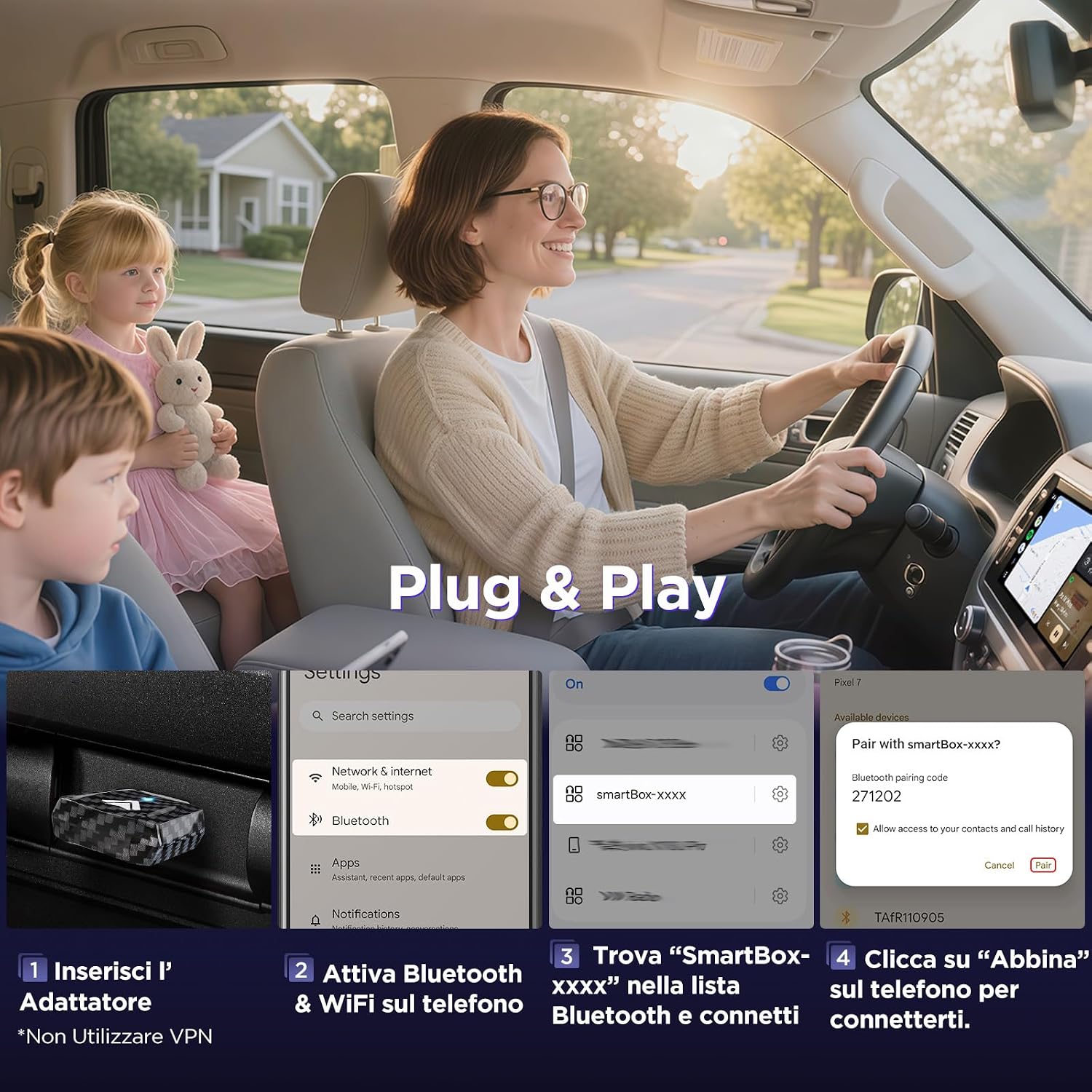
Figure 3.1: Device Compatibility Overview
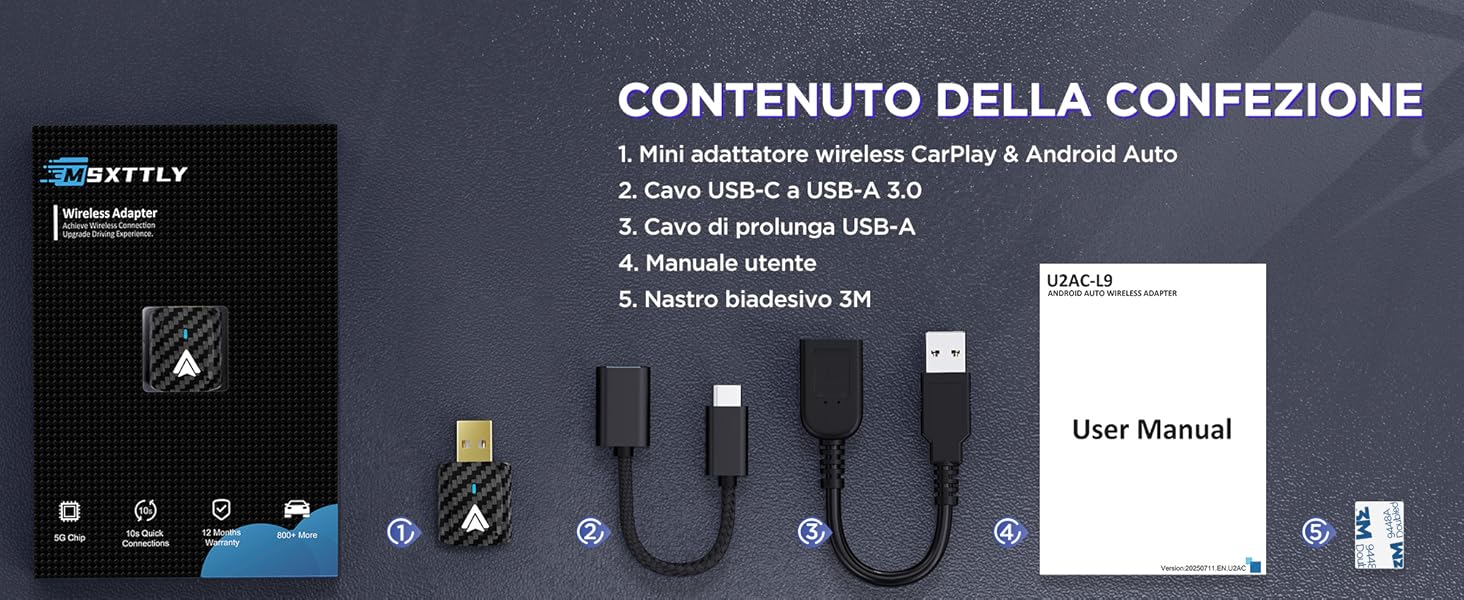
Figure 3.2: Detailed Vehicle Compatibility List
4. Setup Instructions
Follow these steps for a quick and easy setup:
- Insert the Adapter: Plug the MSXTTLY U2AC-L9 adapter into your car's USB port that supports wired Android Auto. Use the provided USB-A to USB-C cable or USB extension cable if needed.
- Activate Bluetooth & Wi-Fi: On your Android smartphone, enable both Bluetooth and Wi-Fi.
- Pair with Adapter: On your phone, go to Bluetooth settings and search for a device named "SmartBox-xxxx" (where xxxx is a unique identifier). Select it to connect.
- Confirm Pairing: A pairing request will appear on your phone. Confirm by clicking "Pair."
Note: Do not use a VPN during the initial setup process.

Figure 4.1: Plug & Play Setup Steps

Figure 4.2: Wireless Android Auto Connection Steps
5. Operating the Device
5.1 Automatic Reconnection
After the initial pairing, the U2AC-L9 adapter will automatically reconnect to your smartphone every time you start your vehicle, providing a seamless wireless Android Auto experience without further manual intervention.
5.2 Control Methods
You can control Android Auto through your car's existing interface:
- Steering Wheel Controls: Use your vehicle's steering wheel buttons for audio playback, calls, and navigation.
- Touchscreen Control: Interact directly with your car's touchscreen display.
- OEM Control Knob: Utilize your car's original equipment manufacturer (OEM) control knob for navigation and selections.

Figure 5.1: Android Auto Control Options
6. Maintenance
6.1 Firmware Updates
Regular firmware updates are released to improve connection stability, effectiveness, and overall performance. It is recommended to keep your adapter's firmware up to date.
To check for and install firmware updates, please visit the official MSXTTLY product page for the U2AC-L9 adapter. Detailed instructions for the update process will be provided there.
Tip: For optimal heat dissipation, especially during long drives, consider using the provided USB extension cable to position the adapter near a car's air vent.

Figure 6.1: Improved Heat Dissipation
7. Troubleshooting
If you encounter issues with your MSXTTLY U2AC-L9 adapter, please refer to the following common solutions:
- No Connection / Adapter Not Recognized:
- Ensure your vehicle supports wired Android Auto.
- Verify your smartphone is running Android 11 or higher.
- Check that Bluetooth and Wi-Fi are enabled on your phone.
- Try plugging the adapter into a different USB port in your car, if available.
- Restart your car's infotainment system and your smartphone.
- Intermittent Connection / Disconnections:
- Ensure the adapter is securely plugged into the USB port.
- Check for any physical obstructions or interference near the adapter or your phone.
- Update the adapter's firmware to the latest version (refer to Section 6.1).
- Ensure your phone's Android Auto app is updated.
- Android Auto Not Appearing on Car Screen:
- Confirm successful Bluetooth pairing with "SmartBox-xxxx".
- On your car's infotainment system, navigate to the Android Auto section. It might require manual selection the first time.
- Some vehicles may require specific settings to be enabled for Android Auto. Consult your car's manual.
- Lag or Delay:
- Ensure your phone has a strong Wi-Fi signal to the adapter.
- Close unnecessary background applications on your smartphone.
- A firmware update might improve performance.
If these steps do not resolve the issue, please contact MSXTTLY customer support for further assistance.


