
Introduction
The VILTROX TCL-X100 VI Tele Conversion Lens is designed to extend the focal length of compatible Fujifilm X100 series cameras by approximately 1.4x. This converts the camera's fixed focal length to a 50mm equivalent (35mm format), ideal for portraits and detailed close-up photography. It maintains premium picture quality without altering the F-stop value and features an optical design that effectively controls distortion, chromatic aberration, and flare.
This manual provides essential information for the proper setup, operation, and maintenance of your VILTROX TCL-X100 VI Tele Conversion Lens.
Package Contents
Upon opening the package, please verify that all items are present and in good condition:
- VILTROX TCL-X100 VI Tele Conversion Lens
- Front Lens Cap
- Rear Lens Cap
- Lens Pouch
- Instruction Manual (this document)
- Warranty Card

Image: Package contents of the VILTROX TCL-X100 VI Tele Conversion Lens.
Video: Unboxing the VILTROX TCL-X100 VI Tele Conversion Lens and its accessories.
Setup
Attaching the Tele Conversion Lens
- Ensure your Fujifilm X100 series camera is powered off.
- Remove the front ring from your camera's lens barrel by twisting it counter-clockwise.
- Align the VILTROX TCL-X100 VI Tele Conversion Lens with the camera's lens barrel.
- Gently screw the tele conversion lens onto the camera's lens barrel clockwise until it is securely fastened. Do not overtighten.
- Remove the front and rear caps from the newly attached tele conversion lens.
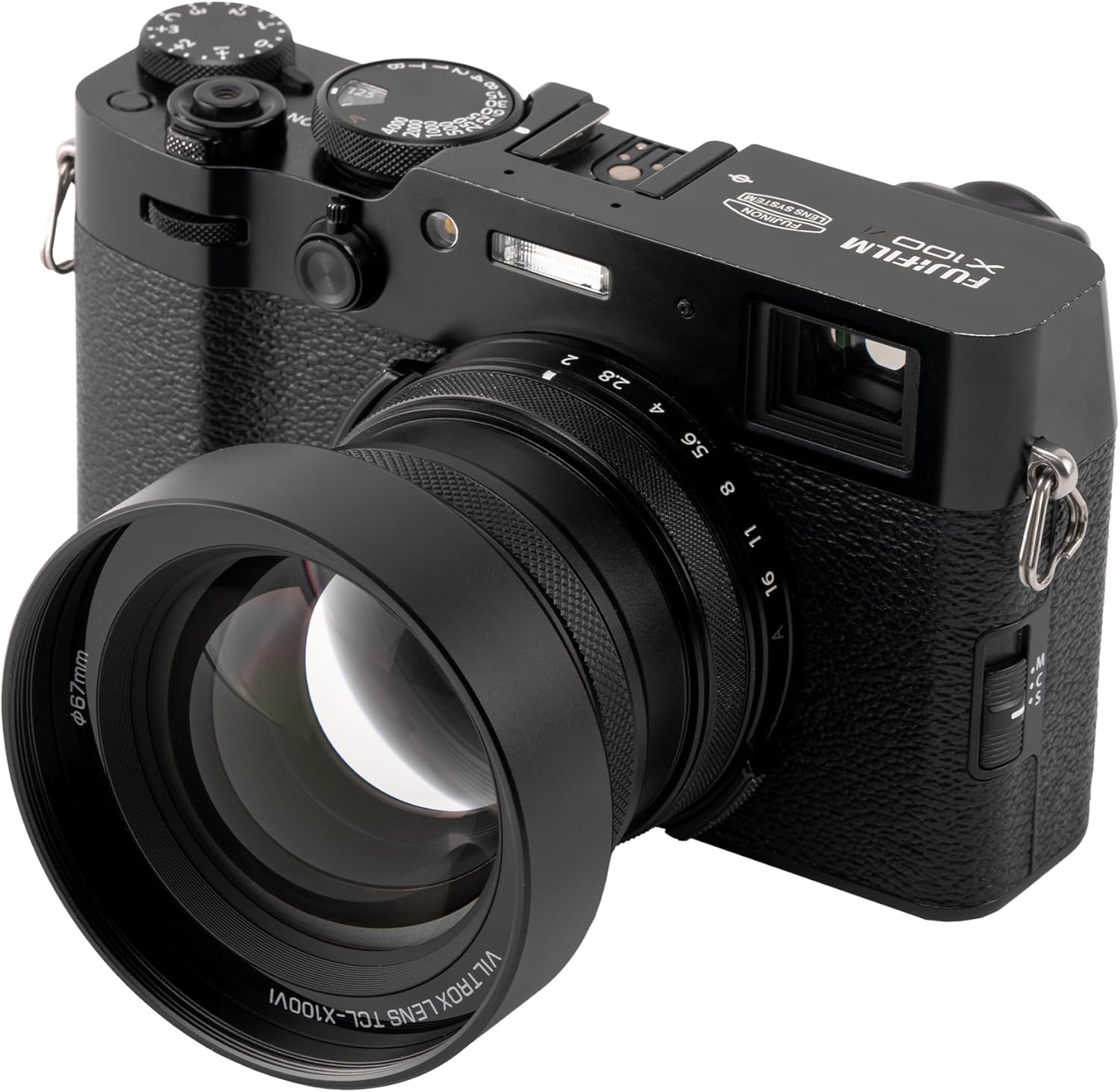
Image: The tele conversion lens mounted on a Fujifilm X100 camera.
Video: Demonstration of attaching the VILTROX TCL-X100 VI Tele Conversion Lens to a Fujifilm X100 camera.
Camera Settings
The VILTROX TCL-X100 VI features automatic recognition on Fujifilm X100F, X100V, and X100VI models. The camera will automatically optimize settings and correct aberrations when the lens is attached.
For older models (Fujifilm X100, X100S), you must manually switch the additional lens settings via the camera's menu. Refer to your camera's user manual for specific instructions on how to access and adjust these settings.
Operating the Lens
Focal Length Extension
This tele conversion lens extends the camera's native 35mm equivalent focal length by approximately 1.4x, resulting in a 50mm equivalent focal length. This is particularly useful for:
- Portraits: Achieve a more compressed perspective and pleasing background blur.
- Detailed Close-ups: Capture subjects with greater magnification and detail from a distance.

Image: Visual comparison of a scene without and with the TCL-X100 VI tele conversion lens.
Optical Performance
The lens features a 4-group, 5-element optical structure, including 2 High Refractive Index (HR) elements. This design is engineered to:
- Effectively control distortion.
- Minimize chromatic aberration.
- Reduce lens flare.
These features ensure sharp, clear image quality from the center to the edges of your photographs.

Image: Optical structure diagram of the TCL-X100 VI lens.
Maintenance
Cleaning the Lens
- Use a soft, lint-free microfiber cloth specifically designed for optical surfaces.
- For stubborn smudges or fingerprints, use a small amount of lens cleaning solution applied to the cloth, not directly to the lens.
- Gently wipe the lens surface in a circular motion from the center outwards.
- Avoid using abrasive materials, paper towels, or harsh chemicals, as these can scratch the lens coating.
Storage
- Always attach the front and rear lens caps when the lens is not in use to protect the optical elements.
- Store the lens in its provided pouch or a dedicated lens case to prevent dust accumulation and physical damage.
- Keep the lens in a cool, dry place away from direct sunlight, extreme temperatures, and high humidity.
Troubleshooting
Lens Not Recognized by Camera
- For X100F, X100V, X100VI: Ensure the lens is securely attached. If the issue persists, try detaching and reattaching the lens.
- For X100, X100S: Verify that the additional lens settings are manually enabled in your camera's menu. Refer to your camera's manual for guidance.
Loose Rear Lens Cap
- Some users have reported that the provided rear lens cap may not fit securely. Consider purchasing a third-party replacement lens cap for a tighter fit if this becomes an issue.
- Always store the lens in its pouch to prevent the cap from falling off and exposing the rear element.
Specifications
| Feature | Detail |
|---|---|
| Product Dimensions | 1.77 x 2.72 x 2.72 inches |
| Item Weight | 8.1 ounces |
| Brand | VILTROX |
| Focal Length Description | 1.4X Telephoto Conversion Lens |
| Lens Type | Telephoto |
| Compatible Mountings | Fujifilm X |
| Optical Structure | 4-group, 5-element (including 2 HR) |
Warranty and Support
VILTROX products are covered by a manufacturer's warranty. Please refer to the included Warranty Card in your package for specific terms, conditions, and duration of the warranty. For technical support, service, or further inquiries, please visit the official VILTROX website or contact their customer service department.
You can find more information and contact details on the VILTROX Official Store.