
Introduction
Thank you for choosing the Yomile AD10 2-in-1 Mini Vacuum Cleaner and Air Duster. This versatile device is designed for efficient cleaning in various environments, including your car, office, and home. It combines powerful suction for vacuuming with a high-speed air blower for dusting, offering a comprehensive cleaning solution. Please read this manual thoroughly before use to ensure proper operation, maintenance, and safety.
Safety Information
- Read all instructions before using the appliance.
- Keep the device away from water or other liquids. Do not use in wet conditions.
- Do not allow children to operate the vacuum cleaner without supervision.
- Do not vacuum flammable or combustible materials, hot ashes, or sharp objects.
- Ensure the filter is properly installed before use.
- Use only the provided charging cable and a compatible adapter (5V/2A recommended).
- Do not disassemble or attempt to repair the device yourself. Contact customer support if needed.
- Store the device in a cool, dry place when not in use.
Package Contents
Verify that all items are present in the package:
- Yomile AD10 Main Unit (Vacuum/Air Duster)
- Long Nozzle (for vacuuming)
- Brush Nozzle (for vacuuming)
- Flat Nozzle (for air duster)
- Round Nozzle (for air duster/inflation)
- Hair Dryer Nozzle
- Pet Care Brush
- Inflatable Nozzles (various sizes)
- USB-C Charging Cable
- Portable Carrying Case
- User Manual

Image: The Yomile AD10 unit displayed with its portable carrying case and all included accessories, such as various nozzles and brushes.
Product Overview
The Yomile AD10 features a compact design with powerful dual functionality. It can be used as a vacuum cleaner for suction and an air duster for blowing, with additional modes for vacuum compression and air inflation.

Image: A visual representation of the Yomile AD10's four operational modes: vacuuming, air blowing, vacuum compression, and air inflation, with corresponding attachments.
Key Features:
- 2-in-1 Functionality: Easily switch between vacuuming and air dusting.
- Powerful Suction: Up to 27,000 Pa for effective debris removal.
- High-Speed Air Blower: 250,000 RPM brushless motor for strong airflow.
- Long Battery Life: 9000mAh battery provides up to 40 minutes of runtime.
- USB-C Fast Charging: Recharges in 3-4 hours.
- Multi-Purpose Accessories: Includes various nozzles for different cleaning tasks, inflation, and pet care.
- Washable HEPA Filter: Ensures efficient filtration and easy maintenance.
- One-Touch Dust Removal: Simple and hygienic emptying of the dustbin.

Image: An infographic detailing the Yomile AD10's main features, including suction power, motor speed, digital display, charging, and filter type.
Setup
1. Charging the Device
- Before first use, fully charge the Yomile AD10.
- Connect the provided USB-C charging cable to the charging port on the device.
- Plug the other end of the USB-C cable into a compatible 5V/2A USB power adapter (not included) or a car charger.
- The digital display will indicate charging status. A full charge typically takes 3-4 hours.
- Once fully charged, disconnect the cable.
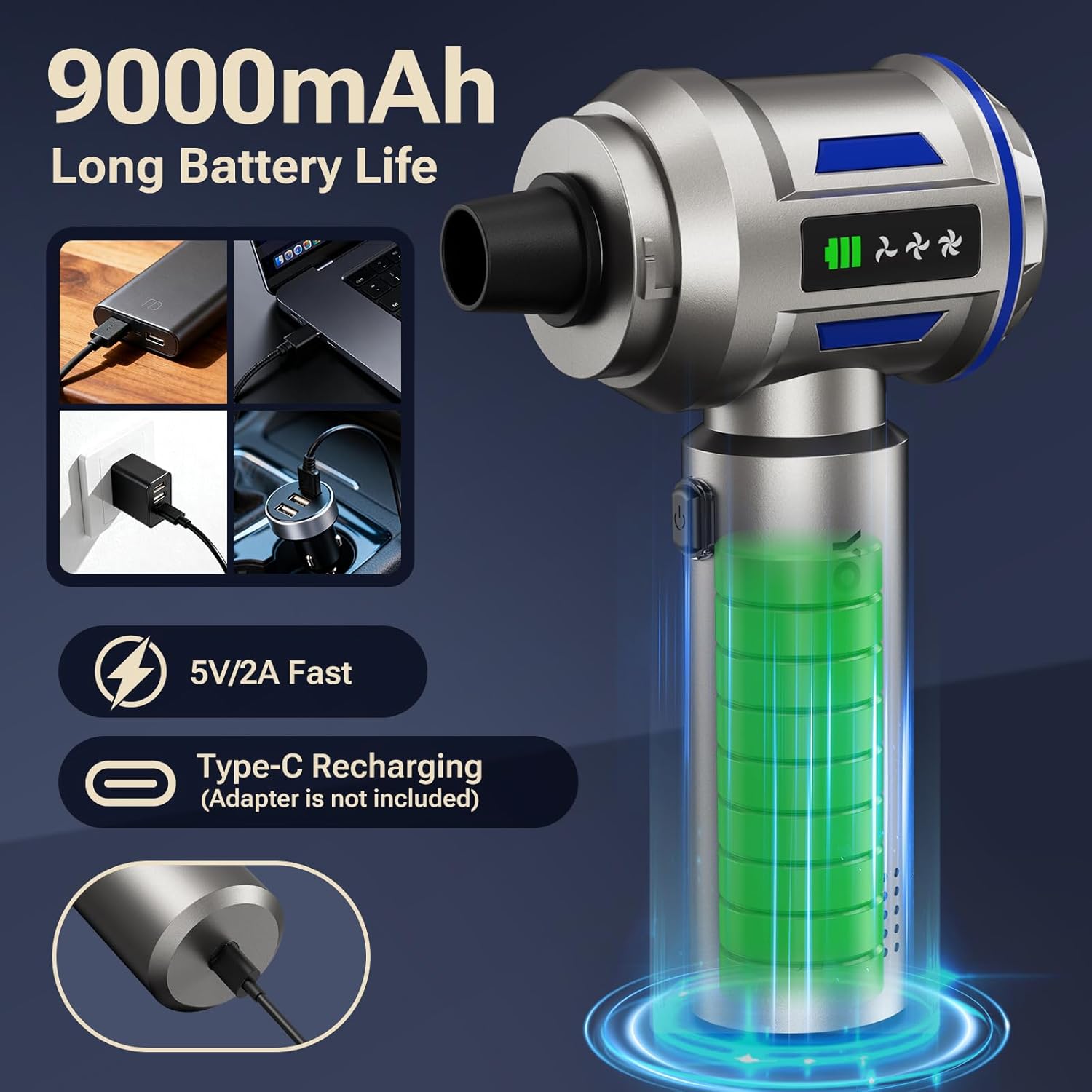
Image: The Yomile AD10 connected for USB-C charging, demonstrating compatibility with various power sources.
2. Attaching Accessories
Select the appropriate nozzle or brush for your desired function (vacuuming, dusting, inflating) and firmly attach it to the device's intake or exhaust port.
Operating Instructions
Power On/Off and Speed Adjustment
- Press the power button once to turn on the device.
- Press the power button again to cycle through different speed modes (if applicable).
- Press and hold the power button to turn off the device.
Using as a Vacuum Cleaner
- Ensure the dust collection bin is securely attached and the HEPA filter is in place.
- Attach the desired vacuum nozzle (e.g., long nozzle for crevices, brush nozzle for surfaces) to the suction inlet.
- Turn on the device and direct the nozzle towards the area to be cleaned.
- Move the vacuum slowly over the surface to pick up dust and debris.

Image: The Yomile AD10 in vacuum mode, demonstrating its powerful suction on a car seat.
Using as an Air Duster
- Remove the dust collection bin if it's attached.
- Attach the desired air duster nozzle (e.g., flat nozzle for concentrated airflow) to the air outlet.
- Turn on the device and direct the airflow towards the area to be dusted.
- Use short bursts of air for delicate items or continuous flow for larger areas.

Image: The Yomile AD10 functioning as an air duster, effectively clearing dust from a keyboard.

Image: Visual instructions for assembling and using the Yomile AD10 in both air duster and vacuum cleaner configurations.
Using Other Accessories
- Inflation Nozzles: Attach the appropriate nozzle to the air outlet to inflate balloons, swimming rings, or other inflatables.
- Vacuum Compression: Use the suction nozzle to remove air from vacuum storage bags.
- Pet Care Brush: Attach to the suction inlet to gently remove pet hair while grooming.
- Hair Dryer Nozzle: Provides powerful airflow for quick drying.

Image: A collage demonstrating the Yomile AD10's versatility across multiple applications, including inflation, car cleaning, and desk cleaning.
Maintenance
Emptying the Dust Collection Bin
- Ensure the device is turned off.
- Press the dustbin release button (usually located near the dustbin) to detach the dust collection bin from the main unit.
- Empty the contents into a trash receptacle.

Image: A visual guide to the one-click dust removal feature, illustrating how to empty the dustbin hygienically.
Cleaning the HEPA Filter
For optimal performance, clean the HEPA filter regularly.
- After emptying the dustbin, separate the main unit and the dust collection bin.
- Carefully remove the HEPA filter from the dustbin.
- Rinse the filter under running water until clean. Do not use detergents or hot water.
- Allow the filter to air dry completely for at least 24 hours before reinserting it into the dustbin. Ensure it is completely dry to prevent mold or damage.
- Reassemble the dustbin and filter, then attach it back to the main unit.

Image: A five-step guide illustrating the process of emptying the dust, separating components, removing the HEPA filter, washing it, and allowing it to air dry.
General Cleaning and Storage
- Wipe the exterior of the device with a soft, damp cloth. Do not use harsh chemicals.
- Clean all accessories after use and store them in the provided carrying case.
- Store the device in a cool, dry place, away from direct sunlight and extreme temperatures.
Troubleshooting
| Problem | Possible Cause | Solution |
|---|---|---|
| Device does not turn on | Low battery; Device not charged | Charge the device fully using the USB-C cable. |
| Weak suction power | Dustbin full; Filter clogged; Nozzle blocked | Empty the dustbin. Clean or replace the HEPA filter. Check nozzles for obstructions. |
| Air duster output is weak | Low battery; Air outlet blocked | Charge the device. Check the air outlet and attached nozzle for any blockages. |
| Device stops working suddenly | Overheating; Low battery | Allow the device to cool down for 30 minutes. Charge the device. |
| Charging indicator not working | Faulty cable/adapter; Charging port issue | Try a different USB-C cable and power adapter. Ensure the cable is fully inserted. |
Specifications
| Feature | Specification |
|---|---|
| Model Name | AD10 |
| Brand | Yomile |
| Suction Power | 27,000 Pa |
| Motor Speed | 250,000 RPM |
| Max Power | 135W |
| Battery Capacity | 9000 mAh |
| Battery Life | Up to 40 minutes |
| Charging Time | 3-4 hours (via USB-C) |
| Filter Type | HEPA Filter (Washable) |
| Dust Container Capacity | 0.2 Liters |
| Product Dimensions | 8.46"L x 7.87"W x 2.95"H |
| Item Weight | 1 pound |
| Noise Level | <75 dB |

Image: A detailed overview of the Yomile AD10's technical specifications, presented alongside the product and its accessories.
Warranty and Support
The Yomile AD10 Mini Vacuum Cleaner and Air Duster comes with a manufacturer's warranty. Please refer to the product packaging or the seller's information for specific warranty terms and duration.
For technical support, troubleshooting assistance, or warranty claims, please contact the seller or Yomile customer service through the platform where you purchased the product. Have your order number and product model (AD10) ready for faster service.