
1. Introduction and Overview
This manual provides essential information for the safe and efficient operation of your BLACK+DECKER BXICHCP2BFZ 2-Burner Full Zone Induction Cooktop. This built-in induction cooktop features two cooking zones, a Full Zone expanded induction area, Power Booster function, digital display, ceramic glass surface, and a safety lock. Please read these instructions thoroughly before installation and use, and retain them for future reference.
2. Important Safety Instructions
To reduce the risk of fire, electric shock, injury to persons, or damage when using the cooktop, follow basic safety precautions, including the following:
- Electrical Safety: Ensure the cooktop is connected to a properly grounded 220V electrical outlet. Do not use extension cords or adapters. Disconnect power before servicing.
- Suitable Cookware: Only use induction-compatible cookware with a flat bottom. Non-magnetic cookware will not heat.
- Surface Temperature: The cooktop surface may remain hot after use. CAUTION: HOT SURFACE. Avoid touching the hot surface until it has cooled down.
- Ventilation: Ensure adequate ventilation around the cooktop as specified in the installation instructions. Do not block air vents.
- Flammable Materials: Keep flammable materials (e.g., aerosols, cleaning products, cloths) away from the cooktop during operation and when it is hot.
- Child Safety: Activate the child safety lock to prevent accidental operation by children. Do not allow children to operate or play near the cooktop.
- Cleaning: Always turn off the cooktop and allow it to cool before cleaning.
- Repairs: Do not attempt to repair or replace any part of the cooktop unless specifically recommended in this manual. All other servicing should be referred to a qualified technician.
3. Product Components and Overview
Your BLACK+DECKER induction cooktop consists of the main unit, an installation kit, and this user manual. Familiarize yourself with the cooktop's layout and controls.
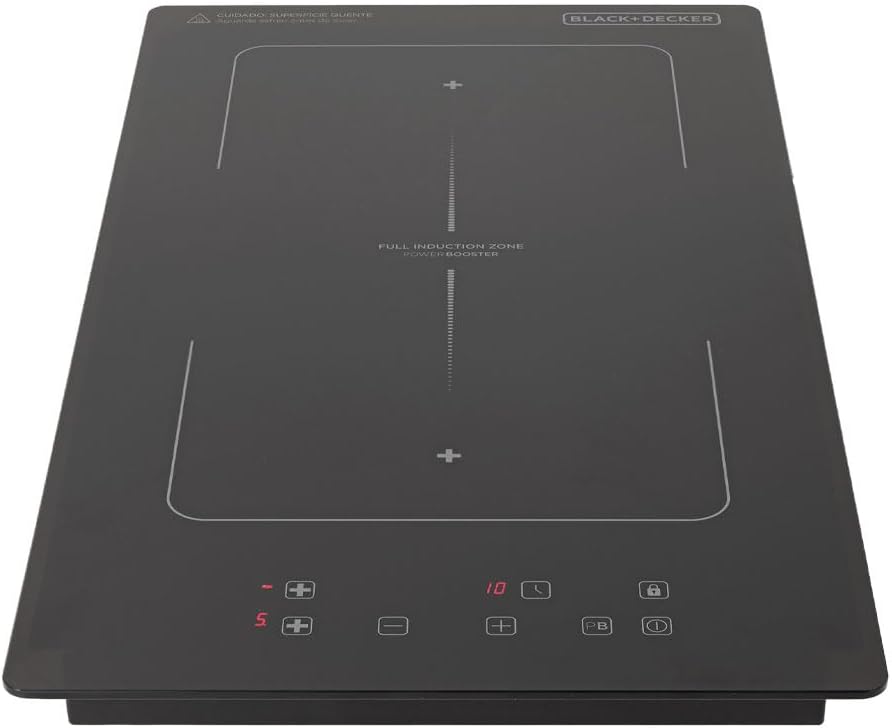

Control Panel Features:
- Digital Display: Shows power levels, timer settings, and error codes.
- Power Level Controls (+/-): Adjusts heating intensity for each zone.
- Power Booster (PB): Temporarily increases power to a cooking zone for rapid heating.
- Timer Function: Sets cooking duration.
- Child Safety Lock: Locks the control panel to prevent unintended operation.
- On/Off Button: Activates or deactivates the cooktop.
- Full Zone Indicator: Indicates the expanded induction area for larger cookware.
4. Setup and Installation
The BLACK+DECKER BXICHCP2BFZ is a built-in cooktop designed for integration into a countertop. Professional installation is recommended to ensure proper electrical connection and ventilation.
4.1. Pre-Installation Checks:
- Verify that the electrical supply matches the cooktop's requirements (220V).
- Ensure the countertop cut-out dimensions are accurate.
- Confirm sufficient clearance for ventilation beneath and around the cooktop.
4.2. Installation Steps:
- Prepare the countertop opening according to the specified cut-out dimensions: 27 cm (width) x 49 cm (depth) x 5.5 cm (height).
- Carefully place the cooktop into the prepared opening. Ensure it sits flush with the countertop.
- Secure the cooktop using the provided installation clips or brackets from the installation kit.
- Connect the cooktop to the dedicated 220V electrical circuit. This connection should be performed by a qualified electrician.
- After installation, clean the ceramic glass surface with a damp cloth to remove any dust or debris.
5. Operating Instructions
This section details how to use your induction cooktop for various cooking tasks.
5.1. Cookware Compatibility:
Induction cooktops require cookware made of ferromagnetic material (e.g., cast iron, magnetic stainless steel). To check compatibility, hold a magnet to the bottom of your pot or pan; if it sticks, the cookware is suitable for induction.
5.2. Basic Operation:
- Power On: Touch the On/Off button (ⓘ) to activate the cooktop. The digital display will light up.
- Select Cooking Zone: Place an induction-compatible pot or pan on the desired cooking zone. Touch the corresponding zone selection button (if applicable, or simply place the pan and the cooktop will detect it).
- Adjust Power Level: Use the '+' and '-' buttons to set the desired heating power level (typically from 1 to 9). The selected power level will be shown on the digital display.
- Power Booster (PB): For rapid heating, select a cooking zone and then touch the 'PB' button. This will temporarily increase the power to the maximum level. The booster function will automatically deactivate after a set period or when manually turned off.
- Full Zone Function: The cooktop features an expanded induction area (Full Zone) between the two main burners. This allows for the use of larger or elongated cookware, such as grill plates. Place the cookware over the designated Full Zone area, and the cooktop will automatically adjust.
- Timer Function: To set a cooking timer, select the desired cooking zone, then touch the timer button (⏱). Use the '+' and '-' buttons to adjust the cooking duration. The cooktop will automatically turn off the selected zone when the timer expires.
- Child Safety Lock: To activate the child safety lock, touch and hold the lock button (🔒) for a few seconds. The cooktop controls will be disabled. To deactivate, touch and hold the lock button again.
- Power Off: Touch the On/Off button (ⓘ) to turn off the entire cooktop. Individual zones can also be turned off by reducing their power level to '0'.
6. Cleaning and Maintenance
Regular cleaning and proper maintenance will ensure the longevity and optimal performance of your cooktop.
- Before Cleaning: Always ensure the cooktop is turned off and has completely cooled down.
- Ceramic Glass Surface: Wipe the ceramic glass surface with a soft cloth and a mild detergent or a specialized ceramic cooktop cleaner. For stubborn stains, use a ceramic scraper designed for cooktops. Rinse with a damp cloth and dry thoroughly to prevent water spots.
- Avoid Abrasives: Do not use abrasive sponges, scouring pads, or harsh chemical cleaners, as these can scratch or damage the ceramic glass surface.
- Control Panel: Wipe the touch control panel with a soft, damp cloth. Ensure no moisture enters the control area.
- Spills: Clean up spills immediately, especially sugary liquids, to prevent them from hardening and potentially damaging the surface.
7. Troubleshooting
If you encounter issues with your cooktop, refer to the following common problems and solutions before contacting customer support.
| Problem | Possible Cause | Solution |
|---|---|---|
| Cooktop does not turn on. | No power supply; cooktop not properly connected; child safety lock active. | Check power connection and circuit breaker. Deactivate child safety lock. |
| Cooking zone not heating. | Cookware not induction-compatible; pan not centered; pan too small or too large. | Use induction-compatible cookware. Ensure pan is centered and within the zone's size limits. |
| Display shows an error code (e.g., "E0", "E1"). | Specific internal fault or condition. | Refer to the full manual for specific error code meanings. Try turning off and on the cooktop. If the error persists, contact customer support. |
| Unusual noise during operation. | Normal fan operation; vibration from cookware. | A low humming sound from the cooling fan is normal. Some cookware may vibrate slightly. This is not a fault. |
For issues not listed here or if solutions do not resolve the problem, please contact BLACK+DECKER customer support.
8. Specifications
| Feature | Specification |
|---|---|
| Brand | Black+Decker |
| Model Number | BXICHCP2BFZ |
| Installation Type | Built-in |
| Number of Burners | 2 |
| Burner Type | Induction |
| Voltage | 220 Volts |
| Total Power | 3500W (1500W + 2000W zones) |
| Top Material | Ceramic Glass |
| Product Dimensions (WxDxH) | 29 cm x 52 cm x 4.5 cm |
| Cut-out Dimensions (WxDxH) | 27 cm x 49 cm x 5.5 cm |
| Weight | 4.3 kg |
| Special Features | Full Zone, Power Booster, Digital Touch Panel, Safety Lock, Automatic Pan Detection |
9. Warranty and Support
This product comes with a manufacturer's warranty. Please refer to the warranty card included with your purchase for detailed terms and conditions, including warranty period and coverage.
For technical assistance, spare parts, or service inquiries, please contact BLACK+DECKER customer support. Contact information can typically be found on the manufacturer's website or in the documentation provided with your appliance.

