
1. Product Overview
The AFERIY P280 is a high-capacity portable power station designed to provide reliable power for various applications, including home backup, camping, RV travel, and temporary workshops. It features a robust LiFePO4 battery, expandable capacity, multiple output options, and fast charging capabilities.
Key Features:
- High Power Output: 2400W to 2800W AC output, capable of powering most household appliances.
- Expandable Capacity: Base 2048Wh LiFePO4 battery, expandable up to 10.24 kWh with additional battery packs (sold separately).
- Fast Charging: Achieves 0-80% charge in approximately 1 hour, with 1.5 hours for a full charge via AC + PV 2500W.
- Versatile Charging: Supports up to 1200W solar input (2x XT90 ports, 600W each) with MPPT technology, and adjustable AC charging power (600W, 900W, 1200W, 1500W, 1800W).
- Multiple Output Ports: Includes 3x AC 220V-240V outlets, 4x Type-C ports (2xPD140W, 2xPD20W), 2xUSB-A, 2xDC5521, 1x XT60 25A port, and 1x 12V cigarette lighter socket.
- UPS Functionality: Uninterruptible Power Supply (UPS) mode with a switching time of less than 10ms.
- Mobile App Control: Monitor battery status and control the unit remotely via the AFERIY mobile app.
- Durable Battery: LiFePO4 battery supports over 4000 charging cycles, maintaining 80% original capacity.
- Compact Design: Dimensions L39.8 × W28.0 × H31.5 cm, weight 21.6 kg, with recessed handles and a top storage compartment.
2. Safety Instructions
Please read all safety instructions carefully before using the AFERIY P280 Portable Power Station. Failure to follow these instructions may result in electric shock, fire, or serious injury.
- Do not disassemble, repair, or modify the unit.
- Do not expose the unit to fire or high temperatures.
- Do not use or store the unit in direct sunlight or in hot environments.
- Keep the unit away from water, moisture, and corrosive substances.
- Ensure proper ventilation during use to prevent overheating.
- Do not block the ventilation openings.
- Use only original or certified charging cables and accessories.
- Keep out of reach of children and pets.
- In case of abnormal operation, smoke, or unusual odors, immediately turn off the unit and disconnect all power sources.
- Dispose of the unit and its battery according to local regulations.
3. Setup and First Use
3.1 Unpacking
Carefully remove all components from the packaging. Verify that all included items are present:
- AFERIY P280 Portable Power Station
- EU AC Charging Cable
- MC4-XT90 Solar Charging Cable (80 cm)
- User Manual
- Warranty Card

Image: AFERIY P280 Power Station with its included accessories, including the power station itself, AC charging cable, solar charging cable, user manual, and warranty card. The image also shows the dimensions of the unit: L39.8cm x W28.0cm x H31.5cm.
3.2 Initial Charge
Before first use, it is recommended to fully charge the AFERIY P280. This ensures optimal battery performance and calibration.
- Connect the AC charging cable to the power station's AC input port.
- Plug the other end of the AC charging cable into a standard wall outlet (220V-240V).
- The display on the power station will indicate the charging status. Charge until the battery indicator shows 100%.
- Alternatively, connect compatible solar panels using the MC4-XT90 cable to charge via solar power.
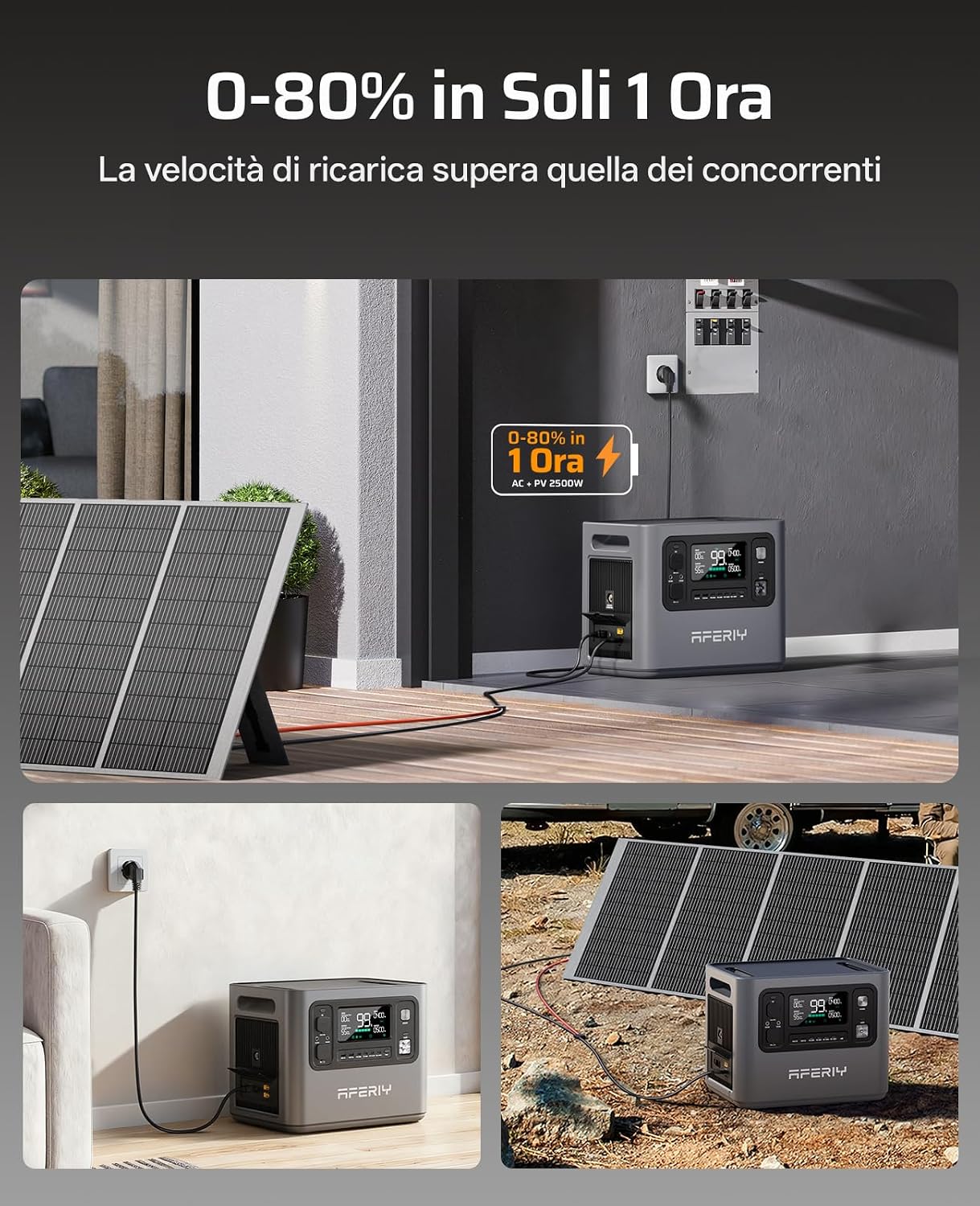
Image: The AFERIY P280 power station being charged from a wall outlet and simultaneously from solar panels. The display shows "0-80% in 1 Ora" (0-80% in 1 Hour), highlighting its fast charging capability.
4. Operation
4.1 Turning On/Off
- To turn on: Press and hold the main power button for a few seconds until the display illuminates.
- To turn off: Press and hold the main power button again until the display turns off.
4.2 Using AC Outputs
The AFERIY P280 provides 3 AC 220V-240V outlets for powering standard household appliances.
- Ensure the power station is turned on.
- Press the AC power button to activate the AC outlets. An indicator light will confirm they are active.
- Plug your appliance into one of the AC outlets.
- Monitor the display for real-time power consumption.
- After use, press the AC power button again to turn off the AC outlets and conserve battery.

Image: The AFERIY P280 power station connected to and powering multiple devices, including a kettle, coffee machine, and electric grill, demonstrating its 2800W AC output capability.
4.3 Using DC and USB Outputs
The unit includes various DC and USB ports for charging smaller devices.
- Type-C Ports: 4 ports (2xPD140W, 2xPD20W) for fast charging compatible smartphones, tablets, and laptops.
- USB-A Ports: 2 ports for standard USB charging.
- DC5521 Ports: 2 ports for DC-powered devices.
- XT60 25A Port: 1 port for high-power DC devices.
- 12V Cigarette Lighter Socket: 1 port for automotive accessories.
To use these outputs, simply plug your device into the appropriate port. Most DC/USB outputs are active when the unit is on, but some may require pressing a dedicated DC button.

Image: An overhead view illustrating the various output ports of the AFERIY P280, including AC outlets, cigarette lighter, XT60, Type-C, QC 3.0 USB, and DC 5521 ports, indicating its versatility.
4.4 Mobile App Control
Download the AFERIY app from your smartphone's app store. The app allows you to:
- Monitor battery level and charging status in real-time.
- Remotely control AC/DC outputs.
- Adjust AC charging power levels (600W, 900W, 1200W, 1500W, 1800W).
- View input/output power.

Image: The AFERIY P280 power station in various usage scenarios, including being controlled via a mobile app interface, demonstrating its smart features and quiet operation.
4.5 Expanding Capacity (Optional)
The AFERIY P280's capacity can be expanded by connecting additional battery packs (sold separately). It supports 1-4 extra batteries, increasing total capacity up to 10.24 kWh.
- Ensure both the P280 and the expansion battery are turned off.
- Connect the expansion battery to the P280 using the designated cable (refer to the expansion battery's manual for specific connection instructions).
- Turn on the P280. The display should recognize the connected expansion battery.

Image: The AFERIY P280 power station connected to an expansion battery, demonstrating its expandable capacity. The combined unit is shown powering a large refrigerator, illustrating its capability for extended use.

Image: The AFERIY P280 power station with an expansion battery, connected to both solar panels for charging and a household grid, illustrating its versatility as a grid-connected energy storage system.
5. Maintenance
5.1 Cleaning
- Use a dry, soft cloth to wipe the exterior of the unit.
- Do not use abrasive cleaners or solvents.
- Keep the ventilation openings clear of dust and debris.
5.2 Storage
- If storing for an extended period, charge the unit to approximately 50-80% every 3-6 months to prolong battery life.
- Store in a cool, dry place, away from direct sunlight and extreme temperatures.
- Ensure the unit is turned off before storage.
5.3 Battery Life
The LiFePO4 battery in the AFERIY P280 is designed for longevity, supporting over 4000 charge cycles while retaining 80% of its original capacity.

Image: The AFERIY P280 power station emphasizing its 10-year lifespan, 7-year warranty, and the LiFePO4 battery technology with over 4000 charge cycles, ensuring long-term durability.
6. Troubleshooting
| Problem | Possible Cause | Solution |
|---|---|---|
| Unit does not turn on | Battery is depleted; Power button not pressed correctly. | Charge the unit; Press and hold the power button firmly for a few seconds. |
| AC outlets not working | AC output not activated; Overload protection triggered; Appliance power exceeds 2800W. | Press the AC power button; Disconnect some appliances; Use appliances within the rated power. |
| Slow charging via solar | Insufficient sunlight; Solar panels not correctly positioned; Dirty panels; Incompatible panels. | Ensure panels are in direct sunlight; Adjust panel angle; Clean panels; Use compatible solar panels. |
| Unit overheating | Blocked ventilation; Excessive load; High ambient temperature. | Ensure vents are clear; Reduce load; Move unit to a cooler environment. |
| App connection issues | Bluetooth/Wi-Fi off; App not updated; Unit not discoverable. | Ensure Bluetooth/Wi-Fi is on; Update app; Restart unit and app. |
If the problem persists, please contact AFERIY customer support.
7. Technical Specifications
| Feature | Specification |
|---|---|
| Model | AFERIY P280 |
| Battery Type | LiFePO4 |
| Capacity | 2048 Wh (Expandable up to 10.24 kWh) |
| AC Output Power | 2400W (Surge 2800W) |
| AC Output Voltage | 220V-240V |
| Solar Input | Max 1200W (2x XT90 ports, 600W each) |
| AC Charging Power | Adjustable: 600W, 900W, 1200W, 1500W, 1800W |
| Charging Time (0-80%) | Approx. 1 hour (AC + PV 2500W) |
| UPS Switching Time | <10 ms |
| Output Ports | 3x AC, 4x Type-C (2xPD140W, 2xPD20W), 2xUSB-A, 2xDC5521, 1x XT60 25A, 1x 12V Car Socket |
| Dimensions (L x W x H) | 39.8 × 28.0 × 31.5 cm |
| Weight | 21.6 kg |
| Certifications | PSE/CE/FCC/RoHS |
8. Warranty and Support
The AFERIY P280 Portable Power Station comes with a 7-year warranty and lifetime after-sales service.
For technical assistance or warranty claims, please refer to the warranty card included in your package or scan the QR code provided in the product documentation for direct access to support resources.
You can also visit the official AFERIY website for more information and support options: AFERIY Official Store


