
Introduction
Thank you for choosing the ACAMMZAR S814 RC Drift Car. This 1:24 scale, 4WD high-speed remote control car is designed for an engaging driving experience, featuring responsive controls, LED lights, and interchangeable tires for both racing and drifting. This manual provides essential information for setting up, operating, maintaining, and troubleshooting your new RC drift car. Please read it thoroughly before use to ensure proper function and safety.
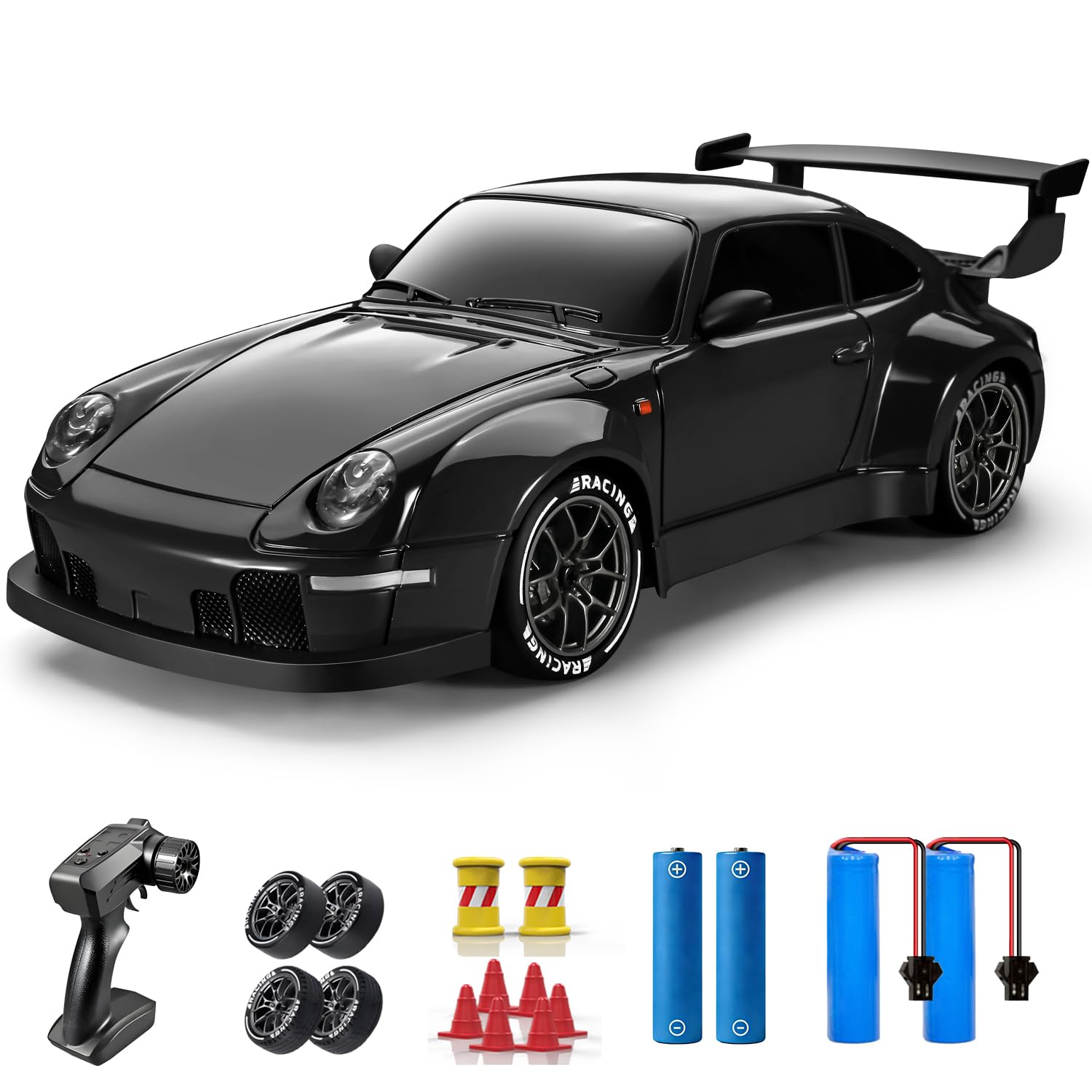
Image: The ACAMMZAR S814 RC Drift Car, a 1:24 scale model with a black finish, designed for high-speed remote control action.
Package Contents
Please check the package contents to ensure all items are present:
- 1 x ACAMMZAR S814 RC Drift Car
- 1 x Remote Control
- 2 x 3.7V 500mAh Lithium-Ion Batteries (one pre-installed in car, one spare)
- 2 x AA Batteries (for remote control)
- 1 x USB Charging Cable
- 4 x Extra Racing Tires
- 1 x Screwdriver
- 1 x Instruction Manual (this document)
- Barricade accessories (cones)

Image: A complete view of the ACAMMZAR S814 RC Drift Car package contents, including the car, remote control, two sets of tires, batteries, charging cable, screwdriver, and practice cones.
Product Overview
The ACAMMZAR S814 is a 1:24 scale remote control drift car featuring a 4-wheel drive (4WD) system for enhanced stability and control during drifting maneuvers. It can reach speeds up to 20 KM/H and offers a control distance of up to 50 meters. The car is equipped with independent front shock absorbers for improved handling and durability.

Image: An exploded view of the ACAMMZAR S814 RC Drift Car chassis, illustrating the internal components, including the independent front shock absorbers and the 4WD drivetrain for smoother drifting.
Setup
1. Battery Installation
Ensure the car and remote control are powered off before installing batteries.
Car Battery:
- Locate the battery compartment on the underside of the RC car.
- Open the battery compartment cover using the provided screwdriver.
- Connect the 3.7V 500mAh Lithium-Ion battery to the car's connector.
- Place the battery inside the compartment and close the cover securely.
Remote Control Batteries:
- Locate the battery compartment on the back of the remote control.
- Open the battery compartment cover.
- Insert the 2 AA batteries, ensuring correct polarity (+/-).
- Close the battery compartment cover.
2. Charging the Car Battery
Use the included USB charging cable to charge the 3.7V 500mAh Lithium-Ion batteries.
- Connect the USB charging cable to a USB power source (e.g., computer, USB wall adapter).
- Connect the other end of the charging cable to the car battery.
- The indicator light on the USB cable will show the charging status (e.g., red for charging, off or green for fully charged).
- Charging typically takes approximately 60-90 minutes. Do not overcharge.
3. Tire Installation
The ACAMMZAR S814 comes with two types of tires: drifting wheels and racing wheels. You can change them based on your preferred driving style and terrain.
- To remove a tire, gently pull it off the wheel axle.
- To install a tire, align it with the wheel axle and push firmly until it is securely in place.
- Ensure all four tires are of the same type for optimal performance.

Image: The ACAMMZAR S814 RC Drift Car demonstrating the two types of tires included: smooth drift tires and treaded racing tires, allowing for versatile driving experiences.
Operating Instructions
1. Power On and Pairing
- Turn on the RC car by sliding its power switch to the 'ON' position. The car's lights may flash.
- Turn on the remote control by pressing its power button. The power indicator light on the remote will illuminate.
- The car and remote should automatically pair. If not, turn both off and on again. A solid light on the remote usually indicates a successful connection.
2. Remote Control Functions

Image: The ACAMMZAR RC car remote control, with labels indicating the functions of each button and control: Light switch, Speed switching, Power indicator, Power switch, Steering wheel, and Forward/backward trigger.
- Steering Wheel: Turn left or right to steer the car.
- Forward/Backward Trigger: Pull to move forward, push to move backward/brake. The throttle is proportional, allowing for precise speed control.
- Light Switch: Press to turn the car's headlights and taillights on or off.
- Speed Switching: Press to toggle between high and low-speed modes. This is useful for beginners or for different driving environments.
- Power Switch: Turns the remote control on/off.
- Power Indicator: Shows the remote control's power status and pairing status.
3. Using the Lights
The RC car is equipped with functional headlights and taillights, enhancing visibility and realism, especially when driving in low-light conditions.
- Press the 'Light switch' button on the remote control to cycle through light modes (On/Off).

Image: The ACAMMZAR S814 RC Drift Car with its front headlights and rear taillights actively illuminated, demonstrating its night-play capability.
4. Drifting Techniques
To perform drifts, use the smooth drifting tires. Practice in an open area, ideally with the included barricade accessories (cones).
- Initiating a Drift: Approach a turn with moderate speed, then quickly turn the steering wheel while applying a burst of throttle. Counter-steer (turn the wheel in the opposite direction of the turn) to maintain the drift.
- Maintaining a Drift: Adjust throttle and steering inputs subtly to keep the car sliding sideways through the turn.
- Practice: Use the barricade cones to set up a drift course and refine your technique.

Image: The ACAMMZAR S814 RC Drift Car on a simulated track, accompanied by orange cones, which can be used as barricade accessories for practicing drifting maneuvers or setting up a race course.
5. Product Demonstration Video
Video: An official ACAMMZAR demonstration of the RC Drift Car, showcasing its features and capabilities in action.
Maintenance
- Cleaning: After use, gently wipe the car with a soft, dry cloth to remove dust and debris. Avoid using water or chemical cleaners.
- Battery Care: Always remove batteries from the car and remote control when not in use. Store batteries in a cool, dry place. Do not expose batteries to extreme temperatures.
- Storage: Store the RC car and remote control in a dry environment, away from direct sunlight and moisture.
- Inspection: Regularly check for loose screws, damaged parts, or worn tires. Replace any damaged components as needed.
Troubleshooting
| Problem | Possible Cause | Solution |
|---|---|---|
| Car does not respond to remote. | Low batteries in car or remote; Car and remote not paired; Interference. |
|
| Short play time. | Battery not fully charged; Old battery. |
|
| Car drives slowly or inconsistently. | Low battery; Obstruction in wheels; Speed mode set to low. |
|
| Car pulls to one side. | Steering trim adjustment needed; Damaged steering components. |
|
Specifications
| Feature | Detail |
|---|---|
| Brand | ACAMMZAR |
| Model Name | S814 |
| Scale | 1:24 |
| Drive System | 4-Wheel Drive (4WD) |
| Max Speed | 20 KM/H |
| Control Distance | Up to 50 meters |
| Car Battery | 2 x 3.7V 500mAh Lithium-Ion (included) |
| Remote Control Battery | 2 x AA Batteries (included) |
| Approx. Run Time | Up to 50 minutes (with two batteries) |
| Charging Time | Approx. 60-90 minutes per battery |
| Lights | Headlights and Taillights |
| Tire Types | Drifting Wheels, Racing Wheels |
| Material | Plastic |
| Item Weight | 0.58 Kilograms |
| Recommended Age | 8 years and up |
Safety Information
- This product is not suitable for children under 8 years old without adult supervision.
- Always operate the RC car in open areas, away from people, pets, and obstacles.
- Do not operate near roads, water, or in adverse weather conditions.
- Avoid touching moving parts during operation to prevent injury.
- Do not modify or disassemble the car or remote control.
- Use only the specified batteries and charging cable.
- Never leave charging batteries unattended.
- Dispose of batteries responsibly according to local regulations.
Warranty and Support
ACAMMZAR is committed to providing reliable products. If you encounter any issues during the use of your RC drift car, please contact ACAMMZAR customer support for assistance. Refer to the product packaging or the ACAMMZAR brand store on Amazon for contact details.
For further information or support, please visit the official ACAMMZAR store: ACAMMZAR Store
