
Introduction
This manual provides detailed instructions for the assembly, operation, and maintenance of your Jocoevol Farmhouse 57" Lift Up Executive Desk. Please read all instructions carefully before assembly and use to ensure safe and proper functionality. Keep this manual for future reference.
Safety Information
WARNING: Failure to follow these safety instructions could result in injury or damage to the product.
- Always assemble the desk on a soft, clean surface to prevent scratches.
- Ensure all hardware is securely tightened before use. Periodically check and re-tighten as necessary.
- Do not overload drawers or the desktop. Refer to specifications for weight limits.
- Keep small parts and packaging materials away from children and pets.
- Use caution when operating the lift-up mechanism to avoid pinching fingers or objects.
- This product is intended for indoor use only.
Package Contents
Before beginning assembly, verify that all components listed below are present and undamaged. If any parts are missing or damaged, contact customer support immediately.
- Desktop Panels (Lift-up sections and fixed sections)
- Side Cabinets (Left and Right)
- Center Support Structure
- Drawers (5 total, including file drawer)
- Keyboard Tray
- Lift Mechanism Hardware
- Drawer Slides and Handles
- Headphone Hook
- Charging Station Unit (Built-in USB Outlet, USB Ports, Type-C)
- Assembly Hardware (Screws, dowels, cam locks, etc.)
- Instruction Manual

Image: Exploded view of desk components, including drawers, cabinets, lift-up desktop, and headphone hook.
Setup and Assembly
Assembly requires two people and basic tools (not included, e.g., Phillips head screwdriver, hammer). Follow the numbered steps carefully.
- Prepare the Workspace: Clear a spacious, clean, and soft area for assembly to prevent damage to the desk components.
- Assemble Side Cabinets: Begin by assembling the left and right side cabinets. Attach the back panels and internal shelves as per the included hardware instructions. Ensure all cam locks and screws are tightened.
- Install Drawer Slides: Attach the drawer slides to the interior of the side cabinets and the center support structure. Pay attention to the orientation of the slides (left/right, front/back).
- Assemble Drawers: Construct the drawer boxes. Attach the drawer fronts with the beadboard detailing and install the retro-style handles. Insert the assembled drawers into their respective slides.
- Attach Center Support: Connect the center support structure, which includes the keyboard tray housing, between the two side cabinets. Secure with provided hardware.
- Install Lift Mechanism and Desktop: Attach the gas spring lift mechanisms to the center support and the underside of the lift-up desktop panels. Carefully align and secure the desktop panels to the lift mechanism and the fixed side cabinet tops.
- Install Keyboard Tray: Slide the ergonomic keyboard tray into its designated slot beneath the lift-up desktop.
- Connect Charging Station: If not pre-installed, integrate the built-in charging station (2-Outlet, USB Ports, Type-C) into the designated cutout on the desktop. Ensure all connections are secure.
- Attach Headphone Hook: Secure the headphone hook to the side of the desk as desired.
- Final Check: Verify that all screws, bolts, and connections are tight. Test the lift-up mechanism, drawers, and keyboard tray for smooth operation.
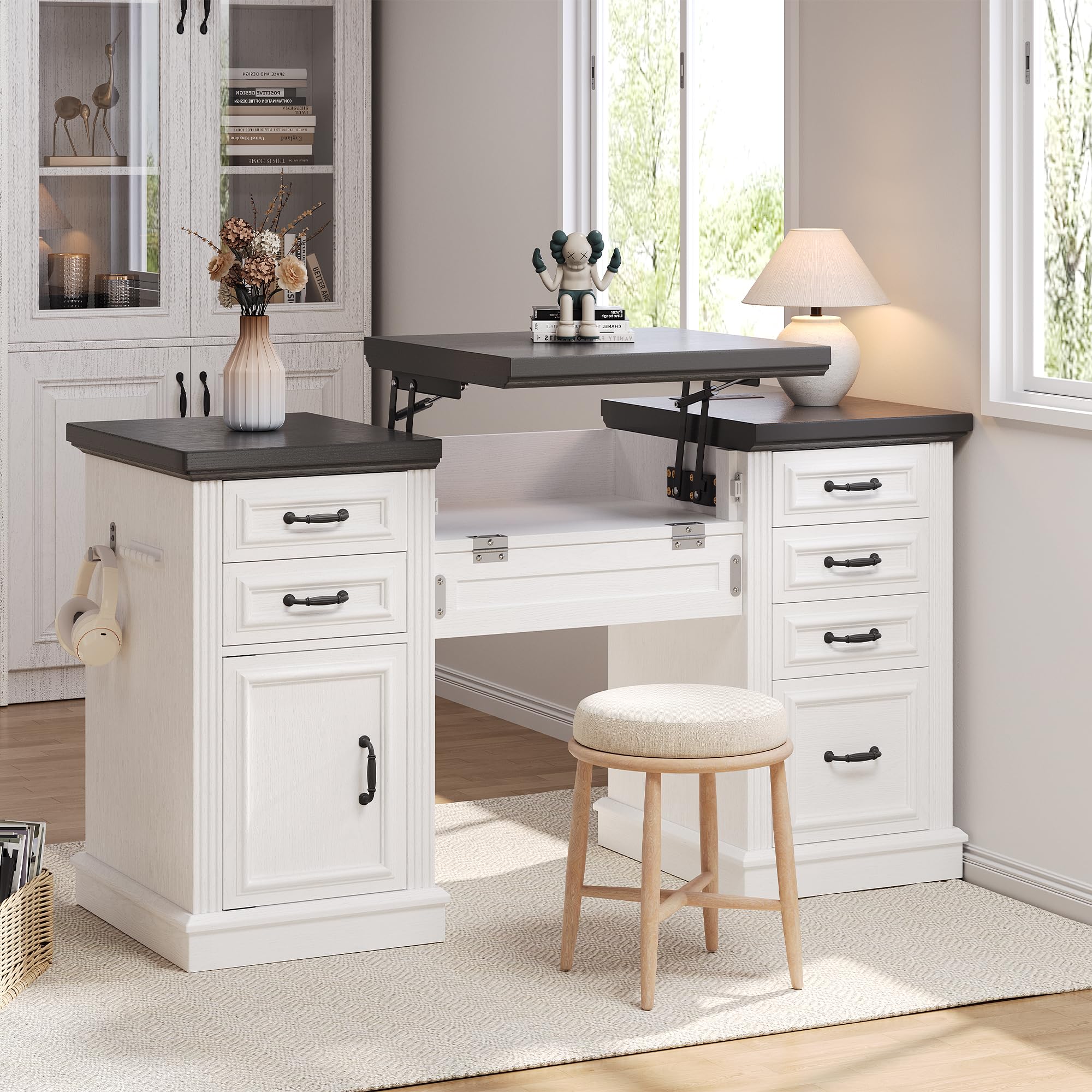
Image: The assembled desk, ready for use.
Operating Instructions
Lift-Up Desktop Mechanism
The desk features a gas spring lift mechanism for seamless sit-stand transitions.
- To Raise: Gently lift the front edge of the center desktop panel. The gas springs will assist in raising the desktop to your desired standing height.
- To Lower: Apply gentle downward pressure to the center desktop panel. Guide it smoothly back into the closed position. Ensure no objects or fingers are in the path of the closing mechanism.

Image: Detail of the gas spring lift mechanism and keyboard tray.
Drawers and File Cabinet
The desk includes five functional drawers and a dedicated file cabinet for organized storage.
- Standard Drawers: Pull the retro-style handles to open and push to close. These are suitable for small items, notebooks, and office supplies.
- File Cabinet: The bottom drawer on one side is designed as a file cabinet. It accommodates letter and legal-sized documents. Ensure files are properly hung on the internal rails.
- Quick-Access Desk Dresser: The cabinet on the left side provides additional storage for larger items or binders. Open the door to access.

Image: A functional drawer storing office essentials.

Image: The spacious file drawer with hanging folders.

Image: The quick-access desk dresser cabinet.
Ergonomic Keyboard Tray
The slide-out keyboard tray provides a comfortable position for your keyboard and mouse.
- To Use: Gently pull the tray forward from beneath the desktop.
- To Store: Push the tray back until it is fully recessed under the desktop.
Charging Station
The integrated charging station provides convenient power access for your devices.
- Plug the desk's power cord into a standard wall outlet.
- Use the 2 AC outlets, USB-A ports, and USB-C port to charge up to four devices simultaneously.
- Ensure devices are compatible with the provided charging outputs.

Image: Diagram of the convenient charging station.
Maintenance
- Cleaning: Wipe the desk surfaces with a damp cloth. Avoid harsh chemicals or abrasive cleaners, which can damage the finish.
- Hardware Check: Periodically inspect all screws and connections to ensure they remain tight. Re-tighten as needed to maintain stability.
- Lift Mechanism: The gas springs are designed for long-term use and generally require no maintenance. Do not attempt to lubricate or disassemble the mechanism.
- Drawer Slides: If drawers become stiff, a small amount of silicone-based lubricant can be applied to the slides.
Troubleshooting
If you encounter issues with your desk, refer to the following common solutions:
- Desk Instability: Ensure all assembly hardware is fully tightened. Check that the desk is placed on a level surface.
- Drawers Not Sliding Smoothly: Verify that drawer slides are correctly installed and free of obstructions. Check for any loose hardware on the slides or drawer boxes.
- Lift Mechanism Issues: If the lift mechanism is difficult to raise or lower, ensure no objects are obstructing its movement. Do not force the mechanism. If issues persist, contact customer support.
- Charging Station Not Working: Confirm the desk's power cord is securely plugged into a functional wall outlet. Check that devices are properly connected to the charging ports.
For problems not addressed here, please contact Jocoevol customer support.
Specifications
| Feature | Detail |
|---|---|
| Brand | Jocoevol |
| Model Number | C-1654 |
| Desk Design | Executive Desk with Lift-Up Feature |
| Style | Farmhouse |
| Color | White+Black |
| Product Dimensions (D x W x H) | 21.6"D x 57"W x 30.3"H |
| Item Weight | 115.3 Pounds |
| Material Type | Engineered Wood |
| Number of Drawers | 5 (including 1 file drawer) |
| Storage Options | 5 drawers + 1 file cabinet + 1 quick-access cabinet |
| Special Features | Built-In USB Outlet, File Storage Drawer, Large Desktop, Headphone Hook, Ergonomic Keyboard Tray |
| Required Assembly | Yes |
| Product Care Instructions | Wipe with Damp Cloth |

Image: Product dimensions overview.
Warranty and Support
Jocoevol stands behind the quality of its products. For warranty information, replacement parts, or technical assistance, please contact Jocoevol customer support through the retailer where the product was purchased or visit the official Jocoevol website.
Please have your model number (C-1654) and purchase date available when contacting support.