
Introduction
This manual provides detailed instructions for the assembly, operation, and maintenance of your Polibi 78-inch Freestanding Kitchen Pantry Cabinet. Please read all instructions carefully before beginning assembly and retain this manual for future reference. This cabinet is designed to provide versatile storage with integrated power features for your kitchen, dining room, or living room.
Safety Information
- Anti-Tipping Devices: Always install the included anti-tipping devices to prevent accidental tipping, especially in households with children or pets. Securely fasten the cabinet to a wall stud.
- Weight Capacity: Do not exceed the maximum weight capacity of 33 lbs (15 kg) per shelf and 22 lbs (10 kg) per drawer. Overloading can compromise stability and cause damage or injury.
- Electrical Safety: The built-in power outlet and USB ports are designed for standard household use. Do not overload the power strip. Ensure the power cord is not pinched or damaged during assembly or use. Disconnect power before cleaning or if any electrical issue is suspected.
- Assembly: Assembly requires two adults. Follow all steps in the assembly guide. Do not use power tools unless specifically instructed, as overtightening can damage components.
- Placement: Place the cabinet on a flat, stable, and level surface. Avoid placing it in areas with high humidity or direct sunlight, which can affect the wood material.
Package Contents
Your Polibi pantry cabinet is shipped in two separate boxes. Please ensure all parts are present before beginning assembly. If any parts are missing or damaged, contact customer support.
Included Components:
- Cabinet panels (top, bottom, sides, back)
- Glass doors with hinges
- Drawer components and slides
- Adjustable shelves and shelf pins
- Drop-down surface with gas springs
- Built-in power strip with 3 AC outlets and 2 USB ports
- 43.3-inch power cord
- Anti-tipping devices (2 sets)
- Hardware kit (screws, dowels, cam locks, etc.)
- Assembly tools (basic wrench, screwdriver)
Setup and Assembly
Assembly is required for this product. A comprehensive instruction video is available to assist you. Please follow the steps below and refer to the video for visual guidance.
- Unpack and Identify Parts: Carefully unpack all components and lay them out on a clean, soft surface to prevent scratches. Identify each part using the provided parts list.
- Assemble the Main Frame: Connect the side panels to the bottom and top panels using the designated hardware. Ensure all connections are secure.
- Install Back Panels: Attach the back panels to the assembled frame.
- Assemble Drawers: Follow the specific instructions for assembling the three drawers. Install the soft-close drawer slides onto the drawer boxes and the cabinet frame.
- Install Drop-Down Surface: Attach the drop-down surface using the provided hinges and soft-open gas springs. Ensure it operates smoothly.
- Install Adjustable Shelves: Insert the shelf pins into the desired holes within the cabinet. Place the adjustable shelves onto the pins.
- Attach Glass Doors: Mount the glass doors to the upper section of the cabinet using the hinges. Adjust as necessary for proper alignment and ensure magnetic stoppers function correctly.
- Install Power Outlet: Secure the built-in power strip into its designated slot. Connect the 43.3-inch power cord.
- Install Anti-Tipping Devices: This is a critical safety step. Securely attach the anti-tipping devices to the top rear of the cabinet and then to a wall stud using appropriate wall anchors.
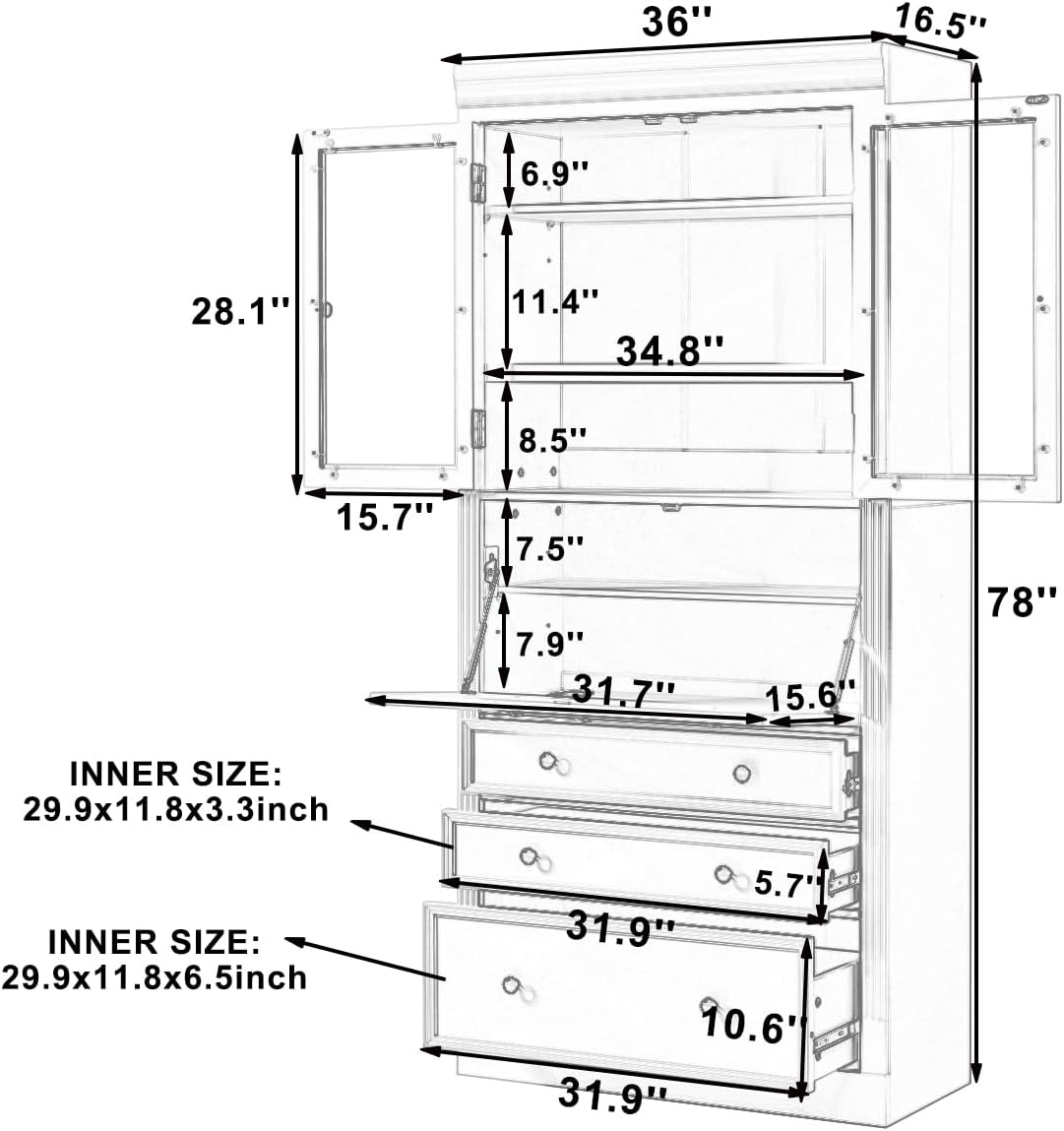
Figure 1: Cabinet Dimensions. This diagram illustrates the overall dimensions (78"H x 36"W x 16.5"D) and internal measurements of the shelves and drawers, crucial for planning placement and storage.

Figure 2: Product Details. This image highlights key features such as the shaker style, magnetic door stoppers, anti-tipping kits, the integrated power cord, soft-close drawer slides, and the soft-open gas spring mechanism for the drop-down surface.
Operating Instructions
Adjustable Shelves:
The cabinet features two fully adjustable shelves. To adjust a shelf, carefully remove all items from the shelf. Lift the shelf slightly and pull out the four shelf pins. Reinsert the pins into the desired holes at the new height, ensuring they are level and fully seated. Then, place the shelf back onto the pins.

Figure 3: Adjustable Shelf Mechanism. This close-up shows the shelf pins and pre-drilled holes, allowing for flexible shelf height adjustments.
Drawers:
The three bottom drawers are equipped with soft-close slides for smooth and quiet operation. To open, gently pull the drawer handle. To close, push the drawer until the soft-close mechanism engages, allowing it to close silently.
Drop-Down Surface:
The middle section features a drop-down surface, ideal for temporary counter space or organizing small items. To open, gently pull the top edge of the surface downwards. The soft-open gas springs will assist in a controlled descent. To close, lift the surface back into its upright position until it latches securely.

Figure 4: Drop-Down Surface Gas Spring. This image details the gas spring that provides a controlled and soft opening for the cabinet's drop-down surface.
Power Outlet and USB Ports:
The integrated power strip includes 3 AC outlets and 2 USB charging ports, along with a safety switch. Plug the cabinet's power cord into a standard wall outlet. Use the AC outlets for small appliances (e.g., coffee maker, toaster) and the USB ports for charging mobile devices. Always ensure the safety switch is in the 'ON' position for power delivery.

Figure 5: Integrated Power Features. This image highlights the convenient drop-down surface and a detailed view of the built-in power strip with AC outlets and USB ports.
Maintenance
- Cleaning: Wipe surfaces with a soft, damp cloth. Avoid abrasive cleaners or harsh chemicals, which can damage the finish. For glass doors, use a standard glass cleaner.
- Dusting: Regularly dust all surfaces to prevent buildup.
- Hardware Check: Periodically check all screws and fasteners to ensure they remain tight. Retighten if necessary.
- Spills: Immediately wipe up any spills to prevent moisture damage to the MDF material.
Troubleshooting
- Drawers not closing smoothly: Check if the drawer slides are properly aligned and free of obstructions. Ensure all screws on the slides are tight.
- Doors not aligning: Adjust the hinges on the glass doors. Most hinges allow for minor adjustments to align the doors properly.
- Power outlet not working: Ensure the cabinet's power cord is securely plugged into a functional wall outlet. Check the safety switch on the power strip to ensure it is in the 'ON' position. If the issue persists, try plugging another device into the wall outlet to confirm the outlet is working.
- Cabinet wobbles: Ensure the cabinet is placed on a level surface. Adjust any leveling feet if present, or place shims under the base if needed. Confirm all assembly hardware is tightened. Ensure anti-tipping devices are securely installed.
Specifications
| Feature | Detail |
|---|---|
| Brand | Polibi |
| Model Number | B0G3P3918L |
| Color | Grey |
| Material | P2 Grade MDF |
| Product Dimensions (D x W x H) | 16.5" x 36" x 78" |
| Item Weight | 167.6 Pounds |
| Special Features | 3 Drawers, Adjustable Shelves, Built-in Power Outlet (3 AC, 2 USB) |
| Mounting Type | Freestanding |
| Required Assembly | Yes |
| Shelf Weight Capacity | 33 lbs (15 kg) per shelf |
| Drawer Weight Capacity | 22 lbs (10 kg) per drawer |
Warranty and Support
For warranty information, missing parts, or technical support, please contact Polibi customer service. Refer to your purchase documentation for specific contact details or visit the official Polibi website. Please have your model number (B0G3P3918L) and purchase date available when contacting support.


