
BoyKeep K12
BoyKeep 4MP Window Camera K12 User Manual
Model: K12
Introduction
This manual provides detailed instructions for the setup, operation, maintenance, and troubleshooting of your BoyKeep 4MP Window Camera K12. Please read this manual thoroughly before using the product to ensure proper functionality and safety.
What's in the Box
Verify that all items are present in the package:
- Window Camera ×1
- Instruction Manual ×1
- Charging Cable ×1
- Sticker ×2
- Cable Clip ×4
Setup Guide
Follow these steps to set up your BoyKeep 4MP Window Camera K12.
1. Physical Installation
The camera is designed for easy, drill-free installation on a window surface.
- Clean the Window Surface: Ensure the window surface where the camera will be mounted is clean and dry.
- Apply Adhesive: Peel off the backing from one of the provided adhesive stickers.
- Attach Sticker to Window: Stick the adhesive firmly onto the clean window surface.
- Mount Camera: Align the top of the camera with the "Top" indicator on the adhesive sticker and press the camera onto the sticker to secure it.
- Connect Power: Connect the charging cable to the camera and a power source. Use the provided cable clips to manage the cable neatly.
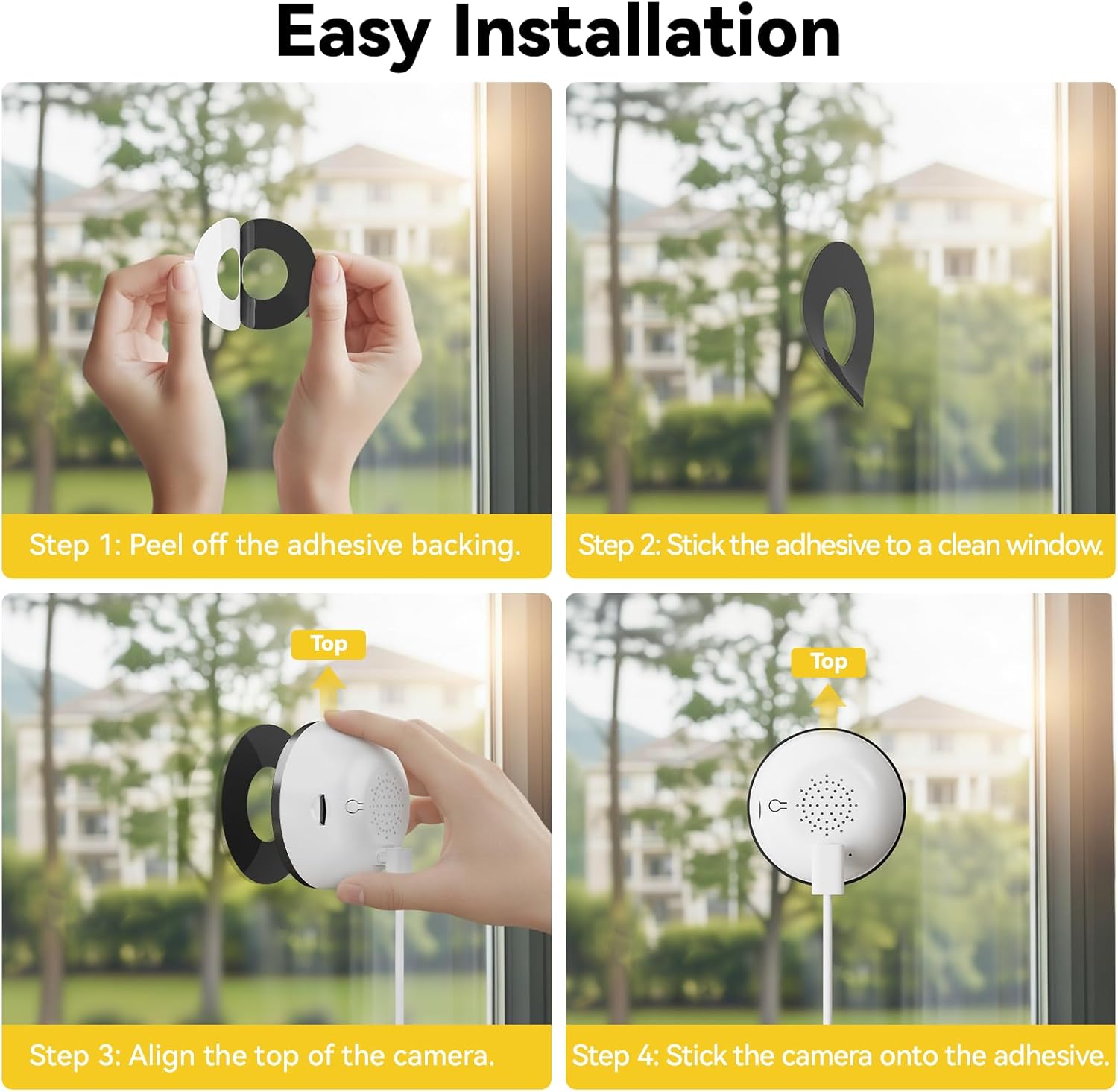
Image: Step-by-step guide for easy installation of the BoyKeep K12 camera on a window.
2. App Setup and Connection
To connect your camera to the mobile application:
- Download the App: Download the BoyKeep application from your device's app store.
- Enable Bluetooth: Ensure your phone's Bluetooth is enabled and the BoyKeep app has Bluetooth access permissions.
- Add Device: Open the app and follow the on-screen instructions to add a new device. The app will search for available devices.
- Confirm Camera SN: Confirm that the last four digits displayed in the app match your camera's serial number (SN).
- Connect to Network: Select your device and enter your Wi-Fi network name and password. The camera supports both 2.4GHz and 5.8GHz WiFi 6 for stable connectivity.
- Wait for Connection: Wait for 1-2 minutes for the camera to connect. You will hear a "beep-beep" sound upon successful connection.

Image: Visual guide for connecting the BoyKeep K12 camera to the mobile application.
Video: Official BoyKeep video demonstrating the setup process for the 4MP Window Camera K12.
Operating Instructions
Video Monitoring and Recording
The camera captures clear 4MP Ultra HD video. You can view live footage and access recordings through the BoyKeep app.
- Live View: Open the app to access the live video feed from your camera.
- Digital Zoom: Utilize the 4× digital zoom feature within the app to enlarge details without significant loss of clarity.
- 24/7 Recording: The camera supports continuous recording.

Image: Demonstrates the camera's full-color night vision and 4x digital zoom capabilities.

Image: Illustrates the Starlight Color Night Vision feature, providing clear, high-resolution images at night.
Motion and Person Detection
The camera features advanced AI for accurate detection of motion and human activity.
- Customizable Zones: Set specific monitoring zones within the app to reduce false alerts.
- Instant Notifications: Receive immediate alerts on your phone when motion or a person is detected.

Image: Depicts the smart detection feature sending instant notifications to a phone when motion is detected.

Image: Shows the AI Human Detection feature tracking human motion and sending alerts.
Two-Way Audio
The built-in high-quality microphone enables real-time two-way audio communication.
- Communicate Remotely: Speak through the camera using the app to interact with individuals near the camera.
- Deter Suspicious Activity: Use the audio feature to deter unwanted visitors.

Image: Illustrates the two-way audio function, allowing users to hear and speak through the camera.
Storage Options
The camera offers flexible storage solutions for your video recordings.
- Free Cloud Recordings: Includes 12-second free cloud recordings stored for 24 hours. No subscription required for this basic service.
- TF Card Support: Supports up to a 256GB TF card (not included) for local storage.
- Optional Cloud Storage: Additional cloud storage plans are available for extended recording history and features. All cloud videos are protected by local cloud security encryption.

Image: Shows the two storage options: cloud storage and local TF card storage.

Image: Details the flexible storage options including cloud storage, 256GB SD card support, and 24/7 recording.
Smart Home Integration
The camera is compatible with popular smart home platforms.
- Alexa & Google Home: View live video and manage your device using simple voice commands through Amazon Alexa or Google Home.
- Family Sharing: Share access to the camera's feed with up to four family members through the app.

Image: Illustrates multi-device access and family sharing capabilities for the camera.
Maintenance
Regular maintenance ensures optimal performance and longevity of your camera.
- Cleaning: Gently wipe the camera lens and body with a soft, dry cloth. Avoid using harsh chemicals or abrasive materials.
- Firmware Updates: Check the BoyKeep app periodically for firmware updates. Keeping your camera's firmware updated ensures access to the latest features and security enhancements.
- Adhesive Check: Periodically check the adhesive mount to ensure it remains securely attached to the window.
Troubleshooting
If you encounter issues with your BoyKeep 4MP Window Camera K12, refer to the following common solutions:
- Camera Not Connecting to Wi-Fi:
- Ensure your Wi-Fi network is active and you have entered the correct password.
- Verify that your router supports both 2.4GHz and 5.8GHz bands, and the camera is attempting to connect to a compatible band.
- Move the camera closer to the Wi-Fi router to improve signal strength.
- Restart your router and the camera.
- Poor Video Quality:
- Ensure the camera lens is clean and free from dust or smudges.
- Check your internet connection speed. A stable and fast connection is required for optimal video streaming.
- Adjust the camera's position to minimize glare or reflections from the window.
- No Motion Detection Alerts:
- Verify that motion detection is enabled in the BoyKeep app settings.
- Check the configured monitoring zones to ensure they cover the desired areas.
- Ensure the app has permission to send notifications on your mobile device.
- App Issues (e.g., Ads, Lag):
- Ensure your BoyKeep app is updated to the latest version.
- Clear the app's cache or reinstall the app if issues persist.
- Contact BoyKeep customer support for app-specific concerns.
- Motor Failure (if applicable):
- If the camera's panning or tilting mechanism stops functioning, perform a factory reset if possible.
- If the issue persists, contact BoyKeep customer support for assistance or warranty claims.
Specifications
| Feature | Detail |
|---|---|
| Model Name | K12 |
| Brand | BoyKeep |
| Recommended Uses | Indoor Security |
| Connectivity Technology | Wired (Power), Wi-Fi (Data) |
| Wireless Technology | Wi-Fi (Dual-Band 2.4GHz & 5.8GHz) |
| Special Features | HD Resolution, Image Sensor, Motion Sensor, Night Vision, Portable |
| Indoor/Outdoor Usage | Indoor |
| Compatible Devices | Smartphone (via App), Alexa, Google Home |
| Controller Type | App |
| Mount Type | Window Mount (Self Adhesive) |
| Color | White |
| Form Factor | Dome |
| Enclosure Material | Plastic |
| Water Resistance Level | Not Water Resistant |
| Effective Still Resolution | 4 MP |
| Photo Sensor Resolution | 4 MP |
| Video Capture Resolution | 2560 × 1440 (2.5K) |
| Frame Rate | 20 frames per second |
| Viewing Angle | 110 degrees |
| Optical Zoom | 4x |
| Focus Type | Fixed Focus |
| Photo Sensor Technology | CMOS |
| Flash Memory Type | Micro SD |
| Max Supported Flash Memory | 256 GB |
| Power Source | Corded Electric |
| Video Encoding | H.265 |
| Night Vision | Full Color Night Vision (Starlight Sensor) |
| Night Vision Range | 10 meters |
| Item Dimensions | 2.67 x 1.32 x 2.67 inches |
| Manufacturer | BoyKeep |
Warranty and Support
For warranty information, technical support, or customer service inquiries, please contact BoyKeep directly through their official channels or the retailer where the product was purchased.
Refer to the packaging or the BoyKeep official website for the most current contact information and warranty details.
Related documentsK12


Ask a question about this manual
Ask about setup, troubleshooting, compatibility, parts, safety, or missing instructions. Manuals+ will review the question and use this page’s manual context to help answer it.