
1. Safety Instructions
Please read all instructions carefully before assembly and use. Retain this manual for future reference.
- Weight Capacity: Do not exceed the maximum load capacity of 150 lbs (68 kg) on the tabletop.
- Pinch Points: Keep hands and fingers clear of moving parts during height adjustment to prevent injury.
- Power Connection: Ensure the power cord is properly connected to a grounded outlet. Do not overload the power strip.
- Stable Surface: Place the coffee table on a flat, stable, and level surface.
- Children and Pets: Keep children and pets away from the table during operation to prevent accidents.
- Liquid Spills: Avoid spilling liquids directly onto the control panel or power outlets. Clean spills immediately.
- Maintenance: Do not attempt to disassemble or repair the electric lift mechanism yourself. Contact qualified personnel for service.
2. Package Contents
Verify that all components are present before beginning assembly. If any parts are missing or damaged, contact customer service.
- Tabletop (1)
- Base Cabinet (1)
- Electric Lift Mechanism (1)
- Control Panel (1)
- Power Outlet with USB/Type-C Ports (1)
- Sliding Barn Doors (2)
- Shelves (2)
- Assembly Hardware Kit (screws, dowels, etc.)
- Assembly Guide (1)
3. Assembly Instructions
Assembly typically requires two adults due to the size and weight of the components. Follow the detailed steps provided in the included Assembly Guide.
- Unpack Components: Carefully remove all parts from the packaging and lay them out on a clean, soft surface to prevent scratches.
- Identify Hardware: Match all hardware to the corresponding labels in the Assembly Guide.
- Assemble Base Cabinet: Follow the step-by-step diagrams to construct the base cabinet, including the shelves and sliding barn door tracks.
- Install Electric Lift Mechanism: Secure the electric lift columns to the base cabinet according to the instructions.
- Attach Tabletop: Carefully place and secure the tabletop to the lift mechanism.
- Install Control Panel and Power Outlet: Mount the control panel and power outlet in their designated locations and connect the wiring as shown in the guide.
- Final Checks: Ensure all screws are tightened and the table is stable before use.

Figure 3.1: Assembled SEDETA Smart Lift Top Coffee Table.

Figure 3.2: Table dimensions and adjustable height range.
4. Operating Instructions
4.1 Smart Electric Lift Operation
The table features an electric lift mechanism for height adjustment, controlled by a panel located on the side of the tabletop.
- Up/Down Buttons: Use the ▲ (Up) and ▼ (Down) buttons to manually adjust the table height. The current height is displayed on the LED screen.
- Memory Presets: The control panel includes three memory preset buttons (1, 2, 3). To save a height setting: adjust the table to the desired height, then press and hold a memory button (1, 2, or 3) until the display flashes or beeps, indicating the height is saved. To recall a saved height, simply press the corresponding memory button.
- Reset Function: The 'S' button (or 'RST') is typically used for resetting the system. Refer to the specific Assembly Guide for detailed reset procedures if needed.

Figure 4.1: Multifunctional Control Panel for height adjustment.
4.2 Built-in Charging Port
The table includes a built-in power outlet for convenient charging of electronic devices.
- Ports: The charging station provides 2 AC outlets (120V/12A), 1 USB port (5V/2A), and 1 Type-C port (5V/2A).
- Usage: Plug in your devices directly to the available ports. Ensure the table is connected to a power source for the charging ports to function.

Figure 4.2: Built-in Power Outlet for device charging.
4.3 Storage Features
The coffee table offers various storage options to help keep your living space organized.
- Under-desk Storage: A hidden compartment beneath the lift-top provides discreet storage for items like laptops, books, or remote controls.
- Sliding Barn Doors: Two sliding barn doors conceal additional storage compartments, allowing you to hide clutter or display decorative items.
- Open Shelves: Central open shelves offer easy access and display space for frequently used items.

Figure 4.3: Large Storage Capacity overview.
4.4 Versatile Use
This smart coffee table is designed for multiple scenarios:
- Coffee Table: Use at its lowest height for traditional living room use.
- Office Table/Standing Desk: Adjust to a higher position for comfortable working with a laptop, promoting better posture.
- Dining Table: The spacious tabletop can be raised to serve as a temporary dining surface.
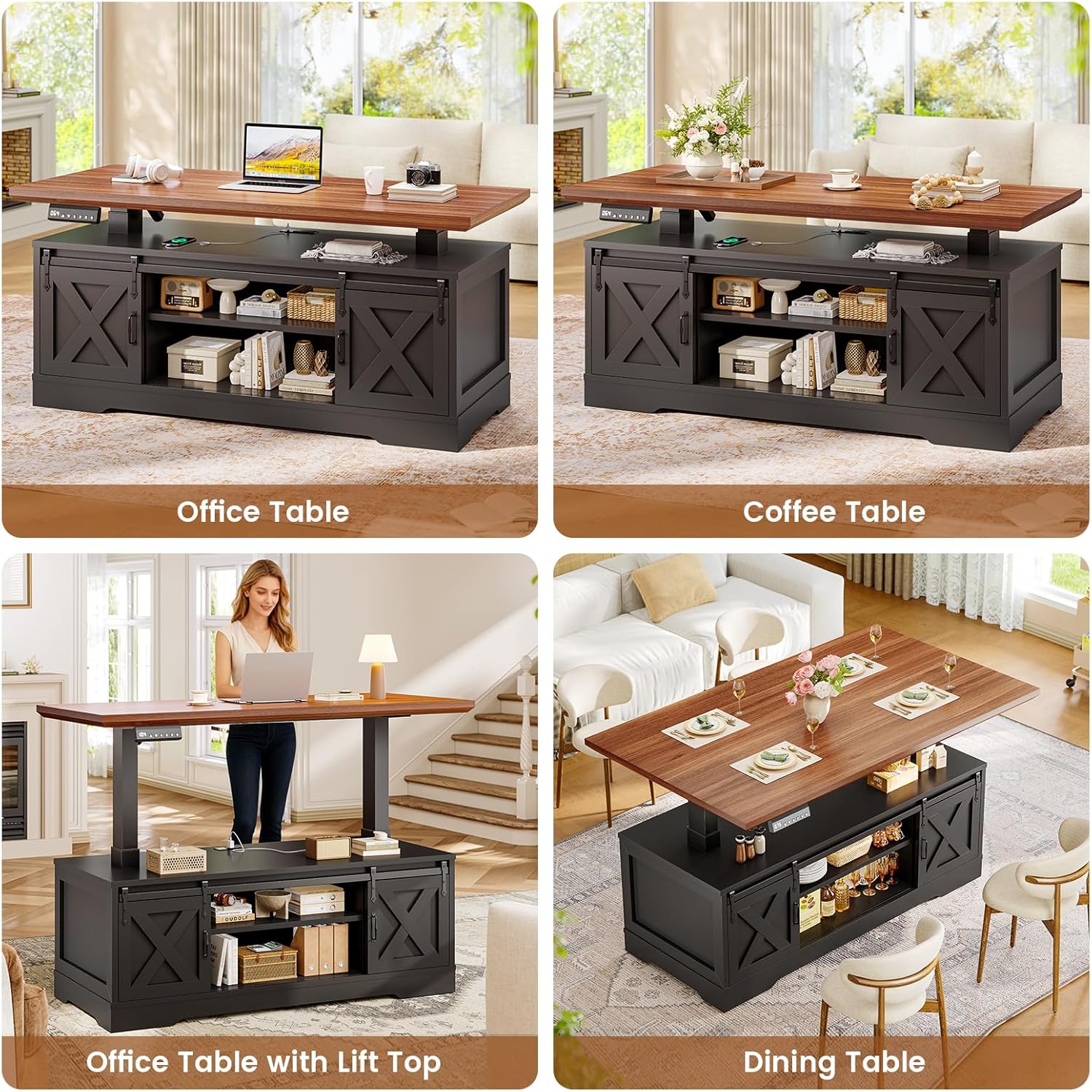
Figure 4.4: One table for multiple scenarios.
Video 4.5: Demonstration of the SEDETA Smart Lift Top Coffee Table's features, including height adjustment, charging, and storage.
5. Maintenance
Regular maintenance helps ensure the longevity and proper function of your coffee table.
- Cleaning: Wipe surfaces with a soft, damp cloth. Avoid harsh chemicals or abrasive cleaners that could damage the engineered wood finish.
- Spills: Clean up spills immediately to prevent staining or damage to the wood.
- Electrical Components: Periodically check the power cord and connections for any signs of wear or damage. Ensure the power outlet is free of dust and debris.
- Moving Parts: The electric lift mechanism is designed for smooth operation. Avoid placing excessive weight on the tabletop or obstructing its movement.
6. Troubleshooting
If you encounter issues with your coffee table, refer to the following common problems and solutions:
| Problem | Possible Cause | Solution |
|---|---|---|
| Tabletop does not move. | Power cord disconnected; Overload; Motor error. | Check power connection. Reduce weight on tabletop. Perform a system reset (refer to Assembly Guide for specific steps). |
| Control panel display is off. | No power; Loose connection. | Ensure the table is plugged into a working outlet. Check all cable connections to the control panel and power unit. |
| Charging ports not working. | Table not powered; Device issue. | Verify the table is powered on. Test with a different device or cable. |
| Unusual noise during operation. | Obstruction; Loose components. | Inspect for any obstructions. Check if all assembly hardware is securely tightened. |
If the problem persists after attempting these solutions, please contact SEDETA customer support.
7. Specifications
- Brand: SEDETA
- Model Name: Lift Top Coffee Table
- Product Dimensions (D x W x H): 21.6" x 47.2" x 25.2" (lowest height)
- Adjustable Height Range: 25.2" to 41"
- Item Weight: 92 Pounds
- Frame Material: Engineered Wood
- Top Material: Engineered Wood
- Color: Black
- Weight Capacity: 150 lbs
- Power Outlet: 2 AC Outlets (120V/12A), 1 USB Port (5V/2A), 1 Type-C Port (5V/2A)
- Noise Level (Motor): Below 30 decibels
- Style: Farmhouse
8. Warranty and Support
For warranty information, product support, or to report missing/damaged parts, please contact SEDETA customer service through the retailer where the product was purchased or visit the official SEDETA website. Please have your purchase receipt and model number available when contacting support.
Online Support: Visit the SEDETA Store on Amazon